VRM could just drop the voltage without signaling anyone and when the CPU voltage drops, it’s no longer stable at high frequency so clock speed will also drop
So it’s probably not a big issue then. The power stages aren’t entirely uncoiled even without heatsink contact, they can sink quite a bit of heat into the pcb.
That’s not usually how that works and amd cpus have relatively competent clock stretching to cope with unexpected voltages. VRM self protection is usually first do prochot and if that doesn’t work just turn off. To be fair turning off is significantly better than having the mosfet do a thermal runaway.
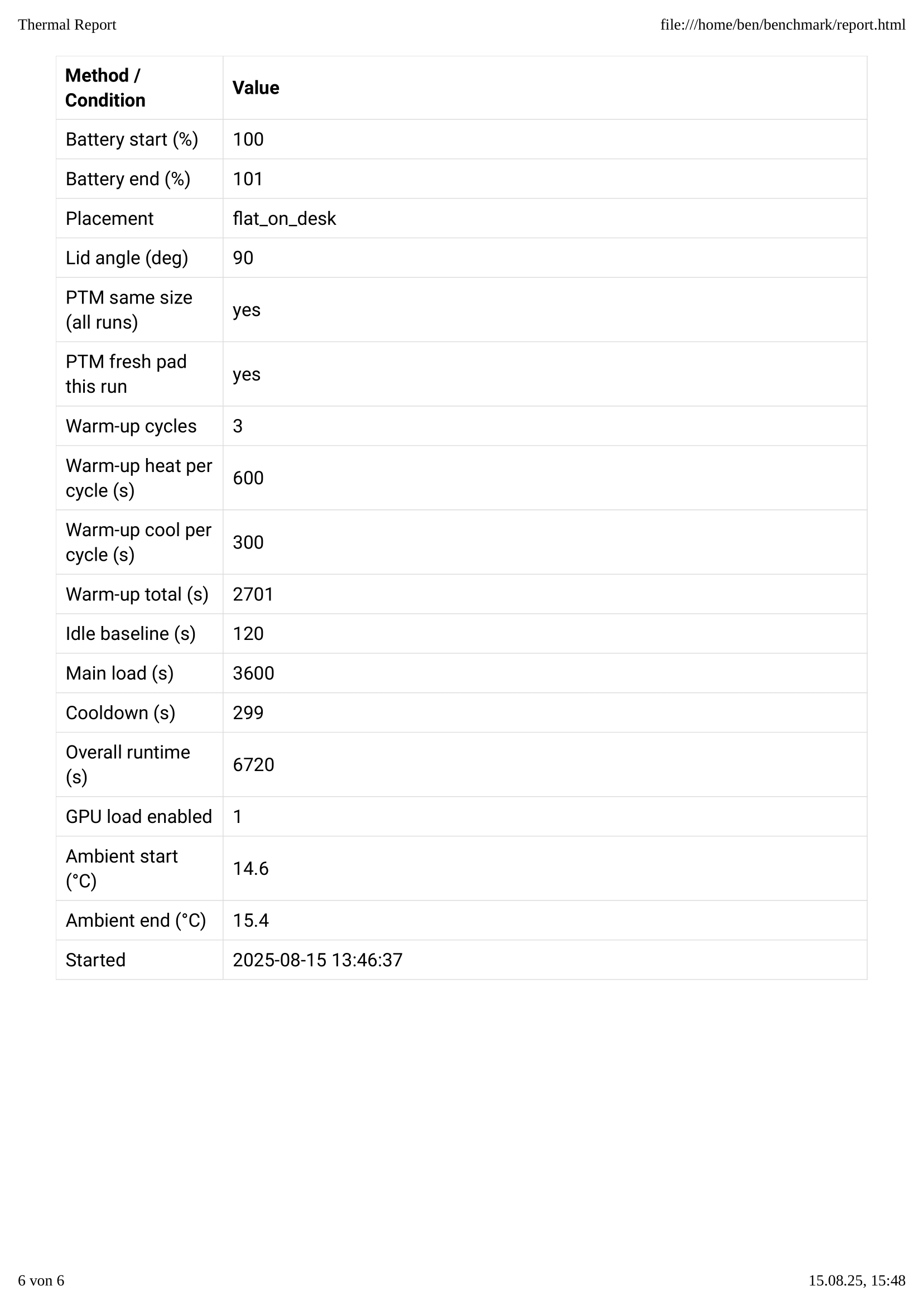
Ok, so I did some benchmarks with the help of ChatGPT, maybe not perfect but it should be ok 
I compared the stock 7040 cooler with the new AI300 cooler on my Framework 13 AMD (7840U), using fresh Honeywell PTM7950 phase change pads cut to the same size for each run.
Both tests were done under identical conditions:
-
Laptop on a desk, lid at 90°
-
100 W Anker GaN charger connected, battery full
-
“Performance” power profile, AC mode
-
Ambient temperature measured manually with an EEVblog 121GW before and after each run
-
Warm-up cycles performed to ensure PTM pads reached optimal performance
Results:
-
Average ΔT (CPU top sensor): 7040 cooler → 68.44 °C, AI300 cooler → 64.85 °C (~5.2 % cooler)
-
Peak ΔT: 7040 cooler → 81.28 °C, AI300 cooler → 76.88 °C (~5.4 % cooler)
-
Average CPU frequency under load: ~4.12 GHz for both — no significant difference
Conclusion:
The AI300 cooler consistently runs ~5 % cooler under sustained load compared to the 7040 cooler, with similar sustained performance. Fan speeds and power draw were nearly identical.
 Test setup photo:

 Full detailed report:


8 Likes
You should try measuring sustained wattage with ryzenadj, because my system regulates wattage downwards to maintain temperatures. This leads to different benchmark results and may not be obvious.
If I unlock wattage on my 7840u, it sustains ~33 to ~37 watts, depending on room temperature. Would be nice if you could reach max 43 watts, which seems to be the limit.
The stock cooler with liquid metal can allready do that, ptm is likely relatively close. I would hope the fancier single heatpipe cooler would go beyond 45.
Sustained?  At which roomtemps? Now I’m interested.
As long as the back of the laptop is slightly elevated (about 2cm in my case) and skin temperature throttling is disabled it’ll do 43-45W sustained in ~23C ambients (at around 95-99C).
Unfortunately I did not figure out how to deal with the skin temp throttling before going from ptm to lm but up to 33W ptm was keeping up with lm. So I am pretty sure lm was not worth it.
I got a response from support. They said that the 7x40 heatsink design has not changed and that it still has no VRM wings. So I guess all the pictures on the marketplace are wrong then. They do look an awful lot like the 11th-gen Intel part…
Wow, thats huge. I’m thinking about ordering PTM7950 right now.
How high are the limits you can set with ryzenadj? I can’t set slow/fast to anything higher than 43/53 watts.
You may need to use smokeless to go above that but going over that is probably not all that useful as you’ll need to lower the thermal limits to not have load spikes overrun it and shutdown the system.
Oh, and I thought that was a hard-limit by the mainboard/power circuitry. I wonder how much wattage the board could supply in theory without overheating.
I can confirm sustained load with the stock cooler at 43 Watt with PTM applied. Of course, your skin temperature will go in the 50s C easily. The laptop is raised with a stand to improve air flow and the fan is running at its max speed.
Yes, pictures are wrong, no VRM coverage.
In my case with lm it is around 45W, it can do 85 for a few seconds but that requires lowering the temp limit to like 90 so it doesn’t overshoot which in turn reduces the sustained power a lot.
guess moving up to lm really wasn’t worth it then XD.
1 Like
Here’s the stock 7840 cooler:

Here’s a 300-series cooler I ordered to try out and received yesterday (just placed on top the other one, not actually installed yet:
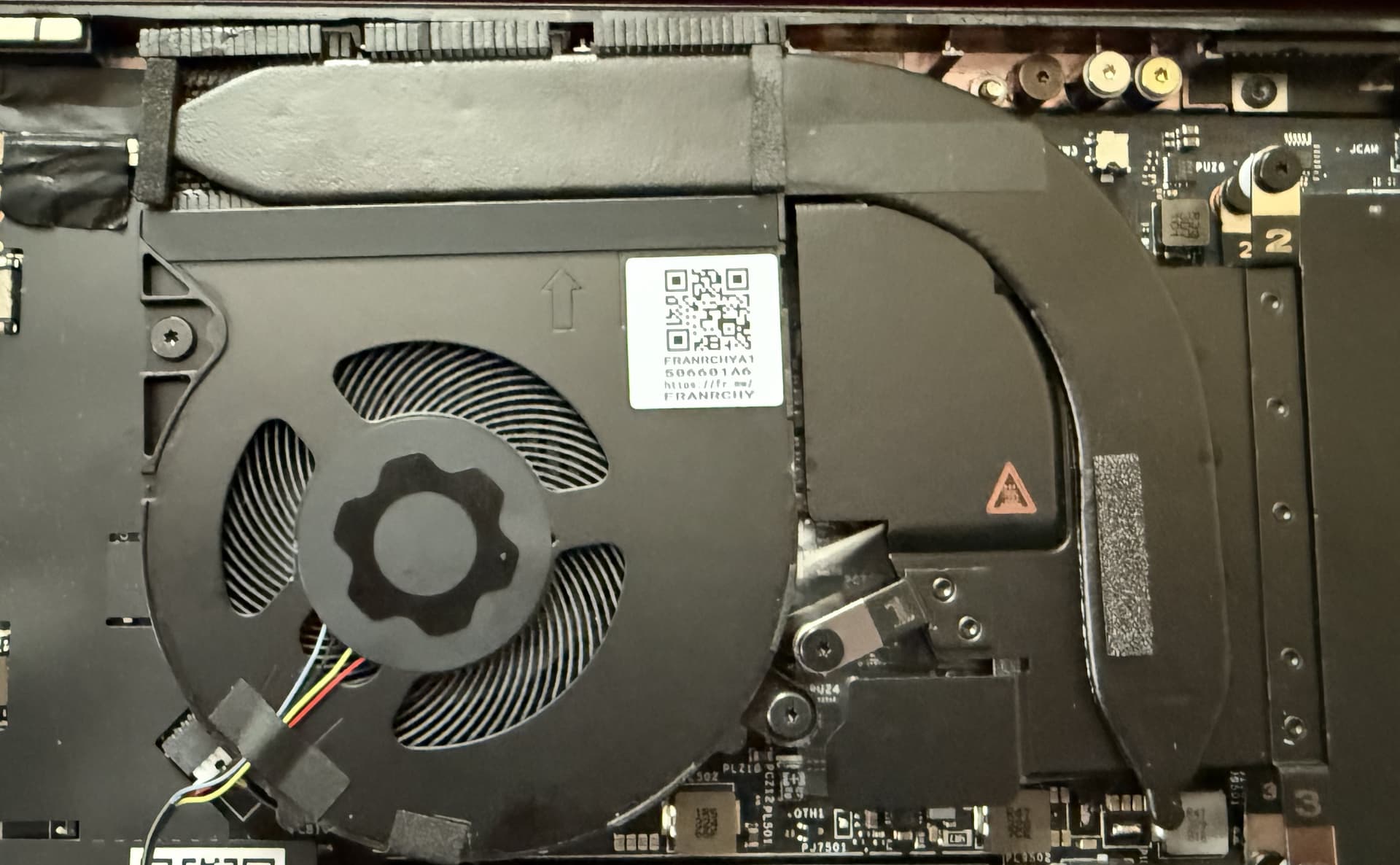
The new ones DO have additional coverage.
1 Like
Yeah guess we really rawdogging the vrms here XD. (to be fair they do have quite a bit of cooling through the pcb allready).
Please do some before/after testing.
I don’t really have the tools or time right now to measure anything that would contribute beyond what @benn posted above. I am curious as to the make/rating of the thermal pads they added. Naturally anything is going to be an improvement over nothing, but if I had free time I’d actually test swapping the included ones with my favorite Iceberg thermal pads.
Today I’ve applied Thermal Grizzly PhaseSheet PTM pads.
- Before: 37 watts at 100ºC
- After: 43 watts at 99ºC
And that’s at ~24ºC room temperature, so it only gets better. I did not notice much change after a few thermal cycles. It worked pretty much immediately on the first try.
I’ve decided against Honeywell pads, as lttstore.com has no small ones in stock and I don’t trust other suppliers to ship real PTM7950. FIY the original heatsinks come with Shin-Etsu 8117 paste pre-applied.
That is in the ballpark of my stock cooler with lm.
Aren’t the grizzly ones just honeywell with a fancy label though? (and of course some authenticity).
Apparently I did get lucky getting stuff that at least performs like the real thing on aliexpress.