i am experiencing odd stuff with delayed or unreliable key press situations in early boot stages and uefi bios or so is my gut feeling recently, what is your key press situation exactly about?
If you have keyboard problems while in the bios. The most likely cause is a loose or damaged cable to the midplate, or the keyboard and trackpad need the contacts cleaned.
The other cause might just be a hardware fault with keyboard.
When the graphics card disengages (to safe power?) my framework 16 switches to 25WTDP. This has been the same with all 4.x bios versions. You can see this on the core temp readout which is at an actual power of 24.2W as well as on the fan control tool. Prime 95 is running with about 100% load on all cores. As soon as I start a program that engages the graphics card, TDP jumps up. Also irritating: The original framework 180W Power supply is only reported as 130W. I tried another cable aside of the original one, that didnt change anything. I also tried the other USB C port, same thing. Both ports are on the correct position.
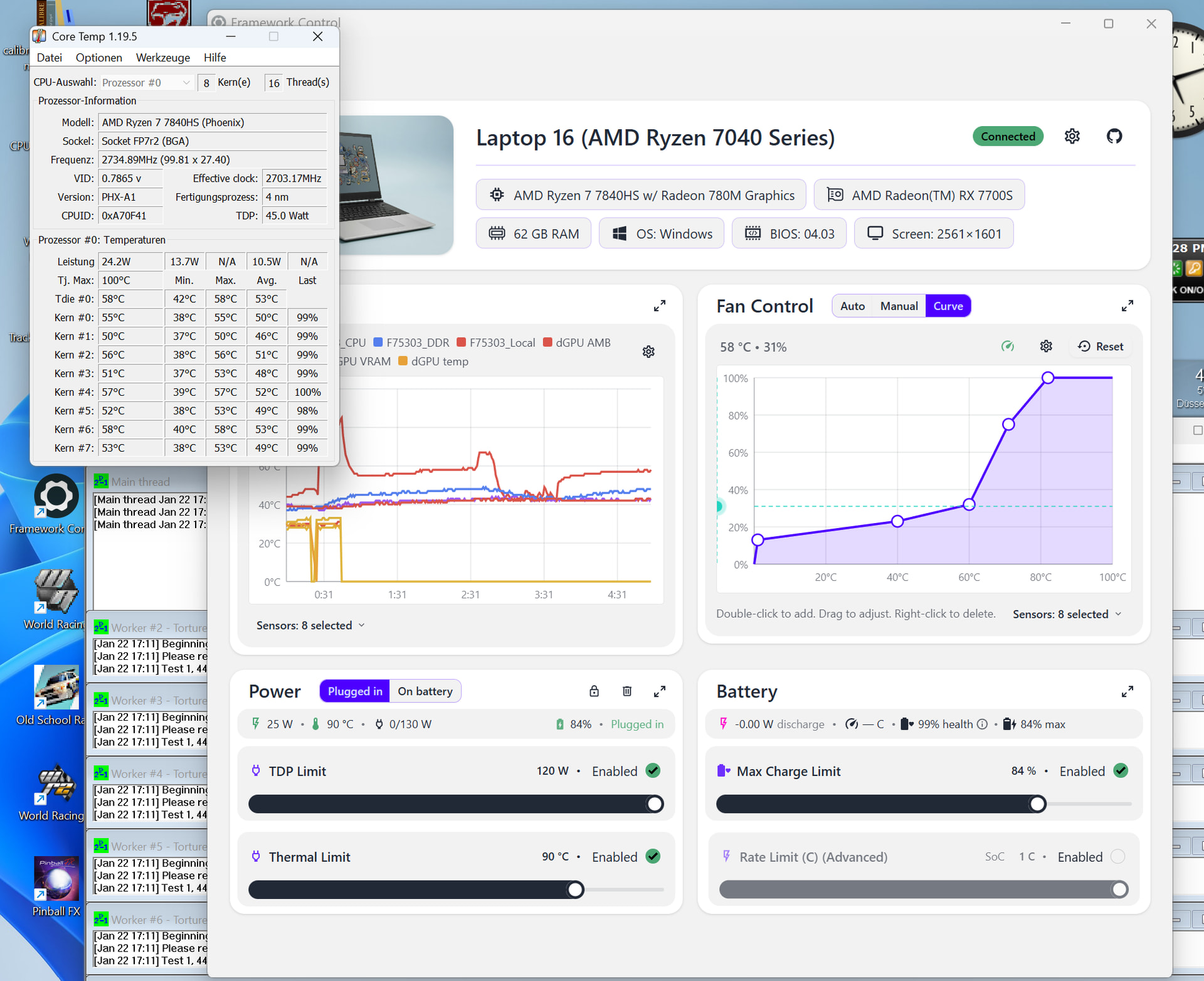
Please add your experience to the GitHub issues here, here and probably Here too. Thus far, Framework have dismissed these issues.
1 Like
its not really possible, as inside a linux operating system, keyboard (i am typing here now from the system) is working all normally and nothing odd is happening. only during very early boot up stages still on the uefi layer of things or the grub2 (linux bootloader) there seems to be tons of characters being typed missing from the input. very odd. anyone else?
fwupdmgr does not update, my system stays on 4.02:
├─System Firmware:
│ │   Device ID:          7010981714ee5c9258de42216cae163ef272c7ab
│ │   Summary:            UEFI System Resource Table device (Updated via capsule-on-disk)
│ │   Current version:    0.0.4.2
│ │   Minimum Version:    0.0.3.5
│ │   Vendor:             Framework (DMI:INSYDE Corp.)
│ │   Update State:       Success
│ │   GUID:               6ae76af1-c002-5d64-8e18-658d205acf34
│ │   Device Flags:       • Internal device
│ │                       • Updatable
│ │                       • System requires external power source
│ │                       • Needs a reboot after installation
│ │                       • Cryptographic hash verification is available
│ │                       • Device is usable for the duration of the update
│ │   Device Requests:    • Message
Running fwupdmgr update never performs an update, even after refresh/cache purge/service restart/ etc.
What is the matter here?
What does fwupdmgr –-version report?
Have you tried:
sudo fwupdmgr refresh
sorry I was busy. I was trying to figure out was is wrong. I have not downgraded bios to 4.02 but I have reverted some changes which allows windows to “turn of device to save power”.
I have not noticed any issues in BIOS, it was only issue from time to time in windows when some key press were missed (whole word / sequence of keys) or issue with “locked shift” key until I pressed it second time.
I have reverted settings related to power saving and monitoring if it fix the issue.
1 Like
@Kevin_Fleming, this is the output of fwupdmgr --version:
compile com.hughsie.libxmlb 0.3.18
compile com.hughsie.libjcat 0.2.0
compile org.freedesktop.fwupd 1.9.31
runtime org.freedesktop.fwupd-efi 1.4
compile org.freedesktop.gusb 0.4.8
runtime com.hughsie.libxmlb 0.3.x
runtime com.hughsie.libjcat 0.2.0
runtime org.freedesktop.gusb 0.4.8
runtime org.kernel 6.14.0-37-generic
runtime org.freedesktop.fwupd 1.9.31
@James3 : yes, I did “refresh” as well as purging the cache, etc., but no success
As noted in the detailed upgrade instructions (unfortunately not included in this thread), this BIOS upgrade cannot be installed by versions of fwupd older than 2.0.16.
1 Like
okay thanks for the reply, i am only having a situation in early boot stages here, outside of the OS, running linux here on my side, in early boot stages i am having massive trouble. inside the OS keyboard is normal. will see what i can make of it.
Ok, thx, I updated fwupd, and then everything worked. 
1 Like
I was having the 544Mhz bug when in “performance” mode for a few months, but last week it started appearing even in “balanced” mode.
I have some entries in “ectool console” that suggest my system is overheating:
ectool console
[886223.363800 thermal HIGH]
[886223.364900 set AP throttling type 1 to on (0x00000001)]
PORT80: F90E
[886228.533000 charge_request(16432mV, 0mA)]
[886228.785600 charge_request(16424mV, 0mA)]
[886229.540800 charge_request(16432mV, 0mA)]
[886229.787400 charge_request(16424mV, 0mA)]
[886230.538100 charge_request(16432mV, 0mA)]
[886230.791000 charge_request(16424mV, 0mA)]
PORT80: AA98
PORT80: 0D78
PORT80: 0DA1
PORT80: AA91
PORT80: AA95
PORT80: 0DA2
PORT80: 0DD5
PORT80: 0DD8
PORT80: 0DDA
PORT80: 0DD8
PORT80: 0DA3
PORT80: 0D9D
PORT80: 0DD5
PORT80: 0DDB
PORT80: 0DDD
PORT80: 0DDD
PORT80: 0DD6
PORT80: AA96
PORT80: AA97
PORT80: 0DC0
PORT80: 0DC1
I: GPU BOCO Exit
PORT80: F90E
PORT80: 0DA0
PORT80: AA98
PORT80: 0D78
PORT80: AA98
PORT80: 0D78
PORT80: 0DA1
PORT80: AA91
PORT80: AA95
PORT80: 0DA2
PORT80: 0DD5
PORT80: 0DD8
PORT80: 0DDA
PORT80: 0DD8
PORT80: 0DA3
[886324.814500 event set 0x0100000000000000]
[886324.866600 PMF: SPL 43000mW, sPPT 52000mW, fPPT 65000mW, p3T 227000mW, ao_sppt 0mW]
[886324.891100 thermal no longer high]
[886324.893600 set AP throttling type 1 to off (0x00000000)]
[886324.896100 thermal no longer warn]
[886324.897700 set AP throttling type 0 to off (0x00000000)]
PORT80: AA8F
[886332.151200 HC 0x0002]
[886332.153600 HC 0x000b]
I have filed a support request, my system is still under warranty (germany).
The EC has 9 temp sensors available to it that might cause the “thermal HIGH”.
The PROCHOT was on for 101 seconds.
ambient_f75303@4d: +41.9°C
charger_f75303@4d: +43.9°C
apu_f75303@4d: +41.9°C
cpu@4c: +40.9°C
gpu_amb_f75303@4d: -0.1°C (Note -0.1 because I don’t have the dGPU)
gpu_vr_f75303@4d: -0.1°C
gpu_vram_f75303@4d: -0.1°C
gpu_amdr23m@40: -0.1°C
and the temp of the battery.
If you type “sensors” (if you have Linux), it will display the current values.
Do you know which of the 9 temps is high?
There are two sensors which have a high temperature while the throttle is active:
Gpu_Amb_F753 is peaking around 97.8°C
Gpu_Temp040 is peaking around 98.8°C
But! at least Gpu_Temp040 is higher while CPU speed is still normal, the peak value before is 100.8°C
Well, that is nice and toasty. The GPU spec is max at 95 C.
So, it is correctly signalling PROCHOT. The EC setting PROCHOT forces the CPU to 544Mhz.
- I guess the question then comes to what was the GPU doing to get so hot.
- Are the fans working?
- Another possible cause might be the GPU heat sink, or thermal paste is not working.
- You might be using some sort of fan curve software that is simply ignoring the GPU temp, and only taking the CPU temps into account. I.e. a bug in the fan curve software.
I would argue that one should have two fan curves, one for the CPU (Tctl=100) and one for the GPU (Tctl=95), and then the output of those curves, pick the highest suggested fan speed and apply that. It is the different Tctl for each chip that makes me suggest two curves are needed.
do “sensors” and look for:
cros_ec-isa-0000
Adapter: ISA adapter
fan1:                  0 RPM     <- 0 RPM means not running.
fan2:                  0 RPM
Part of me’s interested in taking the motherboard out and running it stand alone under a thermal camera to see if anything other than the processor is getting hot… then again it might not get hot at all if it’s not trapped in the chassis, so observation in that sense may be changing the result.
- The GPU is definitely under full load. I can confirm that running e.g. Furmark will trigger the throttle after a few minutes.
- Yes, the fans are clearly working. I can hear them running at high speed. I did not check the exact speed last time I did the test, but they definitely work.
- This is a probable reason and it would mean I have to get a replacement, correct?
- no fan curve software is running
Have you cleaned your vents in the last 4 weeks? If not, you should give it a shot. I’ve seen it have a huge impact on 544mhz issues.