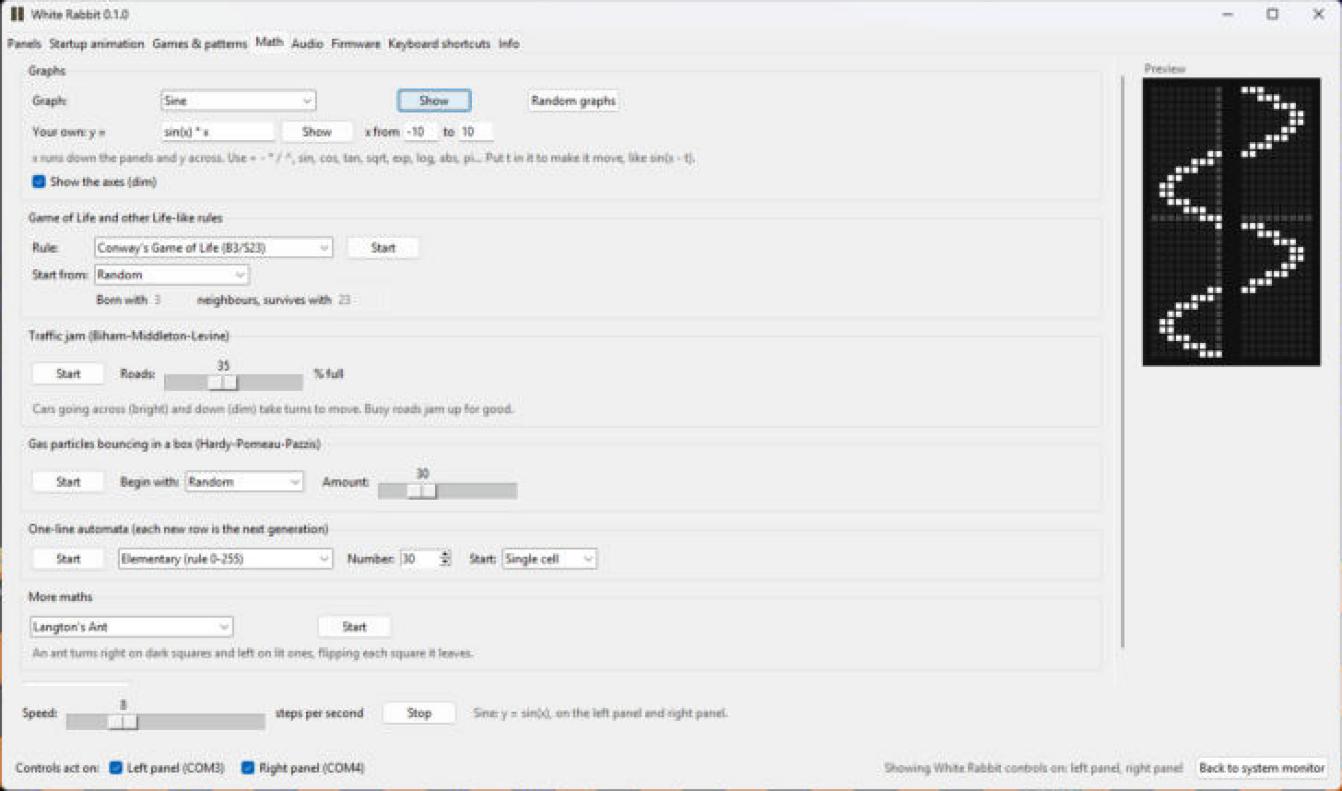
TLDR: White Rabbit controls the led matrix. It runs in the tray starts with windows, runs a system monitor on the panels, and lets you play games, play with math, run a music visualizer or change the startup animation.
I had been using a open source tool to turn the led matrix into a system monitor, but I didn’t like how I had to launch it. I wanted to see the same animation every time the led matrix booted. So I decided to vibe code something and I am pretty happy with what I ended up with. I started by updating the open source system monitor so that it could start with windows. Then I updated the official framework tool and made a modified firmware so I could select a specific animation when it booted. While working on the two I kept running into an issue with the workflow because only one app at a time can use the led matrix so I decided to combine the two tools. When I had one app I started adding features. I think everything has been tested at this point.
System monitor: drag apps onto each panel and they take turns. CPU, GPU, memory + battery, disk, network, temps, fans, FPS, clock and weather. Panels turn off when you close the lid.
Music visualizer: 15 looks, reacts to what the laptop is playing or a microphone. Ctrl+Alt+Shift+M puts it on both panels.
Math: type a formula and it graphs it across both panels, plus game of life rules, traffic jams, gas particles, Langton’s ant, a maze solver and more.
Startup animation: pick one, random from a set you choose, or none. It is saved on the panel so it works without the app.
Games: game of life with extra patterns, snake and ledris.
Firmware: flash my firmware, Framework’s official 0.2.0, or any .uf2 file from inside the app.
I work in live entertainment as a video engineer and sometimes as a vj. People were constantly asking me if the led matrix was audio reactive when they saw it. So I added that feature added.
Use WhiteRabbit-setup.exe to install or WhiteRabbit.exe for the portable version. If you used led_mon it copies your layout over.
The exe isn’t code signed yet so windows will warn you, click more info and run anyway. The startup animation and extra patterns need my firmware, which is based on the official 0.2.0 so you can always flash back.
It is built on MidnightJava’s led-matrix, Jeremy’s LED System Monitor and Framework’s inputmodule-rs. Thanks to everyone who worked on those. I built this with a lot of help from Claude, so if something breaks please let me know here or open an issue on github. I am not a software developer, but if you find any bugs I will do my best to address them. I am working on getting the code signed so that it does not get flagged by antivirus. If anyone has any feedback I would love to hear it.
Very cool project! Maybe this should be moved over to the Creators area of the forum. It’s Framework Laptop 16 specific but it definitely fits as a creative and useful tool made by a Framework user! Kudos!
That’s awesome! I used Claude to engineer my own version too, but I went with WPF, focused on publishing through the MS Store, maximized resource efficiency, and added startup options. It’s interesting how many ways we can solve the same problem!
Very interesting. I probably would not have started my project if I found yours first. Your app definitely has a more modern design. I opted to keep a classic/generic windows system utility look.
I had to modify the firmware to get a faster refresh rate on the led panels to make music reactivity work. I also had to modify the firmware to get control over the boot animation.
Did it cost you anything to get the app in the microsoft store? When you say startup options what are you referring to? I had something built so I can choose the startup animation that plays when the led panel powers up instead of playing a random stock example animation.
Same here too, but I am glad I went through it to learn more about how the COM stuff works. It was a fun experiment.
My goal was to make it something other Framework 16 users can install without worrying about building the app or disabling the Smart App Control features, since the published app and DLLs are trusted by Microsoft.
I already had a Microsoft Store dev account, and I think I paid about 20 bucks to get registered, but I believe they removed the fee, so creating accounts and publishing apps is completely free. The submission and approval process is pretty easy too; the caveat is that your app’s published package has to comply with the submission process. Claude can easily help with that, as there are good docs on it.
And if you do submit to the store, you will need to change how the startup hook flows, as not all ways to hook the app to startup are allowed, except if you are really big and can get an exemption from the rules… 'tis how life goes. You can have Claude point to my repo, as I have all the publishing steps and reqs laid out there as a template for me to use for other apps I create.
Btw, how did you flash the hardware? That sounds pretty cool! I poked around, and I don’t remember seeing many updates from Framework themselves on this, but to be fair, the stock 0.2 firmware is pretty feature-rich as-is and stable.