I need some guidance. I have a Framework Desktop that I’ve had multiple USB-related issues with, and I’ve had an open support case for several months.
Some of the issues:
USB4 ports: Sometimes, during boot, one of the USB4 ports doesn’t work at all. It may take several reboots before both USB4 ports are functional. When I say “not working,” I mean there’s no power output at all.
Front USB 3.2 ports: As I understand it, these two ports share power. I’ve found that I can’t have a hard drive connected while using another USB device in the second front port. I have had a few instances where my system crashes when I read from the drive and have a DAC connected to the other port
Drive stability: Possibly since the last chipset update (not entirely sure), I can’t reliably write directly to a drive connected via the USB 3.2 port. For example, if I export from DxO PhotoLab to that drive, my computer will freeze. I don’t recall this issue happening before.
Powering external displays: I can’t power a portable display through a single cable — the display needs external power. This might be a limitation I just have to live with, but both of my laptops can power the same display this way, so I’m a bit confused. I thought the USB4 standard shouldn’t have this limitation.
Now… after video recording situations where the USB ports don’t work Framework suggested that my system is faulty, and they sent me a new mainboard, Now I have swapped the mainboard and to my dismay, I still have the same issues.
This leaves me with just one fully functional USB connection for hard drives which is not really a workable possibility form me.
I don’t know what to do, ping ponging with support the last time was exhausting and I have spend quite a lot of money in to this setup, I can’t just buy another computer.
What can I expect, should I ask for a return and just eat the loss I have had with non-framework components, like internal SSDs and monitor and such or should I go another round of support and perhaps hope for a driver/bios update to fix the issues?
Windows 11. I did not actually install it clean when I swapped mainboard, but obviously I did when I first received it. I can see its a bit headless not to try, so I’ll give it a go in the weekend.
Taking the expansion cards out and plugging into my laptop and using for pass-through works as expected.
Plugging directly into the USB-C ports that the expansion cards plug into also doesn’t work.
Trying with YubiKeys for both USB-C and USB-A to no success.
Switched the speeds in the BIOS, reset the BIOS, no joy.
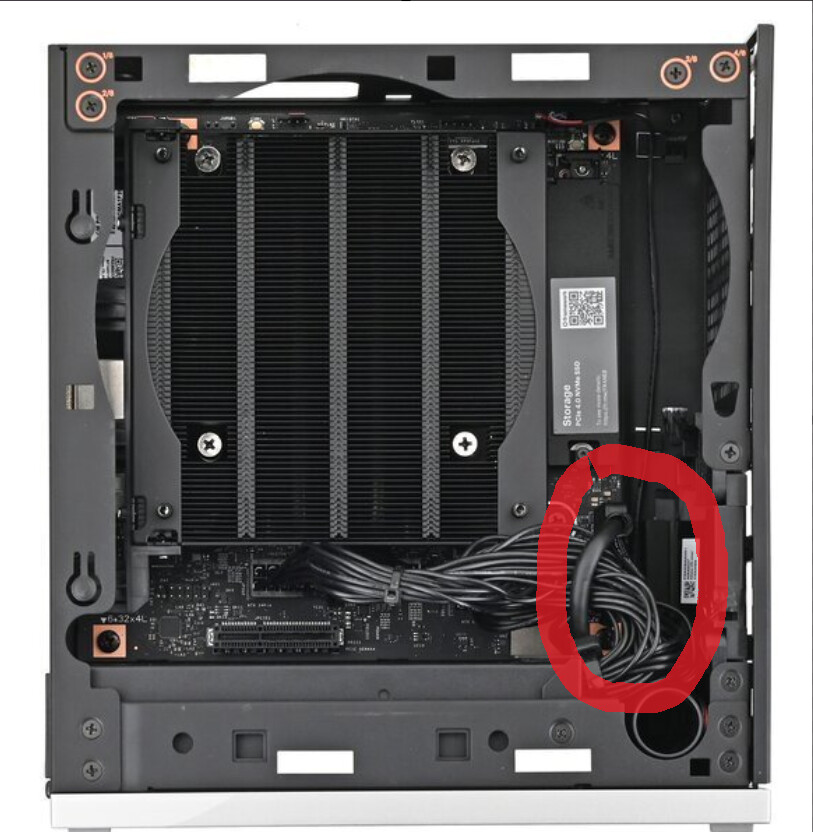
The cabling is rather tight down there with the power cables running under part of the cables to the USB ports, while it seemed perfectly seated before removing, it could be that there was some pressure on it - slightly concerned it might go again.
Great, so this fixed the USB3 port stability issue. Did it also fix the USB3 shared power draw issue @Rumle_Skafte mentioned above? Do you have the same USB4 ports issues?
3A got supported by 3.03 BIOS. But its still bugging out with two powered devices plugged at once… BUT I haven’t stress tested this since I swapped the main-board So I don’t know for sure if this is still an issue in my case. But it was still an issue with 3.03 on the old MB just a few days ago.
Thanks. You are right.
Framework sent me 3.03 while it was Beta with the notion that 3A was added. So I thought it was. And I’m pretty sure I either upgraded to published 3.03 or determined that the Beta was the same as the released.
But I guess its still 1.5A and that’s good, we know they are working on it
Thanks for the correction.
Just figured I would mention the USB problem that I have. I currently have 7 USB devices in total and only 1 device is giving me a problem so far… my Ducky One 2 TKL RGB keyboard.
When connected to either the USB 3.0 hub (Plugged into either USB-A or C port on the back), or directly to the USB-A port on the back, the device will randomly disconnect and reconnect.
The only thing that has worked to resolve the issue is by plugging the keyboard in to the front USB-A port. Not sure why this is the only device behaving this way, but perhaps this is something that can be fixed in a BIOS update.
Endless USB issues with three Nabu Casa devices (2 x ZBT-2 and 1 x ZWA-2) either randomly disconnecting or becoming unreachable/unstable. What was tried so far:
A WaveShare industrial USB 2.0 HUB was returned, thinking the issue was that device, as mostly one sole port (USB2 out of four) would die in some time after working at first. The hub was externally-powered, too, and it’d support USB power drain when disconnected from external power. Interestingly, connecting it through the USB port on a DELL U4025QW monitor, in turn connected through USB4 to the Framework Desktop, was showing the same behaviour.
Procured a new WaveShare industrial USB 3.2 HUB, reached to the firmware developer on GitHub and had two different sets of firmware for the two ZBT-2s, to no avail, the radio co-processors would fail occasionally at first, and very frequently 12-24 hrs. later.
Used a radio spectrum analysers to pick interference-free frequencies and for two full days re-created all the Smart Home networks, ZigBee first, then Thread. Horrible with 60+ devices and a few communication failures despite the clear RF spectrum.
A couple of days back, the most stable Z-Wave network started to crash ~10 devices. Re-set most of those and it seemed to work again.
Yesterday, the ZBT-2 ZigBee coordinator disappeared from ZigBee2MQTT and does not communicate anymore via USB serial. Attached devices seemed to keep working.
Today, noticed a few devices not responding and reporting outdated statuses.
A reboot today meant the new hub has dead full 4 x ports (again no green light like with the returned unit), although one device must be getting some power as its LED is on.
The hub is powered by the Framework rear USB4, no external power is connected, Proxmox lists no hub nor devices anymore. Attaching the hub to a laptop shows the hub has no problems and the hub port lights all turn on.
Reconnecting never solved. Rebooting a second time brought the devices back in view.
Not very happy as this was one of the biggest uses for the Framework Desktop. Looking forward for important improvements, if this is software-based. Any advice welcome, e.g. any BIOS changes that might improve the performance.
There is definitely a problem with USB power in general. I don’t know what it is, but perhaps it has something to do with Framework primarily building laptops up until now.
I went a head and bough another USB hub, one with individual power buttons for each port so that I can more easily get my “problematic” devices reconnected. So for it’s my Ducky One 2 keyboard and a Blue Nessie microphone. Since these USB connection issues happen basically daily, this was the only solution I came up with.
Framework needs to set controls in the BIOS in order to allow us to define how we want power delivered to these USB ports. This is a desktop, not a laptop, I don’t care about saving a couple watts of power.
Also this is considering that I have gone through Windows already and disabled all power management functionality for the USB root hubs and the USB Selective Suspend setting in the power options. Yet these USB power issues are still present, so must be something with the system it self.
I hope the next BIOS update will allow us to set controls on USB power management, I would simply prefer to disable all power management for all USB ports. That’s the easiest solution I think.