Thank you! one of the reason on having lego type attachment on the top and bottom of the dockframe is because you can attach one on top of another, so you could have more ports. We are going to produce some videos about this on May
- To attach one dockframe on top of another
- Also to attach different lego components from third party vendors (there is a whole universe of compatible stuff)
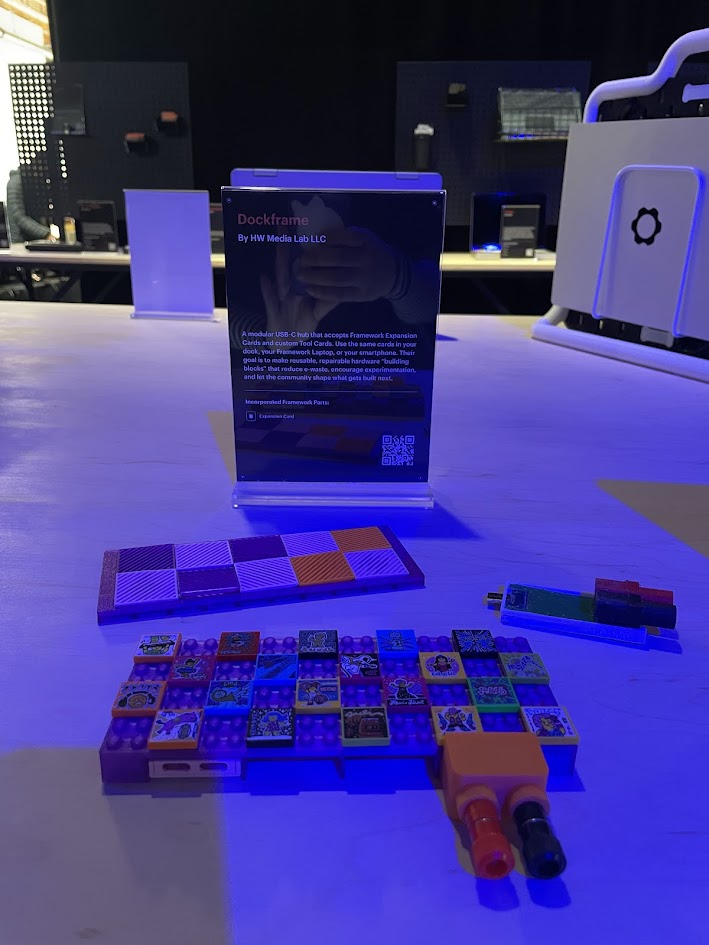
- To attach our custom frame for tiles (like the ones used on the Framework desktop computer)

Thank you for responding! That article did help a lot. For those also curious, here is what I found to be the most helpful in distinguishing the terms:
USB hubs are built for simplicity. They focus on multiplying the number of USB ports you have, letting you connect things like flash drives, mice, keyboards, and other low-power accessories. Some may include a few extras like SD card slots or HDMI output, but their overall function is limited.
Docking stations, on the other hand, are full-featured setups made to transform your laptop into a desktop workstation. They go beyond just USB ports, adding high-resolution video outputs, Gigabit Ethernet, audio jacks, and SD card readers, all through one cable.
I’m so excited to hear that DockFrame is a docking station! I’ve been looking for something to turn my Framework into a desktop for a while now and did not want to waste money on a docking station that had the possibility of not working. When this comes out, I will definitely be waiting for reviews and buying it.
Can’t wait to see!
Cool, great idea.
I actually need a new dock, would definitely buy this. Esp. with PD.
Love the Lego connectors. People with young kids  will really need to watch out for their dockframe then.
I am also very much interested in the SSD card. What will the capacity be?
Please also note that Frameworks own 1 TB SSD card is currently sold out, unclear when this will be available again (says support).
1 Like
I am on the " interest list", and definitely could user at least 2 of these.
Any thoughts on where pricing is going to land, for the each of the main frame sans modules, and for the special purpose expansion modules?
1 Like
Thanks for your comment. We are going to launch a crowdfunding campaign on crowdsupply just for the tool cards in a couple months: multimeter, power supply and XIAO dev card.
The price depends a lot in the amount of cards we sent for production, because it will determine things like using injection molding or not, in-house vs third party assembly, etc, etc.
Is quite hard to estimate the price at the moment, specially that we don’t know yet if tariff will change, etc
With the money of the crowdfunding campaign we will finish the development of the hub too + the dual usb 3 card.
2 Likes
Thanks. About the miniSSD we aim for the 2TB version. Last week we had a meeting with Biwin to have some technical support so we can integrate it. The bad news is that each minissd is like 550USD, so an extension card for that will end up costing like 600 USD
1 Like
New blog post with more information about this LEGO studs on a USB-C dock: how DockFrame stacks, and why it wears Framework Desktop tiles | HW Lab
1 Like
For an SSD extension, I am looking for sth around 0.5-1 TB (boot device size).
As feedback: 600 bucks for a 2 TB extension card is a bit too much for my taste.
I agree yeah. The minissd cards are quite expensive, like 550 each (2TB). I will have a meeting with them next week to see if there is a way to reduce that price.
1 Like
New blog post about our power supply card: Building a Power Supply in a Framework Expansion Card | HW Lab
And soon we will create a post about our breadboard card (compatible with XIAO boards and others)

3 Likes
New blog post about our breadboard card: Building a Breadboard in a Framework Expansion Card | HW Lab
In other news we just got accepted to CrowdSupply and we will start the pre-campaign by the end of this month 


First batch of DockFrame hub PCBs just arrived, and testing has started.
 DisplayPort
Power delivery
 Next up: 10Gbps data transfer and Framework card testing (Ethernet, Audio, HDMI, and more)
5 Likes
UPDATES:
- HUB: Ethernet, Data transfer, HDMI and Audio tests all passed. Now we are testing the power delivery.
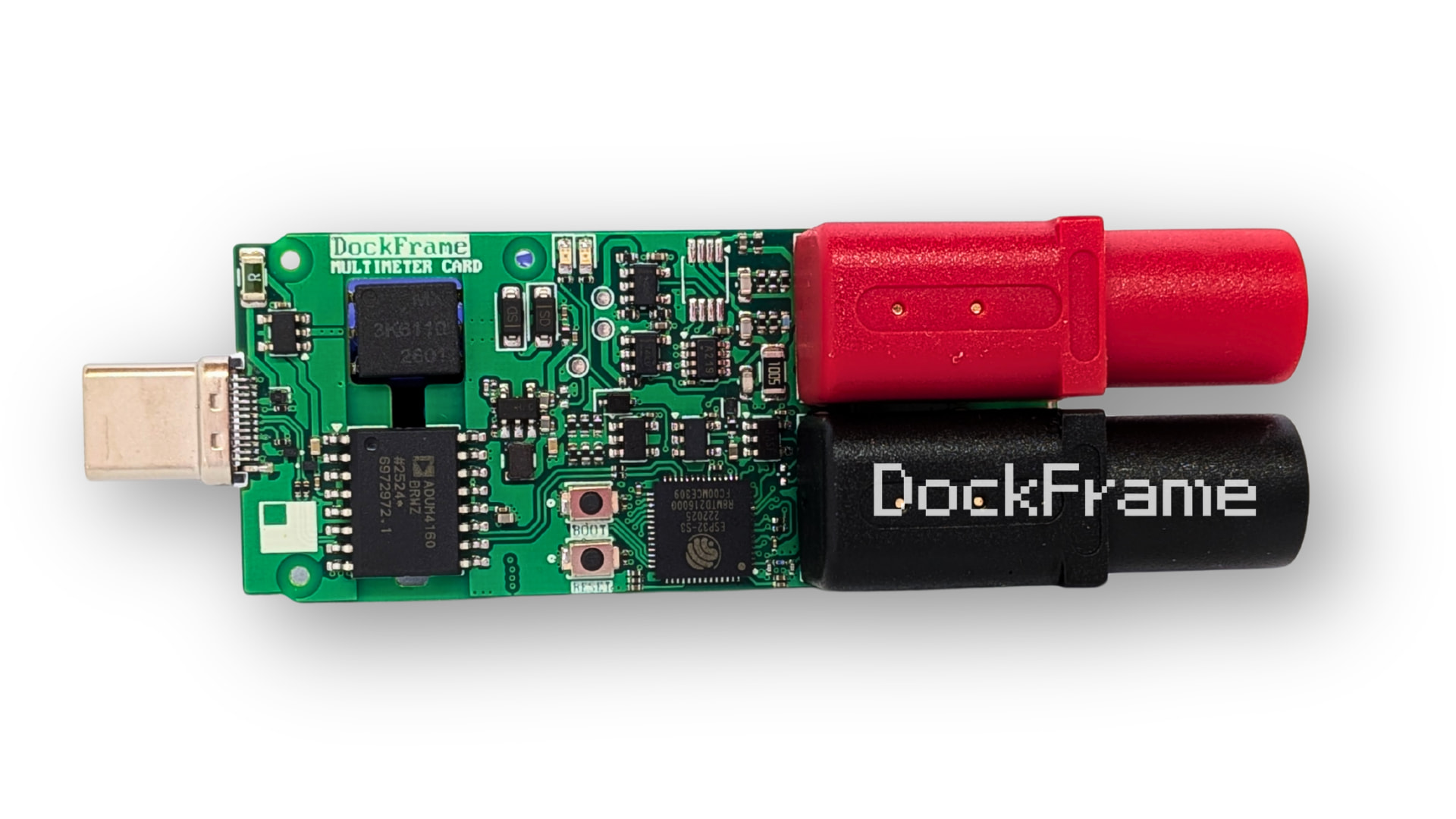
- Tool cards: We received the multimeter and power supply cards and we are testing them right now (we will create a blog post about it today). We may receive the breadboard card this week.
- Mini Hub card: We are almost ready to finish the design and send our first test batch for production.
- Enclosure: We are trying to make everything more compact and easy to manufacture for our injection molding supplier. We are also discussing about different materials options for a good thermal performance.


5 Likes
Seeing the image of the multimeter, I’m positively about it. At first I was a bit scared to just put random voltages and stuff towards my laptop, but I see a big gap between the USB-C section and the multimeter section. It looks very well designed!
2 Likes
Thanks Garrcomm! That “big gap” you noticed is actually the ADUM4160 USB isolator. It provides full galvanic isolation between the measurement side and the USB-C port connected to your laptop. So no matter what voltage or signal you probe, your Framework (or DockFrame) stays protected. Safety by design!
3 Likes
DockFrame is now live on Crowd-supply!
If you’d like to support the campaign, follow the pre-launch page: DockFrame | Crowd Supply

4 Likes
Excited that it’s finally live! Would it be possible to get some more specifics on specs & capabilities, esp for the hub’s four downstream ports? I noticed in your recent picture of the hub that the case had some text above the ports stating “Display Port”, “Data” and “PD”, does that mean only some ports can do certain things, and they aren’t all interchangeable?
Also the Crowd Supply page only lists a four-port “Mini Hub Card” with a seemingly different design to the two-port variant you previously shared. Does this one replace the two-port variant, or is it a seperate product? kinda liked how flush the two-port one would’ve been.
Thanks in advanced!
Good question. At the moment, four ports support data transfer up to 10 Gbps, one supports DisplayPort, and one supports power delivery up to 100W. The hub shown in the photos is our current working prototype, and this is the version we can confidently build today.
Based on our ongoing testing, we are now working toward enabling data, PD, and DisplayPort on all ports. We are also evaluating uplink charging for the host computer and higher power delivery options, including:
- 100W uplink + four 240W downlink ports
- 100W uplink + four 140W downlink ports
- 100W uplink + four 100W downlink ports
About the mini hub card, we are thinking to provide two options, the dual card and the 4 ports version.
3 Likes
Welp! Definitely supporting this…
Can you add speakers to it? Reason I ask, I wanted to make a two-part frame that connected to either side of my FW12 using all four ports. USB-C passthrough, active cooling, but the main thing I wanted was better speakers in the back corners.
2 Likes