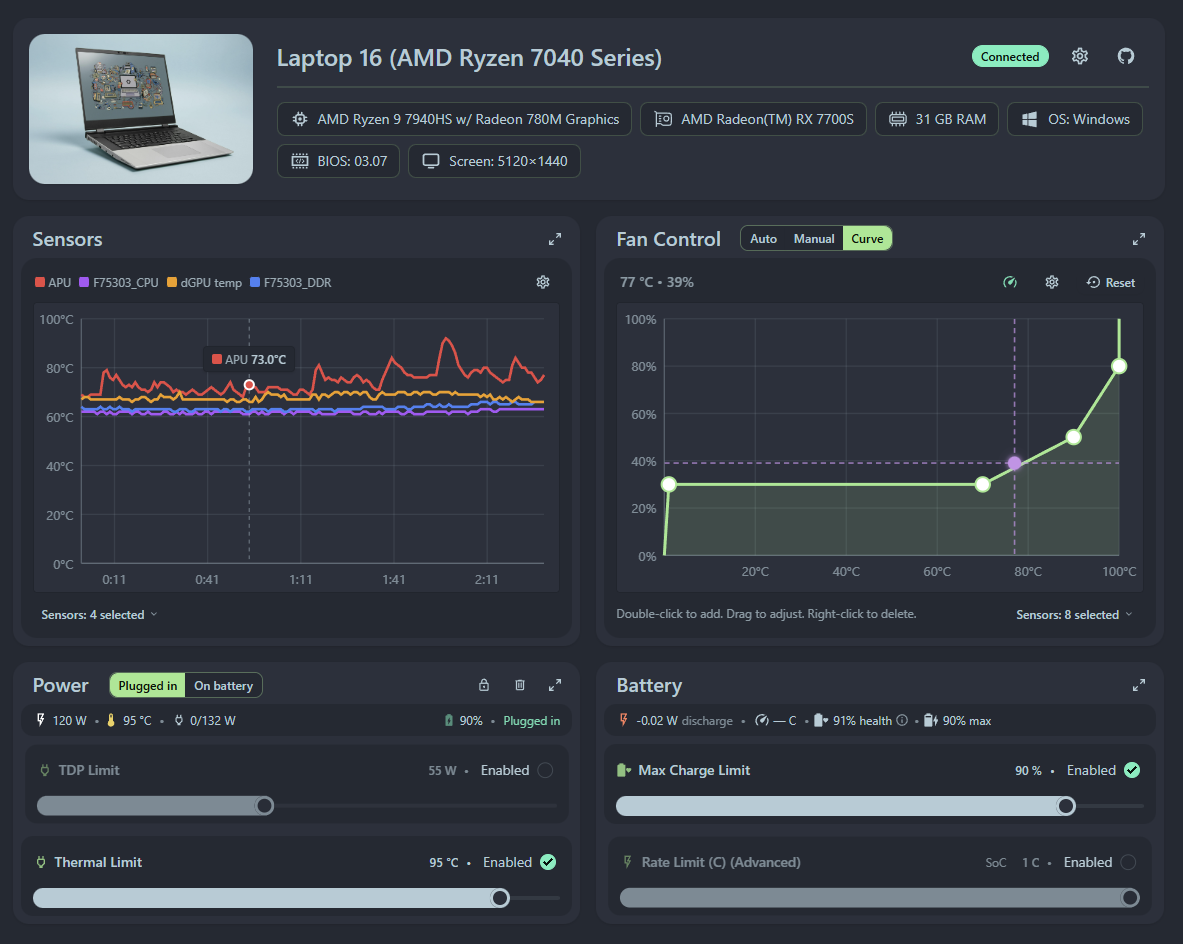
Is it possible to update the first post in this thread and update the title of the thread? A lot has changed since I first posted and I want to update the initial post for newcomers.
Who can help with that? Maybe @catastrophic ?
Is it possible to update the first post in this thread and update the title of the thread? A lot has changed since I first posted and I want to update the initial post for newcomers.
Who can help with that? Maybe @catastrophic ?
I can help you with that - just let me know what you’d like it updated to.
Just got my new 5070 FW16 this weekend and used your tool to fix the jet engine noises when I started doing anything remotely intensive. Seems to be working great so far, thanks!
I do have a question and a feature suggestion:
Anyways, thanks again for this tool, its been super helpful!
@Kemal_Ozturk Ok, this might be a serious ask and I don’t know if it is something that is even possible if you don’t have the mainboard, but I upgraded to the AI 370 just now and installed it and the tool works, but the sensors just say 0-6. Doesn’t actually list what they are anymore. Is this something I might be able to provide from my end and the sensors can be applied to an update depending on the board/cpu we are using?
Hey, glad the fan tool was helpful to calm down the beast.
To answer your questions:
Can you start a new PowerShell window as Administrator and run these commands? And send me the output?
cd “C:\Program Files\FrameworkControl”.\framework_tool.exe --thermalThank you! There has been many updates since initial release, it’s no longer only a fan control app. It also works with Laptop 13 and 12. Let’s change it to:
Header: Framework Control - A tool for: Fan Control (Curve), Sensors, Power Control, Battery Information (Windows, Linux coming soon…)
Body:
Framework finally released a BIOS with the EC tool to allow fine-tuning! Here’s a GUI to do just that! 
Here’s a link to the actual app: Framework Control
Sure thing.. here you go.
Edit: Idk if I should also mention or not that when I do the drop downs for the sensors (say for the fan curve) I want it to read, it also mimics these labels. No longer APU, cpu etc. Just says “Temp X” where as “X” is the number.
When I try to install the latest two updates windows defender flags it as a trojan/virus. When I download 0.4.1 - 2025-11-10 or earlier versions nothing is flagged.
Updated! Let me know if you needed anything updated in the future.
That is quite unfortunate. I was suspecting the EC was returning the temps like that. We’re not going to be able to do anything to fix that on our end, but Framework will likely fix this in the future with a BIOS or driver update.
I also think it’s worth creating a new thread with this information to get the Framework devs’ attention.
Please see my comment about this issue here: Installer can't start service, blocked by Windows Defender · Issue #28 · ozturkkl/framework-control · GitHub
Thank you sir! Will do, appreciate the help.
I think I found an error in the documentation, I couldn’t get it to work initially until I figured out that it was running on port 30912 and not 8090 like it says on Github.
Was this changed at some point or is it something weird on my end?
Check if port 8090 is taken by something else. That behavior looks like a common fallback practice.
Thanks for already going into the explanation. Sorry I missed that. Hopefully you can figure out the open source signing sometime soon.
Well I appreciate you looking into it. I will still use the program as it is still reading the temps and adjusting my curve accordingly. Just missing labels. Maybe through more updates for the new mainboard BIOS it will correct itself. Here’s to hoping.
It’s not weird on your end, the app simply respects what’s set in the .env file for the port, and it happens to be 30912 at this time (set in my GH CI secrets). It might change in the future again, too. I originally changed it to release some breaking changes and make sure the old versions of the service don’t respond to the newly released webpage. The app also used to work as a webpage at Framework Control , but it seems like it’s now broken. So you can imagine the newly released webpage would send new/unknown requests to the outdated backend service. Changing the port makes that communication not happen, thus leaving the user on the setup page rather than giving them a broken experience.
Since then, I’ve also implemented a version detection logic where it says “your service is outdated” so changing the port is less likely to happen going forward. I think README mentions the port as an example “env” value, but I don’t think it says anything about what port the current prod release is running on.
Hope this made sense
Correction, apparently the web page still works, the Brave browser doesn’t allow it to connect to the local service, so I thought it broke. Regardless, here’s the UI I mentioned that will help me stick to a single port and not have a broken/out of sync app.
I would love to see this running on linux !
Can’t wait  ahah
ahah
Keep up the good work @Kemal_Ozturk !