Framework Desktop CPU Performance

My entire time poking at the Framework Desktop machines I’ve been 100% focused on working on the AI/ML side of things, but with that and the weeks-longs inference sweeps mostly done atm (and media embargoes lifted), I started poking a little more on the CPU side of things, and was pretty surprised to find that it’s actually probably the fastest computer I have in my house right now. Here’s a quick Geekbench comparison against my EPYC 9274F workstation:
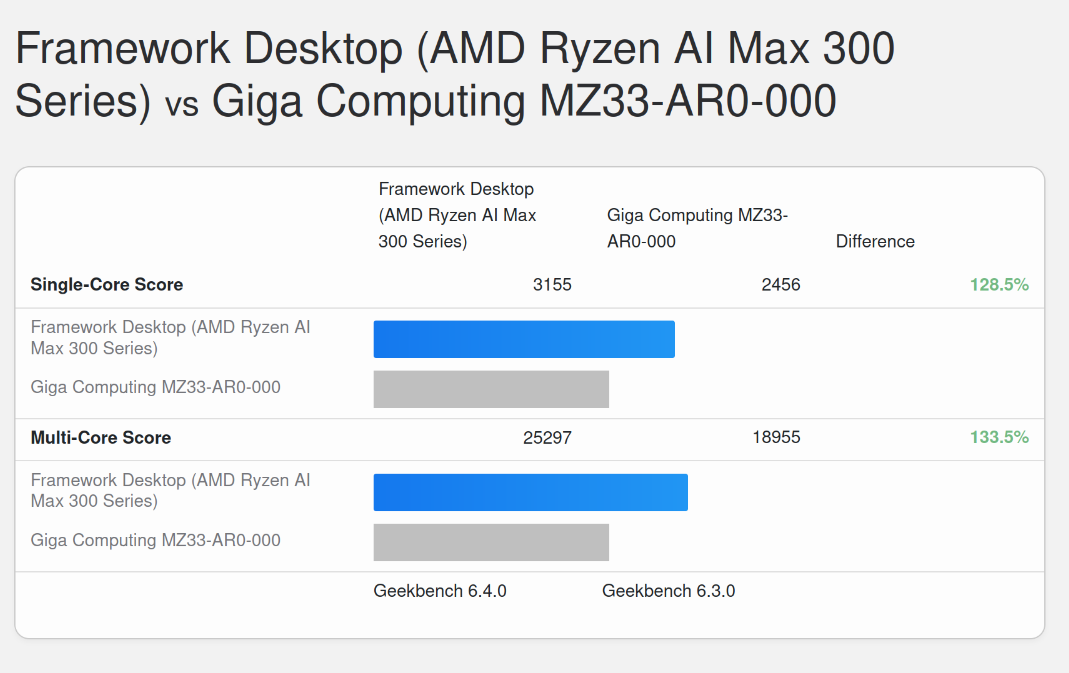
Pretty neat! I paid ~$2500 for my EPYC chip last year (also >$1K for the motherboard and almost $2K for the 384GB of memory). Granted that system has ECC, 128 lanes of PCIe 5.0 and a bunch of other fun stuff, but I think one of the things that’s easy to overlook when focused on the AI/LLM side of things is that the CPU is actually pretty great (and refreshingly, also just works).

I’m not sure if it’s been mentioned/pointed out btw, but while the GPU memory bandwidth is pretty close to what’s on the tin (I’ve gotten up to 221GB/s out of 256GB/s bus max), the CPU side is… much lower, about 85-125GB/s. For those interested in the numbers, I’ve run likwid, passmark, and intel-mlc: strix-halo-testing/hardware-test at main · lhl/strix-halo-testing · GitHub

FWIW, my EPYC system also gets much lower than theoretical MBW as well (theoretical max: 460.8 GB/s, actual, even with a full CCD/GMI links, different NUMA setups: 200-285GB/s). It still ends up about 2-3X higher than the Framework Desktop: speed-benchmarking/epyc-mbw-testing at main · AUGMXNT/speed-benchmarking · GitHub

One real-world CPU sanity check (building latest checkout of llama.cpp):

cmake -B build && cmake --build build --config Release -j$(nproc)

# EPYC 9274F 
________________________________________________________
Executed in   58.34 secs    fish           external
   usr time  263.81 secs    0.00 millis  263.81 secs
   sys time   15.68 secs    2.46 millis   15.68 secs

# Framework Desktop
________________________________________________________
Executed in   50.20 secs    fish           external
   usr time  253.12 secs    0.00 millis  253.12 secs
   sys time    8.67 secs    1.22 millis    8.67 secs

The Framework Desktop is faster (also, sadly, the fan spins up louder), although not a completely fair test since I didn’t bother to close Firefox while running this particular test (actual benchmarks were of course from fresh boots with nothing else running).

6 Likes

This as expected. Each CPU CCD is linked with IOD with a 64GB/s bidirectional link. So two of them (as on 395) can use up to 128GB/s in theory, so if you can measure 125GB it’s spot on.

Halo is better than the desktop parts (64GB/s read and 32GB/s write per CCD) but worse than 2GMI wide enabled server parts (double the desktop values).

However a concerning problem was spotted by other Halo users on Windows, where the CPU tries to fill first CCD with work spilling to the second only after all HW threads are full. Ignoring the affinity requests from the user while doing so.

I recommend reading the full thread. This behaviour is also visible from the Desktop reviews if you look close enough as some benchmarks perform worse than expected.

It would be nice to have someone from Frame.work to comment if this applies to Desktop too, is this intentional and what would be a way for the user to get expected behaviour from using affinity settings on Windows, as it seems Linux is actually handling that better.

2 Likes

Is there any downside to using Process Lasso until there’s an official solution?

If you know what process lasso is and know about the problem, then it’s probably a minor inconvenience.

If you don’t then you may spend hours trying to figure out what is going on, which may lead to frustrating experience for $2000.

The biggest issue here is that according to that thread the system does not respond in expected way for setting the affinity requests what will confuse people and not everyone has time or patience to look around message boards for a solution.

1 Like

Did I understand it right, that Linux is handling the two CCDs well but only Windows has issues with CCD2 utilisation? In that case I am fine.

1 Like

Is this as expected though? The official AMD spec sheet lists:

Specification Value
System Memory Type 256-bit LPDDR5x
Max. Memory 128 GB
Max Memory Speed LPDDR5x-8000

Sure it’s technically accurate, but pretty misleading if its never mentioned the CPU is only able to ever achieve half of the memory bus bandiwdth.

Per this Chips and Cheese AMD's Strix Halo - Under the Hood - by George Cozma interview with Mahesh Subramony, Strix Halo does not use the GMI PHY used in desktop chips but instead uses a “sea of wires” fanout that runs at 32 bytes per cycle bidirectional clocked at “anywhere between one to two gigahertz.” This is the only documentation I’ve seen of how Strix Halo’s interconnect design works.

Well, they never said CPU has access to full bandwidth. They were quite open it does not via the public interview they gave, which you cited, when they state as much. 32B * 2GHz will be precisely 64GB/s. Per CCD.

So it should be 128GB/s theoretical pure read BW. 128GB/s theoretical write BW. And up to full BW if you do some sort of read/modify/write pattern. Assuming you are able to wake up both CCDs.

Wondering if we are talking about a hardware issue or a software one?

This is hardware, part of the CPU chip design.

This is consistent with how AMD specifies their memory bandwidth on their EPYC chips, so it’s not unique to Strix Halo. For example, for their EPYC 9124 spec sheet they specify “Per Socket Mem BW: 460.8 GB/s” without mentioning the per/CCD GMI limitations that means the 9124 (or any non-max CCD) chips will never get anywhere close to the number they list.

Yes, technically the specification is for the “socket” but if you read the sheet, or even their official memory population guidelines there will be no mention of this. You depend on external guides, like this Fujitsu one (see an old Reddit discussion) to discover the “real world” memory bandwidth you will get would be significantly lower (as an aside, for the best chance of reaching good MBW, you’re cheapest path is with an “F” chip).

Personally, I would consider the EPYC specs to be more misleading/confusing (and it’s much harder/more rare to get published information or hands on testing with specific SKUs), but either way, it doesn’t change the fact that AMD’s officially listed specs won’t give you a very good idea of the real-world performance you’ll actually get, hence testing.

So, I asked, as there were discussions that this issue for Windows and not Linux and that Process Lasso can be used to balance the CCDs. I’ve clearly missed something :thinking: Ah, wait, it’s slowly sinking in … memory not core utilization … reading more carefully now :flushed_face:

Sorry, sorta my fault. I was replying to @KaRa about the link in which Process Lasso was mentioned.

1 Like

There’s actually a good example of Strix Halo memory capabilities under windows here. Its not the FW desktop, its the Asus ROG Flow Z13

The tl;dr is 121931 MB/s read; 216896 MB/s write.

Also if we’re talking about architecture then remember that the MALL (infinity cache) is unavailable to the cpu on Strix Halo - its dedicated to the gpu - so there really isn’t any sort of direct comparison to be made even with equivalent desktop cpus. Interesting times….whenever batch 7 ships anyway :smiley:

1 Like

To be fair they mention this in architecture overview for given family, and one more other document. So it’s there in publicly available documentation. The pictures Fujitsu was using look very similar to AMD’s own ones. Maybe they could simply try to produce one bigger document rather than splitting it into smaller parts.

Not only, I think up to 8 CCD parts are using GMI-Wide links, but this can be found from the docs on AMD website. So it simply boils down to finding how many CCDs given SKU has and then multiplying the CCD BW to get possible to achieve socket BW. Still, this could be more clearly communicated. Nevertheless it’s publicly available info.

What reveals that AIDA is not doing pure write tests, but their write test is also reading;)

Nobody here was discussing the affinity issues outside me mentioning it here;) Ah, but now I see my message was flagged as spam. Interesting.

1 Like

Frankly I’m not that bothered about the 128GB/s CCD bandwidth as I assumed the full 256GB/s was only available to the GPU when I first read about Strix Halo. The Chips and Cheese interview sort of reinforced that when I realised the MALL was dedicated to the GPU.

Its probably the most interesting x86 cpu (apu really) that I’ve seen since Opteron first debuted and ate Intel’s lunch.

Roll on batch 7…

Not yours at all. I was speed reading (i.e. not paying attention)

@Vestas Batch 7 right here, too!