Highlights
- Updated MCU 0x6134.
- Updated CSME 16.1.40.2765v3.
- Added support for Framework Laptop 13 Pro features - Enabled compatibility for the haptic touchpad, touch panel, and 74W battery.
- Updated the audio verb table to support the new speakers in the Framework Laptop 13 Pro chassis.
- Enhanced the Power On AC behavior, allowing the feature to work correctly without requiring the system to boot into the Operating System at least once for initialization.
- Fixed an issue where the Battery Extender status was reported incorrectly following a reboot, hibernation, or shutdown after the timer had expired.
- Security Fixes - CVE-2025-27708, CVE-2025-20080, CVE-2025-32008, CVE-2025-31648.
Please note: With BIOS 3.17, you can downgrade to a previous version.
You can check your current BIOS version following the steps here to determine if you are on the latest release.
Subscribing to release notifications
If you want to subscribe to new release notifications you can now opt in through this link to receive an email when we release a new BIOS or driver update for your Framework Laptop.
Downloads
Windows
| Download Link | SHA256 |
|---|---|
| Framework_Laptop_13_13th_Gen_Intel_Core_BIOS_3.17.exe | 4A7252DD4C0D134DFF343F9BA34F3222BD887BAC70C3445A48C00A7EB5920443 |
Instructions for Windows Installer:
- Run the .exe.
- Click yes to reboot.
- Wait for the firmware progress bar to complete, and then the system will reboot.
- If you are updating a system in standalone mode, please pay careful attention to the standalone update process below.
Please note that you must update with a charger attached.
Please note that the windows update does not support updating retimer firmware. There is not a functional impact to port functionality if you do not choose to update your retimer firmware.
Windows retimer updates
Please note that retimer updates only need to be done one time. So this is only necessary to do one time. This is optional.
| Download Link | SHA256 |
|---|---|
| Framework_Laptop_13_13th_Gen_Intel_Core_Retimer_port01_310.exe | 44DB0311EBA4CB86194258682A3A7FB40789F1FD271D19FC504C4B6948A1FE38 |
| Framework_Laptop_13_13th_Gen_Intel_Core_Retimer_port23_310.exe | 5C4EEAB2EEE74414C3323A85FC84E8244848A8251C78D604BD7DABE5D6F0E2FE |
There are 2 retimers on the system. Please follow the instructions to do twice with different executable files.
Retimer update instructions.
- Update the BIOS first.
- Boot into Windows after BIOS update.
- Run the .exe and wait for the firmware update tool to stage the update.

-
After initialization, the system will restart and update the retimer firmware.
-
Repeat step 3 after rebooting to update the second set of retimers.
Please note that you must update with a charger attached.
Linux/LVFS
Please note that for this platform LVFS will not update the CSME firmware. so we only recommend updating using the EFI updater. This is a limitation of LVFS which does not ship the binary blobs from Intel necessary to update the CSME.
Updating via LVFS is available in the testing channel during the beta period.
You can enable updates from testing by running
fwupdmgr enable-remote lvfs-testing
Please note that you must update with a charger attached, then run:
fwupdmgr refresh --force
then
fwupdmgr get-updates
then
fwupdmgr update
Please note that you must update with a charger attached.
LVFS may not update if the battery is 100% charged. LVFS uses the battery status to determine if it is safe to apply updates. However if our battery is at 100% and the charger is off, we set the battery charging status to false. In this case you can discharge your battery a few percent, then plug in AC again and run fwupdmgr update.
Linux/Other/UEFI Shell update
| Download Link | SHA256 |
|---|---|
| Framework_Laptop_13_13th_Gen_Intel_Core_BIOS_3.17_EFI.zip | 410CC3FF339516B2771277562EBE0EE3980014BC00586A3DA287962D361ECD6E |
Note that if you use the EFI shell update with Windows, you should suspend Bitlocker if enabled before updating using the EFI updater.
Instructions for EFI shell update:
- Extract contents of zip folder to a FAT32 formatted USB drive. Cleanly unmount the drive before physically removing it, otherwise the BIOS update may not function correctly.
- Attach a charger to your device while updating.
- Boot your system while pressing F12 and boot from the thumb drive.
- Let startup.nsh run automatically.
- Follow the instructions to install the update.
If doing a standalone update, the display output will not work during the retimer update. Please note that retimer updates take 2 minutes to complete. So please wait at least 5 minutes before attempting to power off or reset the device.
Updating a Mainboard outside of a laptop
This release supports standalone updates without a battery attached. After rebooting, please follow the onscreen instructions to update your BIOS when in standalone mode, which will require moving the power source between both sides of the Mainboard to allow PD firmware to update correctly.
Please note that the power and display output must be connected to the same side during standalone updates. Failure to do this may result in no display output during the update process.
We recommend the following update flow for standalone updates:
Part 1
Ensure that standalone operation is enabled in the bios advanced setup menu.
Display connected to upper left port.
Power connected to the lower left port.
Run the updater from EFI/Windows updater.
After rebooting into the updater the update will commence:
The updater will update the BIOS and EC.


The Updater will update the PD controller that is not connected to the power source.

You will see one PD controller will fail the update with the X, and “Update Complete!!!” is displayed, but the bios will restart.
Part 2
At this screen, the bios update will stop. You must disconnect the display and power source, and move them to the other side.
The display should be connected to the top right.
Power should be connected to the bottom right.

Press the power button, and the second PD update will complete.

If the PD version is the latest, you will see all updates with the V, and “Update Complete!!!” is displayed.

Then, the system will restart to update CSME firmware.
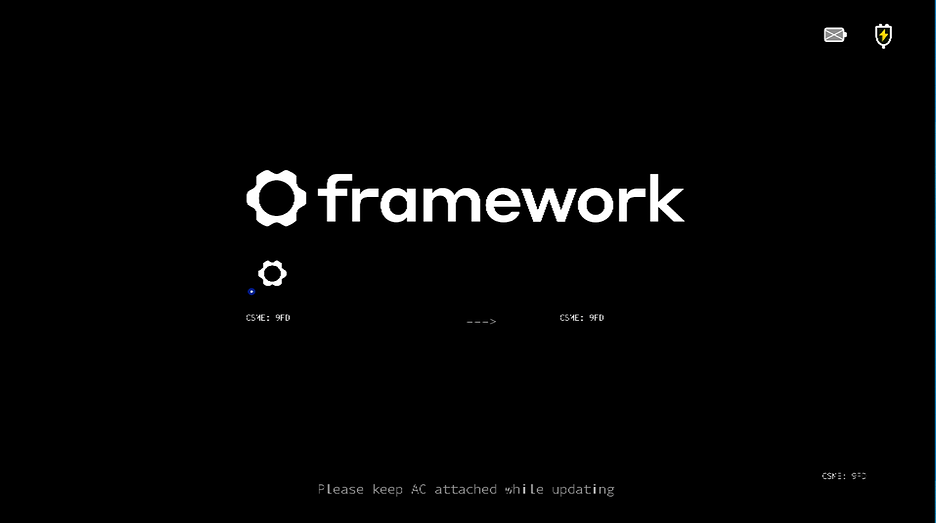
After this, the system will reboot, and your bios update is complete.
Security Fixes
| CVE | Note | Score (CVSS Version 3.x) |
|---|---|---|
| CVE-2025-27708 | Out-of-bounds read in the firmware for some Intel(R) Converged Security and Management Engine (CSME) Firmware (FW) within Ring 0: Kernel may allow an information disclosure. System software adversary with a privileged user combined with a low complexity attack may enable data exposure. This result may potentially occur via local access when attack requirements are present without special internal knowledge and requires no user interaction. The potential vulnerability may impact the confidentiality (high), integrity (none) and availability (none) of the vulnerable system, resulting in subsequent system confidentiality (none), integrity (none) and availability (none) impacts. | N/A |
| CVE-2025-20080 | Null pointer dereference in the firmware for some Intel(R) AMT and Intel(R) Standard Manageability within Ring 0: Kernel may allow a denial of service. Network adversary with an unauthenticated user combined with a high complexity attack may enable denial of service. This result may potentially occur via network access when attack requirements are present without special internal knowledge and requires no user interaction. The potential vulnerability may impact the confidentiality (none), integrity (none) and availability (high) of the vulnerable system, resulting in subsequent system confidentiality (none), integrity (none) and availability (none) impacts. | N/A |
| CVE-2025-32008 | Out-of-bounds write in the firmware for the Intel(R) AMT and Intel(R) Standard Manageability within Ring 3: User Applications may allow a denial of service. Network adversary with an unauthenticated user combined with a low complexity attack may enable denial of service. This result may potentially occur via network access when attack requirements are not present without special internal knowledge and requires no user interaction. The potential vulnerability may impact the confidentiality (none), integrity (none) and availability (high) of the vulnerable system, resulting in subsequent system confidentiality (none), integrity (none) and availability (low) impacts. | N/A |
| CVE-2025-31648 | Improper handling of values in the microcode flow for some Intel(R) Processor Family may allow an escalation of privilege. Startup code and smm adversary with a privileged user combined with a high complexity attack may enable escalation of privilege. This result may potentially occur via local access when attack requirements are present with special internal knowledge and requires no user interaction. The potential vulnerability may impact the confidentiality (low), integrity (low) and availability (none) of the vulnerable system, resulting in subsequent system confidentiality (low), integrity (low) and availability (none) impacts. | N/A |
Enhancements
- Updated MCU 0x6134.
- Updated CSME 16.1.40.2765v3.
- Added support for Framework Laptop 13 Pro features - Enabled compatibility for the haptic touchpad, touch panel, and 74W battery.
- Updated the audio verb table to support the new speakers in the Framework Laptop 13 Pro chassis.
- Enhanced the Power On AC behavior, allowing the feature to work correctly without requiring the system to boot into the Operating System at least once for initialization.
Fixes
- Fixed an issue where the Battery Extender status was reported incorrectly following a reboot, hibernation, or shutdown after the timer had expired.
- Security Fixes - CVE-2025-27708, CVE-2025-20080, CVE-2025-32008, CVE-2025-31648.
Component Versions
This BIOS update is a bundle of updates to multiple embedded components in the system.
Not all of them use the same version number.
| BIOS | 3.17 | Updated |
|---|---|---|
| SIC | 0C.01.F6.20 | Same |
| Intel CSME | 16.1.40.2765v3 | Updated |
| MCU | 0x6134 | Updated |
| GOP | 21.0.1066 | Same |
| EC | ec_317_e12d9a6 | Updated |
| PD | 0.1.2E | Same |
Reporting Issues
To report issues we have created a public issue tracker on github. Issues · FrameworkComputer/SoftwareFirmwareIssueTracker · GitHub
We hope that this is a better way to track issues with community involvement moving forward as we have found it difficult to both gather relevant information about issues people are reporting on the forums, and track the issues through their lifecycle in a transparent way.
If you do experience an issue with the update that is related to your system firmware, please post as complete a description as you can, including relevant system information, and external peripherals. Please note that we do not currently have a SLA for responding to issues on github, but we will be reviewing them through the bios release process, and will review them for future updates as well.
If you have an issue regarding hardware, broken devices, returns, etc, this is not the place, please contact Framework Support. https://frame.work/support
Known Issues
- When updating using the EFI update method, the update will fail if the internal SSD is formatted as MBR.
- No display output during the retimer update.