Hi everyone!
In 2024, I sold my laptop and desktop to buy a Framework 16. Under the hood lie a 7840HS, 32GB of ram, 4TB of SN850X NVMe and the 7700S.
While using it for gaming, especially in High Performance mode (even more so with the 240W charger that unleashes the full sustained TDP of the machine), the keyboard gets hot.
Not unbearable, but surely noticable and annoying.
So… I armed myself with a Mileseey TR10 thermal camera and went testing!
Testing setup:
The warmup period was, in both cases, 30m of non-stop Furmark Stress testing:
Furmark CPU burner - 8 threads (enough to pull >30W sustained from the CPU)
Furmark 1080p stresstest - enough to pull 80W sustained from the GPU.
Cooling setup:
KLIM Cyclone cooling pad on full blast to cool the underside of the machine
7700S fans at 100% using Framework Control Center.
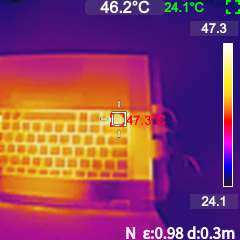
The pictures i’m uploading here represent the maximum temperature reached after the initial 30m test.
The timeline is:
CONTROL RUN - NO MODS APPLIED
-
machine off
-
30m Furmark warmup with stock midplate
-
2m of pictures taken every 10 seconds
-
equilibrium temp (average) reached during step 3.: 50.5° Celsius
-
machine off, cooldown to room temperature

MOD TEST RUN - AEROGEL&THERMAL PAD APPLICATION AND TESTING
- disassembly of midplate
- applying thermal resistor (0.5mm aerogel sheet bought on Aliexpress) in “hot” areas (left side of the laptop:
-
two pieces (slices?) of Aerogel in the upper left corner
-
two pieces of A.g. on the center heatpipes just blow the WLAN card
-
3 pieces of A.g. in the middle area between the heatpipes and the SSD
-
1 piece of thermal pad (conductive, random pad I had lying around, ~0.25mm) just above port 2 of the laptop (you can see the small blue residue from a prior test fit); this was applied to help the midplate transfer heat to the chassis below. In the following picture you see the corresponding side of the midplate (which is upside down), with the thermal pad applied.
3.30m Furmark warmup with modded midplate
-
2m of thermal pictures taken every 10 seconds (same as above)
-
equilibrium temp (average) reached during step 3.: 47.3° Celsius


-
Notes: I took the average reading: In both cases, there was a ~±1°C oscillation.
-
The thermal camera is calibrated (I live at sea level, I used some boiling water and it showed 99,8°C).
-
The images of the laptop are upside down (spacebar/touchpad UP: the camera is aiming at the LCNTRL button). This is due to the way I fixed the camera on my shelf to take the pictures from the same position every 10 seconds.
-
The temperature reading is the one in red, in the center of the screen. It’s the max reading of the whole 192x192 image.
Conclusion:
Purely based on hand feeling (I called my unsuspecting girlfriend to test the keyboard to avoid placebo), she felt the second run noticably colder, and so do I. Overall the aerogel sheet (A4 size) was 10€, I had fun playing around with it and my keyboard is less scorching, so I’m calling this one a win.
Feel free to ask for clarification, I enjoy discussion about thinkering!
See you next time!