I just switched from a standalone framework 13 11Gen i7 1165G7 with 32GB Ram to the
framework 13 Ryzen 7840u with 64GB Ram.
I mostly do light CAD stuff, because its fun and not my job, but some times i like to game.
So with both i ran a Razer X Core eGPU (so the old first gen one with the age old TB3 chip) with a Radeon 6800, and now a 9070XT.
In some games i saw a serious performance lift with the new 9070XT, up to 100%, on some games like Cyberpunk 2077 which were barely playable on the 6800 (in an eGPU setup, not in the desktop), still suck on the 9070XT.
So it seems that at least some games react pretty heavily to the limitations of TB3 with its effectively ~20GB/s bandwidth.
So i decided to botch the Razer X Core and, after looking here and on egpu.io, to get an ADT-Link UT3G v1.6 as that seems to be the perfect pairing for this AMD system.
This seems to not work out though.
The actual Problem:
When i start/connect the adtlink windows tells me that “i should change the USB port
as the device i connected maybe wont properly run on this port”.
(but i´ve tried it on the back left and back right, which both should be USB4 capable)
I have the newest BIOS (3.09) for the framework installed, also made the left/right dance with the powering device and displays so it flashed the newest version to both sides of the USB4.
Maybe someone already has an idea.
Oh, Windows Updates are also all topped up.
Other tidbits:
there was the idea of starting the framework mainboard with the ut3g already powered. Didn’t work.
There was the idea of a broken thunderbolt 4 cable. This is the brand new cable that came with it that im using, sadly i only have a tb3-cable apart from the tb4-cable that came with the set, but both dont change anything on the situation.
I do have two different Thunderbolt 5 cables coming in tomorrow, and will try both.
Since this sounds driver related, and some people with ut3g’s reported they had to reinstall windows, im now throwing the 2tb m2 out, and a 1tb m2 in to do a fresh windows 11 pro install + framework driver package + radeon adrenaline.
(and to be able to switch back in an instant if this doesnt change anything)
Someone also mentioned to boot in secure more, ddu the old drivers and do install them fresh; I’ll do that next IF the clean windows install solves the issue.
I also wanted to try a firmware flash, but the flash tool did not seem to see the ut3g properly so i skipped that for now.
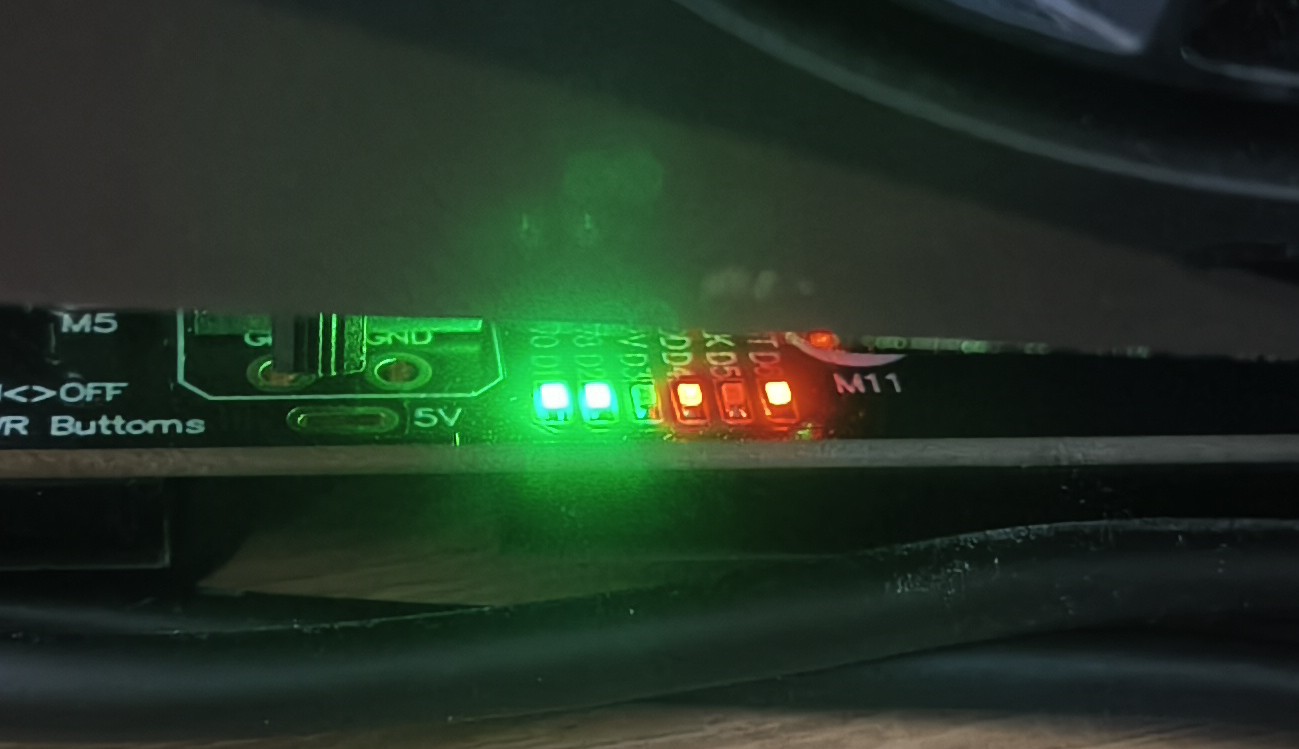
I have the same setup. Try to boot with it and see if it works. I have connected it to the left port close to the screen. My power supply is connected on the right port close to the screen. When the UT3G got power, but the laptop is still off, you should see green and red lights. When you switch on the laptop, the red lights should turn to green within a few seconds of the boot process and you should hear a click sound when this happen, like a relay is switching. It is working correctly, when all LEDs are green.
As i havent managed to start the fresh windows install yet, i tried to copy your exact setup first.
So pulled everything off, only eGPU back left, power back right port, started from powered off only with the eGPU prepowered.
No bueno. LED’s dont change. Also no relais like sound.
It boots up, as its standalone i then have no picture until i plug in a display directly to a free usb port, and see that it had booted into windows.
There 3 switches on the UT3G, 2 very small white and one big black. The white ones are labled SW1 and SW2, both are at position 1 in my setup. The black one underneath the GFX card is labled “Chipset PWR Buttoms”, my setup is at position ON here.
Switch positions and description can be found on this page: UT3G
The lights will switch to green during BIOS boot, not OS boot, the installed OS does not matter at this point.
Another important thing: all the power connectors on the graphics card needs to be connected. If you have, let’s say a GFX card with three 8pin power connectors, but your power supply has only two 8pin connectors, you need a Y power cable to connect all three 8pin connectors on the GFX card. If not, you will see the same, the lights will stay red.
sometimes, not always, the third led from the right that normally is red turns to green if i connect the tb4 cable to the framework. So i have only one red led (the rightmost), the fans of the GPU turn, the lighting of the gpu is on
then windows drops the error message that this device on this usb port may not work correctly
after that short intermezzo it turns the GPU back off, and im back on 2 green LED’s and two red
I have to correct myself, infact the 2 red LEDs turn off and the 3 green stay green, here is a video:
The video ends with the password prompt of the SSD encryption, Windows will be booted after the correct password is entered. As you can see, the lights changes before the Framework logo appears.
That does not happen at all on mine.
I tried setting the SW1 to off-position so it constantly has 12V. This also did nothing.
In BIOS i found the setting for “fall back to pcie3 if on battery” and deactivated that, just to get that out of the way that a faulty battery detection hinders the eGPU working.
But still, after a reboot nothing changed.
I will now redo the BIOS update as the message with “change to another usb port” makes me thinking that the flash of the PD/USB-Controllerchips maybe did not work out back as i did it.
BIOS-Update did flash BIOS and EC, but seemed to have skipped PD1 AND PD2 simply because they have the right version number.
Rebooted again, nothing changed. Now to installing a fresh windows on an extra nvme, and see what happens.
(just because this weird “change usb” message)
After that ill try to flash other firmwares to the ut3g.
rebooting with or without eGPU attached, also with eGPU unpowered and powered
tested the Razer X Core TB3 cable, this does nothing (!)
tested both back ports, with or without original framework usb-c-adapters
changed a Setting in BIOS “fall back to pcie3 if on battery” to disabled so it does not fall back
reflashed the BIOS 3.09 with the Firmware 3.09; this does reflash BIOS and EC, but not the PD-Controllers
tried both Adrenaline 25.6.1 and 25.6.3 (without DDU; simple deinstall, reboot, install)
tried the setup from @Bernd_Steinzimmer (so back left eGPU, back right power), tried several reboots, did not work
checked swtiches on the UT3G, changed SW1 to Position 2 “Force Power On” and tried several reboots, did not work
took another nvme, put a clean windows 11 pro install on it, did not work
at that moment i got my package with one of the Thunderbolt 5 cables i ordered (i ordered a bunch from Amazon to see which work well because this is still a somewhat “new” standard). Plugged that in, instantly worked.
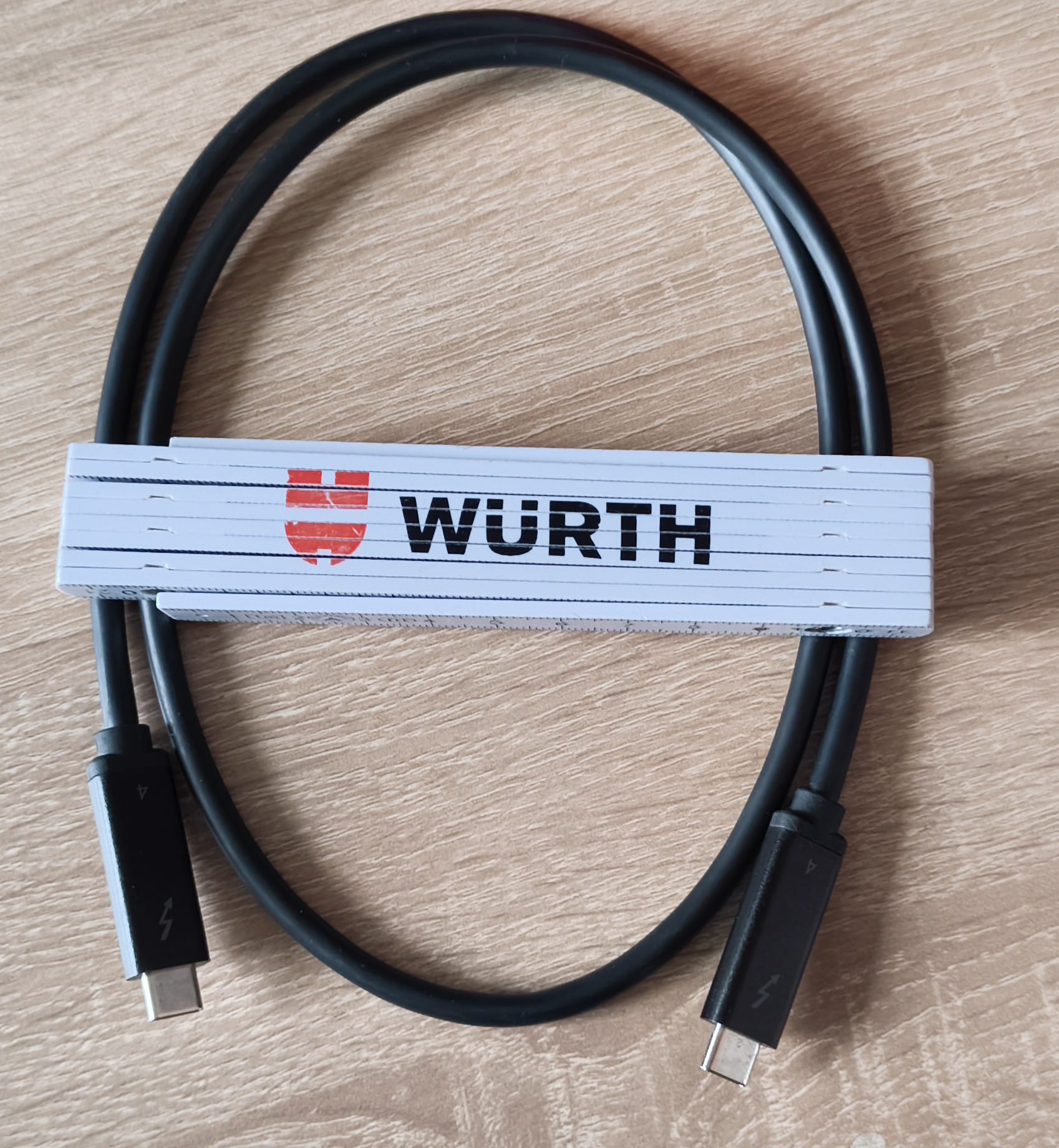
The Thunderbolt 4 cable aka “the culprit” looks like this and came with the package:
Its a 700mm (27.5 inch) long cable with the “4” imprinted on both plugs.
If i would have thought a bit more about it, i could have tested it long before with an external m2/nvme-case i have, as with this windows also says “use another port” and “not supported usb-c audio device”.
I bought my set from AliExpress from the “ADT store”. https://de.aliexpress.com/item/1005007606802724.html
I dont think that this is the official ADT store or is in any way related, as this
is the info on the seller:
I will definitely let them know that the cable may be a problem, as this is basically
dead on arrival, while i handled it very carefully.
More thoughts on this:
either TB5 cables are pretty iffy OR i also got not the best one, as this doesnt always work with the original framework usb-c-modules attached. Instead i have to plug it in directly else the GPU may start “pumping”, so restarts roughly every second or two.
I try to add a video of that later.
right now this is directly attached like here and works:
I actually wanted to keep the USB-C-Module from framework as a “consumable”, but then…
USB-C states 10000 mating cycles so i should be good here and this isnt oculink (which officialy is only good for 50 mating cycles, while some state this may also hold up for 10000)
this is the TB5 cable. Maybe the culprit that it doesnt work with the usb-c-module attached is the 90° angle, as this always was and sometimes still is a culprit in high data rate connections (am a radio and tv technician for 25y now, seen a thing or two of these errors)
Now on to benchmark this against the olde Razer X Core. \o/
Thanks for everyone reading until here, and of course, much
thanks to @Bernd_Steinzimmer for putting time and effort into helping solving this.
Cheers!
Maybe your USB-C modules have some problems if you need to attach it directly. Did you tried all of them? These USB-C modules should just forward the connection, no extra circuits inside.
My setup is working with the provided cable with the 4 on it.
Could of course be the case. Maybe its a mix of 90° angled plugs and that extra connection.
Every break in a connection is always bad for signal quality.
What i am also finding out right now is that if i wait long enough until windows decides to turn the displays off, that then the game and the eGPU drivers crash too.
So i have to set that timing higher or i cant even make a coffee in short breaks. Or its a problem of cyberpunk 2077.
Thank you, thank you, thank you, thank you! You are the reason that today almost after having my UT3G for 2 months I got to run it first time on my Portable Game Console running windows 11. No where could I find a solution. Not reddit, not egpu.io. No one had a clue.
I didnt even know about this site. I had almost given up and the somehow I found this page. You gave me hope so I ordered my tb 5 cable. The same brand you recommended.
And lo, it worked right away! The GPU started spinning the 3 green lights came in. I also have a USB 4 port. And I have a funny feeling TB4 cables don’t do the necessary handshake on a USB 4 port.
The funny thing is the TB4 cable worked on another laptop with a TB port just fine.
In theory true. But thunderbolt as a whole is just a standard that was developed spearheaded by apple, and theoretically should apply to Thunderboltspecific regulations. So you would need a thunderbolt 3 cable for a thunderbolt 3 application. And a thunderbolt 4 cable for a thunderbolt 4 application (but also thunderbolt 4 is also usb4, but… yeah) and so on.
In reality every device and cable manufacturer does their own game.
Thats why now 2 out of the 5 Thunderbolt 5 (!) cables i bought dont work reliably under the Thunderbolt 4/USB4 (!) connection, even if they should.
But that doesn’t impress me much, because that’s what i see on a daily basis with all the standardized data connection types of every type or form. You normally want to go one standard higher (so for example in networking you use cat6e cables for a cat6a connection) to be relatively (not 100% (!)) sure that your connection will function most of the time.
Thunderbolt 4 is a standard that is linked to intel sadly, because apple sold it to intel. But that is not where this all stops. Because in theory every USB4-port is thunderbolt 4 capable.
That is just one more of the weird stuff happening when big companies fight about standards.