I’ve just came accross this post that might interest few of us here (but I did not have time to test it myself yet… maybe next week)
1 Like
Things are moving from Lemonade side: https://youtu.be/yZs-Yzl736E
Hey everyone!
Just wanted to share something exciting - we actually got AMD NPU working on Linux yesterday. Created the world’s first NPU driver for Linux laptops and published it on GitHub.
We’re getting:
-
56 microsecond latency
-
17,800+ operations per second
-
Production-ready stability
-
Full NPU hardware acceleration
Tested on TUXEDO InfinityBook Pro 14 with AMD Ryzen AI 9 HX 370, but the driver should work for other AMD NPU laptops too.
GitHub repo: https://github.com/In2infinity/tuxedo-amd-npu-driver
Would love to hear if anyone tries it and gets it working on Framework laptops. This has been a long-awaited breakthrough for the Linux community!
14 Likes
Help me put these numbers into context please. Is that fast? I honestly don’t know.
3 Likes
Does this work for the framework desktop? Since its a strix halo souped up laptop processor the 350 (the 128gb one!)?
In the absence of a reply by the subject matter expert, I asked the robots…
According to “the AIs” I asked, using the NPU won’t necessarily be faster (better pp speed but lower tg speed?) just more efficient / using far less power than the iGPU. But happy to be “edjamacated” and have that corrected.
Interesting to me is that I’m seeing the NPU used when Windows is doing background tasks now, whereas it used to sit idle no matter what. That hardware that was originally made for AI processing is now seemingly being used as a low power island for background tasks of various kinds.
Kind of nice though, as it keeps both the CPU and GPU free for real work and loads the miscellaneous stuff on the NPU. In the process list below it calls it “GPU 0” but when looking at the actual devices in use, it’s clearly the NPU that it’s loading up.

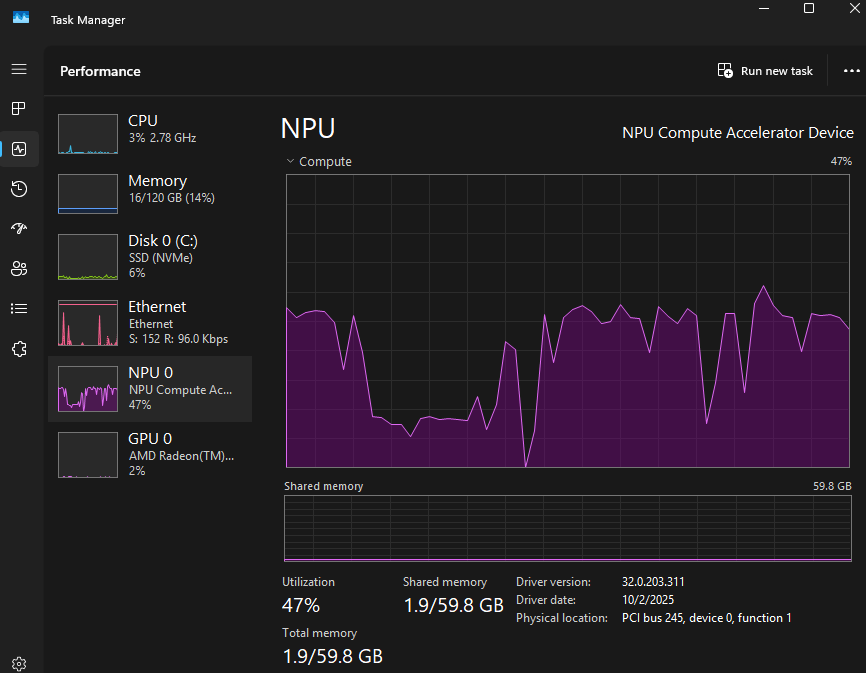
2 Likes
Windows doing low power inferencing tasks is the reason these npus even exist to begin with. Microsoft mandated the npu hardware as part of “copilot” branding, so they could run copilot and recall on mobile devices without completely killing battery life.
There was no chance Intel and AMD weren’t going to follow that mandate since Windows is probably still 95% of the market for their non embedded/server chips.
1 Like
@workintw , @fish_177 I’m not seeing this. Is there something I need to install provided by MS or AMD to see the NPU utilized under Windows 11 Pro? Thanx.
I’d start by checking what NPU driver version you have. IMO the easiest way is to right click on the taskbar and run Task Manager, Performance tab, then click on the NPU. At the bottom it should show the driver version. So for me it is version 32.0.203.314. I think it needs to be 32.0.203.311 or later in order to work right in Windows.
If you already have …311 or higher then I’m not sure what’s going on. If you have a lower version, then yeah, I’d probably give thought to removing whatever AMD drivers you have and downloading them from AMD directly. AMD Download Link Here
The default download says it is named the “AMD Software Adrenaline Edition minimal setup” but there’s a caveat to that. I’ve had nothing but problems with the actual Adrenaline software with Strix Halo right now, but you can use that same download package and skip installing Adrenaline. The logic in me feels like downloading Adrenaline to get everything but Adrenaline makes no sense, but … AMD.
So you start by uninstalling everything AMD software related from the Windows application manager, then run the Adrenaline software install. HOWEVER, for me, the best stability is to select custom install, then pick “Driver Only”. That seems to get the CPU, GPU, and NPU drivers and skip installing the actual Adrenaline package. With that, I’ve had a very good and stable experience ever since the 2025.11 driver shipped. 2025.10 was not so great but the latest 2025.11 has been as good as you can expect from a relatively recently released AMD product.
1 Like
Much thanx for the info & how-to! Yup, that must be it. I have the OEM / Framework provided Adrenaline driver ending w/ .280 installed.
Pretty newly installed system. Things are working well. After 35~ish years of ‘futzing’ with DOS, OS/2, Win, NT then Win again [never really took to Linux beyond that of a user] and for a while pretty good at it and always found where the bodies were buried, I just want things to work these days. LOL.
I really should backup my system as a baseline before I proceed with this.  But thinking I may throw caution to the wind and just upgrade the driver-only with the existing software in place and see if the magic blue smoke that makes things work gets released.
EDIT: Well, it didn’t immediately start smoking. But even with driver ending in .314 not seeing the NPU utilized. So I think I’ll need to follow your instructions fully.
The only process I’ve seen fairly reliably using the NPU on my system is file indexing. This runs after Windows starts up. Every single boot of Windows. You can query the status of this by going to Settings → Privacy and Security → Search
When it’s running you’ll see this:

At first, the “Pending” number will be increasing as it looks around to decide what it wants to index. I never see the NPU in use while the Pending value is increasing, but once it’s doing work, the NPU should be occupied and the value should be decreasing.
What’s odd though? It seems to need to do some work on the CPU before it gets around to loading up the NPU, even after seeing the Pending number decreasing. But yeah: once it’s going, I for sure see the NPU load up. I even just did a reboot to grab the screen capture above as well as this one below:

Indexing goes in fits and spurts, especially if your system is very busy, as you can see I have my GPU loaded up right now with a compute workload, but still Windows is able to slide in some work on the NPU once it gets around to it after a few minutes. This seems much more immediate if the system is idle though.
1 Like
I’m putting this to the side for the time being. Perhaps it is working. I did see the tiniest of blips under NPU lasting a fraction of a second in the Task Manager once, lol. But I don’t know if my system is configured to perform that indexing task atm. Will look later.
But last night, I tried your directions. I cleaned-off all Framework OEM AMD related drivers. And tried to installed the AMD ones. And the AMD package install refuses to complete in either minimal or default mode. Numerous reboots between uninstalled and reinstall attempts. It aborts because it says a Windows Update is in process. Even tho I have Windows Updates paused for weeks. I was allowed to reinstall the Framework OEM package of drivers, then install “driver only” from the AMD installer directly.
But I’m now left without the Adrenaline software UI, even tho AMD Install Manager says I have it installed. And I don’t know why. Since the FW install completed.
Frigg’n AMD. I swore off them like a decade and a half ago over things like this…
There is a commandline installer. So I’ll probably try that later.
1 Like