If bottom buttons would satisfy more people I’m fine with that. I just want real buttons that work with my touchpad.
After thinking about it, I’m not sure I could tolerate buttons on either side of the touchpad (just in case someone wants to suggest that to be contrary). Top or bottom are both fine with me.
I recently got my first Framework 16 for the sole reason that I expected to be able to (relatively) easily replace the godforsaken clickpad with a proper touchpad with buttons.
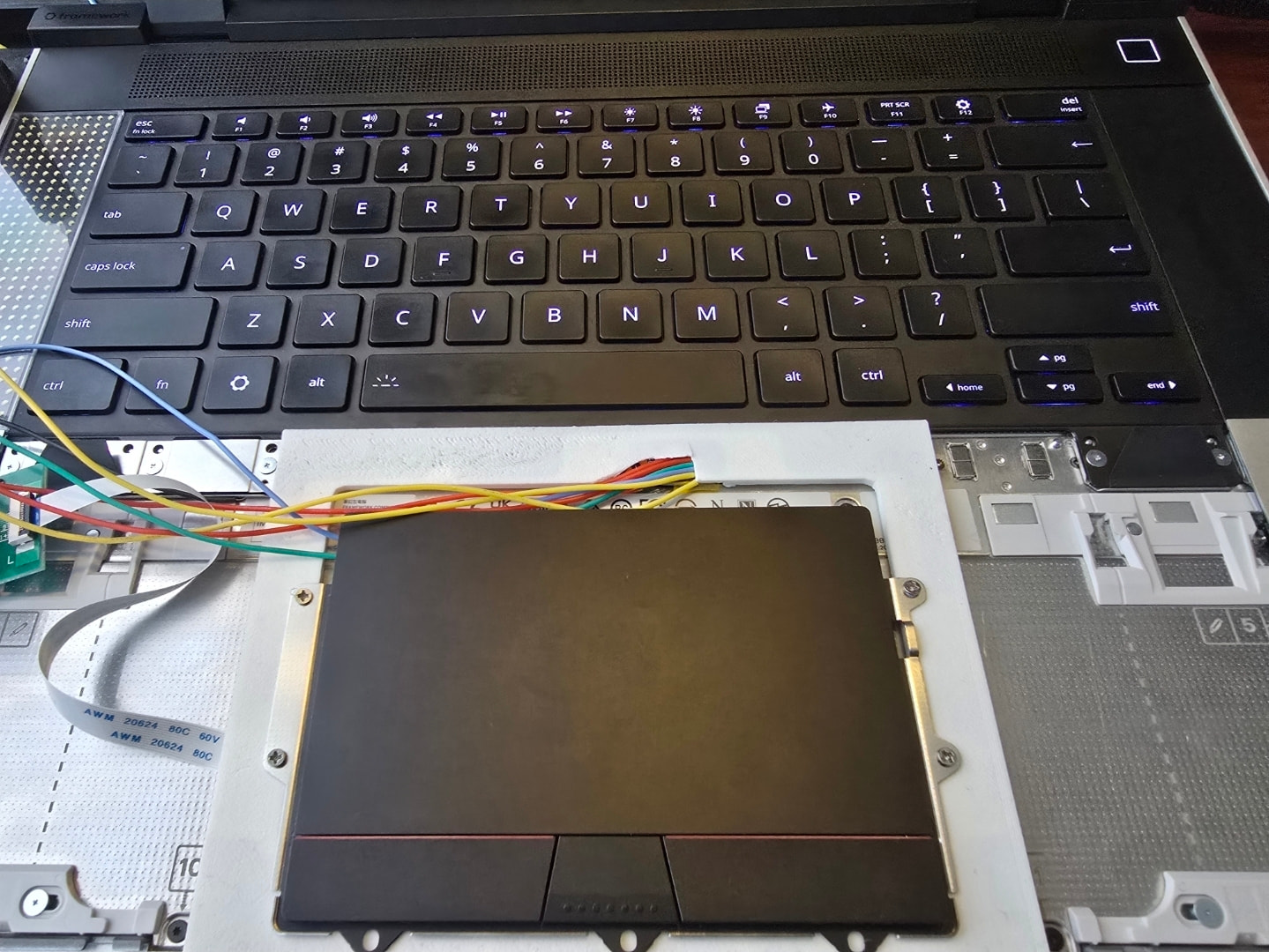
I’ve now got an ugly-but-working implementation using a touchpad from Lenovo 16” Thinkpads.
I bought a dozen or so touchpads to test and this one felt the nicest to me. Off to the left is an ESP32S3 as an intermediary between the touchpad and system, ie.: translating I2C address; the touchpad is actually mounted upside down as I want the buttons at the bottom, so the ESP32S3 flips xy coordinates before sending to the host; and the buttons are just physically passed through via the touchpad ribbon cable so an MCU is needed somewhere to interpret these and stuff into the HID reports for the host. With a little tweaking of settings, it works perfectly in Linux Mint.
I’m painfully slow at 3D modelling so I’m putting this back on the shelf for now until there’s a reference model for the touchpad panel so that I can customise it and design a PCB to integrate with it. ( Full-width palmrest - 3d printed files released - #56 by boarchuz )
Excellent work. I would give an arm and a leg to be able to replace the existing touchpad in my Framework Laptop 13 with your upside-down ThinkPad touchpad. Unfortunately, I don’t have the technical knowledge and equipment necessary to do this myself. I hope that this mod in the future becomes more accessible.
Alternatively, I hope that Framework in the future will provide an official touchpad module with discrete buttons. I made a post here to request this feature.
The panel is black resin from JLC3D. This was mainly to test-fit everything but it’s good enough (after some filing and sanding) that I don’t think I’ll bother with another revision.
The PCB is very simple: a thin strip to mount an ESP32S3 PICO, ribbon connector, and minimal passives, along with the pads to interface with the pogo pins. The second set of pogo pads allows programming/debugging the ESP32S3 over USB by moving the keyboard all the way to the left (exposing a free USB pogo connector) and awkwardly holding the touchpad PCB such that it aligns with both the USB and I2C pogos. The screws are taken from the original touchpad.
All that’s left to do is tweak settings (eg. acceleration) in Linux Mint and, ideally, optimise the ESP32S3 firmware. I am aware that there are far better-suited MCUs for this job but I chose this purely due to my familiarity with ESP32 and the S3’s improved I2C slave controller.
Any chance this’ll be uploaded to GitHub? The lack of dedicated touchpad buttons is the only thing stopping me from buying a Framework 16 at the moment, so this would be awesome if I could make one.