Guide for NixOS users
There are some configurations for the FW 12 in the nixos-hardware repo, which for example enable iio-sensor-proxy by default, but they don’t seem to include any of the workarounds necessary right now. You can also enable iio-sensor-proxy without including the full config simply by setting:
hardware.sensor.iio.enable = true;
On top of that I have had success with the following two extra entries in configuration.nix:
# Ensure that the `pinctrl_tigerlake` kernel module is loaded before `soc_button_array`.
# This is required for correcly switching to tablet mode when the display is folded back.
boot.extraModprobeConfig = ''
  softdep soc_button_array pre: pinctrl_tigerlake
'';
# Patch the `udev` rules shipping with `iio-sensor-proxy` according to:
# https://github.com/FrameworkComputer/linux-docs/blob/main/framework12/Ubuntu-25-04-accel-ubuntu25.04.md
nixpkgs.overlays = [
  (final: prev: {
    iio-sensor-proxy = prev.iio-sensor-proxy.overrideAttrs (old: {
      postInstall = ''
        ${old.postInstall or ""}
        sed -i 's/.*iio-buffer-accel/#&/' $out/lib/udev/rules.d/80-iio-sensor-proxy.rules
      '';
    });
  })
];
Extra observations
Before coming up with a declarative solution I was messing around a bit with manually unloading and reloading the kernel modules as well as creating a modified version of the udev rules file, which I bind mounted as a temporary override:
sudo rmmod pinctrl_tigerlake; sudo modprobe pinctrl_tigerlake
sudo rmmod soc_button_array; sudo modprobe soc_button_array
cp /etc/udev/rules.d/80-iio-sensor-proxy.rules /tmp/80-iio-sensor-proxy.rules
sed -i 's/.*iio-buffer-accel/#&/' /tmp/80-iio-sensor-proxy.rules
sudo mount --bind /tmp/80-iio-sensor-proxy.rules /etc/udev/rules.d/80-iio-sensor-proxy.rules
sudo udevadm trigger --settle
sudo systemctl restart iio-sensor-proxy
This was also sufficient to get tablet mode and automatic rotation into a working state. Strangely enough even though the correct output was shown in monitor-sensor, the option to enable automatic rotation didn’t appear in the KDE Display Settings. The section marked with the red rectangle is still missing for me and I have no idea how to make it show up:
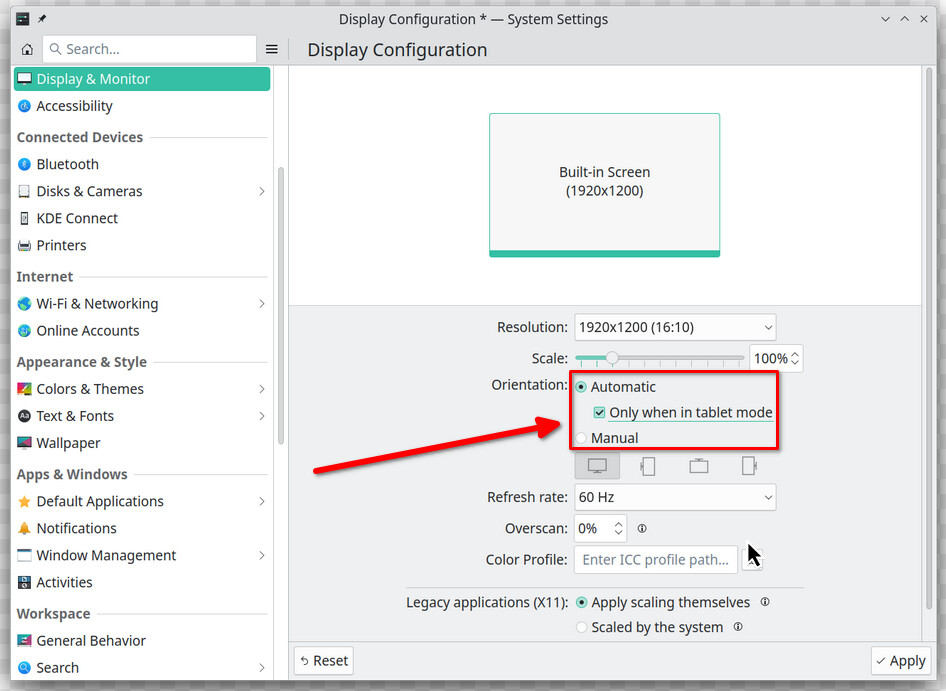
Because of this I was under the assumption that what I was trying didn’t work and kept looking for other solutions until at a certain point I ended up demonstrating to my wife (for whom I’m actually setting this machine up) how monitor-sensor can indeed read the accelerometer values and ended up flipping the screen back, when suddenly BAM, it rotated, which meant that it can actually be enabled without showing up in the settings at all. 
(Also, one more thing to be aware of: If iio-sensor-proxy is enabled, but the workarounds are not applied, all sddm and plasma screens take about an extra 25 seconds to appear, which I assume is due to some kind of DBus activation timeout.)
Note: The actual fix to the iio-sensor-proxy issue has been merged three days ago. Hopefully a new release will happen soon, but until then another way to achieve a working config would be to override the package sources instead of patching the udev rules in postInstall.