I had issues with updating Retimer firmware possibly related to self encrypting SSD (SED/OPAL with PBA).
Steps:
- started update using LVFS (Linux) + reboot
- first updates/reboots went fine (BIOS,PD, …)
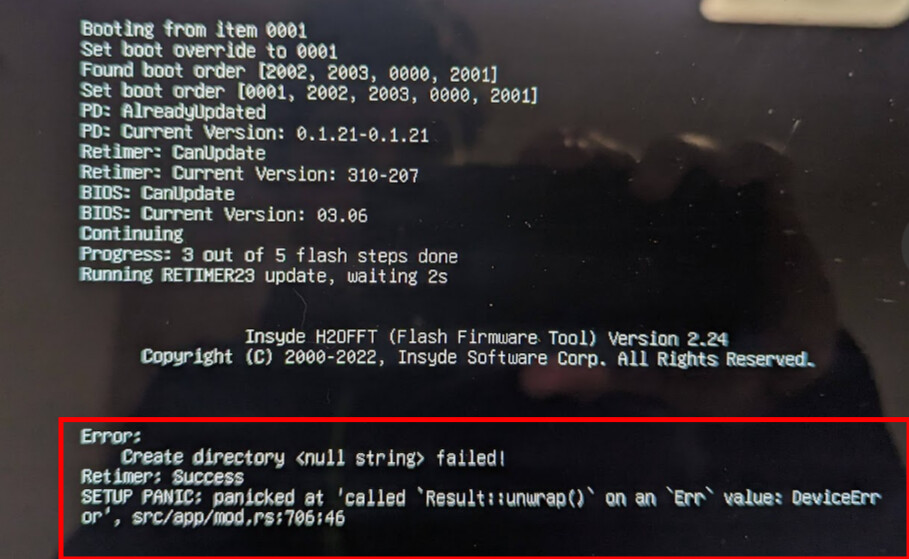
Retimer Update failed with “Create directory failed!” + Rust panic
Afterwards left USB ports on both sides stopped working!
Screenshot of error:
I tried to update multiple times using LVFS and also USB flash drive method. Retimer update always failed, left ports stayed disfunctional and fwupdmgr continued to offer retimer update.
Fix/workaround: I removed the NVME drive and did the update again using USB flash drive method - this time it worked first try and left usb ports started to work again.
I think that maybe retimer update somehow tries to read partition table of the internal SSD which fails because the drive is not unlocked (OPAL PBA / pre boot authorization).
But if that assumption is correct, I think this should be considered a bug. Don’t think the firmware update process should be influenced by the configuration of the nvme drive.