Other than OBS Studio, are there any alternatives to using AMD ReLive since it’s not supported? Just curious if there’s anything else that I should explore.
https://www.amd.com/en/resources/support-articles/faqs/DH-023.html
Other than OBS Studio, are there any alternatives to using AMD ReLive since it’s not supported? Just curious if there’s anything else that I should explore.
https://www.amd.com/en/resources/support-articles/faqs/DH-023.html
My bad. It’s been several years since I had an AMD graphics card in a desktop. It’s now called AMD Adrenaline.
Thank you Level1Techs for featuring it in a video.
Ok, now for some bad news. It turns out that at least per this video, the capture section isn’t there because the iGPU doesn’t support some sort of H.264 encoder.
https://youtu.be/R1jkY8zsKoQ At 12:46
The video is semi-NSFW in some parts, unless you’re wearing headphones and aren’t on company WiFi.
Hello Pal. I’m a little confused by your post. The youtube video you linked to doesn’t seem to mention anything about the video CODECs at 12:46. Also AMD’s specifications do indeed list that all the common modern CODECs are built into the 395+ in the page linked below.
https://www.amd.com/en/products/processors/laptop/ryzen/ai-300-series/amd-ryzen-ai-max-plus-395.html
In the specs link, they show H.264, H.265, VP9, and AV1 at all the standard resolutions and bit depths you’d expect. Maybe you saw something that I missed? It does appear that it has all the normal CODECs you would get from AMD in any modern Radeon GPU/APU.
But how are they activated? I have seen situations where such codecs need to be specifically enabled.
It was actually at 8:30 roughly in the video, but he didn’t do any troubleshooting beyond noting that the tab was missing from the driver software.
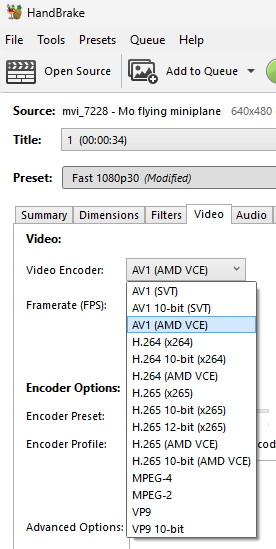
Sure! What tool are you using? I do very little with video, but every so often I transcode a video using Handbrake, for example. I’m still waiting for my Framework Desktop, so today I have an older AMD 8845HS mini PC. It doesn’t do VP9 encode, for example, but has the other CODECs built in. To use them, in handbrake you would select one of the encoders that says “AMD VCE” to use the APU’s built-in CODEC.
VCE is the “Video Coding Engine”, or the hardware accelerated part of the APU so that you can encode/decode with minimum impact to the rest of the APU. Since the 395+ is still extremely new, maybe the reviewer ran into troubles because of how new it is, and the driver support wasn’t working yet? That would sadly be typical AMD to add a feature to hardware but not have support in the driver until months after launch, haha.
It will get there eventually, probably. If you want a seamless experience though you honestly need to buy a Mac Mini or something, but the Apple products are only cheaper if you buy base models and don’t need support for multiple M.2 drives in the box without having to rely on connecting your extra drives over thunderbolt.
A ton of the rest of my old team uses Mac Minis and Mac Studios for video production. They’re fantastic little machines if all you do is video production and you don’t care about being locked into the Apple ecosystem. For me, the ability to pick between Windows now and then perhaps replacing my current Proxmox server in the future is why the Framework makes more sense. It just gives me more options, but yeah, sometimes driver support isn’t working right on Day 1.
I generally agree but hasn’t the APU been out for a while now?

Thank you. I have no idea how I messed that up so bad
I read rumours that there are laptop and desktop bins of Strix Halo. I don’t know if that is correct. Supposedly most Mini-PC vendors waited for the latter while GMKtec opted to just go with the former and have the advantage of being first.
The difference might be better luck in the silicon lottery and better ability to uphold good efficiency at higher wattages.
For making software compatible and driver support though, this should not make a difference.
The AMD guy on Chips and Cheese said the Zen5 cores/chiplets are binned for efficiency and not performance on Strix Halo. He was fairly specific about the reasons/effects of this and I doubt we’re anywhere near the stage where that has changed given there haven’t been any published revisions to the APU docs.
So, some bad news. There is no relive capture support nor any ML powered background noise filtering. I might try my luck with an eGPU from NVIDIA, since you can store temporary files on a disposable cache drive without wearing your main drive.
I took a chance a bought an eGPU and an NVIDIA graphics card and so far it works on some basic games, thanks to USB4.
Coming into this late, but I’m trying to figure out what your use case is? Game streaming? Podcasting? Creating tutorials? What not OBS?
Thanks for asking! I want to:
I think NVIDIA’s software is ideal for this for casual gamers because: