Thanks for starting that new thread! Looking forward to the future with this! And thanks again for making it. So far no issues and profile is working great.
This is awesome! I know there’s been quite a few people looking for something like this. I’ll probably use it eventually, but I’m currently waiting for some bugs to be ironed out in the new BIOS since they left it in beta. I’ve been pretty fortunate so far, but I feel like I should wait on this one to be out of beta (gut feeling). I can’t wait to use this tool and I’m excited to see it improve!
Get ready for your next fan curve update for 3.07 already nice to see this got addressed. But no wonder I wasn’t able to replicate this issue as I’m not using a dGPU.
Sounds great! Curious about the update process; will it be a new file each time? Or is it possible for it (when it is connected to the internet that is) to search for a later version at some point? Keep up the good work.
@Kemal_Ozturk just a suggestion to use something like automated GitHub actions (WinGet Release or WinGet Updater, etc.) to release each new version of your service through WinGet, thus making it not your problem to distribute updates. If users are not happy to update the software using CLI, you can always point them towards something like UniGetUI. This way your software can stay this lightweight.
And if you ever to make Linux version, please distribute it through Flathub, that is preconfigured on 99% of consumer Linux distributions, except Ubuntu. The same mechanisms exist when manifest is published in their organisation on GitHub.
Thank your for your time reading this and sorry for not being able to help with actual code contribution.
Thanks alot for your great Web App. That’s all i wanted and waited for. I eager to see what features you can implement. Would love to see the possibility to safe 1 or 2 presets on the custom curve. Also installing the web app as an application via edge works like a charm.
You might realize the app is no longer working for you. That’s because I’ve released a breaking change. Don’t worry, this is probably the last time the app can break like this with an online update. Why? Glad you asked. We now have offline support
To get back on track, you simply need to re-download and install it once more. Don’t worry, it will replace the old version and will work as normal.
I’ve been incredibly busy this past week. Well, when I’m not coding stuff like this, I’m working as a full-time eng so there’s that… So I apologize for not replying to your messages.
@OVER_CL0CK The new update system is ready! I’ve even got the auto background updates working by utilizing the well-known “.msi” installer and its silent install capabilities. (You can opt in or out in the settings).
@Mike_van_Esch Thank you! Expect more to come, when I have more time that is…
@Daniil Thank you for the valuable suggestion. I’ve looked into it and found it compelling. The only problem is, I’ve already chosen my installer strategy as “.msi” and built my code and GH actions around it. The new update system is also very easy to use and is able to update with the click of a button. All thanks to the “.msi” silent update capabilities. The idea is to have something that’s very user friendly and not require familiarity with WinGet or the CLI.
I will definitely keep the suggestion in mind when/if I start supporting Linux. The userbase for that OS is more comfortable with the command line and package managers, so it might be a very good idea to distribute from a well-known source like Flathub.
@PSierra117 Thank you! I’m glad it’s useful. I’ll keep your feature request in my notes and get to it when other high priority ones are completed. Next up is likely going to be TDP adjustment and Temperature Limit.
Release notes: 0.3.3 - 2025-09-01
Embedded static UI in backend;
New Settings modal: check/apply updates, auto-install toggle, pause
Swift implementation there friend! Again, thanks so much for the work you have put into this. Clearly I am not the only one who appreciates having this. And more who stumble on this thread are sure to salute you . I am curious what bios they are going to ship the 300 series boards with and if I will still be able to use this once I do my swap.

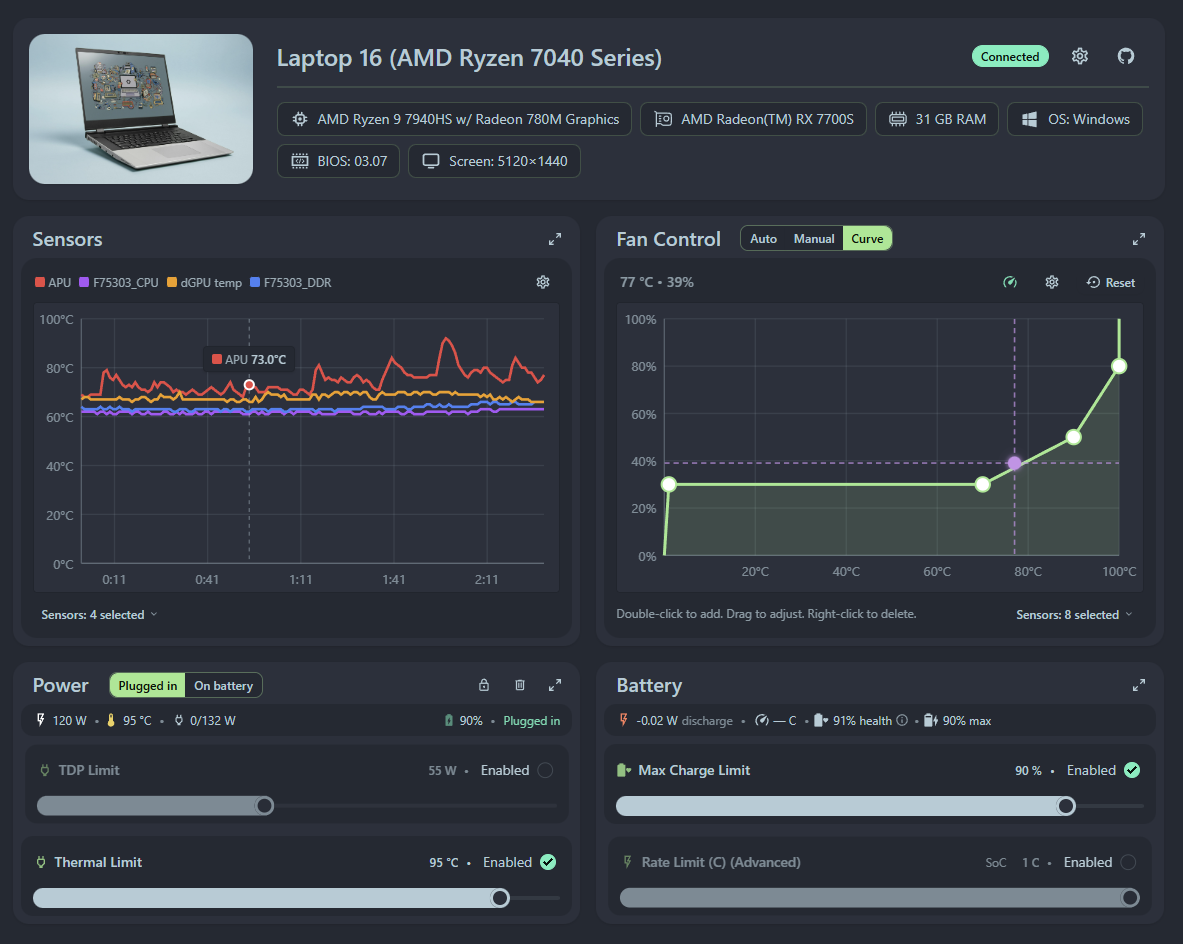

 nice to see this got addressed. But no wonder I wasn’t able to replicate this issue as I’m not using a dGPU.


 . I am curious what bios they are going to ship the 300 series boards with and if I will still be able to use this once I do my swap.