Highlights
- Updated Intel SIC to 8063.00
- Updated CSME to 15.0.55.2751v6 Corporate.
- Update Microcode to 0xBE.
- Added support for Framework Laptop 13 Pro features - Enabled compatibility for the haptic touchpad, touch panel, and 74W battery.
- Fixed an issue where the system was unable to boot from partially locked self-encrypting drives (SEDs)
- Fixed an issue where the Battery Extender status was reported incorrectly following a reboot, hibernation, or shutdown after the timer had expired.
- Enhanced the Power On AC behavior, allowing the feature to work correctly without requiring the system to boot into the Operating System at least once for initialization.
- Secure Fixes - CVE-2025-27708, CVE-2025-20080, CVE-2025-32008, CVE-2025-31648
You can check your current BIOS version following the steps here to determine if you are on the latest release.
After the beta release, we will monitor community feedback, and publish this release to our stable release channel after approximately one week if no major issues are reported.
Subscribing to release notifications
If you want to subscribe to new release notifications you can now opt in through this link to receive an email when we release a new BIOS or driver update for your Framework Laptop.
Downloads
Windows
| Download Link | SHA256 |
|---|---|
| Framework_Laptop_13_11th_Gen_Intel_Core_BIOS_3.25.exe | 0DCB0A579C3F8F0D5B9848AB2EF9C5F4881765A295352B8B08D9324935E3255D |
Instructions for Windows Installer:
- Run the .exe.
- Click yes to reboot.
- Wait for the firmware progress bar to complete, and then the system will reboot.
- If you are updating a system in standalone mode, please pay careful attention to the standalone update process below.
Please note that you must update with a charger attached.
Linux/LVFS
There will not be an LVFS update for this specific release because it has an Intel CSME update, which can’t be delivered through LVFS. Use the UEFI Shell update method instead for this release.
Linux/Other/UEFI Shell update
Please note, you need to update to 3.17 or later to update using EFI, as this is needed to support capsule on disk.
We have finished the beta period, and consider this release stable. You can download the release below, please follow the update instructions below.
| Download Link | SHA256 |
|---|---|
| Framework_Laptop_13_11th_Gen_Intel_Core_BIOS_3.25_EFI.zip | 15511009EC35CF49D7ADCC16F8EC3930B0E6592DF31E93E28CEBCBC550B690B5 |
We have rewritten the update process for EFI. This new version will stage the bios onto your internal SSD and run them all together in sequence. This is to avoid issues with usb devices disconnecting and disappearing during subsequent updates during the update process, which would cause partial updates to be applied.
Troubleshooting:
If you experience ports not working after your update. Please shutdown, unplug all power sources, wait 90 seconds, and then power on again.
Note that if you use the EFI shell update with Windows, you should suspend Bitlocker if enabled before updating using the EFI updater.
Instructions for EFI shell update:
- Extract contents of zip folder to a FAT32 formatted USB drive. Cleanly unmount the drive before physically removing it, otherwise the BIOS update may not function correctly.
- Boot your system while pressing F12 and boot from the thumb drive.
- Let startup.nsh run automatically.
- Follow the instructions to install the update.
Updating a Mainboard outside of a laptop
This release supports standalone updates without a battery attached only when updating using the EFI shell method only. After rebooting, please follow the onscreen instructions to update your BIOS when in standalone mode, which will require moving the power source between both sides of the Mainboard to allow PD firmware to update correctly.
Please note that the power and display output must be connected to the same side during standalone updates. Failure to do this may result in no display output during the update process.
We recommend the following update flow for standalone updates:
Part 1
Ensure that standalone operation is enabled in the bios advanced setup menu.
Display connected to upper left port.
Power connected to the lower left port.
Run the updater from EFI shell. Please follow the “Instructions for EFI shell update” to run the updater.
Select the EFI USB Boot Device.
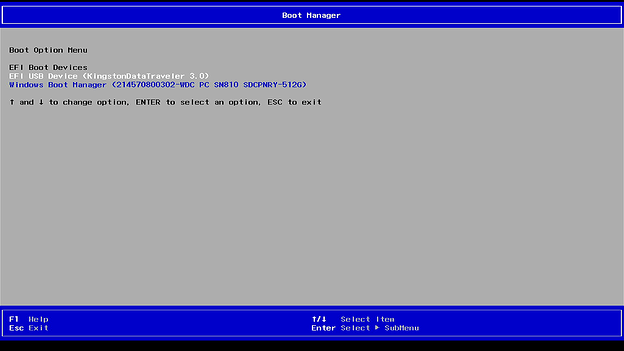
The Updater will update the PD controller from right side. Press any key to continue updating.


Part 2
Plug the AC to the left side, then boot to EFI updater. The Updater will update the PD controller from left side. Press any key to continue updating.


After PD updates, it will reboot automatically, then start the BIOS capsule update.

Then, the EC will update after BIOS section finishes.

Security Fixes
| CVE | Note | Score (CVSS Version 3.x) |
|---|---|---|
| CVE-2025-32008 | Out-of-bounds write in the firmware for the Intel(R) AMT and Intel(R) Standard Manageability within Ring 3: User Applications may allow a denial of service. Network adversary with an unauthenticated user combined with a low complexity attack may enable denial of service. This result may potentially occur via network access when attack requirements are not present without special internal knowledge and requires no user interaction. The potential vulnerability may impact the confidentiality (none), integrity (none) and availability (high) of the vulnerable system, resulting in subsequent system confidentiality (none), integrity (none) and availability (low) impacts. | 8.6 |
| CVE-2025-20080 | Null pointer dereference in the firmware for some Intel(R) AMT and Intel(R) Standard Manageability within Ring 0: Kernel may allow a denial of service. Network adversary with an unauthenticated user combined with a high complexity attack may enable denial of service. This result may potentially occur via network access when attack requirements are present without special internal knowledge and requires no user interaction. The potential vulnerability may impact the confidentiality (none), integrity (none) and availability (high) of the vulnerable system, resulting in subsequent system confidentiality (none), integrity (none) and availability (none) impacts. | 6.8 |
| CVE-2025-27708 | Out-of-bounds read in the firmware for some Intel(R) Converged Security and Management Engine (CSME) Firmware (FW) within Ring 0: Kernel may allow an information disclosure. System software adversary with a privileged user combined with a low complexity attack may enable data exposure. This result may potentially occur via local access when attack requirements are present without special internal knowledge and requires no user interaction. The potential vulnerability may impact the confidentiality (high), integrity (none) and availability (none) of the vulnerable system, resulting in subsequent system confidentiality (none), integrity (none) and availability (none) impacts. | 4.1 |
| CVE-2025-31648 | Improper handling of values in the microcode flow for some Intel(R) Processor Family may allow an escalation of privilege. Startup code and smm adversary with a privileged user combined with a high complexity attack may enable escalation of privilege. This result may potentially occur via local access when attack requirements are present with special internal knowledge and requires no user interaction. The potential vulnerability may impact the confidentiality (low), integrity (low) and availability (none) of the vulnerable system, resulting in subsequent system confidentiality (low), integrity (low) and availability (none) impacts. | 3.9 |
Enhancements
- Updated Intel SIC to 8063.00
- Updated CSME to 15.0.55.2751v6 Corporate.
- Update Microcode to 0xBE.
- Added support for Framework Laptop 13 Pro features - Enabled compatibility for the haptic touchpad, touch panel, and 74W battery.
- Enhanced the Power On AC behavior, allowing the feature to work correctly without requiring the system to boot into the Operating System at least once for initialization.
Fixes
- Fixed an issue where the system was unable to boot from partially locked self-encrypting drives (SEDs)
- Fixed an issue where the Battery Extender status was reported incorrectly following a reboot, hibernation, or shutdown after the timer had expired.
- Secure Fixes - CVE-2025-27708, CVE-2025-20080, CVE-2025-32008, CVE-2025-31648
Component Versions
This BIOS update is a bundle of updates to multiple embedded components in the system.
Not all of them use the same version number.
| BIOS | 3.25 | Updated |
|---|---|---|
| EC | ec_325_e12d9a6 | Updated |
| PD | 3.4.0.2576 | Same |
| Intel CSME | 15.0.55.2751 | Updated |
| Microcode | 0xBE | Updated |
Known Issues
- The EFI update will not work with filesystems that are formatted using MBR.
- If you get a security violation as part of the EFI update. Please disable secure boot.
- This update requires a battery present to complete the update.
- Linux users have reported that S3 sleep no longer works.