So, just to clarify something regarding Battery Charge Limit and Battery Extender.
I have my battery charge limit set to 80% (because I do have my Framework laptop connected to charge most of the time).
I also have Battery Extender enabled with the Extender Trigger set 3.
Will these two settings conflict with each other? Or will the fact that I have the Charge Limit set to 80% mean that the Extender function after 3 days won’t really doing anything?
Just for reference I made this post in this thread that linked to other threads that discuss the same issue as well as the BIOS update threads from Framework saying they fixed the issue (not saying it does or doesn’t - just saying what the BIOS updates have claimed to do):
In the interim, while waiting for a fix, I would suggest you try this process from @mahe using the Intel Extreme Tuning Utility.
Umm, when doing the archaeology note that the second item you quoted comes several BIOS revisions before the first one you quoted, so I think your comment about “directly contradicted” is a load of fluff said in a huff.
BIOS version 3.09 changed the fan curve, which led to more users having the 400mhz bug.
FW was able to reproduce it with the bios version 3.09.
They then reverted the fan curve (or changed it again, i dont know) in later BIOS versions.
FW is not able to reproduce the 400mhz bug with those versions.
No contradiction here..
I wouldnt get my hopes up, that you will get any further resolution of FW here tbh..
I think a too small subset of users are experiencing it and according to your first posted quote, FW was able to resolve this in at least some cases.
So no idea, what the resolutions from support were (despite “buy a new mainboard”), but what have you tried so far?
What BIOS version are you on?
Have you checked, that the all parts of the bios were updated correctly?
Have you tried cleaning the fans?
Have you tried applying new thermal paste (or better PTM)?
And one last question, that came to my mind:
You just joined the forums this month, about 3.5 years after the 12th gen launched.
Did you not experience the 400mhz bug the years before?
Did you just get it second hand?
Just wanted to pitch in that I also have the 400 Mhz bug. i7 1280P, 32 GB of RAM (also happened on 16 GB). I’m running NixOS 25.11 on kernel 6.12.80. BIOS 3.19 stable
It happened both plugged in to the OG 60W charger as well as Type-C to a Dell P2725DE. Right now as I am gathering data, I can’t seem to reproduce it. constant load does trip it sometimes to 400 Mhz but it comes back. Maybe it’s power related? I’ll try to perform short bursts to see if that triggers it.
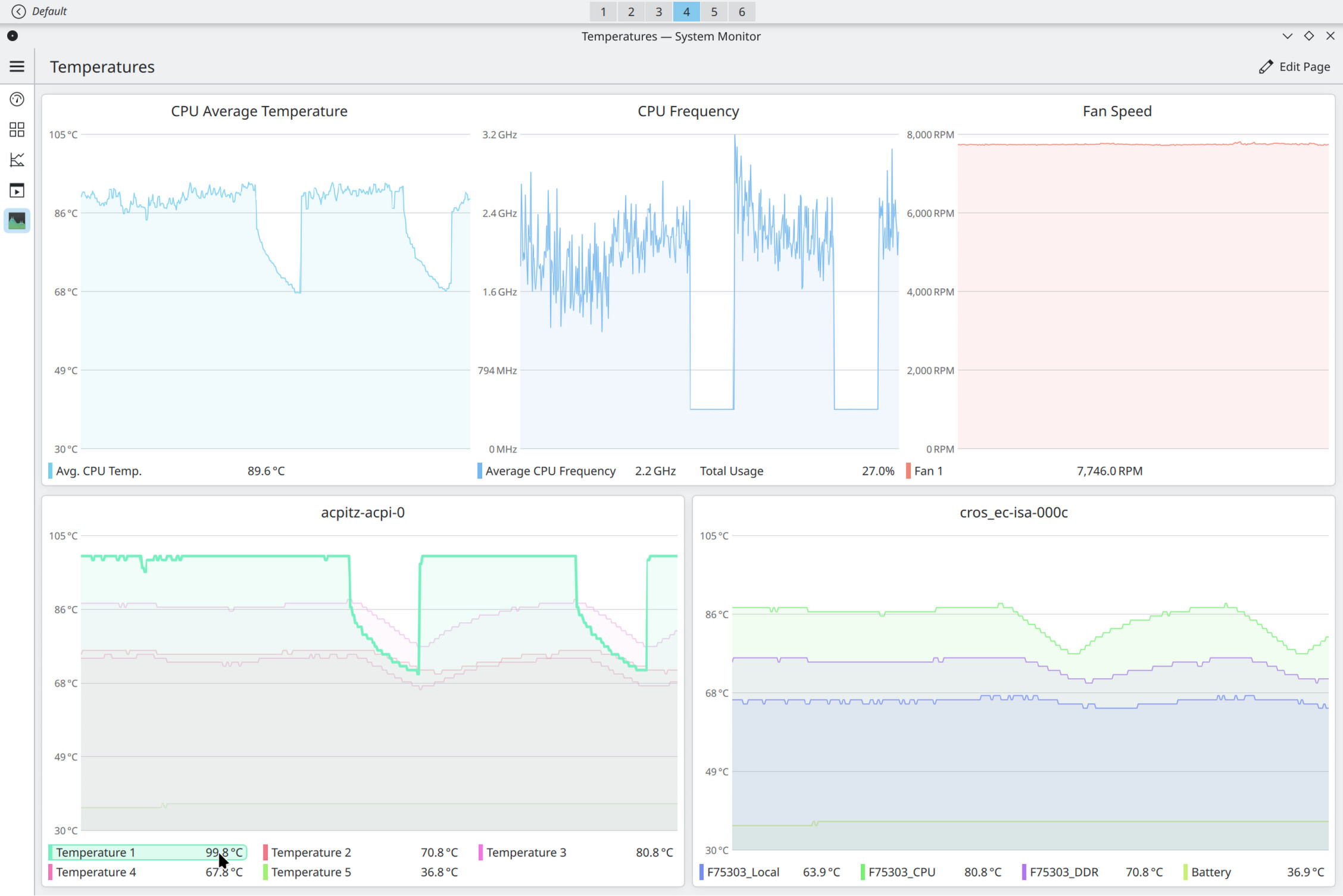
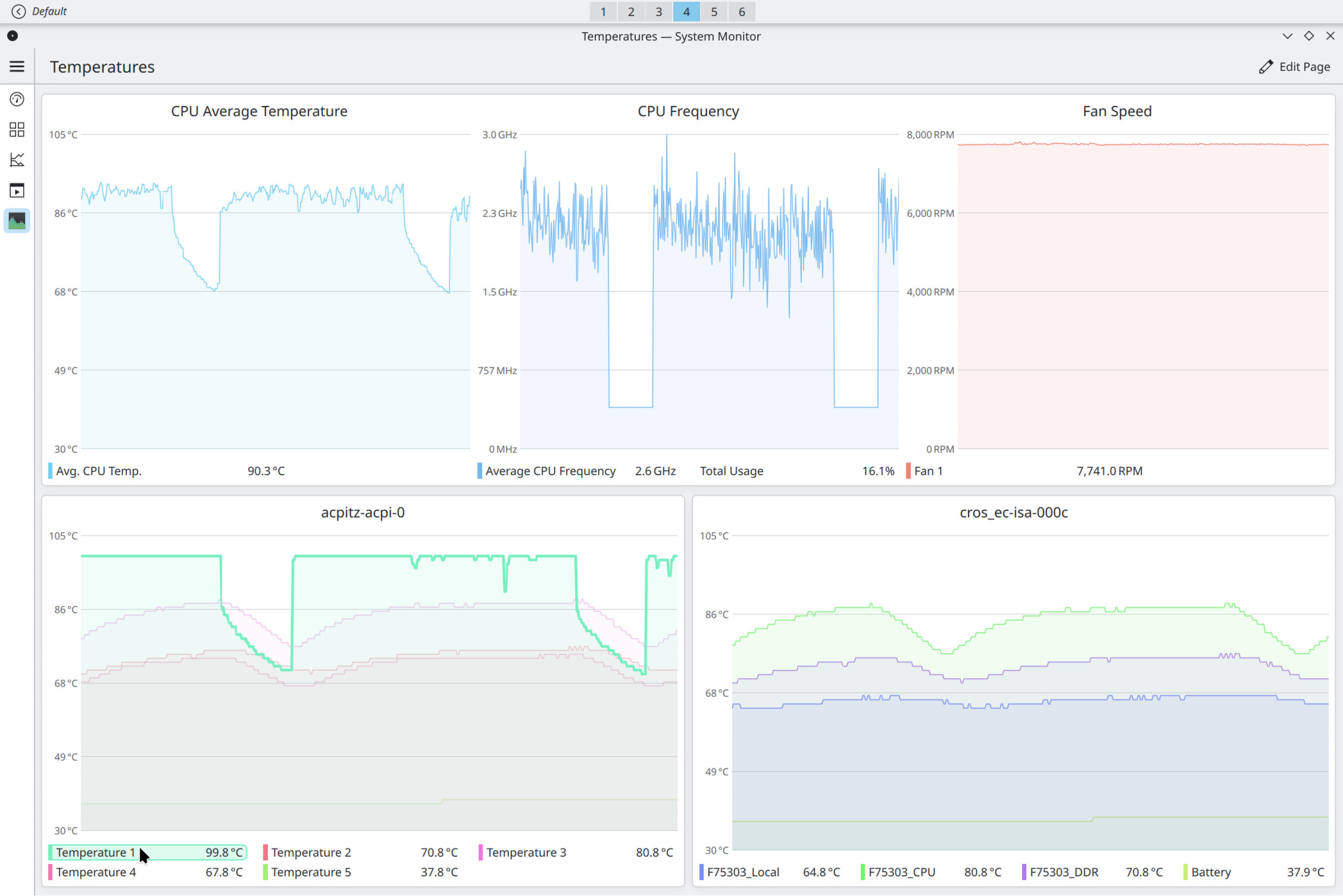
I posted some screenshots in the hopes someone can find a pattern of sorts. There is a Temperature 1 probe on acpitz-acpi-0 and when that reaches 100 degrees C it seems to trigger the thermal protection. Graphs have fixed ranges for temperature and Fan speed. I also have 240 seconds history set.
The way I fix the issue is a shutdown (from the OS) and then I hold power button until it starts, shuts down and then starts again (after around 10-15 seconds). I think that is the EC reset process.
tbh, since I posted this issue I kept doing the same workload. I spin up a Windows VM from time to time because I need Hyper-V Manager and I upgraded to 32 GB of RAM so I can have even more stuff open at once and I couldn’t trigger the bug. Same power supply from the DELL monitor, no issues.
Maybe the new thermal paste finally set in the right place so it doesn’t overheat? Arctic AC MX-7.