Framework Laptop 13 eGPU Recommendations

Hey! So I have a Framework 13 (AMD Ryzen 7840U / Radeon 780M / 32 GB DDR5-5600 / Windows 11), and I want to purchase an external GPU enclosure. I plan to use it for gaming as well as some LLM/AI model development and testing.

I was looking at this one for starters:

I plan to use this power supply:

https://www.bestbuy.com/product/thermaltake-smart-bm3-80-bronze-pcie-gen-5-atx-3-0-850w-semi-modular-power-supply-black/J39ZPC9W4P

I also have a 12 GB NVIDIA RTX 3060 that I can place in the enclosure. Would the RTX 3060 be the max GPU that is recommended due to the bandwidth constraints of Thunderbolt 4?

If I were to upgrade to a higher end / newer card, have you had better experiences with AMD (I would assume greater driver compatibility as well as lower cost per performance) or NVIDIA (for better access to LLM/CUDA toolkits)? What cards would you recommend?

Was curious as to what your thoughts are, and if any of you have tried something similar in the past.

Thanks in advance for your help!

Hello! I would highly recommend you check out egpu.io buyers guide for selecting an available EGPU enclosure. In terms of what gpu, find whatever has the most VRAM you can afford as LLMs take a ton of VRAM. 16GB or more would be ideal. Tons of folks buy top the the line just for the 24gb of vram or more.

2 Likes

Oh one more thing! In terms of thunderbolt 4/USB4 bandwidth its more of a penalty than a cap. Every EGPU will lose some performance due to running via USB lines. The performance is also heavily affected by what the workload is. A higher end card will generally perform better than a 3060. The gpus just will have a penalty compared to installs into native PCIE slots. My egpu setup is a AMD 9070xt gpu with Framework 7640u and it mostly works.

1 Like

Thanks for the prompt response and suggestions. Do you think an AMD card might have better driver compatibility considering I am using an AMD mainboard, as opposed to an NVIDIA card? Or would it not really matter all too much?

Both are pretty well supported in Windows. If you have any interest in Linux I would recommend AMD over NVIDIA. The gpu driver is built into the Linux Kernel for AMD.

1 Like

egpu.io is an amazing site and they have good pages on research using different interfaces.

Since you already have a 3060 that would be a great card to experiment with and get your feet wet, just keep in mind the bandwidth limits that can cause issues. Anything newer than a 4060ti can have some additional issues / performance hit due to the PCIE bandwidth going above 4.0x8, but since it is for AI it may not matter as much or at all.

I’d recommend skipping the nvidia 50 series for egpu for now until you have a quicker interface available to you as well. I have a couple friends who tried to get a 5070 and a 5080 to work on their egpu setups and due to the driver issues it was a mess, one now has a 9070 and the other went all the way back to a 2080 Ti, they both seem pretty happy now. Please send us back some feedback on what you try.

Here is the Egpu ranking list they currently have for TB 5,4 and 3: Best eGPU Enclosures – Septemer 2025 External GPU Buyer’s Guide | eGPU.io its a great page to reference for research and limitations.

By a 9070 do you mean Radeon 9070? Interesting that the NVIDIA 50 series has so many driver issues.

ahh yes, a Radeon 9070, he got some waifu scented something something =P

So I noticed everyone’s mentioning egpu.io. First and foremost, am trying to keep the cost down, and do have some spare power supplies sitting around as well. Also would assume that we want to try for at least PCIe 4.0 / Thunderbolt 4 (it doesn’t seem like there are too many PCIe 5.0 enclosures around, and Framework only supports Thunderbolt 4 anyway at the moment).

Given that info, what might be the best choices? Anything else that you think is important to consider?

It could be tricky, sorry I didn’t reply right away, work and sleep and life getting in the way. so! you’ll have to figure at what level you are comfortable with setting up eGPU components, ie are you comfortable setting up a completely exposed test setup like the ADT-Link: Amazon.com: JMT ADT-UT3G USB4.0 Docking Station 64G PCIe4.0x4 to Laptop Graphics Card External Conversion Adapter Compatible with Thunderbolt 3 4 : Electronics , or would you prefer a full enclosure with more of a focus on a not as tech-savvy end user like a razor: Amazon.com: Razer Core X V2 External Graphics Enclosure (eGPU): Compatible with Windows 11 Thunderbolt 4/5 and USB 4 Laptops & Devices - 4 Slot Wide NVIDIA/AMD Graphics Cards PCIe 4.0 Support - 140W PD via USB C : Video Games .

Once you figure that out you can start to zero in on what you’d like to mess with, and then you can check out reviews and see if you can get a good feel for what you want and at the price point that’ll work for you.

Since you have a PSU and a 3060 already I’d suggest you focus on something that is forward capable with TB5 while still supporting USB 4, I think the capability of USB 4 equates to PCIE 4x04 / 64 gigabits, and I don’t know what FWs USB4 maxes at but it’s around 40, probably not as high as 64 tho, so it’ll limit just about everything somewhat, the eGPU site did an older performance analysis and just about everything had a loss of at least 20% performance due to bandwidth restraints.

and that 20% is if the output is straight to an external monitor and if you use the built in laptop screen the data has to double back over the USB resulting in another cut in performance. (this is for gaming / FPS tho so for AI i dunno how that limits anything.

One last big point is if you are looking at an eGPU that says does Oculink + USB4 make absolutely sure it can do USB4 OR Oculink, many are made to only use Oculink and use the USB4 for power and other functionality.

Also be sure to thoroughly familiarize yourself with what you are setting up, especially if you go for exposed setups, you don’t want to burn out anything by accident, so look for reviews / unboxing n setup tutorials.

Let us know what you decide on, I’d love to vicariously learn something from your experience.

1 Like

I shoulda said too, that first egpu you listed looks fine as well, I forgot you linked one, just google some about it see if there’s any reviews of it etc. I noticed the 1 negative regarding running a 50 series with it :face_with_hand_over_mouth:

hey! decided to try this one first, there was a significant discount on Amazon compared to other models:

GMKtec AD-GP1 External GPU Docking Station, eGPU Enclosure with AMD Radeon 7600M XT GPU Graphics Card, HDMI2.1, DisplayPort2.0, Oculink, USB4, eGPU Dock for Mini PC Laptop Notebook Game Console

Will let you know how it goes!

hey! So here are the performance results with and without the eGPU:

My system specs:

Framework 13, AMD Ryzen 7840U (Radeon 780M GPU) Mainboard, 32 GB DDR5-5600, 2 TB Samsung 990 Plus EVO SSD, Windows 11. Also used Honeywell PTM7970 Thermal Pads on the integrated CPU/GPU.

Am also using the latest driver bundle and BIOS version as of the time of this writing. BIOS memory setting for the 780M is set to gaming, so it tries to allocate the 4GB of memory for the integrated GPU which is the most that it will allow at the moment.

Attaching to the GMKtec AD-GP-1 was plug and play with Windows 11.

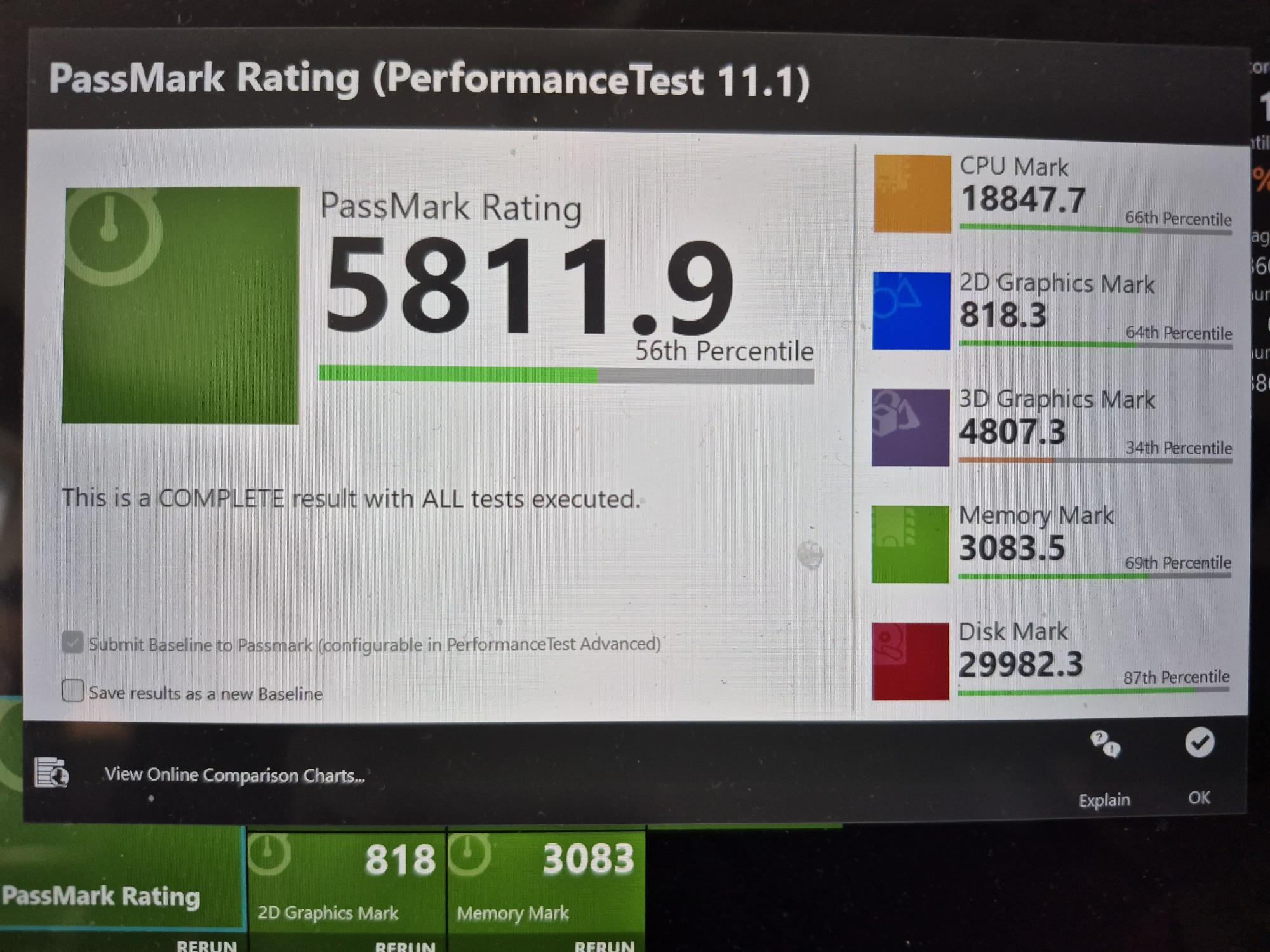
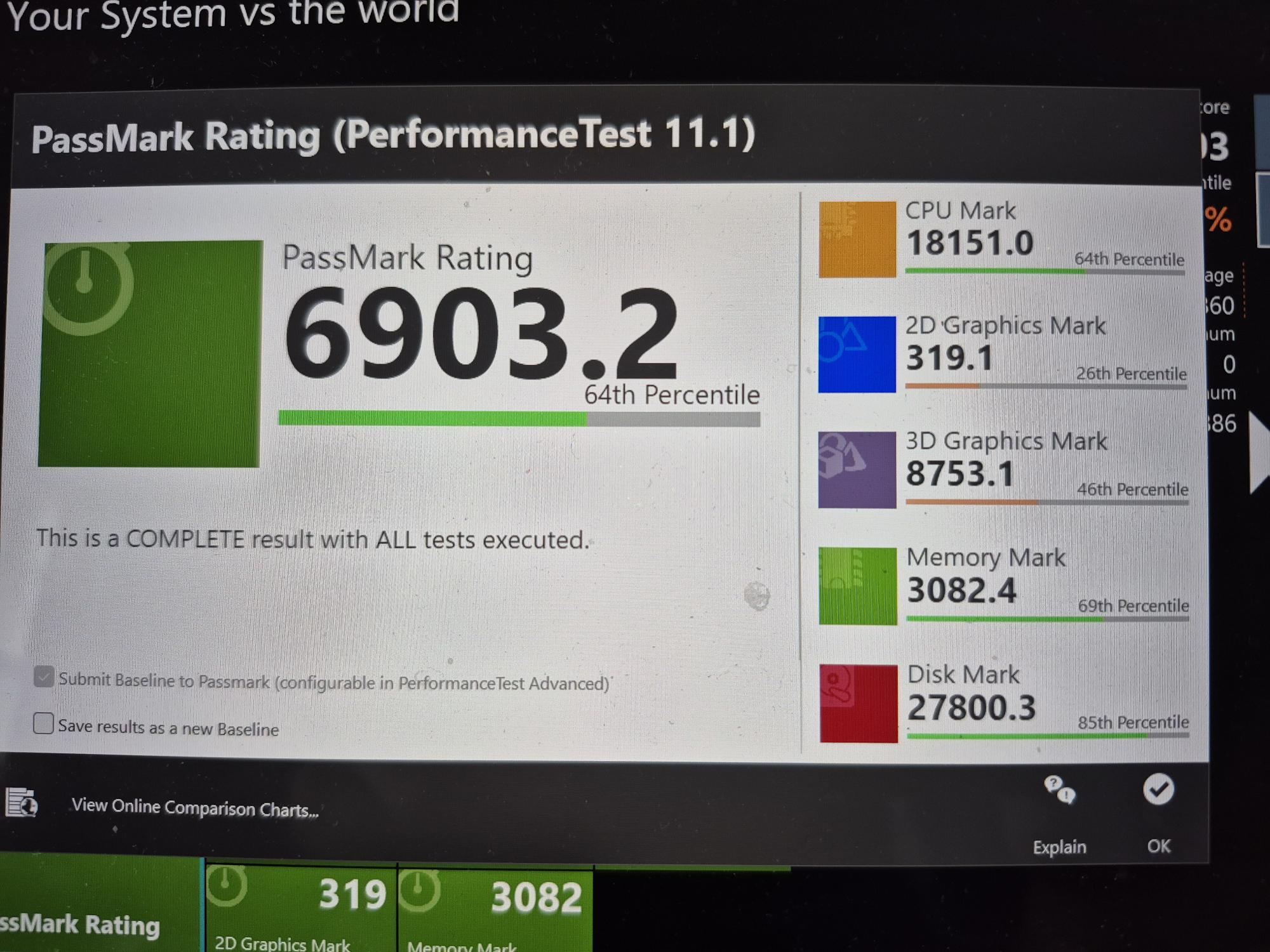
Here are performance benchmark results via PassMark:

Results with only Framework Power Adapter (60W) attached, Max Performance power setting:

**
Results with GMKtec AD-GP1 power supply attached:**

As you can see there is a significant difference in the 2D mark (is actually lower) as well as the 3D mark (which is considerably higher).

Real-World Results:

In terms of real-world results, we notice that games that before could only be played in 720p at 30 fps (tested Hogwarts Legacy and Final Fantasy VII Rebirth) can now be played in 1080p at 30 fps. I was also able to play some games at the native Framework monitor resolution of 2256 x 1504, have the original Framework glossy display for the 13.

In LM Studio, I was able to achieve higher tokens per second rates as well. When running the qwen/qwen3-coder-30b model with the “hey, write a program to invert a binary tree in python” prompt, we get the following results:

Radeon 780M (Integrated Graphics) with 60 W Power Adapter plugged in:

  • 11.26 tok/sec
  • 1194 tokens
  • 0.61 s to first token

Radeon 7600M Graphics (eGPU) plugged in:

  • 11.98 tok/sec
  • 1191 tokens
  • 0.69 s to first token

Results with LM Studio at the moment are a bit disappointing. Didn’t see a huge performance increase, though. Am wondering if results would be different with a different prompt, maybe a prompt that requires a longer answer? LM Studio seems to recognize the GPU properly, so don’t think it’s a driver issue. Perhaps LM Studio is primarily using the CPU and not the GPU as much? It’s also possible that other applications may have better GPU drivers and/or may be able to take better advantage of the GPU power available.

Am also aware that this isn’t by any means a perfect test/benchmark, so curious to hear your input on that as well. Also note that I am not testing the laptop with eGPU performance on an external monitor, am simply using the built-in monitor of the Framework 13 for the above test.

Let me know your thoughts!

Hey,

Late to the post. Long time eGPU enjoyer here. Moved from aorus gmaing box to EXP GDC
TH3P4G3 ( you can find it one gpu.io as people mentioned). I’ve been using it with my AMD 7800 Framework 13 for a couple of months now. It is mostly smooth but I’ve been running into some issues: sometimes it doesn’t get powerdelivery when booted and requires reconnect, plus ocassionaly disconnecting the gpu and reconnecting causes the driver to crash and requires driver/PC restart.

And there is some weirdo mismatch where it tries to use integrated GPU for stuff when it has too much RAM allocated but it seems like Windows issue to me.

As per cards your mileage may vary - I’ve been stuck to NVIDIA due to being tied to Adobe workload but had Intel B580 in there for a few days and gaming performance was nice. Just don’t go balls to the wall on GPU it is gonna be bottlenecked as hell anyways - and for that reason always go with external display through GPU, sticking to the laptop display cuts the TB bandwidth in half.

1 Like

Welcome to the EGPU community! I noticed that you mentioned that you were running at 2256 x 1504 which is the internal Framework display. For best performance please use an external monitor connected to the gpu directly. When you use an internal laptop screen with an egpu the data has to go back and forth over the USB cable which causes a significant performance degradation.