After updating to this version my primary and external monitor randomly switch off. Not at the same time, but one of them will just switch off at a time. Never happened on previous versions. Running Windows 11.
This is just a bump – What does this mean / how does it apply?
1 Like
We upgraded one of our Framework 13 AMD 7040 laptops and it will only boot when it’s disconnected from the docking station. It boots without issue when disconnected from the dock. When connected the keyboard lights up, but nothing shows up on either the laptop screen or the dock connected monitor, and nothing connected to the dock seems to be recognized. If we let the Framework logo appear, and then connect the dock, everything works without issue. We have the Kensington Dock SD5800T Thunderbolt™ 4 and USB4® Quad Video Docking Stations. We don’t have this issue on BIOS 3.17, it just showed up on BIOS 3.18.
1 Like
Experiencing the problem exactly the same way as you @HHPC_IT , albeit with a different dock (two different Dell docks in my case). I added my details to the GitHub Issue noted earlier, but might be a good idea to add your dock to the list there too to highlight that the issue is more widespread and not specific to one vendor’s stuff.
2 Likes
Shortly after posting, I downgraded to 3.17 and was able to successfully boot while plugged into my dock. Hope this gets fixed in 3.19!
3 Likes
I think you need to check out this topic as it sounds like you have the same problem athough you don’t mention a mouse.
1 Like
We were able to do a few more tests and found some unexpected results. The short answer is that there is a mouse connected to the dock that was causing the issue, but the longer answer is more interesting. With only the monitor plugged into the dock, the Framework 13 AMD 7040 booted without issue. When the mouse was plugged back into the same port, the Framework 13 AMD 7040 again failed to boot, so this was a reproducible issue. However, if we moved the mouse to any of the other USB-A ports on the dock, the Framework would boot normally again. This was the result that was unexpected. After testing each port sequentially, they all worked except for the USB-A in the top right on the back of the Kensington SD5800T as shown in the picture below (green works, red fails).
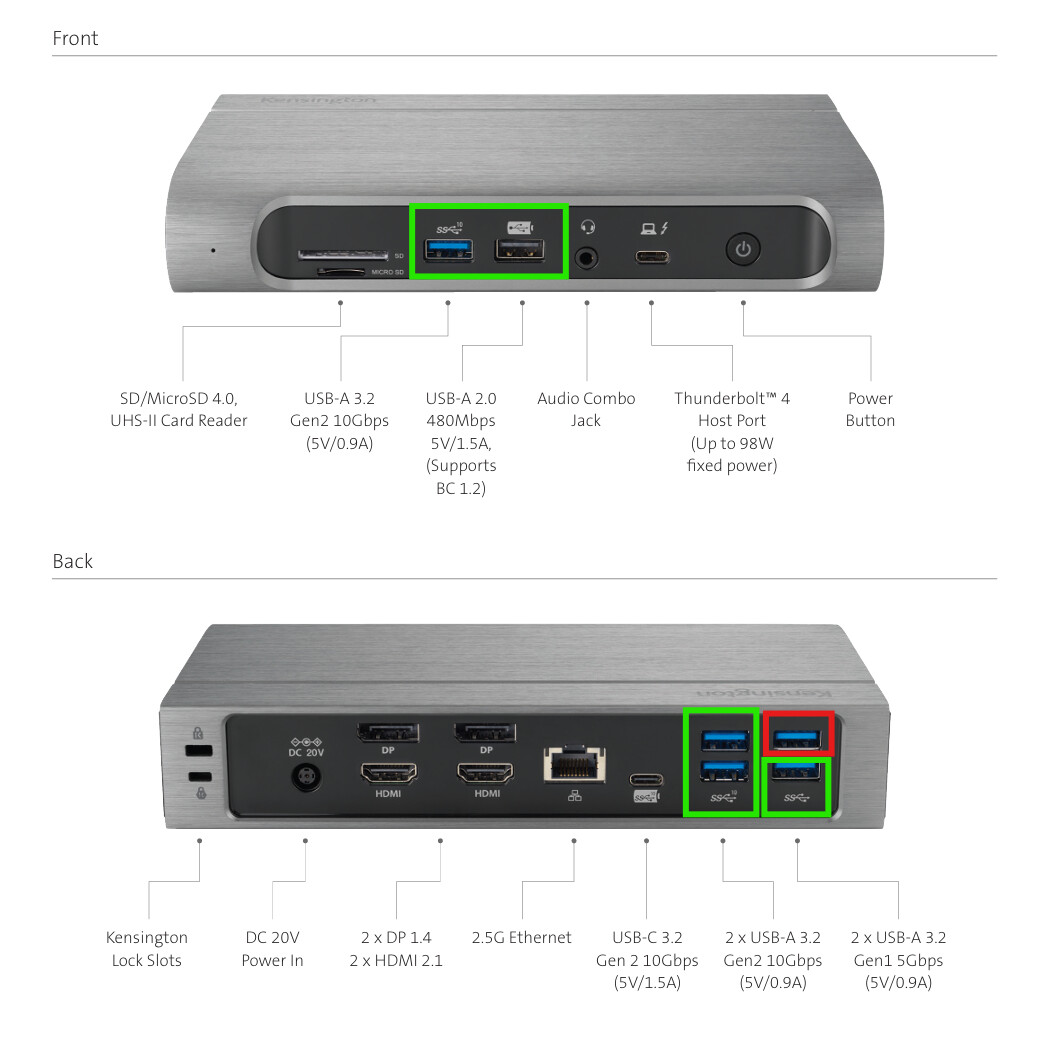
We will still report this in the Github issue tracker, but we tested this on a couple of different mouse / keyboard / monitor (including multi-monitor) configurations as well with the same results. As long as no pointing devices are plugged into the USB-A in the top right of the Kensington SD5800T everything worked fine. Unfortunately, we couldn’t find a diagram for that dock to understand how it’s wired up internally, but it uses the Intel® JHL8440 Thunderbolt™ 4 Controller for it’s connectivity to the laptop.
2 Likes
We also tested with an HP UBS-C G5 dock and could not reproduce the issue with the same input device connected to any of the USB-A ports on the dock.
1 Like
Is anyone using version 3.18 with a dock without experiencing any problems?
1 Like
I was on the BETA too - I think charging has been slowed significantly with this update. Is that expected? I didn’t see anything in the changelog indicating this. Not a bad thing, but unexpected.
Updated here, it only just popped up on whatever is on the CachyOS GNOME login page then I checked the “Firmware” GNOME app and it installed fine.
Hear hear, i am connecting to a KVM. I have the same issue since the 3.18 update, machine updated then just hung up, heck when i downgraded the bios to 3.17 through windows the machine just hung up on restart where that FW sprocket/ cog/ gear is meant to move across the screen. Gingerly i turned off the laptop and turned it back on without connected to the KVM and it resumed the bios downgrade without a hitch.. ( breathed a sigh there ).
My HDMI is on the top left (facing the laptop) and am running the latest drivers from AMD ). Havent had any issue with the software upgrades till now, unfortunately the KVM is non negotiable.
FW 13- 7840U on 64GB RAM and 2TB kingston KVR 2TB on win 11 all updates til lthe last week done on the OS
Yes. I have wireless mouse receiver on a chained USB hub. No boot issues. It maybe takes a little longer to POST with the dock connected, but that’s all.
We don’t have any issues when connected to a HP USB-C G5 dock. On our Kensington SD5800T docks it works fine as long as there are no input devices connected to the top-right USB-A port on the back. Tested this with a few configurations and Framework 13 AMD 7040 laptops. With that said, we’re holding off on upgrading any of the remaining Framework 13 AMD 7040 laptops to 3.18 (they’re already on 3.17).
Yes, I’m using this Plugable USB-C Docking Station, 4K Triple Monitors, 100W Laptop Chargi ~ Plugable Technologies with a 13 7040, 3 screens, and am now on 3.18. I will occasionally have to redock with the laptop open to get all 3 screens recognized, but I’ve had that with multiple docks, its not new to 3.18.
Battery extender function does not work. I have my laptop plugged in for days and never take it off the charger. Battery extender is on in BIOS with a 1 day timeframe to reduce charge voltage. Battery stays at 100% at all times even when plugged in for days.
When has that stopped Framework before? 
Just wondering - since it would seem that you leave your laptop plugged in for long periods - what happens if you use Battery Charge Limit instead of the Battery Extender?
For example, with my Framework 13 (granted its a 12th Gen Intel with a different BIOS), I have set the Battery Charge Limit to 80% and it does do it in Windows (charge doesn’t go beyond 80% and Windows reports Smart Charge is enabled).
Even though I do have Battery Extender set to 3 days it never triggers because of the Charge Limit being set to 80%.
I haven’t tested if Battery Extender works, though.
Until now, I believed that beta tests were for getting feedback from brave users to help decide whether it’s okay to release the software as stable. However, there is a lot of feedback here and on GitHub, yet 3.18 is still available as a stable release, causing problems for more and more users. Many of them may use docks or hubs and not all of them will report the problems here.
I mean, I agree with you, but this is like the third or fourth 7040 firmware update that was released in beta, had multiple users identify issues and attempt to give Framework all the information they would need to fix it… and then the broken release was pushed to stable anyway.
Personally, I won’t be giving Framework any more of my money until they figure things out. Software has been a problem for them since the start.
2 Likes