OK, I think, I made a pretty strong statement and it bothered me, so I decided to do some testing.
Here’s my test setup:
- Framework 16
- Windows 11 24H2
SD expansion card driver - seems like it matches latest version from here:
Testing steps:
- Plug card in, wait for it to appear in Explorer
- List root directory and 2 others in Total Commander
- Read file from non-root directory which is more than 10 KB using Lister (F3) from Total commander
- Copy two 8 MB files to non-root directory
- Read a copied file using Lister (F3) from Total commander
- Delete copied files
- Eject the SD card
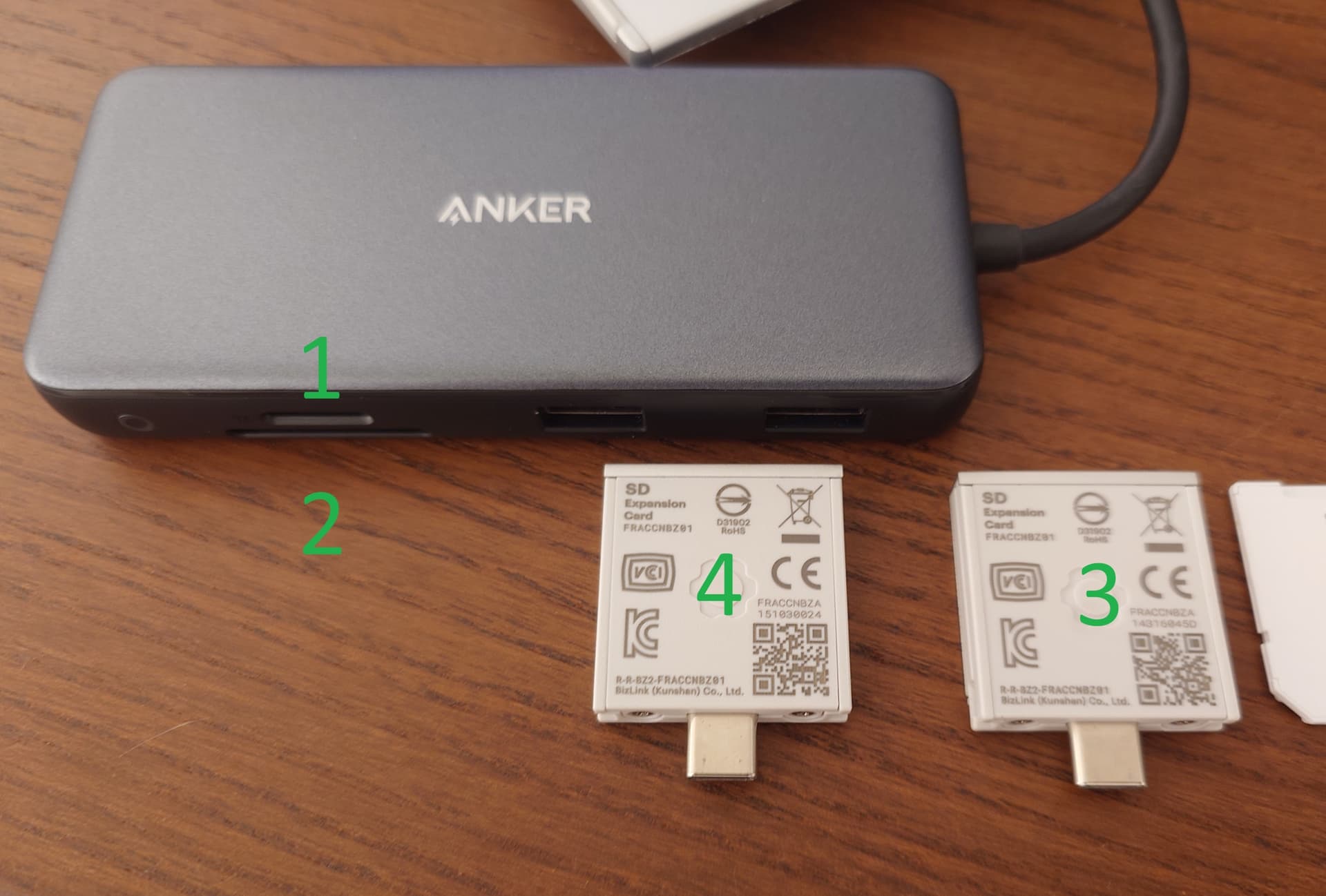
Readers:
- Anker PowerExpand 8-in-1 - MicroSD reader
- Anker PowerExpand 8-in-1 - SD reader
- Old Framework full-sized SD reader I bought in August 2024
- New Framework full-sized SD reader I got from Framework support in August 2025
MicroSD to SD Adapters:
α. Samsung adapter 1
β. Samsung adapter 2
γ. SanDisk adapter 1
δ. SanDisk adapter 2
SD cards:
a. Kingston 2 GB - SD - single FAT32 primary partition
b. Transcend 16 GB - SD HC
c. SanDisk Extreme 128 GB - single FAT32 primary partition with 32 KB cluster size
d. Samsung Pro Plus 128 GB - single exFAT primary partition with 16 MB unallocated space before it
e. SanDisk Ultra 400 GB - single exFAT primary partition
f. Samsung Pro Plus 512 GB - single exFAT primary partition with 32 MB unallocated space before it
g. SanDisk Ultra 64 GB - i - single FAT32 partition
h. SanDisk Ultra 64 GB - ii - single FAT32 partition
i. SanDisk Ultra 64 GB - iii - 16 MB unallocated, 30 GB FAT32, 30 GB ext4 partitions - used in Switch, bought a long time
j. SanDisk Ultra 64 GB - iv - 256 MB FAT32, 59 GB ext4 - Raspberry Pi OS
g, h and j bought at the same time on Amazon but used in different devices.
All readers plugged into the same port on my Framework 16 (top left port when looking at the opened laptop, or Port 1 as labeled on this page). Readers not unplugged between different cards, only cards removed and inserted into active readers. Laptop plugged in separately into a 90W charger on the other side.
Here are the results:
| Reader |
Adapter |
SD card |
Test result |
| 1 |
No adapter |
a |
N/A - Doesn’t fit into MicroSD slot |
| 1 |
No adapter |
b |
N/A - Doesn’t fit into MicroSD slot |
| 1 |
No adapter |
c |
OK |
| 1 |
No adapter |
d |
OK |
| 1 |
No adapter |
e |
OK |
| 1 |
No adapter |
f |
OK |
| 1 |
No adapter |
g |
OK |
| 1 |
No adapter |
h |
OK |
| 1 |
No adapter |
i |
OK |
| 1 |
No adapter |
j |
OK |
| 2 |
No adapter |
a |
OK |
| 2 |
No adapter |
b |
OK |
| 2 |
α |
c |
OK |
| 2 |
α |
d |
OK |
| 2 |
α |
e |
OK |
| 2 |
α |
f |
OK |
| 2 |
α |
g |
OK |
| 2 |
α |
h |
OK |
| 2 |
α |
i |
OK |
| 2 |
α |
j |
Doesn’t recognize card insertion, prevents the reader from being recognized if plugged in with card inside. Works fine when retesting after adapter β worked |
|
|
|
|
| 2 |
β |
c |
OK |
| 2 |
β |
d |
OK |
| 2 |
β |
e |
OK |
| 2 |
β |
f |
OK |
| 2 |
β |
g |
Didn’t get recognized for first three insertions. Then started working fine |
| 2 |
β |
h |
OK |
| 2 |
β |
i |
OK |
| 2 |
β |
j |
OK |
| 2 |
γ |
c |
OK |
| 2 |
γ |
d |
OK |
| 2 |
γ |
e |
OK |
| 2 |
γ |
f |
OK |
| 2 |
γ |
g |
OK |
| 2 |
γ |
h |
OK |
| 2 |
γ |
i |
OK |
| 2 |
γ |
j |
OK |
| 2 |
δ |
c |
OK |
| 2 |
δ |
d |
OK |
| 2 |
δ |
e |
OK |
| 2 |
δ |
f |
OK |
| 2 |
δ |
g |
OK |
| 2 |
δ |
h |
OK |
| 2 |
δ |
i |
OK |
| 2 |
δ |
j |
OK |
| 3 |
No adapter |
a |
OK |
| 3 |
No adapter |
b |
OK |
| 3 |
α |
c |
OK |
| 3 |
α |
d |
OK |
| 3 |
α |
e |
OK |
| 3 |
α |
f |
OK |
| 3 |
α |
g |
OK |
| 3 |
α |
h |
OK |
| 3 |
α |
i |
OK |
| 3 |
α |
j |
OK |
| 3 |
β |
c |
OK |
| 3 |
β |
d |
OK |
| 3 |
β |
e |
OK |
| 3 |
β |
f |
OK |
| 3 |
β |
g |
OK |
| 3 |
β |
h |
OK |
| 3 |
β |
i |
OK |
| 3 |
β |
j |
OK |
| 3 |
γ |
c |
OK |
| 3 |
γ |
d |
OK |
| 3 |
γ |
e |
OK |
| 3 |
γ |
f |
OK |
| 3 |
γ |
g |
First two insertions: listing root fine, then other directory listing fails. Testing with adapter β is fine. Third insertion: listing root fails, getting partition label fails |
| 3 |
γ |
h |
First two insertions: directory listing fine, reading file hangs the device. Third insertion: directory listing takes a long time, reading file fails. Testing with adapter β afterward is fine. |
| 3 |
γ |
i |
OK |
| 3 |
γ |
j |
Over multiple insertions: shows drive letter in Explorer, doesn’t appear in Disk Management, access hangs and fails. Testing with adapter β afterward is fine. |
| 3 |
δ |
c |
OK |
| 3 |
δ |
d |
OK |
| 3 |
δ |
e |
OK |
| 3 |
δ |
f |
OK |
| 3 |
δ |
g |
Over multiple insertions: shows drive letter in Explorer, doesn’t appear in Disk Management, access hangs and fails. Testing with adapter β afterward is fine. |
| 3 |
δ |
h |
Multiple insertions: shows up in Disk Management, listing root takes a long time, listing other dirs fine, reading file hangs and fails or succeeds after a long time. |
| 3 |
δ |
i |
OK |
| 3 |
δ |
j |
Over multiple insertions: no drive letter in Explorer, doesn’t appear in Disk Management. Testing with adapter β afterward is fine. |
| 4 |
No adapter |
a |
OK |
| 4 |
No adapter |
b |
OK |
| 4 |
α |
c |
OK |
| 4 |
α |
d |
OK |
| 4 |
α |
e |
OK |
| 4 |
α |
f |
OK |
| 4 |
α |
g |
Didn’t recognize the card, when checked on a different working reader, the card appeared empty and chkdsk found lost file. Recreated files on card. After testing in another reader, this reader still doesn’t recognize the card, or access is slow and hangs. |
| 4 |
α |
h |
First insertion: Listing dirs fine, reading files fine, until reading a bigger file and access hangs. |
| 4 |
α |
i |
OK |
| 4 |
α |
j |
Not recognized on multiple insertions |
| 4 |
β |
c |
OK |
| 4 |
β |
d |
OK |
| 4 |
β |
e |
OK |
| 4 |
β |
f |
OK |
| 4 |
β |
g |
Over multiple insertions: shows drive letter in Explorer, doesn’t appear in Disk Management, access hangs and fails. Testing with adapter β afterward is fine. |
| 4 |
β |
h |
Multiple insertions: Listing dirs fine, reading file hangs the device. |
| 4 |
β |
i |
OK |
| 4 |
β |
j |
Not recognized on multiple insertions. Afterwards tested OK in reader 1 to confirm that it’s not dead |
| 4 |
γ |
c |
OK |
| 4 |
γ |
d |
Multiple insertions: Listing dirs fine, reading file hangs the device. Tested again after card e, same behavior. Testing with adapter β afterward is fine. |
| 4 |
γ |
e |
OK |
| 4 |
γ |
f |
First two insertions: not recognized. Third insertion: listing dirs fine, reading file hangs device. Tested OK in reader 2 with the same adapter. Then hangs and fails again when tested. |
| 4 |
γ |
g |
Doesn’t recognize card over multiple insertions. |
| 4 |
γ |
h |
Doesn’t recognize card over multiple insertions. |
| 4 |
γ |
i |
OK |
| 4 |
γ |
j |
Doesn’t recognize card over multiple insertions. |
| 4 |
δ |
c |
OK |
| 4 |
δ |
d |
Multiple insertions: Listing dirs fine, reading small files is fine, reading big files hangs the device. Testing with adapter α afterward is fine. |
| 4 |
δ |
e |
OK |
| 4 |
δ |
f |
Listing dirs fine, reading files hangs the device. Some files then read fine, some fail to read. |
| 4 |
δ |
g |
Doesn’t recognize card over multiple insertions. |
| 4 |
δ |
h |
Doesn’t recognize card over multiple insertions. |
| 4 |
δ |
i |
OK |
| 4 |
δ |
j |
Doesn’t recognize card over multiple insertions. |
| 2 |
No adapter |
a |
OK |
| 2 |
No adapter |
b |
OK |
| 2 |
α |
c |
OK |
| 2 |
α |
d |
OK |
| 2 |
α |
e |
OK |
| 2 |
α |
f |
OK |
| 2 |
α |
g |
OK |
| 2 |
α |
h |
OK |
| 2 |
α |
i |
OK |
| 2 |
α |
j |
OK |
| 2 |
γ |
c |
OK |
| 2 |
γ |
d |
OK |
| 2 |
γ |
e |
OK |
| 2 |
γ |
f |
OK |
| 2 |
γ |
g |
OK |
| 2 |
γ |
h |
OK |
| 2 |
γ |
i |
OK |
| 2 |
γ |
j |
OK |
When I say “doesn’t recognize card” this most likely means I wasn’t patient enough for the card to be shown due to device being very slow and busy. Only cards with “OK” reached the write test, all cards with failures failed on the reading part.
I also checked some cases on my Android phone, and they match results on the Framework laptop, so I wouldn’t say this has anything to do with a host device.
It’s clear that both Framework readers exhibit a lot of problems. In fact, the reader I received from support (it was a retail unit, not refurb, judging by the packaging), has many more problems than the unit I originally purchased as the original reader at least manages to read all cards with some adapters, while the new unit fails many more cards with adapters seemingly making no difference.
@Eagle this may be something someone at Framework can review. I can do more testing, etc, if required. Not contacting support as my feeling is they would be more concentrated on solving my case instead of maybe checking of this is a more widespread issue…