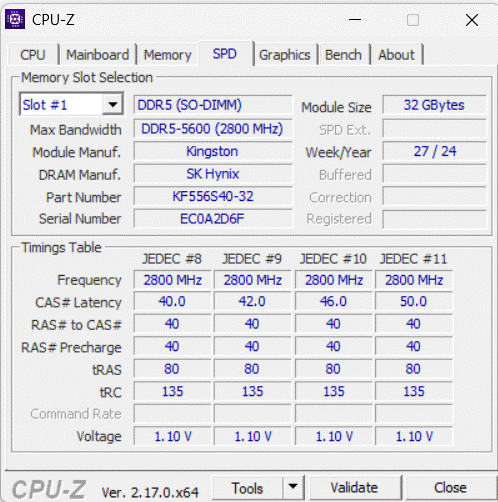
Hi, I just received my FW 16 and have not been able to boot.
The screen stays black even after hours powered on.
I have tried using one RAM stick and re-seating both RAM and SSD.
I even tried unplugging and reconnect the eDP cable on the display-side with no luck.
When I turn on my FW, the LED stays white most of the time. After unplugging the battery for a while, there have been blinking random colors (mostly green and blue).
The RAM I have is Kingston Fury Impact 32GB 5600 mhz (KF556S40IBK2-32, RAM is not on the list of supported sticks).
The SSD is a WD Black SN7100.
Any idea what can be the cause of the problem? Or if I missed something?
Looking on Kinston Website on Specification/Features, it says it has OnDie ECC.
ECC is not supported on this Laptop. Without working RAM, you won’t even get to the BIOS. Double check the info, but I think you are out of luck there.
I checked both my RAM sticks specs, and what RAM is officially supported by FW.
It seems that my RAM has onDie-ECC. But some of the supported RAM also has onDie-ECC (For what I could see at least).
Edit: Seems like others with AI 300 chips from FW 13 have the same problem with the Kingston RAM that I have. Maybe I need to look for other RAM sticks.
Any suggestions? I do not want to buy something that is not compatible (the validation list from FW lists only a few RAM tested and confirmed to work)
Before throwing any more money at it, contact support or see if you can find the led flashes code for faulty ram on the motherboard. Also check the forum for how to completely reset the system on the mother board. Try to verify that its the ram that causes your issue.
Almost assuredly, if everything is fine hardware wise; it is the Kingston Fury RAM. There have been so many posts of people who can’t get their boards to work with this brand/model of memory.
I get it, apparently it qualified at one point to be on the compatibility list; user experience on the forums have had a common theme with this memory and the AMD AI boards: incompatible.
Return the memory and get a different brand. Crucial has been stellar, have had luck with G.Skill personally too. Stay away from the fastest timings, this is not a desktop device.
Do not lean into trying to get something on the compatibility list too hard, just get:
DDR5, 5600Mhz, Cas Latency (CL) 42 or 40 have almost all been reported to work just fine. If it says AMD compatible then that is great too.
I have the Ryzen AI 9 HX370, using 64GB(2x32) Kingston Fury Impact DDR5 5600 CL40 with no issues. I have it running with Win11 and also Ubuntu 25.10 and no issues.
I have contacted support, to see if the RAM is the issue.
A BIOS reset does not work, still black screen. I am leaning towards the RAM issue.
I have no other laptop with DRR5 support to check that if the RAM is working or not.
All DDR5 sticks have on-die ECC as the speeds are so high - the server kit’s ECC is additional to this. This seems to just be misleading marketing, and generally speaking, the machine would probably just ignore the additional ECC if it was present.
I got a reply from support, and they confirm that the Kingston Fury RAM is not supported.
Now I have some Crucial RAM on the way to replace the Kingston RAM.
Thank you all for your support, really appreciate the response I got!
Fingers crossed my FW 16 works without any other issues!
That is interesting because I upgraded my machine from Ryzen 9 7940HS → Ryzen AI 9 HX370 and as part of the upgrade I moved my Kingston Fury 64GB(2x32GB) DDR5 5600 CL40 and have had zero issues running Win11 and Ubunto 25.10. I wonder if the Kingston RAM is not compatible with the 350 and works with the 370? very strange!
It seems that only the 32GB kit is incompatible as all the successful reports I’ve seen are for the 64GB Kit.
I can add another non-success story of the KF556S40IBK2-32 to the pile with my R7 350 at least, GSKILL’s F5-5600S4040A16GX2-RS saved me from having to buy the 64GB kingston set for CL40 memory.