Omarchy + Rotation (Framework 12)

Omarchy runs perfectly on a Framework 13 out of the box.

However, it gets ALMOST there on a Framework 12. If you follow the Framework Arch install guide (essentially installing the Framework specific stuff for the rotation functionality, etc.) then the driver needed for rotation will be installed and will be functional.

Hyprland, however, does not have any automatic mechanisms in place to do anything with the info the sensor is outputting.

You can write a sh script that you can have hyprland exec-once on start up that will handle all of this for you. This script contains elements necessary to rotate touch inputs as well.

Couple this with a key combo to toggle a file to enable or disable rotation and it will work fully.

Here is the rotate-screen.sh contents which should be placed in ~/.config/hyrp/:

#!/bin/bash
# File to store rotation toggle state (0 = off, 1 = on)
TOGGLE_FILE="$HOME/.config/hypr/rotation-toggle"

# Ensure toggle file exists, default to enabled (1)
[ -f "$TOGGLE_FILE" ] || echo "1" > "$TOGGLE_FILE"

# Monitor sensor and adjust screen based on orientation
monitor-sensor | while read -r line; do
    # Check if rotation is enabled
    if [ "$(cat "$TOGGLE_FILE")" -eq 1 ]; then
        if [[ $line == *"orientation changed: normal"* ]]; then
            hyprctl keyword monitor "eDP-1,1920x1200@60,0x0,1.2,transform,0"
            hyprctl keyword input:touchdevice:transform 0
            hyprctl keyword input:tablet:transform 0
        elif [[ $line == *"orientation changed: right-up"* ]]; then
            hyprctl keyword monitor "eDP-1,1920x1200@60,0x0,1.2,transform,3"
            hyprctl keyword input:touchdevice:transform 3
            hyprctl keyword input:tablet:transform 3
        elif [[ $line == *"orientation changed: left-up"* ]]; then
            hyprctl keyword monitor "eDP-1,1920x1200@60,0x0,1.2,transform,1"
            hyprctl keyword input:touchdevice:transform 1
            hyprctl keyword input:tablet:transform 1
        elif [[ $line == *"orientation changed: bottom-up"* ]]; then
            hyprctl keyword monitor "eDP-1,1920x1200@60,0x0,1.2,transform,2"
            hyprctl keyword input:touchdevice:transform 2
            hyprctl keyword input:tablet:transform 2
        fi
    fi
done

Technically you should only need “eDP-1,transform,1”, but in my testing this did not work. Note that the 1.2 here sets scaling. You will want this to match whatever you have set in the monitor.conf, which is found in the same folder all of these files are in. Makes sure this matches or you’ll be changing your scaling every time you rotate.

Make sure you make this script executable and set the proper permissions:

chmod +x ~/.config/hypr/rotate-screen.sh

Then you’ll need to add the following to your exec-once area of hyprland.conf:

exec-once = ~/.config/hypr/rotate-screen.sh

Next you’ll need to create the toggle script to allow you to enable and disable rotation. So create another sh script in the same folder (~/.config/hypr/). Call this file toggle-rotation.sh:

#!/bin/bash
TOGGLE_FILE="$HOME/.config/hypr/rotation-toggle"

# Toggle between 0 (off) and 1 (on)
if [ "$(cat "$TOGGLE_FILE")" -eq 1 ]; then
    echo "0" > "$TOGGLE_FILE"
    notify-send "Auto-rotation disabled"
else
    echo "1" > "$TOGGLE_FILE"
    notify-send "Auto-rotation enabled"
fi

Save and set permissions on it as well:

chmod +x ~/.config/hypr/toggle-rotation.sh

Lastly we can create the keyboard combo that will allow us to enable and disable rotation. When enabling or disabling you will get a notification about the status of rotation that you just set.
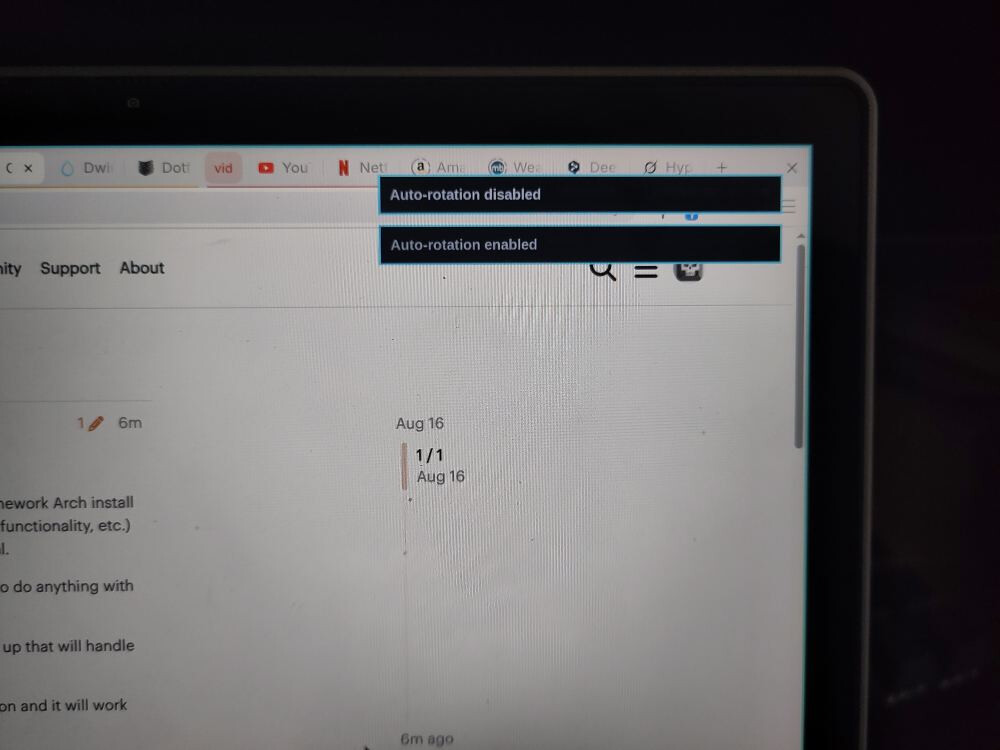
So add the following binding to your hyprland.conf file in the same folder:

bind = SUPER, R, exec, ~/.config/hypr/toggle-rotation.sh

You can make this whatever key binding you wish. This is probably already used under a normal unmodified Omarchy install, just FYI.

Save everything. You can force hyprland to relaunch through a super+esc and selecting relaunch, or you can just reboot.

Rotation should now work. Try it out just to confirm.

The last thing to add is a possible icon on the waybar that you can click to change rotation (ie: on or off) and to have a visual indicator that it is enabled or not. I have not been able to get that working just yet, but will add to this whenever I manage it.

10 Likes

Nice guide, maybe post it to the omarchy github discussions too

1 Like

Great work!

I asked you about the auto-rotating display on Omarchy below. I thought the rotation worked out of the box, but we actually need to set up to use the rotation.

I don’t think we need the above command, which removes the executable bits.

1 Like

Thanks, I have done as you suggested.

Yes you did. Sorry I was mistaken. The good news is that the driver and sensor all work without issue. They just need some plumbing in Hyprland to get working.

Thanks for the scripts.

Worked perfectly with Arch + Hyprland + ML4W dotfiles

I’m having trouble having the touch inputs being properly recognized when in rotated state.

Is touch working properly for you with the script @2disbetter ?

installing the Framework specific stuff for the rotation functionality

There’s nothing Framework specific to install. As long as you have a kernel 6.12 or newer, the cros_ec kernel drivers can load.

GNOME and KDE and the monitor-sensor tool you use in your script rely on the iio-sensor-proxy package. But that’s not Framework specific.

I see there’s also GitHub - JeanSchoeller/iio-hyprland: Listen iio-sensor-proxy and auto change Hyprland output orientation but I haven’t tried it.

The script here is pretty simple, nice.

On Hyprland it is not. Seems the display is rotated but the touch stays in the original orientation. Should be easy to fix, but I just haven’t had the time. I, admittedly, do not use the 12 in tablet mode much. Nice just knowing I can.

1 Like

This is what I am referring to, step 15 of the installing Arch on the Framework 12 guide:
Arch Linux on the Framework Laptop 12 - Framework Guides

Ah ok, makes sense, I understood the wording differently.
I mean that there’s nothing special for our system vs similar systems.
Of course since Arch comes with almost no packages you’ll have to install some packages depending on what kind of hardware you use.

1 Like

You can try if input:touchdevice:output=eDP-1 maybe also input:touchdevice:transform=0 works.

I haven’t tried hyprland yet but Nirav said input:touchdevice:output=eDP-1 is needed to keep the touch input on the internal monitor if you connect external screens, maybe it’s also needed in the case of rotating the internal screen.

1 Like

Touch does not stop functioning when the screen rotates. Touch targets are just not correct. The touch surface needs to rotate as well. However, thanks for the heads up on touch dropping out when connecting an external monitor. Adding the command in the hyprland.conf file should be able to resolve that as well. I rarely, if ever, plug another monitor in, so I might not have ever had that issue.

However, here is an updated script that will handle touch rotation as well. Thanks for the tip Daniel!

#!/bin/bash
# File to store rotation toggle state (0 = off, 1 = on)
TOGGLE_FILE="$HOME/.config/hypr/rotation-toggle"

# Ensure toggle file exists, default to enabled (1)
[ -f "$TOGGLE_FILE" ] || echo "1" > "$TOGGLE_FILE"

# Monitor sensor and adjust screen based on orientation
monitor-sensor | while read -r line; do
    # Check if rotation is enabled
    if [ "$(cat "$TOGGLE_FILE")" -eq 1 ]; then
        if [[ $line == *"orientation changed: normal"* ]]; then
            hyprctl keyword monitor "eDP-1,1920x1200@60,0x0,1.2,transform,0"
            hyprctl keyword input:touchdevice:transform 0
        elif [[ $line == *"orientation changed: right-up"* ]]; then
            hyprctl keyword monitor "eDP-1,1920x1200@60,0x0,1.2,transform,3"
            hyprctl keyword input:touchdevice:transform 3
        elif [[ $line == *"orientation changed: left-up"* ]]; then
            hyprctl keyword monitor "eDP-1,1920x1200@60,0x0,1.2,transform,1"
            hyprctl keyword input:touchdevice:transform 1
        elif [[ $line == *"orientation changed: bottom-up"* ]]; then
            hyprctl keyword monitor "eDP-1,1920x1200@60,0x0,1.2,transform,2"
            hyprctl keyword input:touchdevice:transform 2
        fi
    fi
done

I have updated the initial post to include these input transforms as well.

2 Likes

This is a nice solution, but it does have some caveats. For one, this service is FAR more efficient than a bash script. Order of magnitude more efficient. However, at the levels we are talking it doesn’t really matter. You are not able to disable rotation with this, other than killing the process for it. It seems to handle rotation for the display and touch, which is nice.

Perhaps a hybrid solution would be to set a key binding to start and stop iio-hyprland with the corresponding rotation enabled and disabled notifications.

I will toy around with this and see if it is worth the trouble.

So I messed with it. It doesn’t seem to rotate the screen itself although it is supposed to. Just looking over the source it seems like the hyprctl command format might have changed and this is why rotation isn’t working. I am going to try to patch this myself and see if I can get it working.

The script above though just works.

1 Like

Great! Been looking for this. I did some keybindings + arrowkeys to solve it but to make it rotate automagically is even better!

2 Likes

So I wrote a C/C++ application that handles this using the rotation toggle file created here. You would load this with an exec-once = FW12Rotate command in your hyprland.conf.

You don’t need anything beyond the initial Omarchy install (assuming you installed the iio sensor component as per the Framework Arch installation guide for the Framework 12) to use this.

I am going to make a few more tests with it, and ensure it is as resource minimal as I hoped. Will share here when ready.

2 Likes

Ok, work is over for the day, and I was able to give this a bit more of a whirl. It seems to be working just fine. No more debugging messages and it is working quickly and correctly with the toggle rotation file and Hyprland key combos.

I put it all on github if you want to give it a whirl. Let me know if you have any questions or if you have any problems. It should just work on the Omarchy and the Framework 12.

3 Likes

I noticed the pen touch is not rotated along the screen at least with the script version.

@2disbetter can you confirm if this happens also with the app you wrote? I assume it’s the same, since in the end it also uses hyprctl to change the same variables.

Version 1.01 will have the pen rotation added. I wasn’t aware that pen and touch input were two separate things, but honestly it makes sense.

For the script you’ll just need to add this line to the transforms:

hyprctl keyword input:tablet:transform 0,1,2,3

I’ve updated the main posts as well. Thank you for pointing this out to me!

3 Likes

Thanks for updating the scripts/app!

I didn’t have much time to look up the hyprland docs until mid next-week, but I assumed it had to be something else needed to be transformed, so that gets me going quicker.

1 Like