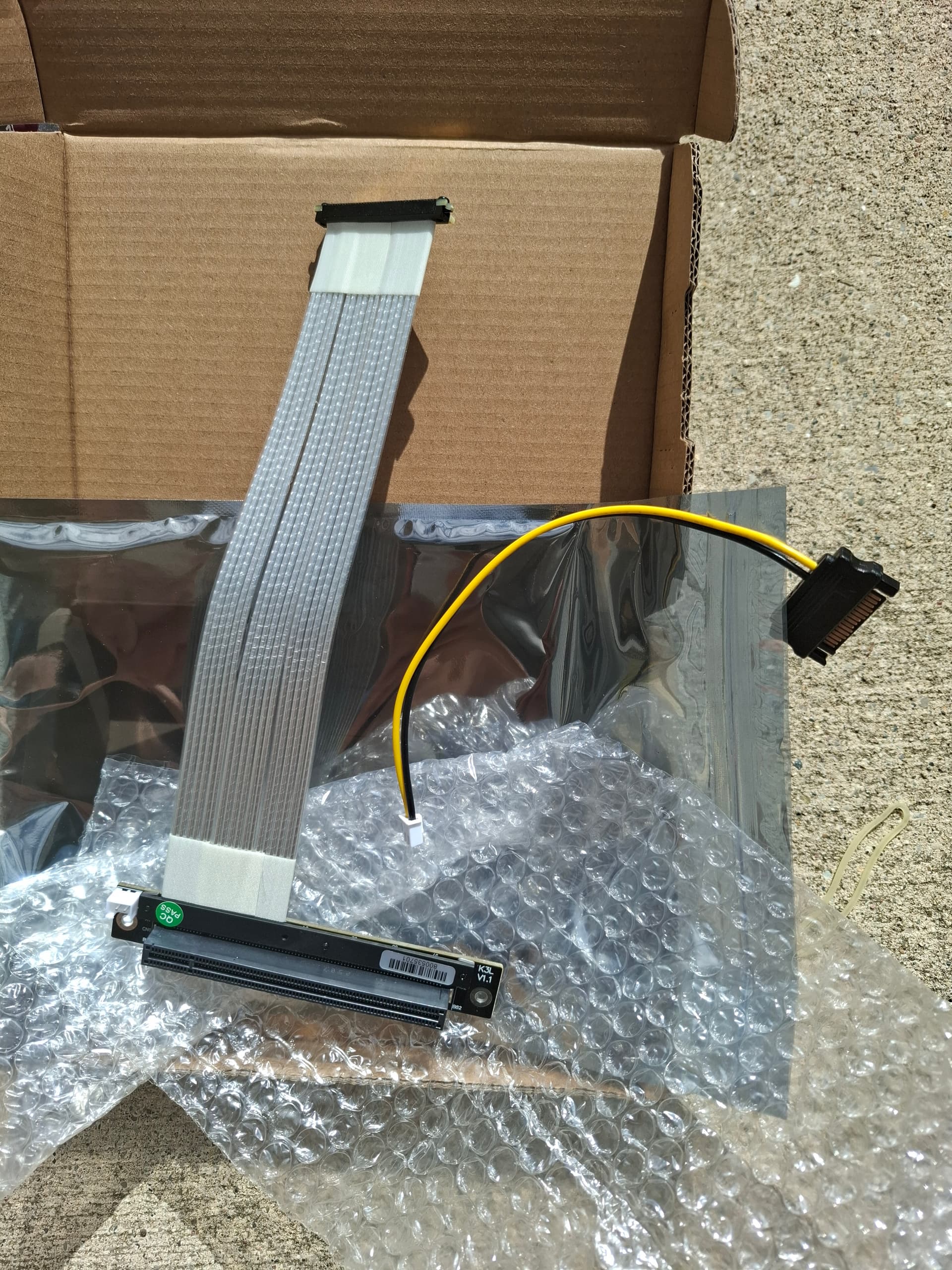
I concur that the only (apparently) viable options CURRENTLY are M.2 → PCIe 5.0 4x slot with a power connector. Even for that, I am unable to see a reliable and obvious choice so far.
Having said that, I dont feel someone like me would need to upgrade to external GPU for the next 6months to a year, and things may be different then. Fingers crossed!
Do you still need a powered x4 to x16 riser if your card uses external power? I ask because I’ve got an ADT-Link riser cable coming in the mail and the plan is to hook my RTX3090 into that x4 slot that way (and eat the performance loss). I’m putting the board into my existing mini-ITX case (a Lian-Li Q58) that is designed to use a riser anyway, so I’m hoping it’ll be a straight drop-in replacement.
My next wish is for a watercooling block for the mainboard, but all things in due course, I suppose.
Depends on the card, and I don’t have the tools to tell you.
Some cards don’t pull much from the slot, some expect the full 75 watts. I’m not sure if cards can load balance or anything like that You’ll just have to try it and tell us if it works.
As for your comment about a waterblock for the mainboard, that’s funny timing because I just posted this other forum post because I’m planning to make one.
And honestly based on my amateur-ish research the easiest solution for a waterblock appears to be buy a vapor chamber and sandwich that between your waterblock and the chip/ram. But the stock cooler also cools the VRM and their public CAD file of the mainboard doesn’t even include the VRM location so until they update the file or I get one I have no idea what my plan will be…
To be clear, I will be CNC-ing something for my waterblock solution, my plan at the moment is to use an existing baseplate from another block and CNC a different acrylic piece, because my CNC can’t do the super fine channels required for a baseplate.
But the reviews and appearance don’t fill me with confidence. It does look like a powered solution, however. As for the waterblock, I’ve got some engineer friends who offered to help design one, but I’ve no real idea how complicated the requirements will be. I’m mostly waiting out on a commercial option (or at least a validated design that I can have machined) to become available. I’d be curious to see how you go with your project.
There are FW Desktop schematics here. I’m not all that clear on the power design aspects but around 3V and somewhere between 2W to 15W would mark the continumn I suspect. There is some info here and there’s an M.2 Wiki page, too.
I ordered an ADT-link K23SL-TL PCIE riser cable. It has 90 degree connectors, so I’m hoping I’ll be able to mount my 3090 next to the motherboard in the normal expansion card brackets in a rackmount case. I emailed them asking about adding power to it, because it looked like there was a place on the board to connect a power lead. They told me they would send me a version with a power cable connected.
It’s shipping from China, so I should get it in about three weeks. In the interim I got a couple of the cheap ones on Amazon to try. I’ll post results once I get everything in and get it built.
Going by the market trends, OCuLink is relegated to PCIe 4.0. SlimSAS isn’t going beyond PCIe 5.0 (and even that is rare).
For PCIe 5.0 and beyond, you need to use MCIO. Every other option is a hindrance in some way―not necessarily technical, but if nobody makes the compatible cables, you are limited to previous generation PCIe signalling speeds and you will have a very hard time finding compatible AICs/cables.
I was hoping to use it for extra storage with another m.2 SSD drive - I hope I am not over thinking this idea and I hope it will work. If anyone has an idea if this will work or not please respond.
Oh Man, I ordered the K23SH not realising there was a right angled connector version, or a version with a power connection. Did you just request it in the order page?
I’m still gathering the parts for the build, so it’ll be a few more days until I can test. Judging by the discussion in the “Request: verify dGPU support” thread, this solution might not be a slam dunk. (I’m hoping the issues get resolved with a firmware update though.)
I think most of those issues come from the usb4 or oculink solutions in the other thread. I expect using the actual PCIe slot to be straight forward and just work. The only thing that I’d be worried about is resizeable bar support. I’m hoping this works for you and that framework sees it and gives us resizeable bar support in the bios.
Also how did you email them? Because if this solution works, I’ll definitely be following in your footsteps. I was hoping to find a PCIe 4x → 16x riser with power injection.
Yeah, I sent an email to adt-sales@adt.link around the same time I placed the order.
That is true about nobody in that thread trying quite this kind of cable, but LukeW4lker’s solution was PCIE-Oculink-PCIE, so it might be functionally equivalent.
My own build is proceeding slowly - I’m still working through issues with none of the fans I have on hand fitting quite right in the Powerspec case I got (nothing to do with Framework), and I only get a little bit of time after I put the kids to bed to work on it, so it might be a couple more days before first power.
 You’ll just have to try it and tell us if it works.