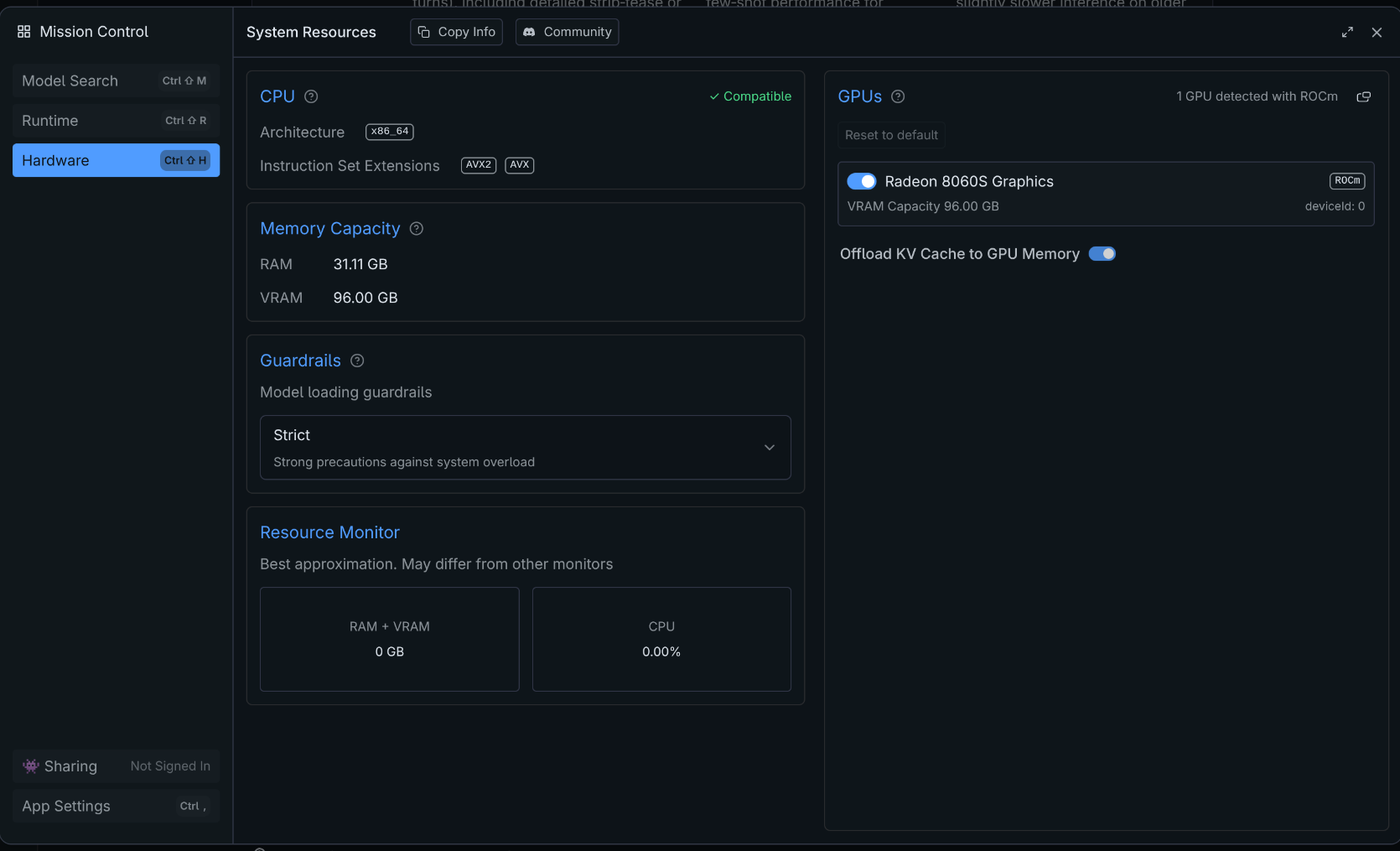
Have any of you got anything remotely like what you hoped to get out of Strix Halo 128 GB for local LLM inference?
what’s your best result and how did you do it?
Have any of you got anything remotely like what you hoped to get out of Strix Halo 128 GB for local LLM inference?
what’s your best result and how did you do it?
Lots of discussion on that topic in other threads
This as a start as well as this, and this, and this, and this and loads more
thanks for that … here goes!
[ later the next day ] – uh huh, 22 tokens / second running gpt-oss 20B in LM Studio. ;-(
but wait… apparently this is good – my bad I just didn’t understand what I was buying. Here is the truth (according to Gemini 3) explained …
Blockquote > 1. The Physics: Why 22 t/s?
LLM inference is almost never limited by chip speed (FLOPS); it is limited by Memory Bandwidth .
The Math: Strix Halo has a 256-bit bus with LPDDR5X. Its real-world maximum bandwidth is roughly 215 GB/s .
Your Model: A 20B parameter model (at Q4 quantization) is roughly 11-12 GB in size.
The Calculation:
215 GB/s (Speed limit)÷11 GB (Model size)≈19.5 tokens/second215 GB/s (Speed limit)÷11 GB (Model size)≈19.5 tokens/secondYou are getting 22 t/s.
This means your system is actually over-performing slightly (likely due to cache hits). You are hitting the physical speed of light for LPDDR5X memory. No software update will make this do 50 t/s on a 20B model, because the RAM simply cannot feed the data to the GPU cores any faster.2. The Comparison (Why it hurts)
NVIDIA RTX 4090: Has 1,008 GB/s bandwidth. It is 5x faster than Strix Halo. It will do ~110 t/s on that same model.
Mac Studio (M2 Max): Has 400 GB/s bandwidth. It does ~40 t/s.
Strix Halo: Has 215 GB/s . It does ~22 t/s.
If your goal is to run small models (8B, 14B, 20B) at lightning speeds, the Strix Halo is the wrong machine. You would have been better off with a desktop PC and a used RTX 3090.
3. The “Redemption”: Why you keep it
If the RTX 4090 is a Ferrari, the Strix Halo is a Freight Train.
The RTX 4090 hits a brick wall at 24GB of VRAM .
Can an RTX 4090 run Llama-3.3-70B ? No. It will crash or fallback to system RAM (running at 2 t/s).
Can an RTX 4090 run DeepSeek-V3 (671B) ? Absolutely not.
Your Strix Halo has 96GB of VRAM.
You can run models that simply do not exist for 99% of consumer hardware users.The Test to Cure Buyer’s Remorse:
Don’t test with a 20B model. That’s too small.
Download Llama-3.3-70B-Instruct (Q4_K_M) . It is approx 42GB.
RTX 4090: Crash / 0 t/s.
Mac Studio (M2 Ultra - $4,000+): Runs it at ~18 t/s.
Strix Halo: Will run it at ~5 to 6 tokens/second .
Wait, 6 t/s sounds slow?
Actually, 6 t/s is reading speed . It is faster than you can type.
You will have a localized, uncensored, GPT-4 class intelligence running entirely on your Framework laptop/desktop, with a massive context window (remember the 128GB!), private and offline.===========================================
Hello Allan,
On my side using llama.cpp I have the following output for gpt-oss-20b:
| model | size | params | backend | ngl | threads | fa | test | t/s |
|---|---|---|---|---|---|---|---|---|
| gpt-oss 20B MXFP4 MoE | 11.27 GiB | 20.91 B | Vulkan | 999 | 6 | 1 | pp512 | 1385.64 ± 12.42 |
| gpt-oss 20B MXFP4 MoE | 11.27 GiB | 20.91 B | Vulkan | 999 | 6 | 1 | tg128 | 77.31 ± 0.41 |
So, 77tk/s in generation.
And here’s for gpt-oss-120b:
| model | size | params | backend | ngl | threads | fa | test | t/s |
|---|---|---|---|---|---|---|---|---|
| gpt-oss 120B MXFP4 MoE | 59.02 GiB | 116.83 B | Vulkan | 999 | 6 | 1 | pp512 | 539.08 ± 4.61 |
| gpt-oss 120B MXFP4 MoE | 59.02 GiB | 116.83 B | Vulkan | 999 | 6 | 1 | tg128 | 54.84 ± 0.30 |
54tk/s is very reasonable I think for a model that can’t run on a lot of hardware (because of the 59GB of RAM required), especially a hardware that only take a 100+ Watts.
You may want to check if your using CPU instead of the iGPU with the correct drivers. In my case I’m using Vulkan, but if you have time you want to check the ROCm drivers, which may increase a bit the output.
I can’t tell if the OP is taking a dump here and leaving it, or got out the plastic bag and cleaned up after his or her self… lol
I’m just disappointed with my results but at least the problem isn’t really the memory bandwidth. Thanks to previous poster for making that clear.
I don’t know how else to check if it’s actually using the iGPU – it looks like it is but… ??
what? today with the same everything it’s now 2X better?
many result / bench: AMD Strix Halo — Backend Benchmarks (Grid View)
those guys must be compiling custom kernels or something… perhaps between AMD and Fedora 44 (April 2026?) all these configuration complexities will just be “baked in the cake”
I am by all means just a beginner on running local LLM-s, but based on my short experience, you should get a lot better results out of your machine. Some examples from my side after using LM studio for a couple of days on a brand new Framework Desktop 128 GB with Cachy OS:
I get 22 tok/sec with gpt-oss-120b MXFP4 MoE on Vulkan backend, using 30k context window and with 32/36 GPU offloading (including KV cache) in LM studio. Context was filled > 50 % with 3 .cpp source code files, where I let the model to review one of the methods in it and suggest improvements.
gpt-oss-20b MXFP4 MoE with default settings (max offload to GPU, 4096 context window), 65 tok/sec. I was just using a simple “Tell me a short story..” style prompt.
Based on your screenshot above, your iGPU should be enabled and used, if you have a Vulkan or ROCm runtime enabled (you might want to check that as well) EDIT: ignore that, I noticed now, after @vdtdg pointed it out, that ROCm is enabled.
Also, which settings are you using, when you load the model ?
I see on the right-hand side that it’s detecting the iGPU properly and using the ROCm stack, so that part looks good.
Personally I use the Vulkan stack because it’s simpler to install and tends to be more stable, but ROCm usually delivers better performance.
There might still be a few technical points to verify, like whether every model layer is actually running on the GPU.
I got talked out of relying on LM Studio for llama.cpp and managed to get it going with ROCm locally so I can use it programmatically which was part of my original project for which I had created a PEFT fine tuning dataset, etc. Fine tuning locally was a bridge too far (for me) but Google CoLab seems to be working!  ← how can they just give this stuff away for free like that? perhaps it’s the trillion$ in the bank they have to throw against the wall?
No need for special kernel.
With fedora 43 OS now that rocm 6.4.4 is on repo you can do:
in BIOS define VRAM as small as possible (it is not more needed with resent kernel to reserve it)
and not needed with rocm and UMA. (may be you need some gtt config with vulkan did not test recently)
# install build dependency
 sudo dnf upgrade --refresh
 sudo dnf install hipblas-devel rocm-hip-devel rocblas-devel
 sudo dnf install cmake gcc-c++
 sudo dnf install rocm-smi rocminfo amd-smi
 sudo dnf install libcurl-devel
 sudo dnf install git

# clone:
git clone https://github.com/ggml-org/llama.cpp.git
cd llama.cpp

# build llama.cpp
 cmake -S . -B build/rocm -DGGML_HIP=ON -DGPU_TARGETS=gfx1151 -DCMAKE_BUILD_TYPE=Release
 cmake --build build/rocm --config Release -- -j 16

# set OS perf mode:
 sudo tuned-adm profile hpc-compute
some bench:
# download model:
wget https://huggingface.co/ggml-org/gpt-oss-120b-GGUF/resolve/main/gpt-oss-120b-mxfp4-00001-of-00003.gguf
wget https://huggingface.co/ggml-org/gpt-oss-120b-GGUF/resolve/main/gpt-oss-120b-mxfp4-00002-of-00003.gguf
wget https://huggingface.co/ggml-org/gpt-oss-120b-GGUF/resolve/main/gpt-oss-120b-mxfp4-00003-of-00003.gguf

# run bench
GGML_CUDA_ENABLE_UNIFIED_MEMORY=ON \
  ./build/rocm/bin/llama-bench -ngl 999 --mmap 0 -ub 4096 -fa 1 \
  -r 3 \
  -p "1,1,2,3,4,8,12,16,24,32,48,64,96,128,192,256,384,512,768,1024,1536,2048,3072,4096" \
  -n 16 \
  -pg "512,64" \
  -m gpt-oss-120b-mxfp4-00001-of-00003.gguf
| model | size | params | backend | test | t/s |
|---|---|---|---|---|---|
| gpt-oss 120B MXFP4 MoE | 59.02 GiB | 116.83 B | ROCm | pp1 | 51.44 ± 0.41 |
| gpt-oss 120B MXFP4 MoE | 59.02 GiB | 116.83 B | ROCm | pp1 | 51.63 ± 0.25 |
| gpt-oss 120B MXFP4 MoE | 59.02 GiB | 116.83 B | ROCm | pp2 | 59.82 ± 0.92 |
| gpt-oss 120B MXFP4 MoE | 59.02 GiB | 116.83 B | ROCm | pp3 | 80.97 ± 2.97 |
| gpt-oss 120B MXFP4 MoE | 59.02 GiB | 116.83 B | ROCm | pp4 | 102.17 ± 3.03 |
| gpt-oss 120B MXFP4 MoE | 59.02 GiB | 116.83 B | ROCm | pp8 | 157.13 ± 6.53 |
| gpt-oss 120B MXFP4 MoE | 59.02 GiB | 116.83 B | ROCm | pp12 | 167.46 ± 4.24 |
| gpt-oss 120B MXFP4 MoE | 59.02 GiB | 116.83 B | ROCm | pp16 | 183.64 ± 11.85 |
| gpt-oss 120B MXFP4 MoE | 59.02 GiB | 116.83 B | ROCm | pp24 | 222.79 ± 5.86 |
| gpt-oss 120B MXFP4 MoE | 59.02 GiB | 116.83 B | ROCm | pp32 | 238.90 ± 18.10 |
| gpt-oss 120B MXFP4 MoE | 59.02 GiB | 116.83 B | ROCm | pp48 | 228.93 ± 19.80 |
| gpt-oss 120B MXFP4 MoE | 59.02 GiB | 116.83 B | ROCm | pp64 | 314.23 ± 3.45 |
| gpt-oss 120B MXFP4 MoE | 59.02 GiB | 116.83 B | ROCm | pp96 | 395.90 ± 4.25 |
| gpt-oss 120B MXFP4 MoE | 59.02 GiB | 116.83 B | ROCm | pp128 | 435.93 ± 7.71 |
| gpt-oss 120B MXFP4 MoE | 59.02 GiB | 116.83 B | ROCm | pp192 | 506.93 ± 6.98 |
| gpt-oss 120B MXFP4 MoE | 59.02 GiB | 116.83 B | ROCm | pp256 | 588.22 ± 6.58 |
| gpt-oss 120B MXFP4 MoE | 59.02 GiB | 116.83 B | ROCm | pp384 | 707.59 ± 6.55 |
| gpt-oss 120B MXFP4 MoE | 59.02 GiB | 116.83 B | ROCm | pp512 | 781.25 ± 2.85 |
| gpt-oss 120B MXFP4 MoE | 59.02 GiB | 116.83 B | ROCm | pp768 | 852.62 ± 3.17 |
| gpt-oss 120B MXFP4 MoE | 59.02 GiB | 116.83 B | ROCm | pp1024 | 915.19 ± 1.04 |
| gpt-oss 120B MXFP4 MoE | 59.02 GiB | 116.83 B | ROCm | pp1536 | 991.37 ± 1.68 |
| gpt-oss 120B MXFP4 MoE | 59.02 GiB | 116.83 B | ROCm | pp2048 | 1018.35 ± 2.66 |
| gpt-oss 120B MXFP4 MoE | 59.02 GiB | 116.83 B | ROCm | pp3072 | 954.44 ± 2.93 |
| gpt-oss 120B MXFP4 MoE | 59.02 GiB | 116.83 B | ROCm | pp4096 | 983.83 ± 1.94 |
| gpt-oss 120B MXFP4 MoE | 59.02 GiB | 116.83 B | ROCm | tg16 | 51.81 ± 0.02 |
| gpt-oss 120B MXFP4 MoE | 59.02 GiB | 116.83 B | ROCm | pp512+tg64 | 300.97 ± 0.64 |
| build: c97c6d965 (7123) |
for server you can run it like that
GGML_CUDA_ENABLE_UNIFIED_MEMORY=ON \
  ./build/rocm/bin/llama-server -ngl 999 --no-mmap -ub 2048 -b 4096 -c 131072 -fa on \
  -m gpt-oss-120b-mxfp4-00001-of-00003.gguf
firefox => http://127.0.0.1:8080/
for remote use:
ssh -L 8080:127.0.0.1:8080 <USER>@<SERVEUR>
22 tk/s for tg is to small for this model, or you did not use the mxfp4 one. This model is a MoE, it use only 5B param at a time 5*((16+1)/32)~2,66Go with 256Gb/s you get max of 96tk/s … well not all weight are MXFP4 and not all OP are matmul… so for now 50/60 tk/s look good…
(or there is something wrong with LM-Studio?)
i haven’t a clue how you guys are getting those high t/s … here’s a screen cap of my PyQt chatbot app with some info at the bottom
Time to first token is 1/2 second and I can’t read 30 tokens per second so I guess that’s fast enough (for me) but it’s obviously still having trouble knowing when to stop in an appropriate place! ;-(
Eventual plan is to have TTS and STT going over BlueTooth headset fast enough for real time conversation - I have no idea if that’s even possible but that was the original plan …
A great example why you shouldn’t blindly trust an LLM. The physics and rule of thumb calculation is actually correct… But only for 20B dense model.
GPT-OSS is a sparse MOE model. GPT-OSS-20B has only 3.6B active parameters, and GPT-OSS-120B has 5.1B active parameters. So, basically 20B version runs a bit slower than 4B dense model.
After some experimentation it seems the hardware does not support more than about 7 T/s in actual use when running a 70B parameter LLM locally. Any disagreements about that estimate?
What quantization? Assuming dense model, for 4-bit quants, if you get 7 t/s, it’s actually pretty good and is very close to the maximum theoretical speed on Strix Halo.
I use “speculative decoding” in which a smaller model of the same family suggests next tokens and the bigger model assesses and decides. If you can get 70% acceptance you get a bump up to 2 T/s but the acceptance rate depends largely on how closely aligned the two models are.
for general knowledge, coding, science, etc. I use:
for my AI symbiote I use:
Of these two the Qwen pair is faster because of the higher acceptance rate or possibly the quantization alone? You can see T/s in the top righthand corner of the screencap
Why not use gpt-oss-120b? It’s newer and faster on Strix Halo than Qwen series, and especially Llama. Qwen3-30b is not bad for coding too, and it’s very fast.
As for your results, I’d guess that’s because you have higher acceptance rate with Qwen - these are models from the same model family, and draft model is larger => has more hits.
because you suggest it, I will check it out – but I’ve split my RAM 50/50 between iGPU (VRAM?) and regular system RAM because I’m using RAM for the audio stuff (TTS, STT) so I’m not sure I can run gpt-oss-120B even if it is “sparse”!