Looks like they’ve gotten some progress, maybe: FW Desktop 3.04 slow grub/linux boot · Issue #138 · FrameworkComputer/SoftwareFirmwareIssueTracker · GitHub
The communication can probably use some improvement.
Looks like they’ve gotten some progress, maybe: FW Desktop 3.04 slow grub/linux boot · Issue #138 · FrameworkComputer/SoftwareFirmwareIssueTracker · GitHub
The communication can probably use some improvement.
For now, I think the following blocks the 0.3.4 update so you don’t accidentally upgrade to it:
fwupdmgr block-firmware a20024b975a82a6d8166c161d6fdfa9859fe6d47542932816c1bb6e3f4ccf3be
Came here from Reddit, I installed both the latest drivers and BIOS, and ended up with the same slow boot issue others reported. Initially not sure which of the 2 was the issue, but was pretty sure it’s one of them…
Also since the latest driver and BIOS updates, I realized my FW will not return properly from Hibernation. It always loads like it was shut down. Did anyone else experience this issue? I feel like this is yet another driver issue somewhere…
I also opened a case with support for the slow boot issue, they asked me to go back to BIOS 3.03. And indeed the boot time went back to around 20 seconds from like a minute (or sometimes even more).
I hope one day someone from the Framework team will comment, but until then, we’re just shouting into the noise, being ignored.
Looks like they found the cause of the issue with the long boot time.
You can also verify before running the above command by running:
$ fwupdmgr search a20024b975a82a6d8166c161d6fdfa9859fe6d47542932816c1bb6e3f4ccf3be
Framework Desktop (AMD Ryzen AI Max 300 Series)
│
└─Desktop Ryzen AI MAX 300 System Update:
      New version:        0.0.3.4
      Remote ID:          lvfs
      Release ID:         132193
      Summary:            Framework Desktop System Firmware for Ryzen AI MAX 300 Mainboards
      License:            Proprietary
      Size:               36.1 MB
      Created:            2025-11-19 00:00:00
      Urgency:            High
        Tested:           2025-11-22 00:00:00
        Distribution:     bazzite 43 (bazzite-deck-gnome)
        Old version:      0.0.3.3
        Version[fwupd]:   2.0.16
        Tested:           2025-11-20 00:00:00
        Distribution:     bazzite 42 (bazzite-gnome)
        Old version:      0.0.3.3
        Version[fwupd]:   2.0.12
        Tested:           2025-11-20 00:00:00
        Distribution:     fedora 41 (workstation)
        Old version:      0.0.3.3
        Version[fwupd]:   1.9.30
      SBOM:               /lvfs/devices/component/132193/sbom
      Vendor:             Framework
      Duration:           2 minutes
      Description:
      This BIOS release contains the following changes:

      • Updated the AMD PI code to version 1.0.0.2.
      • Added support for 3A charging profiles on USB-C ports, enabled only when the BIOS setting "Force power supply on in standby" is set to "Enabled."
      • Fixed an issue where the system incorrectly showed an "invalid supervisor password" error when the user set the TPM to Hidden and set the supervisor password in the same BIOS session.
      • Fixed an issue where the storage password could not be removed after being set in the BIOS.
      • Resolved a bug preventing the specific keyboard from functioning while in the BIOS interface.
      • Improved the PXE Boot behavior, ensuring the system automatically attempts the next boot device upon a network boot failure.
      • Enhanced the Power On AC behavior, allowing the feature to work correctly without requiring the system to boot into the Operating System at least once for initialization.
      Checksum:           a20024b975a82a6d8166c161d6fdfa9859fe6d47542932816c1bb6e3f4ccf3be
Also experienced the long boot issue and worked around by downgrading the bios. For a while i thought that the bios upgrade bricked the computer. It’s not obvious that one should let the inital boot phase run for that long, so my instinct was to reboot and try booting the fallback Fedora Silverblue image (which unsurprisingly also looked stuck), then a live flash disk.
I did open this thread prior to upgrading but i TL;DR’d away before the slow boot got mentioned. IMO it isn’t visible enough. I would suggest updating the firmware release banner that shows during fwupdmgr upgrade to mention this problem, and/or perhaps @Quin_Chou could you edit the first post in this thread to mention the problem there?
I’ve noticed a significant increase in POST-to-booting on Windows 11. It seems to get hung at the Windows Boot Manager (or whatever the environment is called - basically the invisible piece that does the work GRUB does for Linux). The Framework POST logo shows for up to a minute before the rotating “booting” circle appears, indicating that the EFI has handed the CPU over to the windows install. Notably, this does not seem to be memory training - that exhibits as an extended blank screen before the POST screen appears.
Very strange. This is the first report of a Windows 11 boot slowdown I’ve read about. After powering down and then pressing the power button, my Windows 11 install, 25H2 and running off a WD SN850X, is at the login screen in 31-32 seconds, with 2-3sec of black screen between framework logo and login screen.
Any connected external drives or USB/TB devices?
Greetings all, really appreciate the feedback. Please see if any issues you experience are reported here: GitHub · Where software is built
If you have an issue you feel like is not there, please file them now.
Getting those bugs filed there allows our engieers to get ahead of what you’re experiencing and get us to a resolution that much faster. This is very important as that is where they look for your feedback, those issues filed.
Thank you 
@Matt_Hartley someone might want to update the form fields in GitHub with Desktop options. Many reflect laptop but Desktop is absent
Appreciate the feedback, I will pass it along.
Mine sits on the framework logo for about a minute before the “windows is now doing stuff” circle appears and starts spinning (not memory training - when that happens it’s before the POST screen). 25H2 on an SN850X as well (with another SN850X on the backside). The only notable connected device is an external UGREEN NVMe enclosure with yet another SN850X in it. I wonder if the 3A charging issue and my extended boot issue are related? Maybe it’s taking longer because i have a high-power device plugged in? The issue is, if I don’t have it plugged in when I power on the PC, it can’t negotiate 15W (still in talks with support over this) which it needs for high-I/O with active cooling.
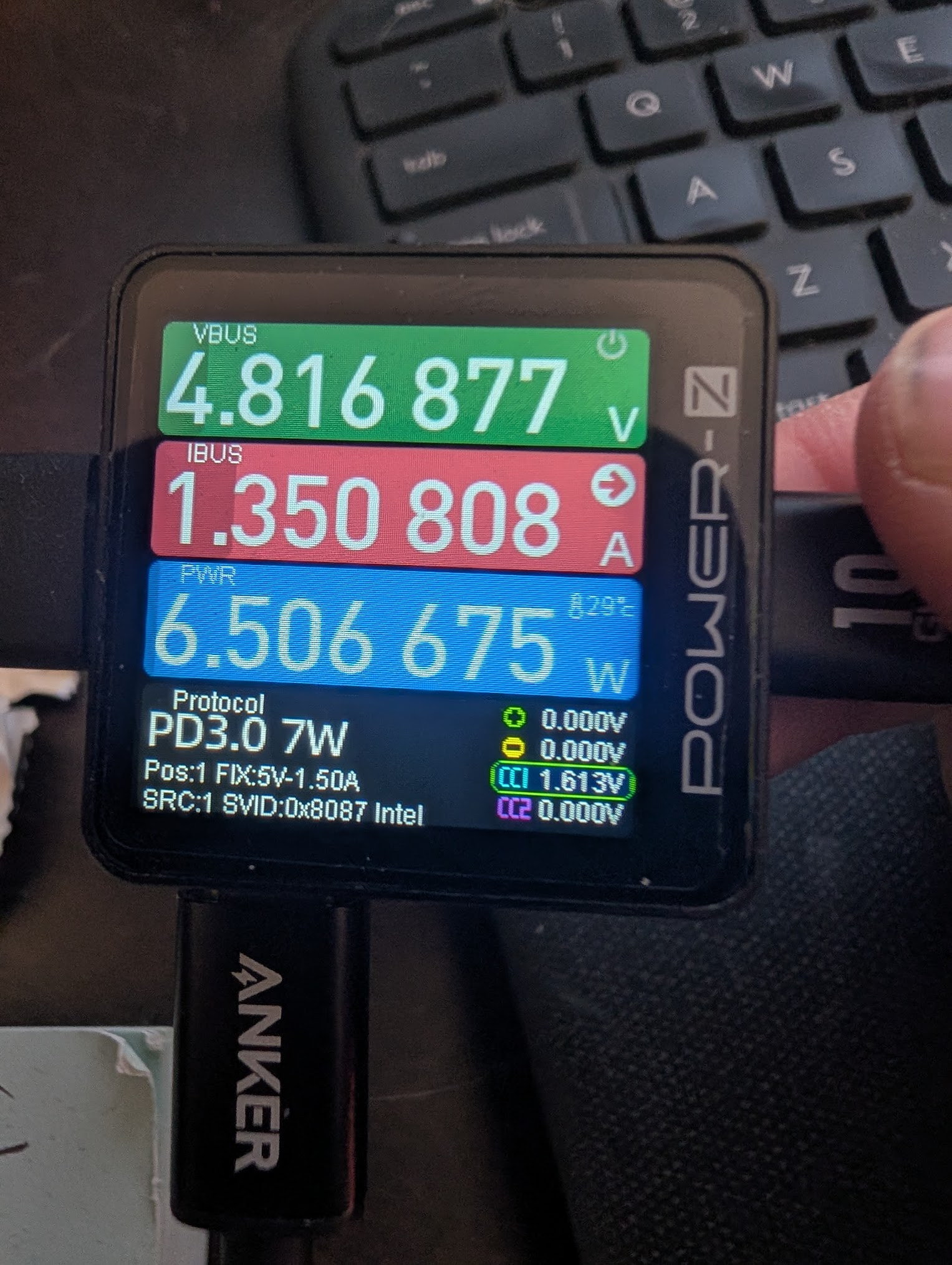
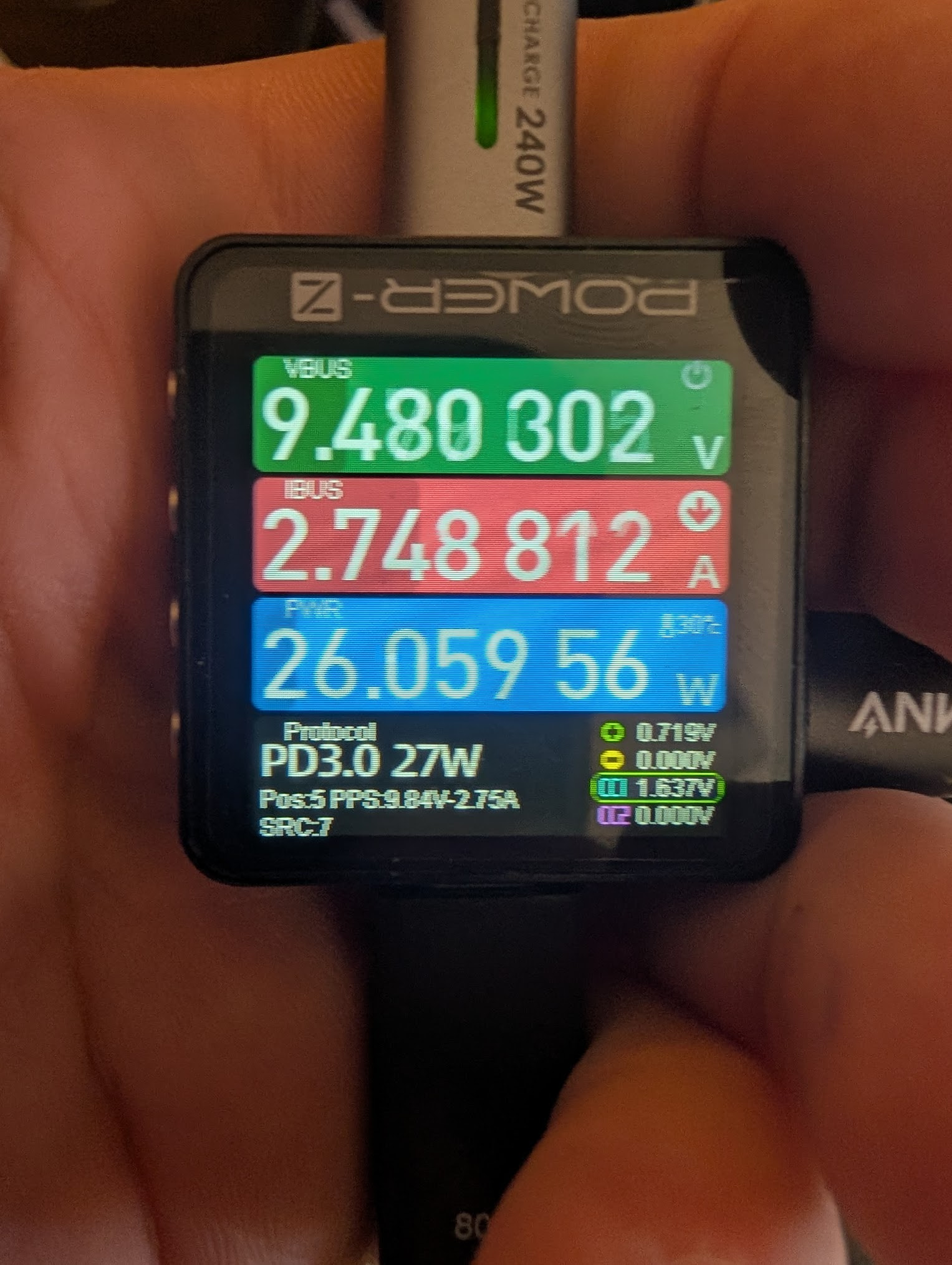
The engineering team sent me a picture of an iPhone connected at PD 15W (coincidentally using the same exact PD power meter I use) which I totally concede is possible - if the device is plugged in when the PSU is engaged. But they didn’t state what conditions led to this 15W, or whether it was stable when unplugging/plugging while the desktop is powered on. I sent back a video showing my phone negotiating 15W as soon as the PD chip is initialized, and holding that 15W all the way into Windows. When I un/replugged it, it consistently negotiated PD 7W, over and over. When I connect it to a 240W USB-C power supply, the phone pulls up to PD 30W, so I know it will actively renegotiate as high as the source PD controller will let it. I tested a total of 12 devices and all show the same behavior. 3A/15W available at boot, and 1.5A/7W available post-power-on.
It seems like they’re rebuilding the PD logic from scratch. if they already have good PD logic for more power-constrained devices like the laptops, why can’t they just use the same logic here, minus the charge circuit?
Supporting Images
Plugged in while desktop powered off, picture taken after reaching Windows login screen (note, the Desktop did not send a SVID - this behavior is inconsistent but not absent):
After unplugging/replugging while desktop is running (twice)(note it now reports an SVID of “0x8087 Intel”:
Pulling from 240W PD3 Anker power station:
Oh, and BIOS setting shouldn’t be a problem:
Note: I am using a 240W-rated USB-C extension cable to connect the meter to the rear port. This is purely for ease of taking videos & images of the meter and devices. I have verified that this behavior persits with a variety of cables with the meter plugged directly into either the device or the PC, and the extension cable is not having any notable effect. Plus when I plug in a 15W device without the meter or anything, it just powers down, but if I have it plugged in while booting, it runs fine as long as it stays connected.
We seem unable to access any of the advanced settings still, any chance these will be coming in a future update?
Among other things, would be good to get access to:
If you dare using it, the program ryzenadj (available for Windows and Linux) can do the TDP controls and a lot more of that, like reducing Tjmax.
Just be careful when using that tool, and only use it when you know what you are doing, out of spec settings might damage the system.
Thanks for the reference. Appreciate the caution, I’ll take care to follow the AMD published limits to be safe.
That said, my initial goals for TDP in this build is actually to limit it to 100W rather than force boost so that sounds safe. And as for IOMMU, I’d like to try turning it off in BIOS since that is reportedly a very minor performance boost in some cases. I know, seems weird to be giving up performance on one side and chasing it on the other - but my goal is to determine what controls do exist and what gains that might result in.
For now I have a couple FWD mainboards I’m testing things with. Based on how things go I may end up building a larger cluster with more nodes. My preference is to use a motherboard (rather than shucking a mini-PC) which was only FWD last year. But I was a bit disappointed to find that the BIOS seems pretty lacking relative to the other Ryzen AI MAX+ 395 vendors.
Minisforum are coming out with MAX+ mainboards this year - presumably their BIOS will be a lot more open (since their MS-S1 Max’s BIOS is), they have opted for a generic LGA1700 cooling system, and their PCIe slot is x16 (x4 electrical). Strong competition indeed.
Fortunately, on the BIOS side FW can improve their offering without any board changes. 
Are you using Windows or Linux bwt? If you are using Linux, 115W boost (~10 sec)/100W sustained TDP are actually the stock energy setting in the OS (balanced). If you switch to “Performance” it changes to 140W boost (10 min)/120W sustained TDP.
Windows is behaving apparently very differently, not sure what is happening there.
I do not consider 100W TDP limit weird at all. The performance gains above 100W are really not much. In games I even found that they were barely there at all.
PS: Ryzenadj also enables undervolting for the CPU btw, however, undervolting of the iGPU was not possible (yet?) when I tested those things.
I’m on Linux. Using it as a headless server, I was looking to limit total power draw to see if I can get it running safely in a 250W budget (DC power supply / HDPLEX) to fit 2x into a compact 2U case with the PCIe slot exposed. I’ve not looked at ryzenadj yet, but it is now on the list. TY again.
(I know there are other 2U cases that can take “real” PSUs, I have the 2xFWDs in one of them now with 2x the standard FWD PSUs. But I like the usability of the MyElectronics option, if the power budget is workable. Just exploring options, basically)
Check you power settings in Linux and have a look at the actual power draw readings for example with s-tui (needs to be run with sudo to show power readings) during CPU stress test.
I have been using the 395/64GB with a SN7100 (2TB) and no Wifi module, for half a year now on an HDPLEX GaN 250W PSU. Never experienced any issues, using it at 100W boost and sustained. I think as long as you don’t go above 120W TDP you should be absolutely fine.