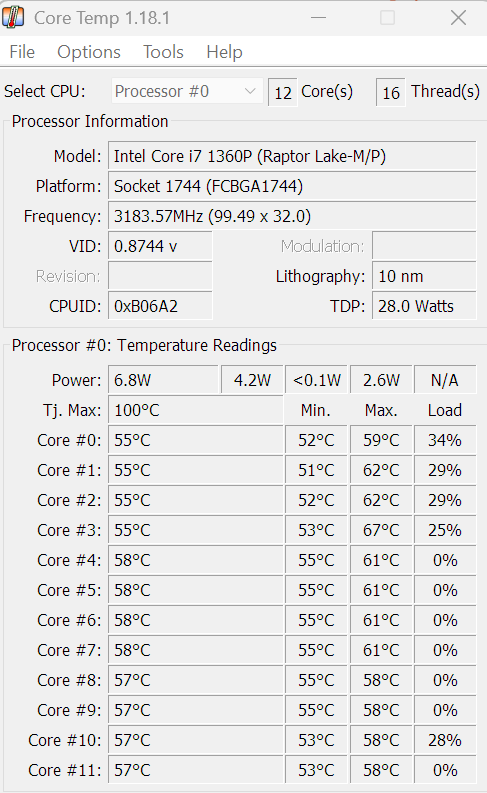
I’m using my Framework 13 (13 gen) for daily email & web browsing etc and I’ve noticed the bottom is getting quite warm and unable on my lap.
The fan is almost silent (usual operation, doesn’t sound strained in the least) and the CPU usage is normal. I thought the fan might have dust build up over the 2.5y of use but when I opened the machine I barely found any “fluff” to remove. I can see some dust build up on the fan wings but nothing that would cause it to heat more than usual.
I did see that the thermal paste holding came right off with no tugging - don’t know if that’s helpful.
Granted it’s summer and a couple of degrees warmer, but something doesn’t seem right and I’m a bit of a noob to understand what could be causing it.
I’ve attached a screenshot from Core Temp & my task manager performance.
I’m running Windows 11 on 64GB RAM and an 13th Gen Intel(R) Core™ i7-1360P.
I’ve experienced this on every laptop where the chassis is the heatsink (ie macbooks). Gets hot when placed on a soft surface like my lap or the couch because it insulates and covers the exhaust on the bottom. If you put it on a hard surface does it still get super hot? If not then I’d say this is normal, and given that your cpu isn’t overheating might indicate that the chassis as a heatsink is doing its job
I thought I read somewhere that the term “laptop” was pretty much redundant now because really, todays laptops are not really safe to use directly on your lap. You’re likely to impede the cooling of the device with it on your lap.
Id recommend a tray or something that would allow for an equally flat surface, protecting your thighs from the heat, and allowing good airflow for the device.