I received my new Framework 12 (Sage) on September 10.
I installed Windows 11 Pro, did all the updates, installed the recommended drivers, and updated the BIOS to the latest version.
Since the beginning, I’ve noticed that my laptop runs hot, even when I’m not doing anything intensive — just chatting on Discord, watching YouTube or Twitch with nothing else open.
It gets so warm that after a while I can’t keep it on my lap because the bottom becomes very hot.
When it’s in tablet mode, the keyboard (which rests on my lap) also gets quite warm.
It becomes uncomfortable to the point that I can’t keep the computer on me anymore, as the heat goes right through my clothes.
I’ve been in contact with Framework support since September 17. They’ve had me run a very large number of tests, my ticket has been escalated twice, but I still haven’t gotten a real answer. At one point they told me that all of my internal temperature readings looked normal to them. I understand that, but it doesn’t explain why the chassis itself gets so hot — and they haven’t really addressed that part.
I’d like to know if anyone else here has noticed the same issue?
I should also add that the fan is quite noisy. It’s intermittent, but when it kicks in, the laptop is pretty loud, which adds to the discomfort.
I have i3-1315U. Just returned everything to stock settings and am using Balanced mode for cpu performance.
At idle my fans run at 0 RPM. Room temperature is on the cooler side - 19.5 degC. But my idle may be a bit different than Windows 11 idling
I tried gaming for a bit and it did run hot and loud. That didn’t bother me because I used it in laptop mode with wireless controller.
This year I tried gaming on an iPad 11”. And the thing ran hot and sucked power like crazy and I used a lower wattage charger which wasn’t powerful enough and it began to drain and charge battery which increases temperature. CPU throttled. Had to add a fan to my gaming iPad to cool it.
Did it bother me that my tablet was hot? No, because I used external display and wireless controller.
(Btw, same iPad also got hot when using it to take notes with pencil - fan helped, but it also cooled my hand which was not comfortable)
I had the same experience with Framework support as you did and I’ve been in contact with them since Sep 14. No resolution or any satisfying answers yet.
After running all the tests they wanted, I was told the temperature looks normal which only adds insult to injury.
I have a sage i3-1315U laptop I received on Sep 9, 2025.
I updated the BIOS to 3.05 which is the latest as of today.
I run tests with no cards, only a USB-A card for the live distro, even charging directly via the motherboard USB-C ports when needed.
Typically I have only USB-A (wireless mouse) and USB-C (charging) cards for convenience. Not much difference in the long run.
So far I tried three linux distros (LMDE6, Mint 22.2, Ubuntu 24.04 Live) and I see the same problem with all of them.
It gets hot while using it the same way you do: web browsing, YT videos, nothing else open.
The top of the keyboard gets very hot and the bottom of the laptop gets hotter than that and the fan goes at full blast.
With Linux Mint 22.2 currently installed, I see the behavior below.
If I use it from an almost full battery to under 30% when it needs to be charged, the temperature is already too high for comfort and the fan is on at full speed.
It’s not able to cool the laptop and once plugged in, the heat only gets worse. 70+C and sometimes hitting 80+C as reported by various utilities.
As a different use case I tried playing a 2009 game (Drakensang) on Lutris, which I chose because it really doesn’t have any special requirements hardware wise. The game graphical settings are set average to low.
In a much shorter time than in the very light scenario above the machine gets extremely hot and the battery life plummets if used on battery.
Then I installed auto-cpufreq and forced the “powersave” governor and turbo mode “never” (off) when plugged in. While that helps with gaming, it still runs hot and reaches 70 to 80C as reported by the Simple CPU monitor. At the same time I used the following commands to watch the sensors:
sensors
auto-cpufreq --stats
auto-cpufreq gui
and they all show high temperatures after any sustained use.
The key takeaway is that after enough time passes the system cannot be cooled effectively and a leser load just increases the time until the inevitable heating occurs.
Running on battery is not significantly better than plugged in so this cannot be blamed on the charging circuit+battery.
It looks like either a bad thermal design or a defect with some of this batch if no one else notices something similar.
The only solution I found is to shut it down and let it cool because I don’t want to risk permanent damage especially as this issue is not officially recognized as existing.
Since my last post I’ve heard back from Framework support. After insisting that this didn’t seem normal to me, they offered to send me a replacement of the motherboard!!
I’ll have to send the previous one back in exchange.
I don’t know if this will actually solve my problem, but I’m hopeful!!
You said you received your laptop on September 9 ? were you in batch 8?Is it possible there’s a batch issue with this one…?
Well, what does a program like “top” says? (run in terminal)
Either something runs behind your back, or your “normal” usage is a bit ab normal.
For example, on Fedora 42 I have a service usbmuxd which taxes 1 CPU at 100% every time I plug an Apple device to charge via the laptop. I have to manually stop it. Haven’t tried to report a bug yet, because I don’t exchange data between the devices.
I’ve run a compilation on all core for about 4 minutes and the cooler keeps up on my i3-1315U. Obviously, when things get toasty the frequency lowers to 2-3Ghz on all cores to avoid overheating.
P.S.
Look at the service which are running. Everything should be quiet and just a little warm (40-60 degC depending on season - here the winter begins).
P.S.2
If you’re all confident that your low usage is really that, maybe consider if you have to repaste the CPU.
And yes, it is a batch 8 machine. It could be an issue with the batch but with only two occurences it may be just coincidence.
I had a USB hub die while being used with this laptop and I’m pretty sure THAT is coincidence and nothing more.
Two other hubs I tried work just fine but I don’t keep any permanently connected and so far I never charged through any of them just to keep things simple for testing.
Then there is the BIOS: it appears there are problems with 3.05 and a new beta version will be released.
We also don’t know what is considered normal for these laptops in terms of load and temperature.
It would be nice to have an official test that would load the CPUs in a deterministic way and provide a temperature curve for that case.
I’m tempted to use Prime95 and do a stress test.
And here’s more weirdness. The official power adapter is 60W.
I used three brand new Anker rated 65W, 67W and 70W chargers with different cables and both of them get too hot to touch in the scenario below. Two of them are GaN so they are more efficient than the others.
The cable end entering the laptop is cool but the end connected to the charger and the charger itself gets really hot.
Looking at voltages and currents they all seeem to see very similar numbers but they do fluctuate for any given combination of cable+charger.
What power rating does your charger have and how hot does it get while charging a laptop already warm from normal use?
Do you have any numbers for the high temperatures you see?
That’s the first thing I checked: what runs and how much CPU it uses. I don’t consider any of these descriptions of “normal” very rigorous but it’s enough to give me an idea.
I mostly avoid plugging in anything for these test runs, “not even a mouse” at times.
I use apple charger for makbook - 70 watt. I do not charge the battery during use - it’s set at 60% charge. I use the battery when travelling and in cases of a blackout (a few times a week for 10-15 minutes).
The hottest part is at the exhaust, but that is to be expected.
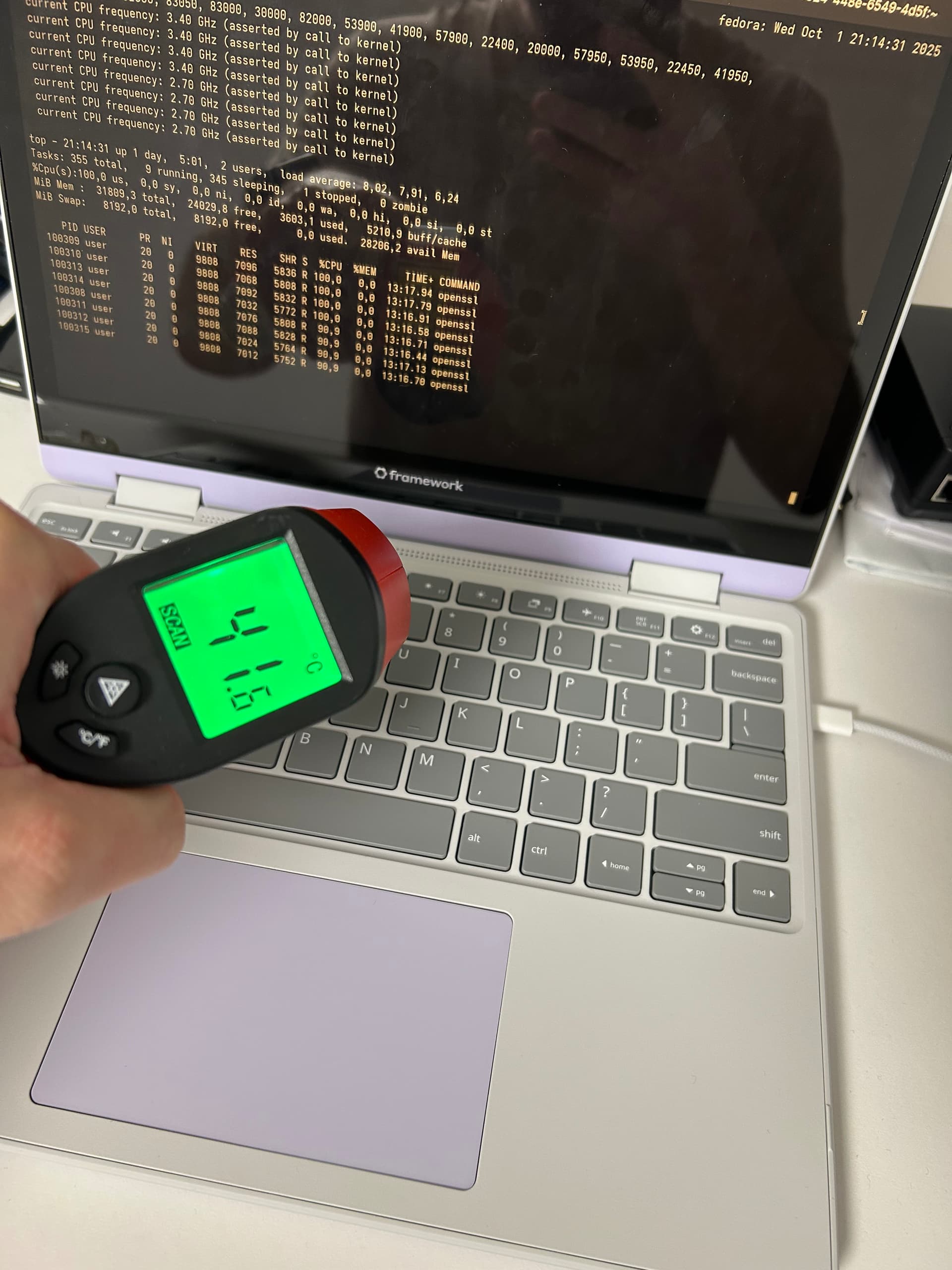
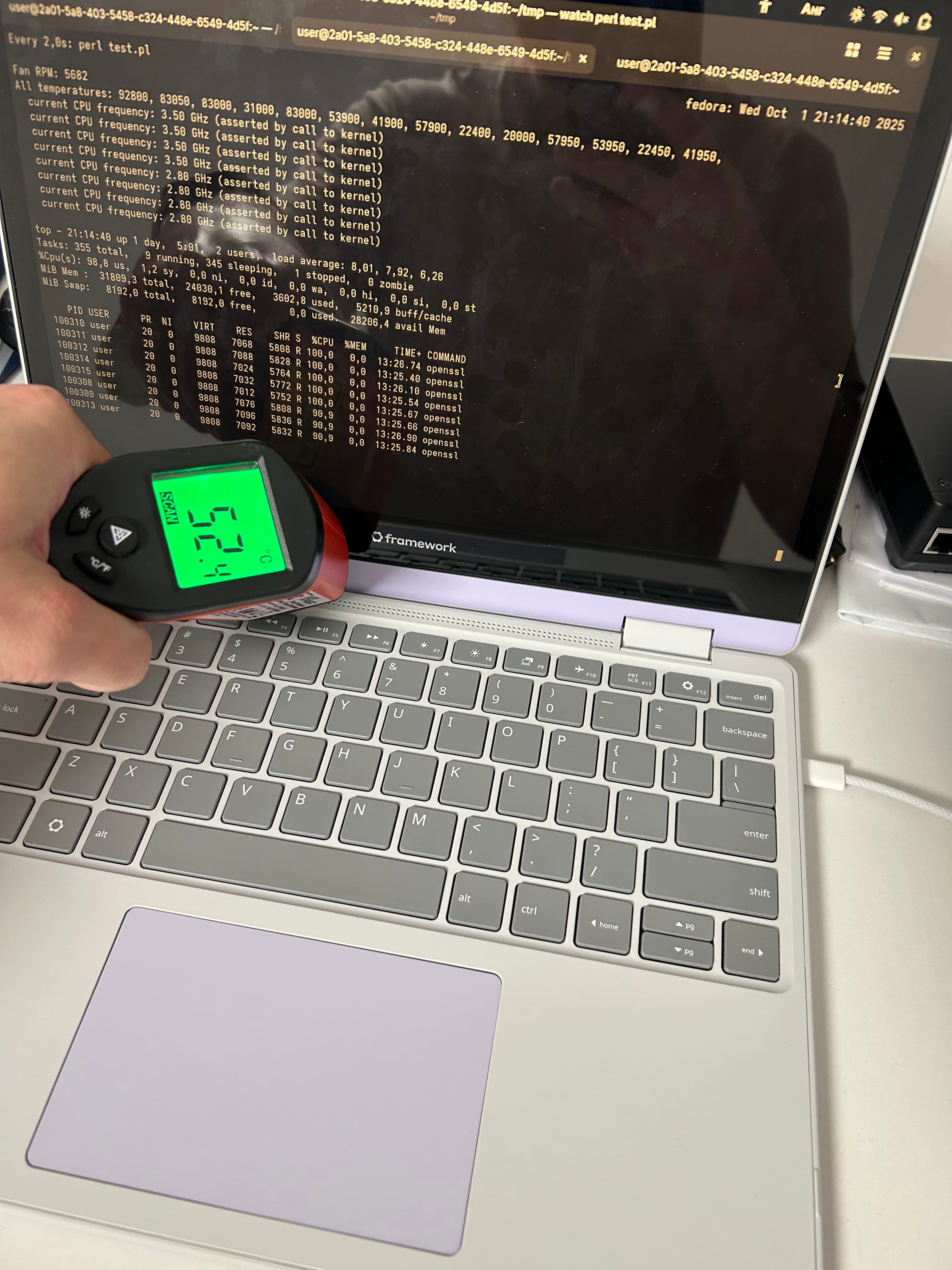
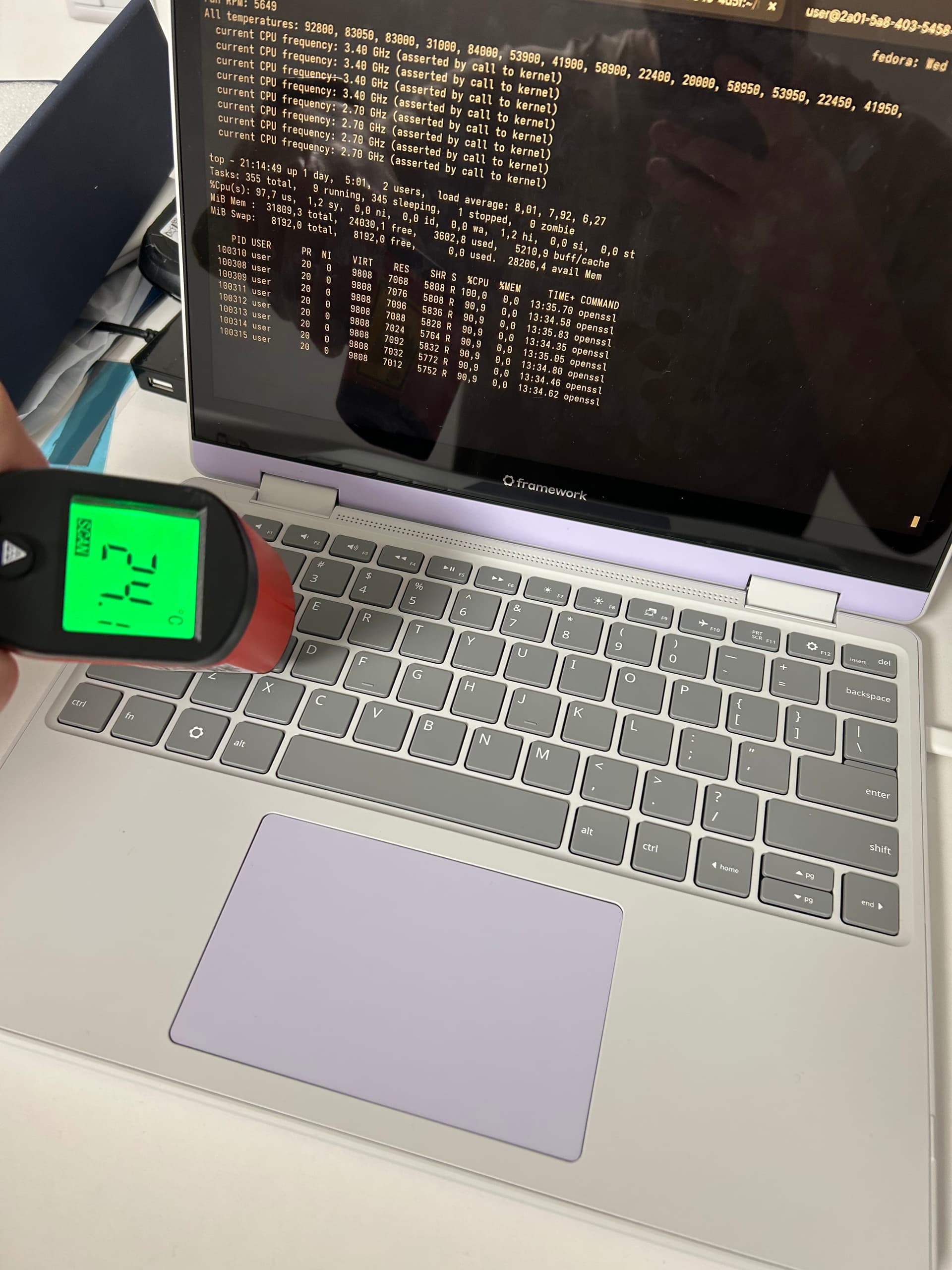
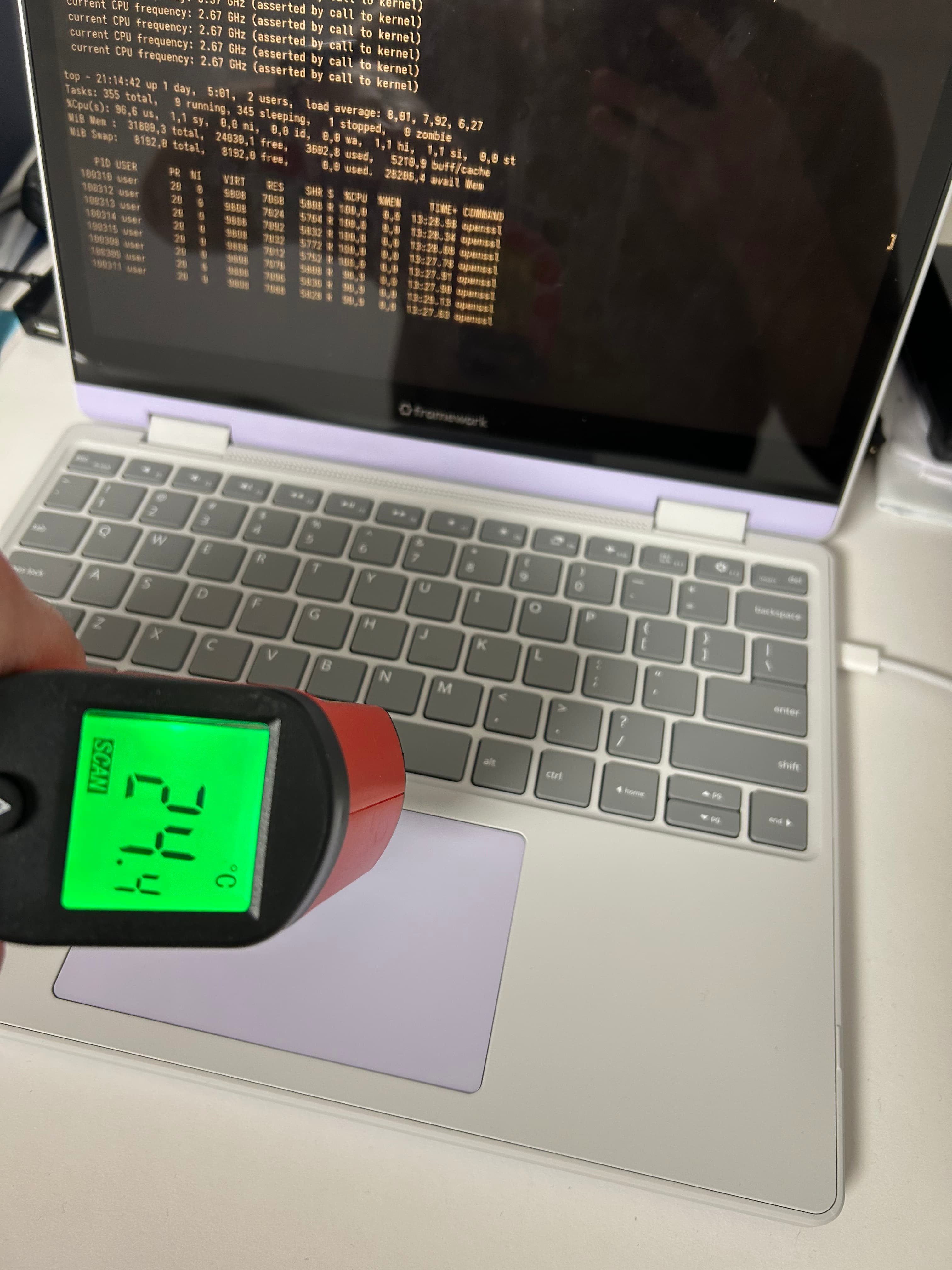
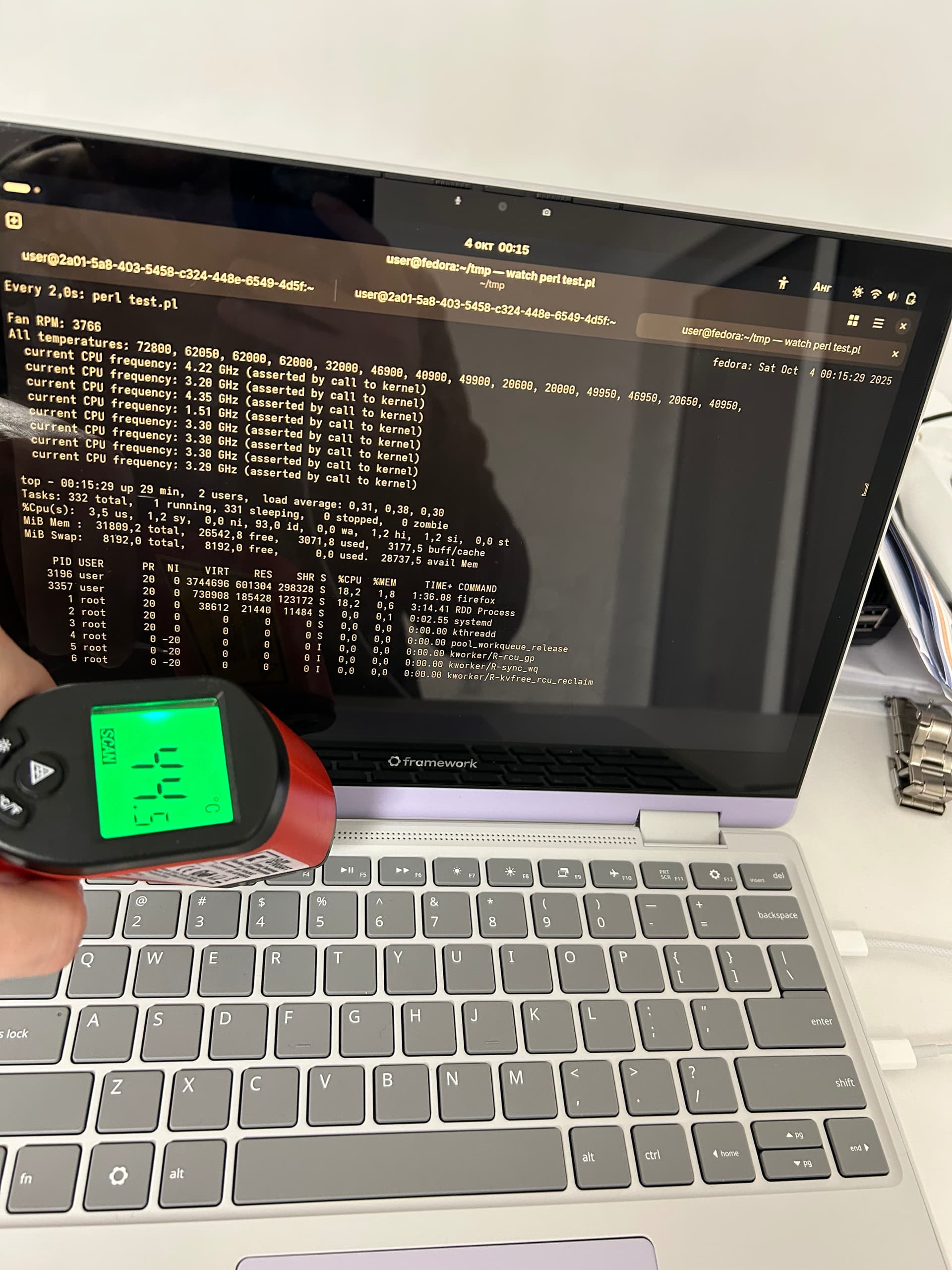
I took pictures of simulating work for about 13 minutes by starting 8 processes with “openssl speed”. The test still continues. I take all the temperature from /sys/class/thermal*/temp, but I don’t care which component is the hottest - I just look if throttling occurs.
I also limit battery charge to 60% and I keep it plugged in when I know the battery life will plummet on the planned use. In such cases the chargers stay lukewarm.
They heat up only in the scenario described above.
Using a similar IR thermometer, I got 45C when measuring more perpendicular to the kbd where yours shows 41.5C - in cases where it got hot.
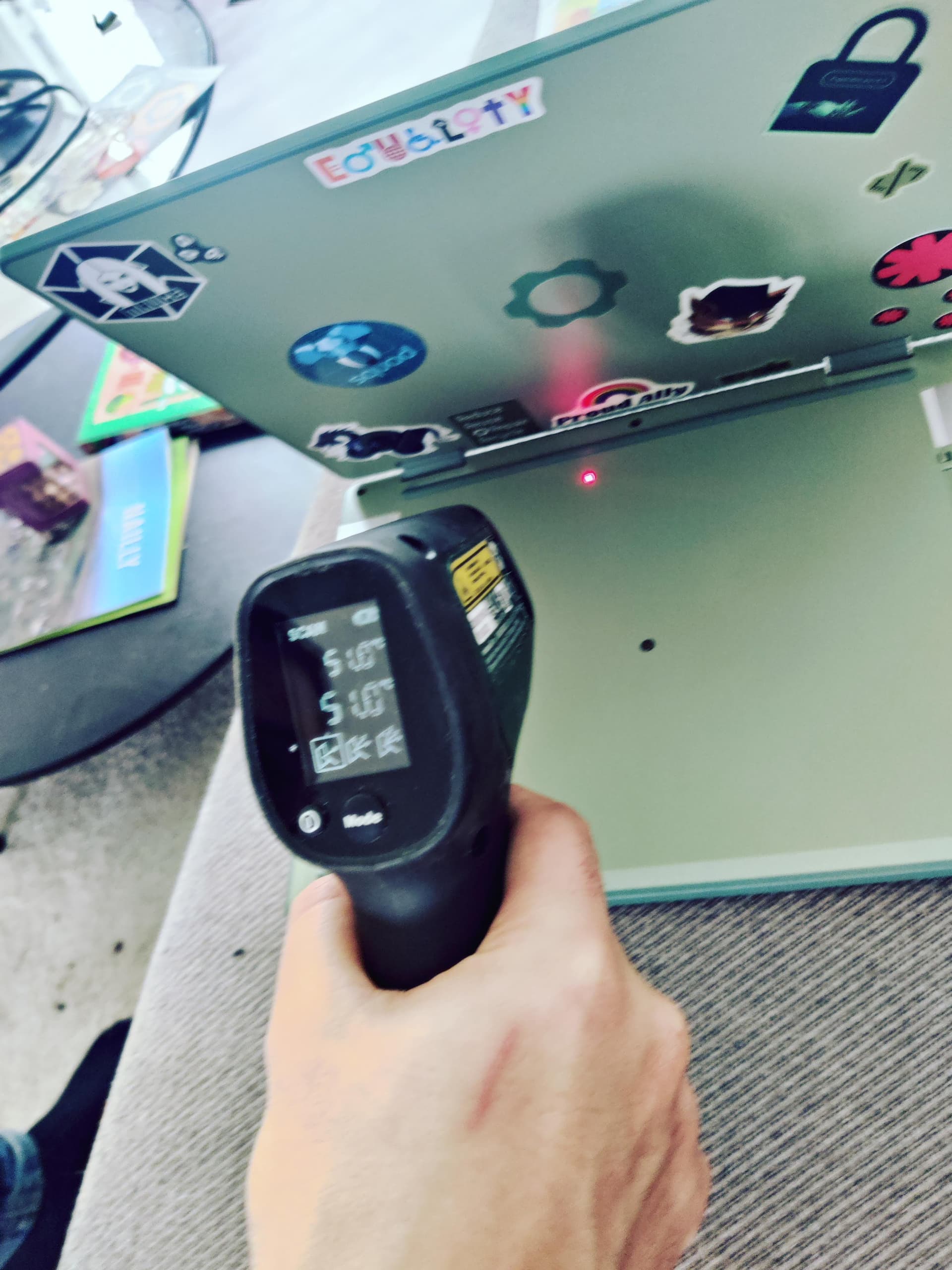
Keeping in mind these average a circular surface which varies in size depending on the distance to the measured surface I’d say it’s probably higher than that going by how it feels to the touch. Flipping the open laptop 90 degrees so the lid/screen is on the table I measured 55C on the bottom.
I didn’t measure the exhaust because of the averaging behavior. Unfortunately I don’t have a thermal camera to capture a heat map.
I ran mprime in balanced mode for 5 minutes today on charger and the machine was throttling nicely and never got hot, just 60ish(C) and stable. I will test for longer at some point.
However, when I started browsing with one (1) tab open when I got to watching an embedded video which I looped to run it for a few minutes the temperature got higher than that.
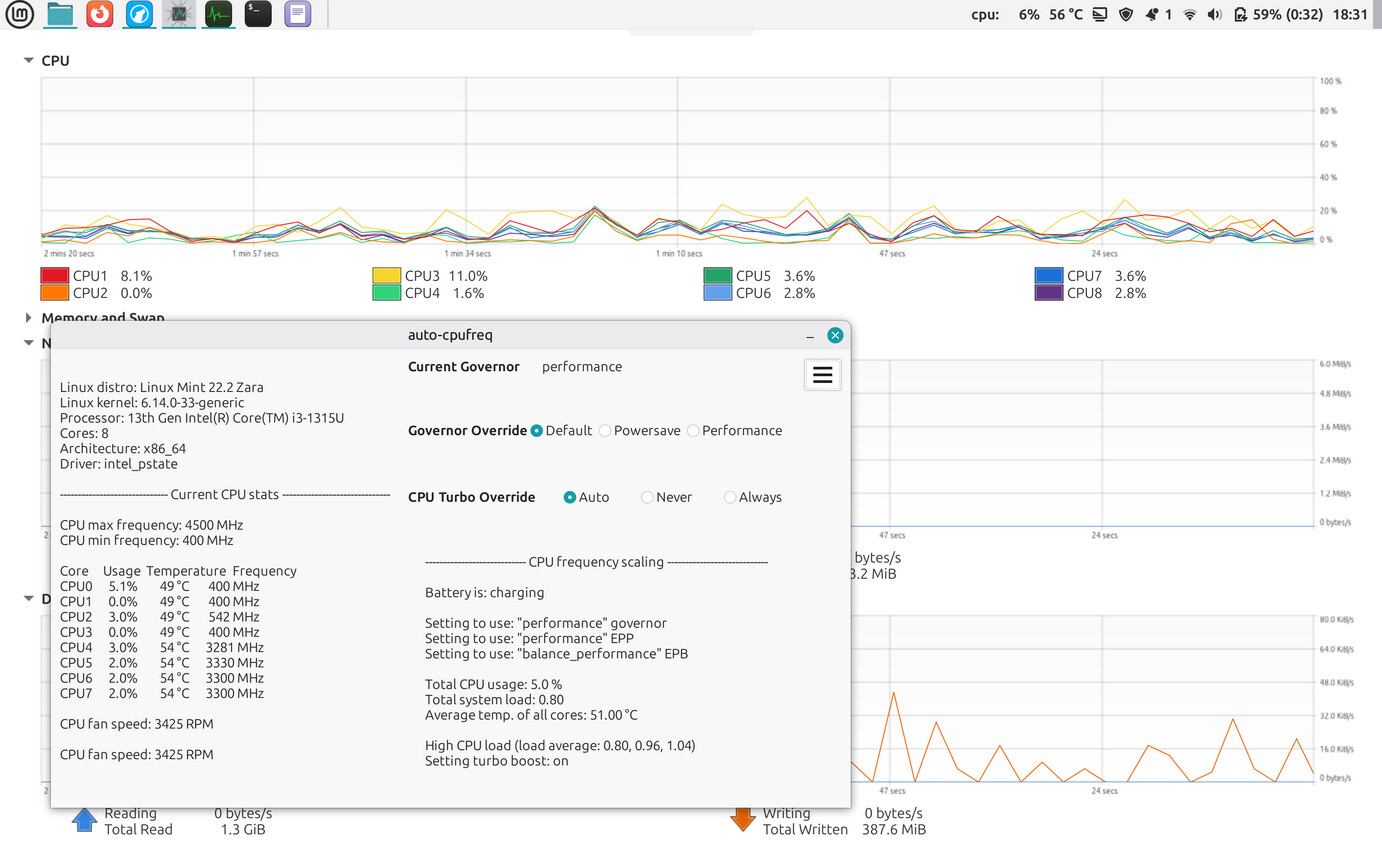
Attached are pictures showing
the auto-cpufreq gui and the system monitor on battery while playing said video
the auto-cpufreq gui and the system monitor on charger while playing the same video
the auto-cpufreq gui on top of the system monitor on charger while browsing the same site with no video playing
I prefer to show the system monitor instead of top/btop/htop because one can see the history. It wasn’t very busy just before the capture being the point. The “static” browsing capture is for reference.
Regardless of how efficient/inefficient the playback may be, the temperature is higher than what I’d expect for such a load.
This is not the extreme temperature case either, I didn’t have time to try and trigger that.
Note: The memory use graph is collapsed because I probably clicked on it when switching windows and I just noticed it now. It has no other significance.
Edit: I’m limited to upload two pictures and to reply only three time to a post?! I’ll post the other three tomorrow if I can.
I received the new motherboard yesterday, replaced it, and redid all the BIOS, driver, etc. updates as requested by Framework.
I had a brief moment of hope for a few hours, but then the laptop started heating up again… everything is exactly the same !
Support has put me back into another loop of troubleshooting: running Cinebench, recording videos, checking if the fan is spinning properly (it is spinning, I can clearly hear it!!).
I’m a bit discouraged, I don’t know if my Framework has a defect or if this is a design issue. But if it were a design issue, wouldn’t there be more feedback from other people experiencing the same thing?
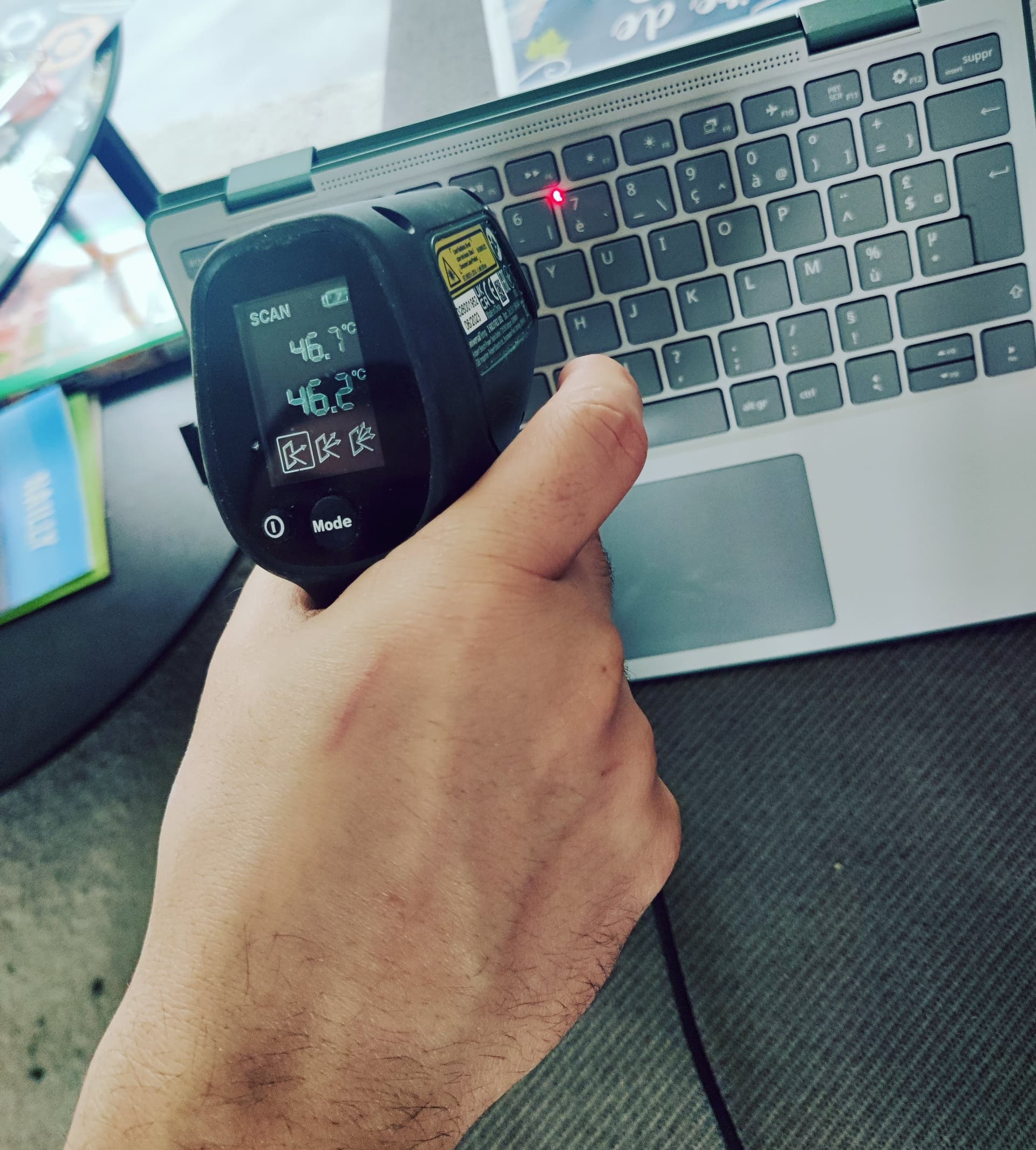
I measured the temperature and reached 52°C on the back of the chassis. Here’s a picture showing 51°C, and another one with 46°C on the keyboard.
At that temperature, it’s impossible to keep it on my lap: even through my pants it gets way too hot, and I have to put a tray or cushion between my legs and the laptop. The keyboard itself also gets quite warm…
I just wanted to add, mine feels like it reaches roughly the same temps in the same areas (back middle of the chassis, both top and bottom, but I don’t have anything to measure it with), but that to me seems normal? The fan is spinning at quite a low rpm constantly (barely audible if at all) while just browsing or watching YouTube, so after 60-90 minutes it does heat up but yeah to me that seems par for the course for laptops in general, especially one with this design of a relatively small exhaust through the keyboard cover and the back.
My CPU Package is reading 50-55°C in the above stated light use conditions, so I’d expect the exhaust to approach the same (obviously depending on ambient as well). It does get quite warm to the touch once it stabilizes, and I can conceivably see it being uncomfortable to hold on my lap, but then again I’ve never had a different experience with laptops.
Thanks for the picture. Now I have a number for what someone feels as too hot.
Yes, I agree that at this temperature it’s not suitable to touch any body part. As a fellow user, I do not find it strange. I think I’ve read that 13th gen Intel CPUs run hot.
After 15 minutes of watching watch review here is my temps. Note that the room temperature is 17.6 degC, because it’s winter here and I’m saving money for the stylus. I expect it’ll run a bit hotter in the summer or if I had money for heating.
I think so too. I also have a dell laptop that’s i5 1235u from before this and it always ran hot (I would hear the fans spin up every time I just loaded a youtube video up).
Both GNOME’s and KDE’s system monitor doubles or even triples the idle power consumption thanks to their fancy UI. terminal programs like s-tui are more efficient
I’m not looking at idle power consumption here. The issue is heat vs trivial use.
This is done using total load as a measure and is not a precise thing. It doesn’t matter so much what creates that total load as it matters what the load is.
I think leaving the system monitor on while doing light tasks like document editing is going to heat the computer more than doing light tasks without using the system monitor