If and when this happens to the FW13 and is at least MVP then Framework becomes a viable option for me again. I got burned so horribly with the Intel 12th gen platform that never again will I buy a laptop without FOSS firmware already available.
I sincerely hope FW is privately supporting this effort. FOSS firmware and firmware support in general has not been well handled by this company in the past.
Hopefully the port will be complete or in a MVP stage by the end of the year.
No link in that article that I can find, so I’m not holding my breath.
However, a working alternative to Framework’s garbage firmware would be an amazing thing to happen. We are still tortured with terrible firmware bugs over a year into this laptop.
I think so. The big advantage would be that Framework would be free to focus on newer hardware without having to support old boards via frequent software updates in order to patch exploits.
Ah gotcha. My first thought was that it might expose options available through something like smokeless easier to get to, but from a business perspective I could see the sense in what you say.
It replaces the InsydeH2O BIOS currently in use with a FOSS alternative. This would enable the community to implement features desired that Framework has failed to enable such as ReBAR support and yes, provide firmware support after Framework abandons/EOLs products.
There are theoretical security benefits that come inherently with open-source as well. Plus the ideological consistency between R2R and FOSS.
Your information is outdated (although mostly correct in terms of Intel CPUs).
If i may do a bit of shamelss self-plug here, I explained it in detail at 38C3:
Also worth watching in terms of PSP:
Another (older) shameless self-plug. relevant to the discussion only because of CrosEC:
On AMD Zen architecture you don’t have CAR anymore. Memory initialization is done by the PSP (Platform Security Processor), a tiny ARM core(s) (one per CCX). So it looks more or less like:
Apply power to the SoC.
PSP BootROM wakes up, loads off-chip bootloader.
ABL (AGESA Boot Loader).
Parse APCB, in our case memory isn’t soldered so SPD ROMs are located at SMBus 0x50 and 0x51.
Perform memory training and initialization, save to APOB.
Load SecureOS, TPM and other “security” stuff.
Release x86_64 cores from reset.
Bring-up the UART GPIOs and other things you added to bootblock.
Jump to romstage, it’s not doing anything here (since memory is already up) except for passing some pointers etc.
Jump to ramstage, where silicon initialization is taking place (APIC, MPIO, CCX, PCIe etc.)
Payload (we’re not at this point yet): For now it will be only EDK2. Modern AMD iGPUs don’t support legacy BIOSes anymore, OpenSIL ships with GOP driver that needs to be added to the build. I’m planning on reverse-engineering it though and using LinuxBoot should be possible anyway as Linux kernel can perform gfxinit on it’s own).
Thought you folks might be interested. I think it’s a decent progress for one week
Figuring out the SIL_CONTEXT structure took me quite a while, but eventually saw which values SilContext is passing data to. After adding it the memory was “initialized” without any hacks: SIL_CONTEXT silcontext; silcontext.ApobBaseAddress = CONFIG_PSP_APOB_DRAM_ADDRESS; silcontext.SilMemBaseAddress = CONFIG_EARLY_RESERVED_DRAM_BASE;
There are still some issues with memory however, as during CCX init it reports nonsensical values: [DEBUG] SIL:xUSL:AmdGetApobEntry:67:APOB SIG Check fail, APOB is not supported [DEBUG] SIL:xUSL:AmdGetApobEntryInstance:172:No entry found [ERROR] SIL:xUSL:ApobGetCcdLogToPhysMapPhx:386:Failed to retrieve Apob Instance (InstanceId = 0x0) [DEBUG] SIL:xUSL:InitializeCcxAndLaunchAps:330:NumberOfSockets=1 [DEBUG] SIL:xUSL:InitializeCcxAndLaunchAps:331:NumberOfDies=1 [DEBUG] SIL:xUSL:InitializeCcxAndLaunchAps:332:NumberOfCcds=1550182662 [DEBUG] SIL:xUSL:InitializeCcxAndLaunchAps:333:NumberOfComplexes=1550639000 [DEBUG] SIL:xUSL:InitializeCcxAndLaunchAps:334:NumberOfCores=1550639376 [DEBUG] SIL:xUSL:InitializeCcxAndLaunchAps:335:NumberOfThreads=33 [DEBUG] SIL:xUSL:InitializeCcxAndLaunchAps:351:AmdDownCoreMode is changed to CCX_DOWN_CORE_7_0 [DEBUG] SIL:xUSL:CcxDownCoreInit:213:CCD mode: 0x8 [DEBUG] SIL:xUSL:GetZen4DesiredCcdCount:63:Unsupported CCD Mode 8 [DEBUG] SIL:xUSL:GetZen4DesiredCcdCount:70:Zen4: DesiredCcdCount 0xFFFFFFFF CcdDisMask 0x0 [ERROR] SIL:xUSL:CcxDownCoreInit:228:Invalid CCD mode requested! [ERROR] SIL:xUSL:CcxDownCoreInit:263:Invalid CCX downcore mode requested!
Had to hack-up OpenSIL’s code for AOAC as it would disable UART0 during powering it on. I suspect OpenSIL uses different device definitions, but I find it a bit funny that I ran into the same exact issue when I was working on PantherLake about half a year ago (although that was a problem with early silicon revision). I simply sabotaged the check for now:
Looks like now we’re getting to the point of initialising USB and PCIe, but obviously I haven’t worked on that code yet as I expected more issues with silicon initialization:
[SPEW ] SIL:xUSL:InitializeMpioPhxTp1:116: [SPEW ] SIL:xUSL:xUslFindStructure:92: [DEBUG] SIL:xUSL:xUslFindStructure:99:Looking for IP block ID 17 [DEBUG] SIL:xUSL:xUslFindStructure:106:SilMemoryBase: 0x2000000, FreeSpaceOffset: 0x1b7a4, FreeSpaceBase = 0x201b7a4 [SPEW ] SIL:xUSL:xUslFindStructure:116:FoundStruc.Data @0x2006a3c [DEBUG] SIL:xUSL:InitializeMpioPhxTp1:130:MPIO IP block is located at 2006a3c [SPEW ] SIL:xUSL:xUslFindStructure:92: [DEBUG] SIL:xUSL:xUslFindStructure:99:Looking for IP block ID 13 [DEBUG] SIL:xUSL:xUslFindStructure:106:SilMemoryBase: 0x2000000, FreeSpaceOffset: 0x1b7a4, FreeSpaceBase = 0x201b7a4 [SPEW ] SIL:xUSL:xUslFindStructure:116:FoundStruc.Data @0x2019b0c [SPEW ] SIL:xUSL:NbioInitializeDxio:92: [SPEW ] SIL:xUSL:FixupLaneMappingForFP8:804: [DEBUG] SIL:xUSL:FixupLaneMappingForFP8:825:Lane Mapping for PHX1 and HPT1 [SPEW ] SIL:xUSL:FixupLaneMappingForFP8:845: [SPEW ] SIL:xUSL:MpioRemoveCxlLinksPhx:573: [SPEW ] SIL:xUSL:MpioRemoveCxlLinksPhx:579: [SPEW ] SIL:xUSL:MpioConfigurePsppPhx:1794: [SPEW ] SIL:xUSL:xUslFindStructure:92: [DEBUG] SIL:xUSL:xUslFindStructure:99:Looking for IP block ID 17 [DEBUG] SIL:xUSL:xUslFindStructure:106:SilMemoryBase: 0x2000000, FreeSpaceOffset: 0x1b7a4, FreeSpaceBase = 0x201b7a4 [SPEW ] SIL:xUSL:xUslFindStructure:116:FoundStruc.Data @0x2019aac [SPEW ] SIL:xUSL:MpioConfigurePsppPhx:1818: [DEBUG] SIL:xUSL:MpioCfgBeforeDxioInit:202: Socket 0 [SPEW ] SIL:xUSL:MpioManageTopology:435: [ERROR] SIL:xUSL:MpioManageTopology:471:Complex descriptors reached limit without terminator. [DEBUG] SIL:xUSL:MpioUserConfigDump:134:<---------- PCIe User Config Start-------------> [DEBUG] SIL:xUSL:MpioUserConfigDump:135: BMC Link Location is 0 [DEBUG] SIL:xUSL:MpioUserConfigDump:140:<---------------- Socket 0 -----------------> [DEBUG] SIL:xUSL:MpioUserConfigDump:140:<---------------- Socket 1 -----------------> [DEBUG] SIL:xUSL:MpioUserConfigDump:140:<---------------- Socket 2 -----------------> [DEBUG] SIL:xUSL:MpioUserConfigDump:140:<---------------- Socket 3 -----------------> [///] [DEBUG] SIL:xUSL:MpioUserDescriptorConfigDump:33: Engine Type - Invalid [DEBUG] SIL:xUSL:MpioUserDescriptorConfigDump:38: Start Phy Lane - 41 [DEBUG] End Phy Lane - 16 [DEBUG] SIL:xUSL:MpioUserDescriptorConfigDump:43: Hotplug - 0 [DEBUG] SIL:xUSL:MpioUserDescriptorConfigDump:44: GpioGroupId - 67
I reckon we should be able to get into payload (EDK2) by the end of next week if I won’t run into some silly issues with MPIO. I’m going to enjoy my weekend first though
In the boot logs, one of the errors is stack corruption. I would suggest probably start looking there, before sorting the apob problem.
Maybe a problem with calls between source code and binary blobs and the associated return values.
[ERROR] Stack corruption detected at eip: 0x5c666f54
With those changes, it looks like MPIO (MicroProcessor Input/Output) block initializes PCIe. I can see that my NVME SSD (in big slot) and WiFi card are detected:
[DEBUG]  SIL:xUSL:GetAsk:227:Response = 0x1 | 0xd0 | 0x0 | 0x0 | 0x0 | 0x0
[SPEW ]  SIL:xUSL:MpioUpdatePortTrainingStatus:45:
[DEBUG]  SIL:xUSL:MpioUpdatePortTrainingStatus:56:  Training State for Device 1 Function 1 is 0x8
[DEBUG]  SIL:xUSL:MpioUpdatePortTrainingStatus:85:  linkTrainingState indicates EMPTY_SLOT
[DEBUG]  SIL:xUSL:MpioUpdatePortTrainingStatus:56:  Training State for Device 1 Function 2 is 0x8
[DEBUG]  SIL:xUSL:MpioUpdatePortTrainingStatus:85:  linkTrainingState indicates EMPTY_SLOT
[DEBUG]  SIL:xUSL:MpioUpdatePortTrainingStatus:56:  Training State for Device 2 Function 2 is 0x6
[DEBUG]  SIL:xUSL:MpioUpdatePortTrainingStatus:67:Successful Device is on Socket 0 StartLane 23 Endlane 23 Device 2 Function 2
[DEBUG]  SIL:xUSL:MpioUpdatePortTrainingStatus:56:  Training State for Device 2 Function 4 is 0x6
[DEBUG]  SIL:xUSL:MpioUpdatePortTrainingStatus:67:Successful Device is on Socket 0 StartLane 24 Endlane 27 Device 2 Function 4
[SPEW ]  SIL:xUSL:MpioUpdatePortTrainingStatus:93:
[DEBUG]  SIL:xUSL:WaitReady:40:Wait for MPIO ready...
[DEBUG]  SIL:xUSL:MpioServiceRequestCommon:75:MpioServiceRequest Enter
[DEBUG]  SIL:xUSL:MpioServiceRequestCommon:88:  MPIO Service Request 0x1
[DEBUG]  SIL:xUSL:MpioServiceRequestCommon:89:  MPIO Service Request Argument 0x0, 0x0, 0x0, 0x0, 0x0, 0x0
[DEBUG]  SIL:xUSL:MpioServiceRequestCommon:212:MpioServiceRequest Exit
@sirwolfgang I was told that Strix/Krackan will not receive OpenSIL support. However, AMD’s engineers said they would be open to support this and my coworkers added preliminary support for this platform in coreboot.
If PSB (Platform Secure Boot) is disabled on that platform, we’ll simply need to nicely ask Nirav to share schematics with me once I get this model up and running
You can check if PSB is disabled by pulling coreboot repository, going to util/amdtool, compiling it and launching it as root (disable secureboot, add iomem=relaxed to cmdline at boot): ./amdtool -a.
At the bottom of report you should see the status. Here’s how it looks on Phoenix:
============= Platform Secure Boot ==============

PSB: STATUS = 00000000
0x0000 = PLATFORM_VENDOR_ID
0x0000 = PLATFORM_MODEL_ID
0x0000 = BIOS_KEY_REVISION_ID
0x0000 = ROOT_KEY_SELECT
0x0000 = PLATFORM_SECURE_BOOT_EN
0x0000 = DISABLE_BIOS_KEY_ANTIROLLBACK
0x0000 = DISABLE_AMD_KEY_USAGE
0x0000 = DISABLE_SECURE_DEBUG_UNLOCK
0x0000 = CUSTOMER_KEY_LOCK
PSB: HSTI = 50001001
0x0001 = PSB Status/Error (Other)
0x0000 = PSB Fusing Readiness
0x0001 = SPL Fuse Update Required
0x0000 = SPL Fuse Error
0x0000 = SPL Entry Error
0x0000 = SPL Table Missing
0x0001 = HSTISTATE_PSP_SECURE_EN
0x0000 = HSTISTATE_PSP_PLATFORM_SECURE_EN
0x0001 = HSTISTATE_PSP_DEBUG_LOCK_ON
0x0000 = HSTISTATE_PSP_CUSTOMER_KEY_LOCK_ON

PSB state: NOT ENABLED
You may flash other firmware!
But the Platform Secure Boot state may still be changed to ENABLED or DISABLED!

=================================================
@ellyqw
On the FW16 AMD 7840HS that you have.
Which pins on the mainboard are you using to flash the BIOS ?
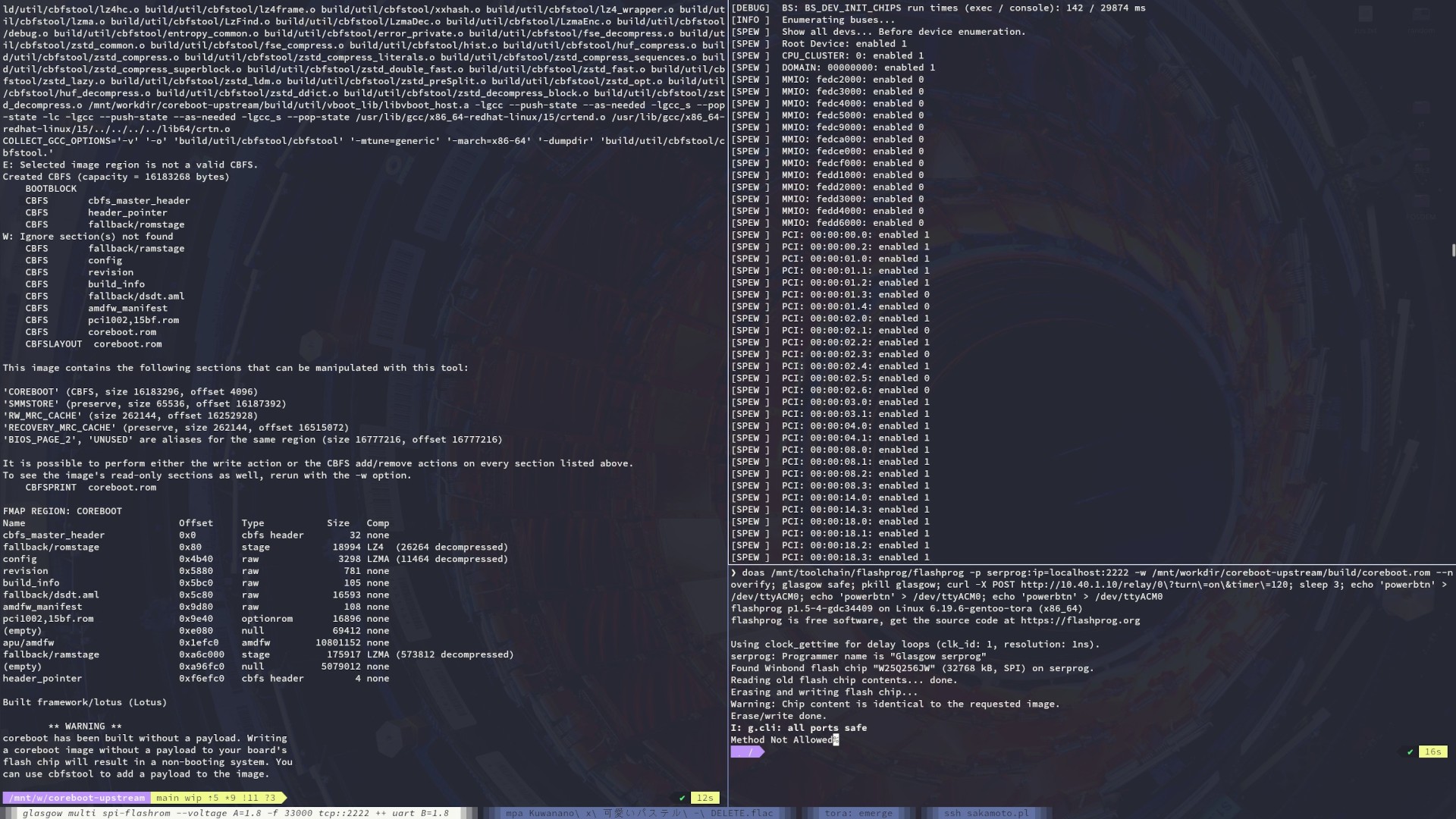
Which tool / software are you using to flash the BIOS?
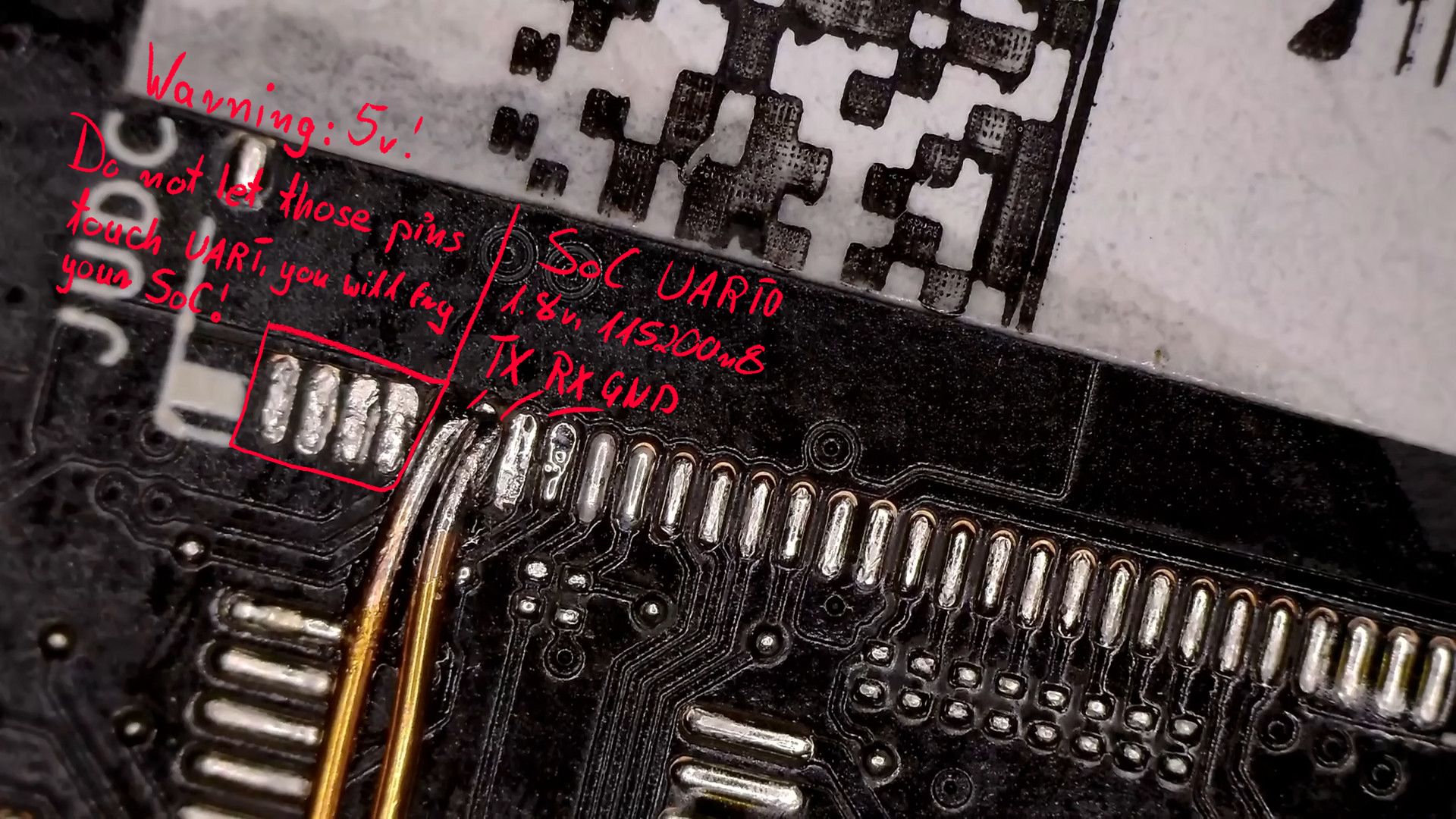
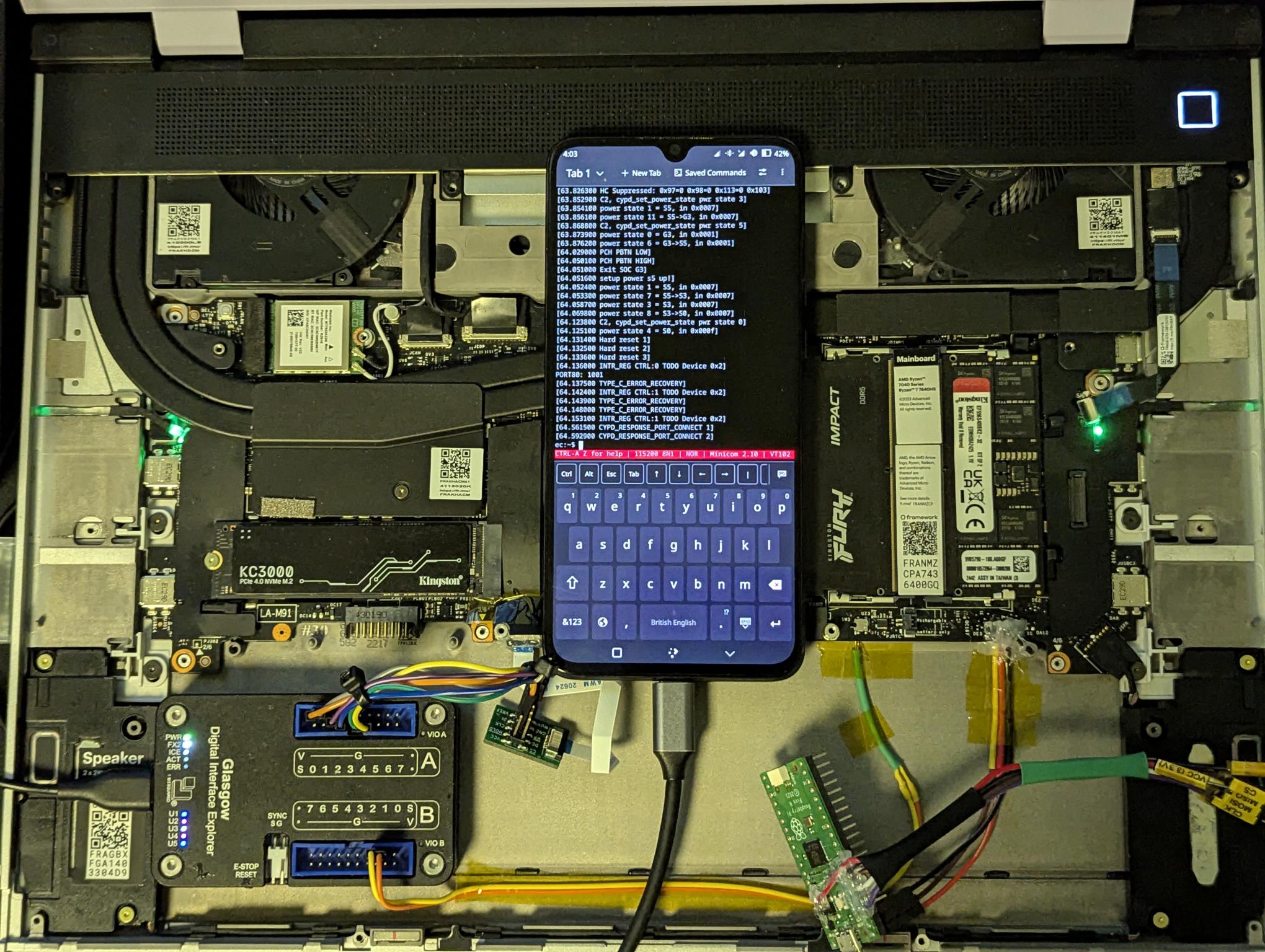
Glasgow is connected to JSPI (interfacing with Winbond 256Mbit SPI flash) and JUDC (SoC UART0).
It’s capable of driving it’s I/O pins with 1.8V and can run two applets at the same time, which makes it perfect for the job (as mentioned, I/O on AMD SoCs is 1.8V only).
Pi Pico is connected to JECDB and it’s used for talking with the Embedded Controller’s UART (3.3V I/O).
Shelly Plug is connected between power strip and official 180W power adapter that came with the laptop. It allows me to toggle power on/off from terminal using curl (including toggling power on for specified amount of time, so I don’t have to worry about leaving system in powered-on state and forgetting about it).
@ellyqw Unfortunately it’s reporting that dumping PSB status is not yet supported on this northbridge. Southbridge is also reporting not fully supported.
AMD Krackan Root Complex [1022:1122]
Ryzen AI 7 350 w/ Radeon 860M: Family 26, Model 96, Stepping 0
I’ve ordered a [cheaper] spare mainboard, headers, connectors, etc so I can get a sled up and running.