I have just installed a new PSU in my Framework Desktop. I had been following the Noisy PSU Fan thread. Although my PSU isn’t noisy, there were aspects of it such as the constrictive fan duct and the cramped cable arrangement that I’m not too keen on.
I purchased an Enhance ENP-7660B 600W Platinum rated PSU. It has a custom loom to the same lengths as the FSP unit which comes as standard. It also has a Noctua fan fitted with a custom PWM controller. The fan has been set to run constantly at 15% duty cycle. In the limited testing I have done so far, it cannot be heard and the PSU casing doesn’t get as warm as the FSP did under similar use.
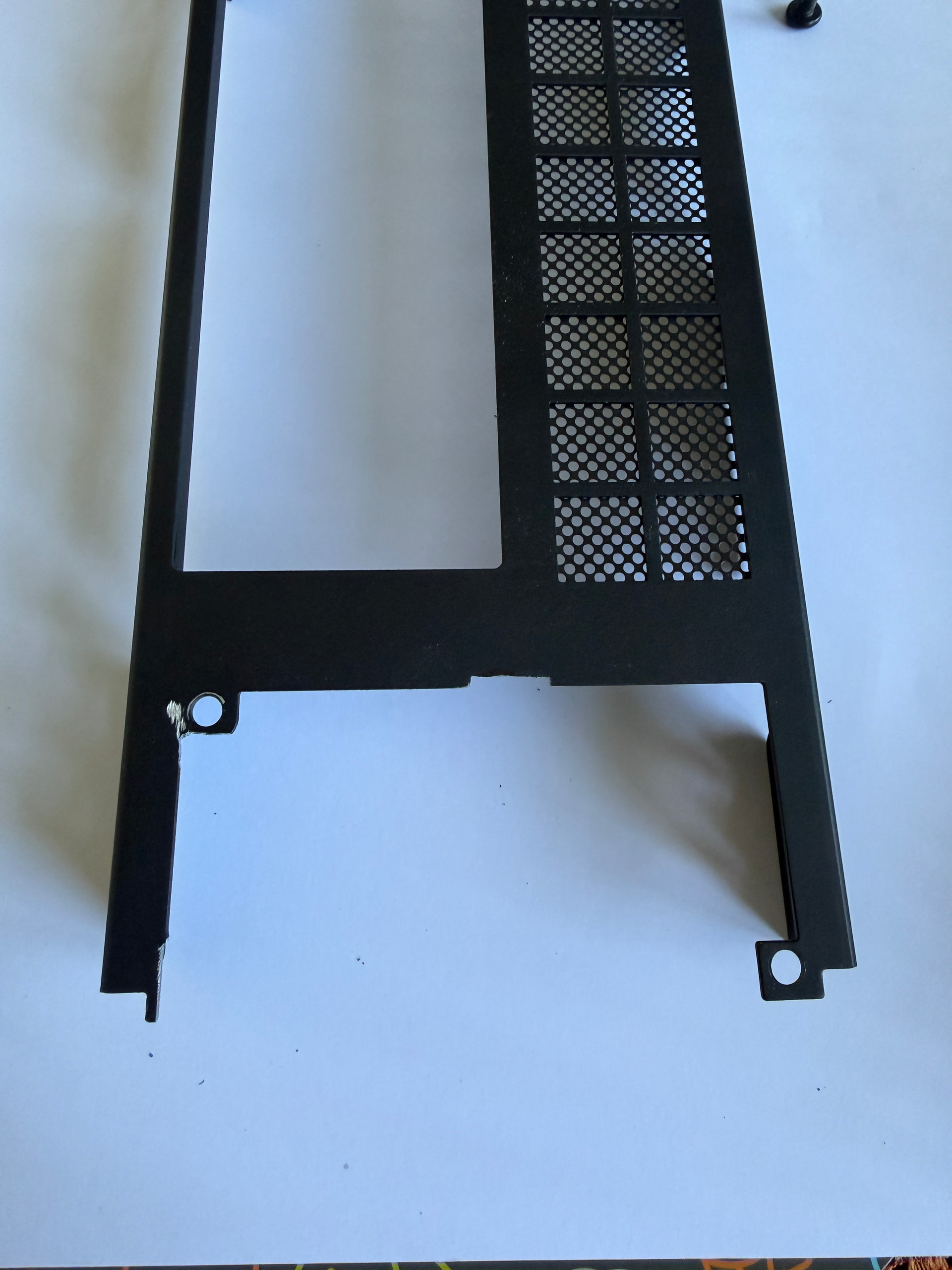
It isn’t a straight drop in as I had hoped, I’ve had to make small modifications to the back panel of the computer case with a Dremel to make it fit. I also had to remove a small bracket from the Enhance which would have interfered with the USB ports (it unscrews) and taken the small corner bracket from the FSP and used that to secure the Enhance. I don’t believe this is a fault of the Enhance PSU but more likely that Framework have designed their case around their chosen PSU rather than adhering to the Flex ATX spec. Perhaps Framework could re-engineer the rear panel to be more universal in what PSU’s can be fitted. I realise some people may not wish to take a Dremel (other rotary tools are available) to their expensive computer case.
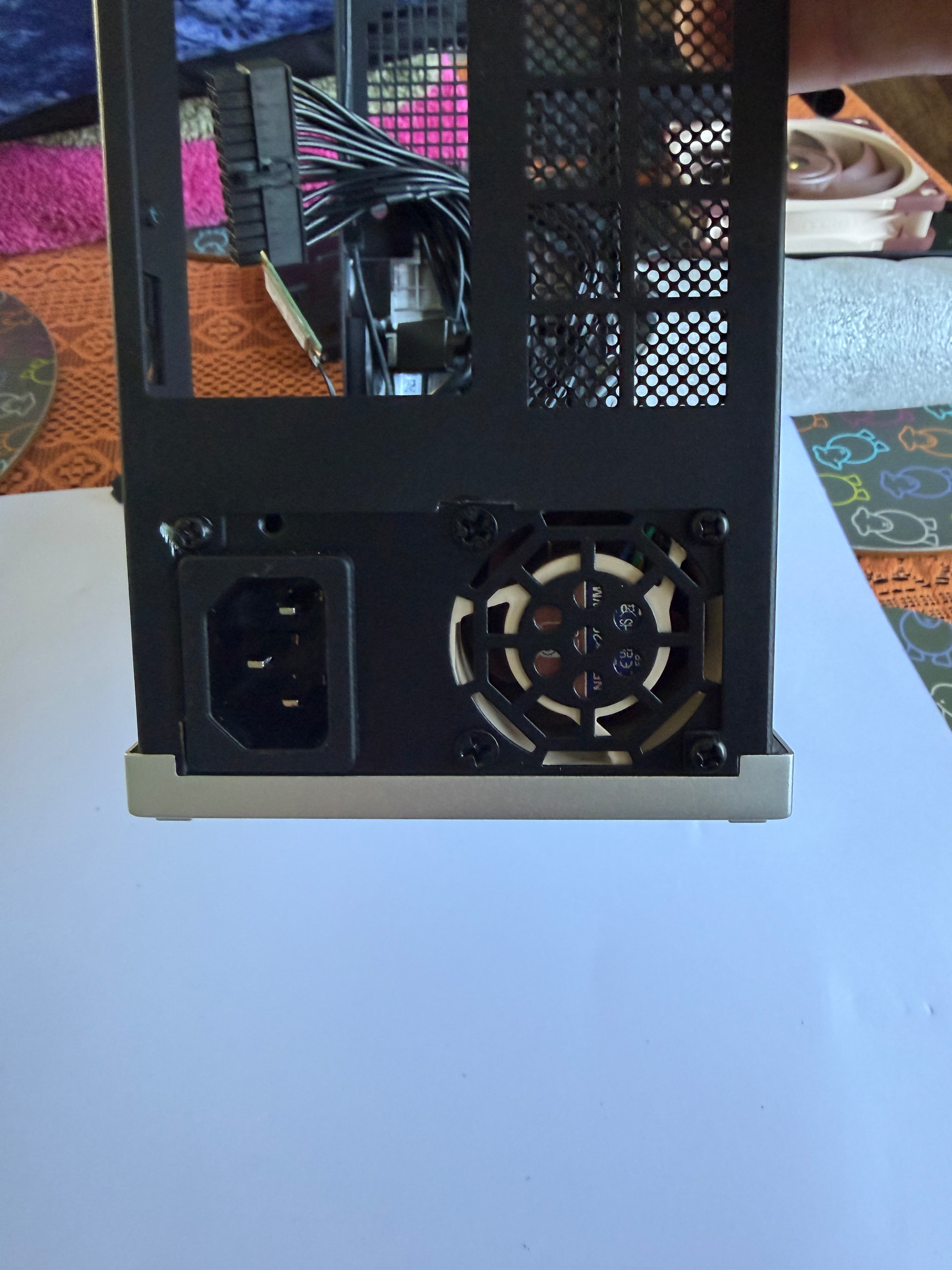
Anyway, here are some pictures. My Dremel slipped whilst performing surgery and scuffed the paint job. I’ll tidy this up later.
As you can see, there is a lot more room up front where the USB’s are. It was definitely easier to manipulate the cables when installing. Also it was interesting that the plugs on the new PSU were much easier to plug in than the ones on the original PSU, maybe the plug housings are of better quality, who knows!
Here is the picture of the bracket I mentioned in the first post, I forgot to post it. I haven’t had to modify the new PSU in any way which is good considering that I am currently evaluating it. The only irreversible modifications are some trimming to the rear panel of the computer case. As I had mentioned before, maybe Framework could re-engineer their panel to be more compatible with the Flex ATX specification allowing ANY Flex ATX PSU to be attached.
Incredible mod! Thank you for sharing. Hope Framework is coming through with their own solution soon.
It’s painful to see new products getting announced and complete silence about their progress with old problems (FW Desktop PSU, cracked FW12 casings) for months.
Hi, yes it was Overtek. I’m currently testing the PSU under real world conditions as they can only simulate using dummy loads. Once I’m happy with it I guess they’ll be good to go for anyone who wants one. I measured the original loom so this one is the same length. Jon also fitted a custom PWM fan controller and a Noctua fan and did all the programming/mapping of the controller to suit. The fan is currently set to run at 15% duty all the time unless temperature dictates that it needs to run faster. It is inaudible at 15%, I had to film it with my phone to check the fan was actually running. The PSU doesn’t get as hot as the FSP one does. It liberates a lot of room at the front of the case as well making the small intake redundant.
I’ve boobed somewhat with my install, in my rush to get it up and running I put the PSU in label side up and ended up modding the case back panel to suit when it should actually go in label side down. I believe it will be drop in with NO case mods when put in upside down. I have the rear panel from my friends desktop on loan to double check this. I’ll post an amendment one I’ve verified it will fit. That will open it up to a lot more users who would have been reluctant to take a Dremel to the rear of their case. I’ll just message Framework support to see I it is possible to buy a replacement rear panel rather than a full case. Hoping to do the flip tonight, but definitely over the weekend, fingers crossed. It would be great if it just drops in.
Ok folks, a pretty important update. I flipped the power supply ie: label side down like our original FSP units and it fits with NO alterations to the rear plate. Tested with the untouched rear plate from my friend’s unit. Only minor issue now are the screws securing the Noctua fan. They don’t sit flush like the original fan screws so I removed one just to get it installed. I’m sure between myself and Overtek that we’ll find alternative screws or an alternative solution that provides a flush fitting fastener.
Meanwhile I’ve ate some humble pie and approached Framework Customer Services to purchase a new rear plate for myself. My OCD won’t let me leave it as it is.
On your PSU picture there are visible vents on the label side. Is there any downside now that the vents practically sit to the bottom? Not that much space - if at all - on the bottom? Would have assumed vents opening up into the chassis would be better - especially with the 80mm fan installed as intake. Could help push the heat out of the back of the case.
Hi @wolfie as you correctly pointed out, the label side of the PSU is vented. That is why when I installed it at first I put it label side up as that’s how you would expect to install it but I had to mod the rear plate to secure it. I wasn’t too keen on putting it in upside down but that is the way the stock PSU is installed. There isn’t much in the way of room underneath and there certainly aren’t any vents on the base of the case. In any case, it doesn’t seem to run any hotter than stock. I’ve tested it a lot over the last couple of days and I haven’t heard the PSU fan once. If anything, I think the chief source of heat on the PSU is that expelled from the CPU heatsink. I don’t have an 80mm fan installed as Noctua reckoned it didn’t make any difference to the temperature inside the case.
So the way I see it is for a straight drop in upgrade it has to go upside down. If you want to take advantage of the vents, you’ll need to mod the rear plate. I may in future install an 80mm on the front pulling air in because up to now I’ve been running my desktop with no side panel installed as I knew I’d be tearing it down more than once for the PSU install. It might run hotter with the side panel on, who knows. Regardless the Enhance PSU is leagues ahead of the stock offering for many reasons.
Yes Overtek will offer as a complete upgrade with modded loom, Noctua fan and custom mapped PWM controller. No issues so far, runs cooler than stock and I’ve yet to hear the fan even though it is always running at 15% duty. Just got the fan screws to sort out, this is in hand. I’ll post any updates in this thread.
This is sooo cool! I contacted them at some point but they were not able to make one with a Noctua fan at that time. Just subscribed to this thread, I’m looking forward to get one!
I didn’t know they had anything on the site yet. Still getting flush fitting fan screws sorted out so it can be a drop in replacement for our sorry PSU’s. Other than that I reckon it’s probably good to go. I’ve had no issues whatsoever with my new PSU, you wouldn’t know the Noctua fan installed in it was running all the time at 15% duty, it’s silent. The 120mm Noctua on the APU spins up now and again depending on load but it’s never on for very long and its not noisy either. Only time the APU fan really goes is if I am re-encoding video for instance. Even then its not annoyingly load and after the task has finished, it spins down after a few seconds.
Jon at Overtek is a perfectionist. He won’t release this for sale until it’s just right. Just a matter of time now.