With the DIY version, I’m using a larger mini atx case with overkill 650w power supply with continuously running fan at about 32 dBa as measured by the iPhone ‘decibal’ app with the phone positioned on the desktop less than 1 foot away. While not perfectly quiet, its a low whisper and acceptable to me. At idle (most of the time actually), the CPU fan is not running.
While running Passmark (I got 12310 running Win11) and a peak power draw of 114 w and peak CPU temp of 77.4C, my aftermarket (since DIY build) cpu fan did go on and the iPhone read 38 dBa peak, about 6 dBa louder.
For me, this is perfectly acceptable but I’m not sure what everyone’s tolerance for noise is and how loud the production framework case & power supply is under similar load conditions.
Support offered to replace my PSU, here’s what they wrote after I stated that I only want a replacement if it’s going to be quiet.
“Please be advised that we cannot guarantee that the replacement will be noise-free. Although we had replaced some users, they confirmed that the noise issue is mitigated and has turned out to be acceptable.”
So there’s hope. I’ll wait for the replacement and hope for the best. If that doesn’t work I think I’ll just buy a small form factor case and SFX power supply, an expensive option but should be a pretty safe bet. The exterior fan was a fun experiment but I don’t think I want it long term.
I’m thinking a 3D printed panel for the cooler to add a bit of distance from the case for the air tunnel, or some velcro tape on the case and cooler, both to attach it and have some extra distance, might help. What do you think?
Yes, I think it could work. When I held the fan in my hand and increased the distance slightly the whine disappeared which allowed me to run the fan faster with less noise, but then it probably pulled air from the surroundings instead of from the PSU. But I still think a bit of distance would reduce air turbulence reducing the noise.
It’s the 5 volt edition of the Noctua fan which is designed for USB and it includes the USB-adapter in the box. Normal case fans are 12 volt, don’t mix the two up.
In my case, two reasons. I’d have to make a hole in the case, I don’t want to do that. Secondly I was planning to maybe mounting an 80 mm fan inside of the case which would use that fan header. Also, the case fan ramps up and down based on how hot the mainboard or CPU is, not how hot the PSU is.
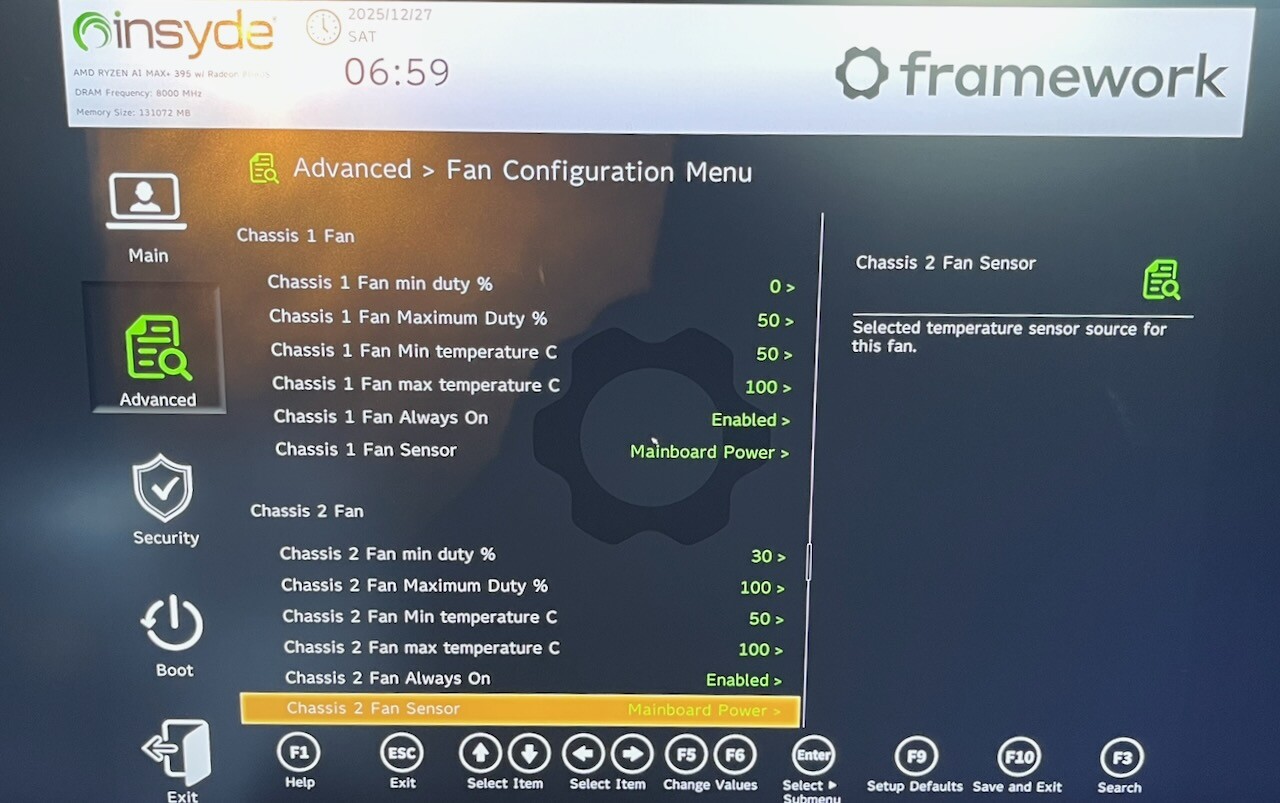
EDIT: I did check in the Bios. You can actually also control all 3 fan outlets separately, so you do have separate control curves for SysFan1 and SysFan2. You can set some fixed speed or make it dependent on CPU, MainBoard Memory, Mainboard Ambient or Mainboard Memory Temps.
This does make sense as well, as the board is also intended to be usable in regular Mini-ITX cases and there you commonly have at least one front and one back side fan.
When a fan whines the noise you are hearing is the blade pass frequency. It’s bN/60 where b is the number of fan blades, N is the RPM of the fan, dividing by 60 coverts it from /minute to /second or Hertz.
Fans tend to be quite sensitive to the evenness of airflow into the inlet in such a way to equally load each blade with a consistent volume of air spread somewhat evenly across the blade length. Some fans are also sensitive on the discharge side, but the inlet is always critical.
So when you held the fan in your hand, you were starving the fan and air was unevenly loading the blades. You might imagine it as a bunch of chaotic vortexes, being chopped up like ice in a blender. As you move the fan away from your hand, the airflow is evened out and the fan operates much quieter, like a smoothie in the blender sounds after all the large chucks of ice are chopped up
I’ve provided this explanation to encourage your further tinkering. As you suspect, if you pull the fan away from the heat source to quiet it down, you also are pulling air from the wrong place. The simple solution is to use a short duct. You can use your hand holding experiment to optimize the clear distance needed and make the duct that long.
Thanks. I actually got a bit disheartened by all the reports of people receiving replacement PSUs with exactly the same issue so even though I’m currently also waiting for a replacement PSU I ended up buying a mini ITX case and an SFX power supply for my Framework Desktop anyway. So after an hour of tinkering I finally have a completely silent system during idle. With the monitor off I can’t even tell if the computer is on except for a LED on the mainboard inside the case. Actually, the loudest fan in my room is now in my monitor.
I’ll probably repurpose the original case and replacement PSU for a server build later on.
I didn’t want an eyesore on my desk so I ended up going with the Fractal Design Terra Jade case, it’s a bit bigger than I wanted originally but it’s really gorgeous in my opinion, looks even better in person. The case is pretty open and does not have any dust filters, but I think my fans will be still most of the time. It has two USB-ports on the front, one USB-C and one USB-A, the latter can’t be plugged into the motherboard without an adapter, but I found one on Amazon so it might not be a big issue.
Regarding the PSU I picked the Corsair SF750, pretty overkill for the Framework but seems fairly efficient at low wattages. I also considered the Seasonic SPX 650 but the Corsair seemed just slightly better efficiency wise. The Corsair fan supposedly doesn’t even start spinning under 300 watts load which I doubt I’ll ever even reach with the Framework.
Externally mounted Noctua 40x20 fan. At 30% pwm @ 2k rpm it’s nearly inaudible with your ear next to it. I stuck it to the PSU exhaust grill with tape for sealing and wire for rigidity. It’s connected to the extra Chasis FAN header and setup to be always on at min 30% in EFI (bios). The power connector is currently run externally via open top.
Removal of the terribly restrictive pipe from the PSU inlet. This required the temporary removal of the MB and some swearing when dealing with the wire jungle. Air is mainly supplied by uncovered holes in the bottom row of Tiles, which is left bare, though you probably only need to remove the bottom middle one.
With this there is no annoying PSU fan sound at idle and the PSU is not getting cooked, which is a plus for it’s longevity.
An improvement might be a 3d printed bracket for a 60mm fan mounted via the PSU screw holes.
I built a very similar setup using an external 60 mm fan connected to ‘Sys Fan 2’. I also set it to a minimum of 30%. To my ears, the Framework Desktop is now completely silent during idle or moderate use. Under heavy load, both the internal CPU fan and my external fan run faster and can be heard, but they are never as loud as the internal PSU fan. Since attaching the external fan, the internal PSU fan has never started.
I was thinking about going with this same setup. The Terra is a bigger than I ideally wanted, but as you say its gorgeous. I also really like the Lian Li A3-mATX.
Can I ask what you’re using for cooling, and how the noise is under heavy load?
There are two sort of bad things about the Terra in my opinion now that I’ve had it for a while.
First, the back has these big open gaps because of the movable spine, but then again the movable spine is what allowed me to fit the tall cooling tower on the Framework Desktop motherboard. So check clearances if you are going with the Lian Li A3-mATX.
The second bad thing is that there’s very little room for additional cooling fans, case fans. It relies mostly on convection for cooling. I didn’t think it mattered too much so I put two headphone stands on top of the case that covered most of the slits and that wasn’t great under load, it caused the case to heat up quite a bit, so I had to move them.
So currently for cooling, the only fans I have is the one on the CPU cooler and the fan in the PSU, but that’s enough as long as I don’t cover the top slits.
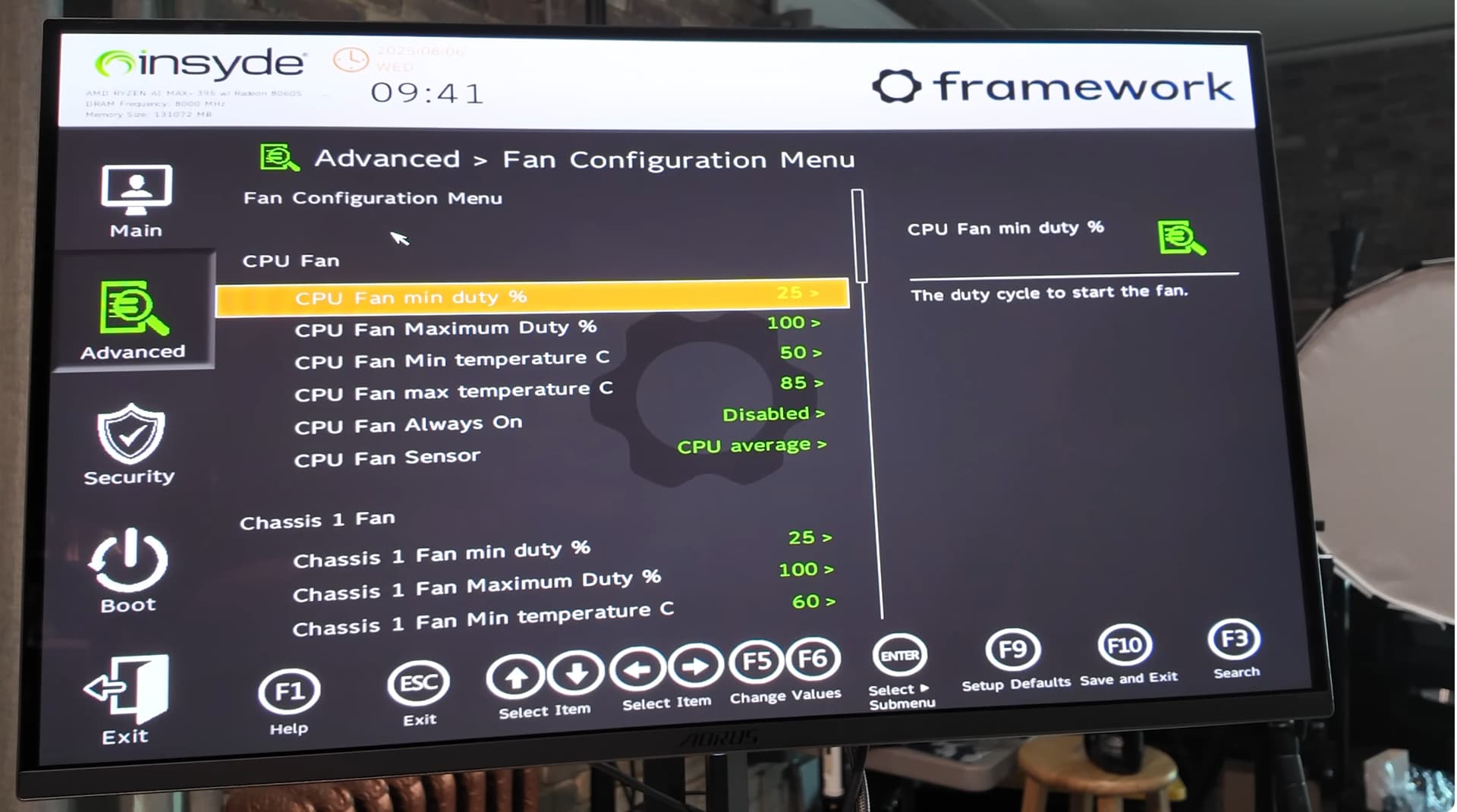
The only noise I hear under heavy load is the CPU fan which I capped in BIOS to 60% if I remember correctly because it’s kind of loud at full blast since the case is so open.

 Actually, the loudest fan in my room is now in my monitor.