Hi FW Community, I’ve recently gone on a bit of a quest to get the most battery life out of my 12th gen Intel (i5-1240P) on Linux. I’ve written about it extensively on my blog here and here. I’d like to get more of everyone’s experiences. Once Framework release the battery test methodology for the new 13 pro, I’d like to see users using the same tests to benchmark their current systems battery and create a basis for comparison once the upgrades start being available.
As an example, I have a,
Framework 13 (12th Gen i5-1240P)
61 Wh battery at 89% designed capacity
~6W at idle and 9W to 13W in real-world usage
3h45m to 4h45m of battery life on a full charge
This was also to get the battery and efficiency discussion out of the “Introducing Framework Laptop Pro 13” thread.
That’s your blog? I like what you are doing. I just skimmed through the titles at least and few articles.
6W in all distros sounds like the problem is more fundamental - hardware, or the drivers running the hardware.
I thought about making my own laptop and may still do so. I’m personally not a fan of USB-C as the only way of charging. Not only the port but the whole USB-C charging portion should be on a separate board, because the increased complexity reduces reliability.
Yes you do need to check Device Initiated Power Management(DIPM) is on for your drive. That’s what allows for the lower ASPM states.
In Windows you can further enable ASPM states by registry changes. Once you do you can adjust what state it can reach and sleep/wake times.
Depending on the laptop(although it’s getting better), the software power monitor has errors. The Dell Latitude E7440 with 4th U chip is accurate, but Lenovo Yoga 710-11 with 7th Gen Y is inaccurate under ~3.5W but accurate over that. So the accuracy depends on your laptop. Though I would think 12th Gen would have mostly fixed that issue.
Another component that is relatively easy to “fix” is the WiFi module. Intel modules are generally the best in this regard. I had another 4th Gen U laptop that had a Realtek module and once I changed that to an Intel module it allowed CPU to drop from 2.2W to 1W. Qualcomm is better than Realtek but some are not that good. Mediatek ones are iffy too.
For WiFi you don’t want signal transmit strength set at low. If you set it low, then it has to stay in that mode more and it can’t sleep as often. You want it high as possible so it can sleep.
For display I would check if Panel Self Refresh/Panel Replay is on. There’s the first gen PSR with whole screen refresh, and PSR2 with partial screen refresh. That saves power on the compute side, because merely having a display connected(even if nothing is shown on screen) consumes power.
Based on all the screens it definitely points to something more fundamental like @David_Choi said.
From what I can tell @Brendan and I mostly have the same system. The biggest difference might actually be the SSD (SK Hynix P31 1TB vs WD SN850 2TB) that I can see at this point. But it seems like too large a discrepancy to just be that.
We both have the AX210 WiFi that the board came with.
If I turn on powertop and just leave my machine alone, it’ll report getting down closer to 3W.
I do remember reading often that the those SK Hynix NVMe drives were the most efficient (low-wattage) options. Considering the prices right now, I can’t afford to switch. I have an Intel module (AX210) and I did verify that ASPM was working as expected.
You have to check DIPM is enabled. ASPM is the general thing, DIPM is specific to storage drives.
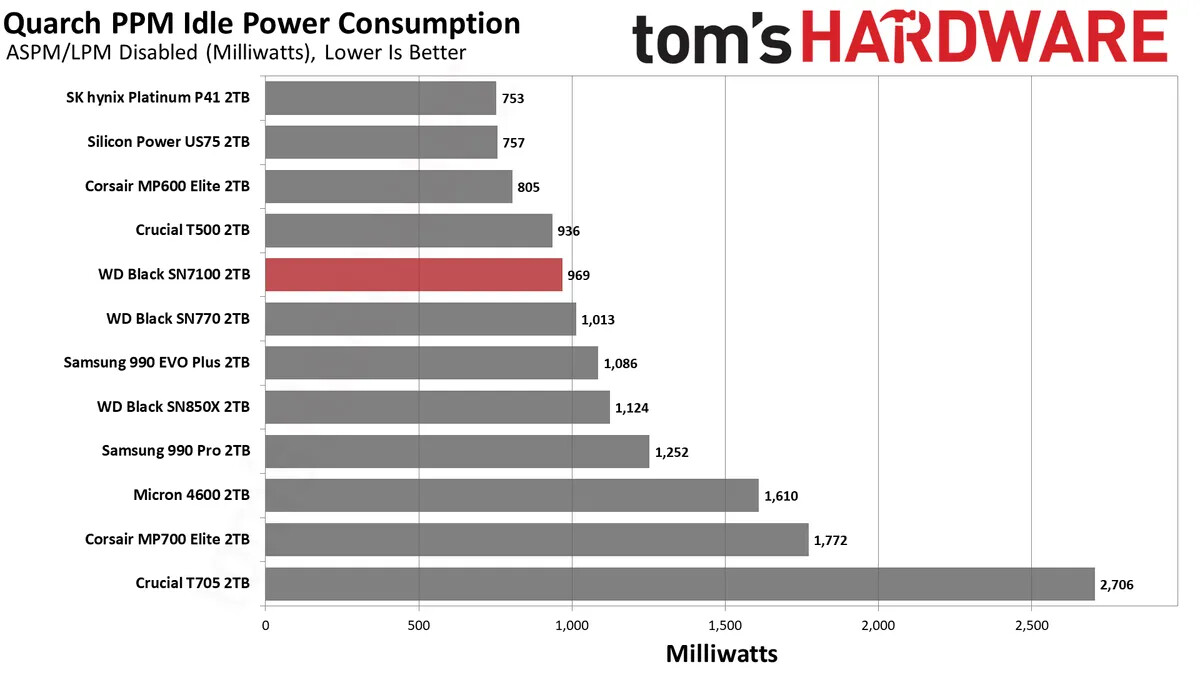
According to Tomshardware, the difference in power between the two drives with ASPM disabled is ~1W. It seems no one does power testing except TH, and that’s with ASPM disabled. I miss Anandtech. They would do power use tests.
Considering the SN850 is still only 1.4W, that can’t explain it alone.
Your screenshot under “GPU” section shows the CPU C and P states. Your C(core) states are C10, but your P(Package) states are C2 and C3. This is the problem. That’s what I meant earlier when I said your C states doesn’t matter if P states are high. The order of operation is Cores must sleep first before the package can sleep. Package C6/C7 for example is when the cores are sleeping and the CPU flushes the caches out into dedicated block(essentially a tiny cache). Pre-4th Gen U chips can do that. 4th Gen U brought C8.
C3 is quite alarming. Your Pkg P state should be worst case C7, good is C8. C10 is almost never seen as it’s too deep sleep and it doesn’t matter that much.
Package C8 vs Package C2/3 = 3-4W in my experience. My Yoga 710-11 with 7th Gen Y can do Package C8 60-80% of the time under idle.
This means your majority power consumer is still CPU not sleeping. This is a rough guess, but your cores are sleeping, which means something-IO is keeping the SoC awake. Remember 12th Gen “Alderlake” chip has PCH(Platform Controller Hub) on the same package as the compute(CPU+GPU+Memory controller). So it’s counted as same power.
By the way, getting those figures low will help higher load battery life too. Rule of thumb is if you lower idle power by 1W, you generally lower load power by 1W.
I’m not exactly sure what I did, but I’ve been noticing the last few days on idle I can now achieve between 3-4W. Here are some screenshots of powertop.
The Power estimates per device seem wildly off. The Network interface is said to consume much more than device itself.
WiFi adapters are actually low power devices. So anything above 3W even at peak is abnormal. And vast majority of the time even when transferring data the average power is far less. So something’s up with the metering system.
Additionally, many monitoring software consume power on their own as they use additional CPU cycles and may wake some idle interfaces. It’s better to use the computer normally without them and check the battery percentage every hour or two. Keep in mind due to the efficiency difference of DC-DC converter at different voltages, the power efficiency measured from 100% - 90% battery may be different than 20% - 10% battery level.
The keyboard backlight also uses about 3W. Are these tests done with that off?
I have noticed that the keyboard backlight stays on all the time, but of other, non FW laptops, it tends to have an idle timer, that switches the lights back on at the first key press.
Maybe if someone implemented that timeout feature in the FW keyboard, battery life could be improved.
It won’t make a huge difference. It’s 4.2V per cell at peak versus 3V. That’s say going from 90% to 87%, which is less than 5%. You are talking MASSIVE differences here. It should be 3-4W when it’s 6W. That’s a 100% difference.
But it seems he got it fixed somehow.
Linux monitoring utilities seem to be much more demanding or something. On Windows it’s very accurate(if the hardware implementation is correct, which lot of them are). Microsoft said that the RAPL(Runtime Average Power Load) is accurate compared to hardware and even Intel uses them internally.
It was a bash script called kblightd, found on GitHub to control the keyboard backlight for the FW laptop. I must have installed it at a certain point. Turns out it was polling constantly and using energy.