Framework 16 speaker volume curve issue

Hardware: Framework 16 (AMD Ryzen AI 300 Series) on BIOS LFKN6.03.04
Distro: CachyOS rolling, updated 12/4/2025 (and Fedora 43 Workstation live USB for troubleshooting since it’s officially supported)
Kernel: 6.18.0-3-cachyos (64-bit) for CachyOS and 6.17.1-300.fc43.x86_64 for Fedora 43 Workstation Live USB
Linux audio compatibility option is selected in the BIOS.

The problem:
The volume level set in the OS seems to affect the tweeters and the subwoofer on different curves and I’d like to adjust those curves to bring them closer together and make more of the range of possible volumes usable.
I believe the problem is conveyed best with an image. Look at this graph:
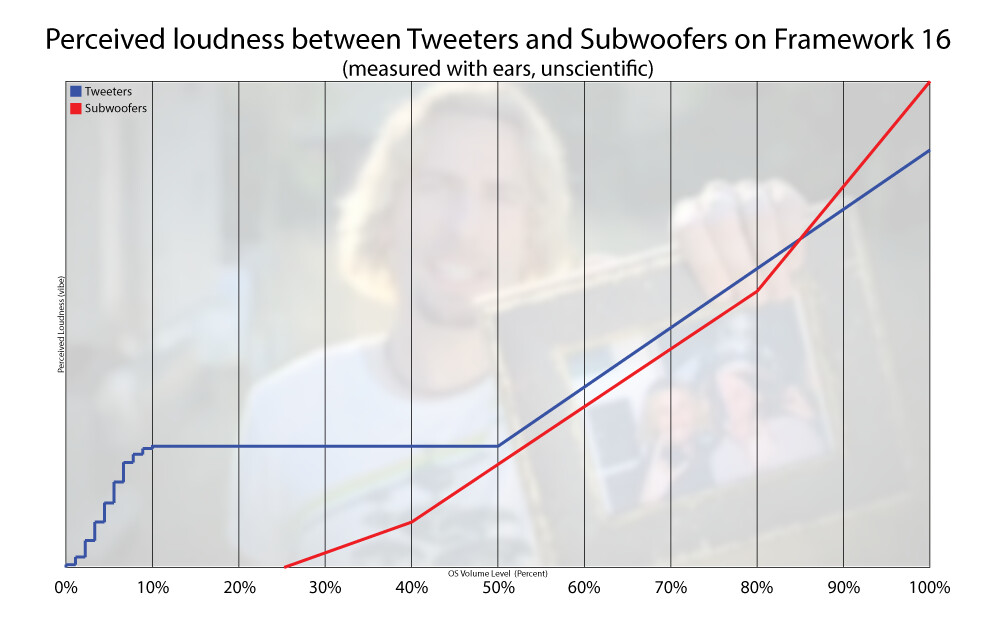
There’s a few problems I’d like to point out:

-There is an awkward acceleration curve between 1% and 5% OS volume, then from 5% to 10%. Extreme granularity at 1-3%, larger jumps in loudness from 3-8%, then extreme granularity from 8-10%.
-From 10% to 50% OS volume, there is no noticeable change in loudness from the tweeters
-The subwoofers only start producing any sound at all somewhere around 25% OS volume, so listening to audio anywhere lower than 25% OS volume results in poor quality, tinny audio
-There are several changes in perceived linearity throughout both the tweeter and subwoofer volume curves. Most notably at 10% and 50% for the tweeters, and 40% and 80% for the subwoofers.

I have done most troubleshooting in CachyOS as that is the distro I intend to use long term. In CachyOS/KDE audio settings, I have changed the volume change step to 1% so it is precise enough to set the volume to a comfortable level using the volume fn keys on the keyboard.

I have followed the Arch Linux setup guides both on Framework’s website ( Arch Linux on the Framework Laptop 16 - Framework Guides ) and the Arch Wiki ( Framework Laptop 16 - ArchWiki )

I have verified the issue also happens when booted into a Fedora 43 Workstation live USB since that distro is officially supported, as well as a Fedora 43 KDE live USB since that’s the desktop environment I use in CachyOS. The issue remains.

I have tried using Easy Effects and several community made presets and while these do affect how the speakers sound, it does not change the behavior shown above, so I have not set EE to run at startup.

A workaround I have found for the worse-than-a-smartphone audio quality at the lower end of the OS volume level range, is to set the OS volume somewhere around 40% to 70%, depending on the ratio of bass to treble I want, and then lower the application I am using’s volume control itself down to the lowest possible setting that isn’t zero. (Example: YouTube’s video player volume slider or Megabonk’s in-game master volume slider.) This tells me that the hardware is capable of producing a great, more full sound stage even at lower volumes.

I would really like to be able to tune the response curve for the Tweeters and Subwoofers to scale together more consistently, as well as spread out the granularity of the volume controls so I don’t have to either live in 5% to 8% OS volume level, or use the workaround described above and get absolutely blasted with audio when I forget to lower the OS volume level before opening another application that plays audio.

Thanks for reading! I am not a Linux expert or an audio expert and I’ve hit my “All of the links are purple” wall. I have yet to find another forum post discussing quite the same issue I’m having.
Has anyone else experienced these issues? I am otherwise enjoying the Framework 16 and am happy to support Framework’s mission! My setup just needs a bit of tuning :slight_smile: Thanks peeps

5 Likes

I think you have rediscovered what has been known for decades - the frequency response of the ear varies depending on the loudness of the sound. Hifi systems have had compensation controls for this for decades.

1 Like

Interesting read, thanks for the link! Yeah, I guess most consumer devices are tuned to work more predictably to our ears when changing the volume. It feels wrong to be able to change the volume between 10% and 25% and literally not notice a difference in volume.

Here’s to hoping someone knows how to tune the speakers/drivers! I’m all ears!

It seems like disabling the Linux audio compatibility in the BIOS makes the volume curve work better.

I started experiencing this issue as well after replacing a broken 7840hs mainboard with an hx370 mainboard (bios 3.04). The speaker response was excellent on the older mainboard, but now the audio is basically garbage at the bottom half of the volume range.

With the bass gone, it sounds quite bad, and the fact that the tweeter volume basically stays constant as the os volume is reduced means it’s usually too loud for my environment anyway.

I just tried disabling Linux audio compatibility in the BIOS. While it definitely does change the sound profile, I wouldn’t say it solves the problem. It just makes the volume range sound muddy. Thank you though! That may help someone if they prefer that sound

Yeah, so I just got my new Framework 16 (AMD Ryzen AI 300) and can confirm that the sound that goes through the speakers is really bad compared to other machines I may have had.

Connecting my laptop through bluetooth (e.g. on a Megaboom 3) produces a more pleasant experience. I haven’t tried the audio jack yet.

1 Like

Same, but the interesting part was on Fedora 43 KDE Plasma, the sound was initially quite good using the ISO installed with Rufus. But then after Fedora did hundreds of package updates, the sound turned to crap..muffled.

1 Like

Just tried switching the Linux audio compatibly off on my new AMD 370 Fwk 16 (Running Ubuntu 25.10) and as far as I am concerned it is a vast improvement.
With the firmware audio setting set to Linux compatibly the volume control seems to affect the bass far more than the treble. At lower volumes the lower frequencies are inaudible and the highest frequencies seem as loud as there where at full volume.
With firmware audio setting set to Windows the volume control in Linux actually works as expected.

This isn’t quite what you guys are talking about, but have any of you tried @Bryan_Ames ‘s Easy Effects profile yet? I applied it way back and it’s served me so well I’ve never looked back in terms of audio quality.

Framework 16 Sound Quality - Framework Laptop 16 - Framework Community

I can’t say I ever use my speakers below 50% though, as it’s practically inaudible for me and my content, and I don’t have bad hearing. I usually run 70%+.

1 Like

When switching the audio compatibility off (or rather to Windows, as there is no off setting) in BIOS, I get no sound at all. The speakers don’t seem to be detected. Do I need to install some drivers?

Hello together!
I am new here and got to this forum just because of this topic.

I’m running Fedora 43 on this machine and was amazed that everything just works out of the box.

But yes, the sound…
I looked at this graph (nice background BTW) and it looks exactly what I noticed myself.

I also tried switching audio compatibility to Windows, but then Fedora has no audio device at all. So I am left with the Linux option…

Everything that AI and the Internet suggests is easyeffects, but honestly that is no solution.

Would be cool to be able to control the speakers (tweeters, woofers) separately, but no software on Linux can provide that.

It is a pity. The sound is really good on higher volumes (66% and higher) but sounds - as already mentioned - worse than a smartphone…

Yes, its a Linux/Distro issue. The sound is far better when using Win11 on the same Laptop. But as TechPriest mentioned, you can achieve a hell of an improvement, if not better then Windows by using Easy Effects. They even have a pre-loadable Profile for the FW16. Its not perfect but a good starting point. Just remember..sound quality is subjective and what sounds good to you might sound not that great to me. What I don’t believe, is that it is a hardware speaker quality problem as mine with a bit of fine tuning is already as good as my Lenovo Legion.

SOLVED! PipeWire - ArchWiki

You need to add an alsa rule to use software mixer instead of hardware mixer.

I had tried using a handful of easyeffects profiles and none of them helped because easyeffects was later in the chain than what was causing the issue.

Yes, this is part of the problem I am referring to and is resolved by using software mixer instead of hardware mixer.

1 Like

I discovered I can control the tweeters and woofers seperately by using alsamixer and choosing the “HD-Audio Generic” card. Oddly, the “Speaker” and “Bass Speaker” labels are incorrectly swapped but you can get independent control of the tweeters and subwoofers this way.

Isn’t it possible to come around with a little more details?
I mean, “SOLVED!” sounds great. But a detailed description on how it is solved would be even greater :wink:

1 Like

I’ve tried both Linux audio fix ON and OFF using Fedora 43 on my Framework 16, and with it ON the low end drops out very quickly when lowering the volume as others have stated. I’m also noticing some sort of phase issue with it ON as if one channel is slightly delayed. Having it OFF does sound very muddy in comparison though so not sure which I’ll stick with for now…

With alsamixer I found out, the internal audio (Ryzen HD Audio Controller Speaker) has indeed three sliders.

  1. Master (controls main volume)
  2. Speaker (controls Bass Speaker)
  3. Bass Speaker (controls the normal speaker)

Yes, the Speaker and Bass Speaker are wrong
When you change volume in the system, it controls the “Speaker” slider only until it is 0, then controls the “Master” volume in three steps from 100% to 0%. That is the problem.

The solution would be to re-map the volume control of the system to “Master”.
The last days I tried that, together with Googles Gemini, but no success so far.

Maybe anyone has THE idea…

I’m seeing a couple people with replies that make it seem like my other posts aren’t showing up. @DasJott and @Micah_Chandler , have you tried setting up the alsa rule to use the software mixer instead of hardware mixer in my post above?