Framework Laptop 12 Mainboard Printables Contest

Now that the new updates for Framework Laptop 12 are out of the bag, you may be wondering: What should I do with my previous Framework Laptop 12 Mainboard if I choose to upgrade?

We’re so glad you asked. We’re excited to announce our newest contest with Printables: Framework Laptop 12 Mainboard Re-Use Contest where you can win Framework Laptop 12 Mainboards (SSD, RAM, and WiFi included!!) and more!

The Challenge:

We challenge you to design a custom 3D-printed case, mount, or accessory for the Framework Laptop 12 Mainboard. We want to see innovative solutions that highlight the capabilities of the Mainboard as a powerful standalone computer.

You can design a sleek enclosure for a mini desktop setup, a dedicated multimedia server, a retro cyberdeck, or a creative desk mount. We are keeping the challenge open to your creativity rather than strictly mandating specific designs.

A valid entry must securely house or support the FrameworkLaptop 12 Mainboard. You do not need to own the physical Mainboard to participate. CADs and STLs are provided.

Deadline is September 30, 2026.

Learn more: https://www.printables.com/contest/524-framework-laptop-12-mainboard-re-use

We’re looking forward to seeing what you create. Good luck!!!

8 Likes

The prizes are behind the contest link:

First place:

Prusa CORE One+ kit,
Framework Laptop 12 Mainboard (Series 3 Intel® Core™ 5 320) (RAM, SSD, and WiFi card included). ​
Second place:

1750 Prusameters,
Framework Laptop 12 Mainboard (i5-1334U) (RAM, SSD, and WiFi card included). ​
Third place:

1400 Prusameters,
Framework Laptop 12 Mainboard (i3-1315U) (RAM, SSD, and WiFi card included). ​
Honorary metion:

500 Prusameters

  • Framework Laptop 12 Mainboard (i3-1315U) (RAM, SSD, and WiFi card included).
4 Likes

Anyone here cheeky enough to make a robust and non-cracking rear case? :rofl:

1 Like

sry if it’s not quite to the point in this thread,
but what about an option to buy a new Laptop-chassis with everything except the mainboard, then people who don’t need the newest most powerful mainboard could just buy that plus a used framework mainboard.

Gives people with lower budgets more options to start into the ecosystem.
And it might be more sustainable, possibly preventing people from unnecessarily buying new mainboards.

That topic would probably be worth its own thread. As you rightly point out, it’s probably a different theme.

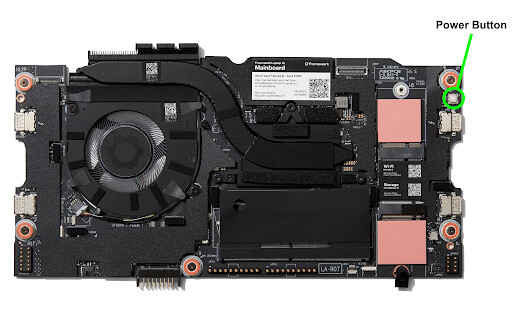
Is using the power button board a must or is there a secondary power button on the main board itself?

There’s a power button on the Mainboard itself

3 Likes

Hi all!

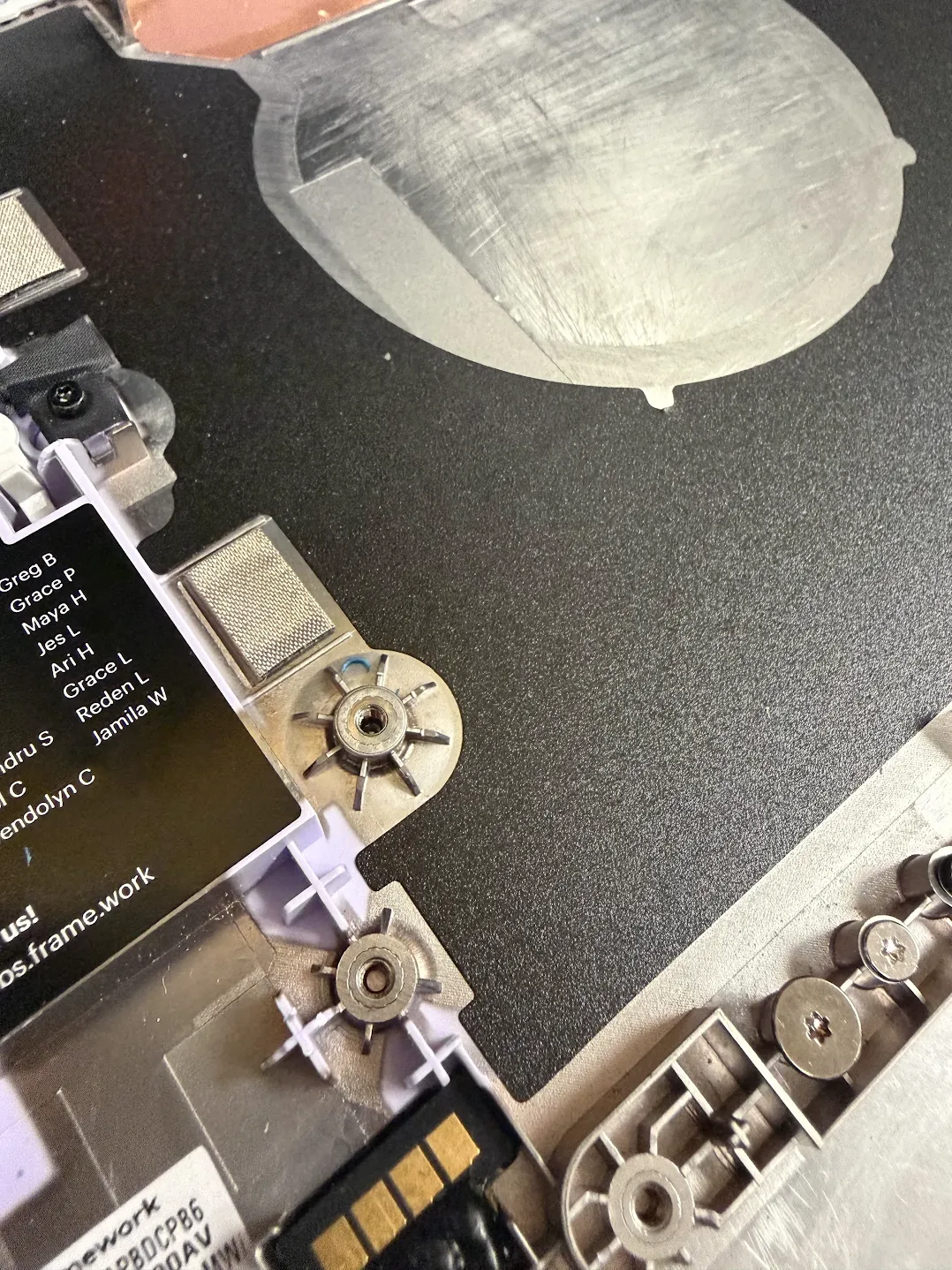
I’m trying to design some fun enclosure for the contest but I don’t have any Framework hardware yet. So I have a question about the captive screw mounts on the motherboard and their connection to the laptop’s frame. I wonder if the “pins” on the frame go inside the holes in the MB or the MB just “lays” on those “pins”?

Here’s my screenshot from the provided step file, where you can see that part of the MB:

And I’m not sure if the “pins” on the laptop frame go up to the green, yellow or gray face on the image.

I’ll see if we can get the CAD uploaded, but for now, let me know if these images help!

1 Like

Many thanks for the super fast reply! Yes, the images will help for sure.

Got the CAD up as well now: https://www.printables.com/model/1852833-framework-laptop-12-bottom-cover-kit

3 Likes

Now that we have the actual CAD for the bottom case, making a 3d printable version will be a walk in the park…

Quick question on the Laptop 12 mainboard mounting for the contest: the five captive T5 screws (orange rings) stay attached to the mainboard and thread down into bosses on the chassis, correct? If we print our own mounting plate, can you confirm the thread size and engaged length of those screws so we can size heat-set inserts correctly? My guess is M2, but I’d like to be sure before submitting, thanks!

M2 x5, we also shared the bottom cover kit CAD https://www.printables.com/model/1852833-framework-laptop-12-bottom-cover-kit

1 Like