Well, that didn’t take long.
1 Like
The saga continues:
GOOD NEWS!
This update kinda fixes Issue2. (The stuck 20w Powerlimit-EnergySave bug)
kinda because it still wont update to the 20w powerlimit when entering energySave mode while plugged in, but at least it doesent get forever stuck at 20w anymore!
Issue1: (the Powerstuttering issue)
Sadly still present. Even tho it should be fixed now according to the fix-notes! (x3) The most recent log can be found here:
https://thetec.ch/share/Framework/Evidence_for_$Power-Stuttering$/Bios4.02/

As you can see it still triggers the prochot on/off fast and the power-draw jumping erradically from 6A down to 1A and up again. This happens so quickly, you can hear the speakers crackle!
Steps to reproduce:
Win11 25H2 26200.7171
7700S GPU, 7950HS CPU
180w charger plugged into port 2.
Balanced PowerProfile selected
step1: play nms for anything between 15m and 4h to trigger. (higher change of triggering if you actually play it!)
step2: observe
note: also observed on Vrchat, Stationeers, HalfLifeAlyx, CaptainOFIndustry
1 Like
Running on a Laptop 16 (AMD Ryzen 7040 Series).
Bluefin Linux, fwupdmgr is 2.0.16.
BIOS update worked.
Keyboard update never happens, even with the testing repo enabled.
ETA: I was able to use the .UF2 trick to update both, however. It’s actually pretty easy, but the instructions are not as clear as they could be, IMO.
Same thing here. I have a 1st gen keyboard and a numpad. fwupdmgr is 2.0.16. Latest Bazzite version. Keyboard and numpad are not listed at all both in terminal and Gnome Firmware (Flatpak). Checked on LVFS, everything is promoted to stable. Never enabled testing repository.
To anyone not seeing the updates in fwupdmg, did you try refreshing the package list?
sudo fwupdmgr refresh did yield some entries in get-updates where there were none before.
1 Like
Any word on whether or not BIOS v4.02 fixes the issue with the Framework 16 not respecting charge limits and fully charging?
I’ve got my charge limit set to 85% and it is staying there.
1 Like
First I am hearing of this. Mine has respected my 80% charge limit since they implemented in the bios. I am on 4.02 now and still holds true.
1 Like
Ever since they implemented the bios update that added the smart battery extender, occasionally my computer will ignore the 60% charge limit and charge up to 100% even if battery extender turned off. Everything I’ve tried doesn’t seem to fix it, it seems like there’s some code from the smart battery extender that will occasionally override the charge limit.
Ah I see. Interesting. I’ve never used the battery extender feature because I didn’t want to deal with the fuss of it resetting after an unplug and replug. I have always had that off myself but just set the limit.
Yeah that’s the funny part. I turned the battery extender on for a couple of days and then turned it off, but it seems the damage was done.
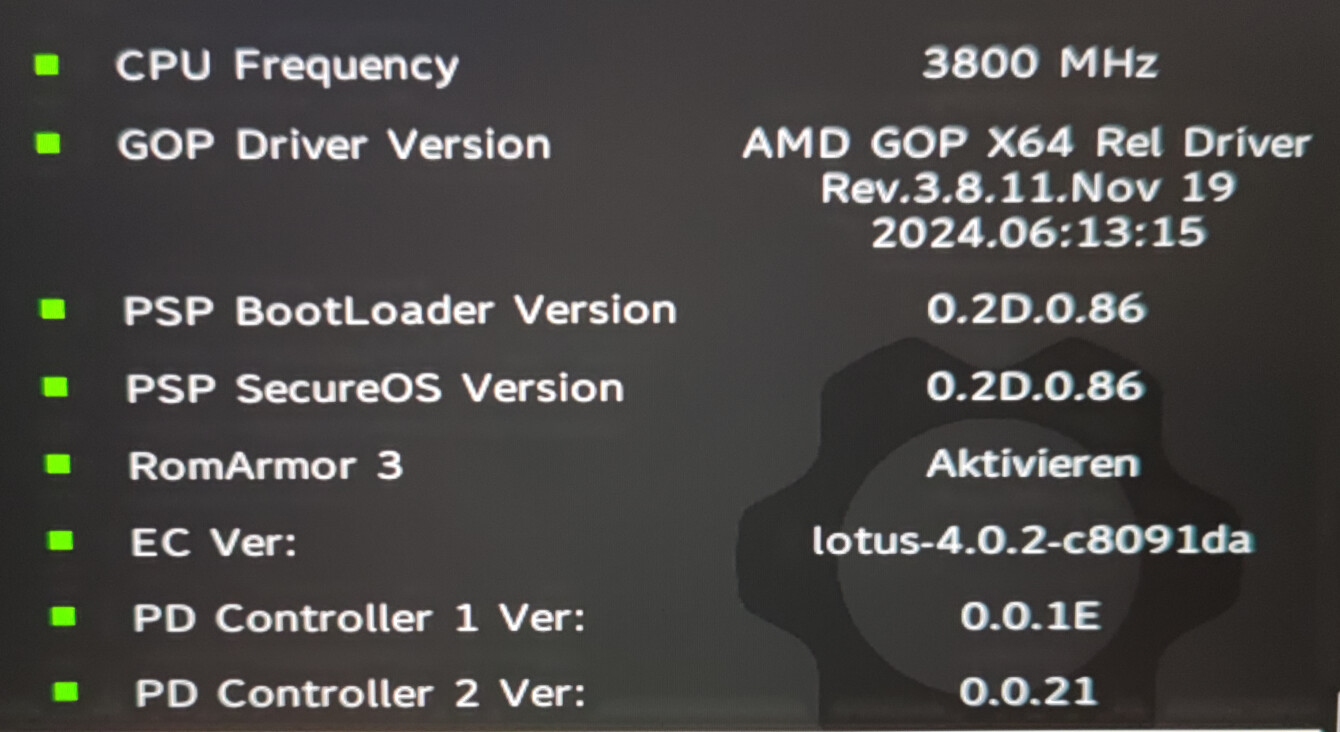
Maybe this is also interesting for one or another: I had the wireless receiver of my mouse plugged in port 5 and the power cord in port 4, but update failed for PD1.
After plugging the cord into port 1 and removing the receiver I did the FW Update again and this time, PD1 got updated and working again.
So the Instructions should point out, that NO other devices should be plugged in!
1 Like
This is called out by Framework in the original post on this thread
3 Likes
I don’t come to the forum much so I don’t know what the “544mhz CPU” issue might be but that might be related to what I experienced.
I upgraded firmware on the keyboard first no problem then upgrade the BIOS. That first boot seemed to take longer than usual and then the machine was kind of unresponsive. HTOP showed a system load of 5-10 with nothing but stock Ubuntu 24.04 running.
A reboot didn’t seem to fix it.
However, powering off the machine and removing the charging cable for a few minutes seems to have done the trick.
So I’m posting here in case someone sees the same and this might help.
2 Likes
You can add CPU frequency into the display of htop using htop’s settings. This would tell you if the cpu is getting stuck at 544Mhz (or some other value). At 5-10% load I’d expect cores to be in the 1-5Ghz range at random, rather than every core being the same value.
1 Like
I have a shell script called cpu-rate written into .local/bin that just does:
#!/bin/bash

watch -n.1 "grep \"^[c]pu MHz\" /proc/cpuinfo"
also, I had a script for the previous bios to fix the 500mhz cpu issue that was just:
#!/bin/bash

tuned-adm profile powersave
tuned-adm profile balanced
however starting in 4.01 iirc the fix stopped working but the bug remains. However, now it appears to not be caused/fixed by flipping power profiles but still appears to be power related based on what I’ve read here. The only fix I have at the moment is restarting the computer, but it also happens a lot less frequently, something like once every 2-3 days as opposed to every time I unplug the computer + once every 2-3 days. My guess is the issue was already there being caused by multiple things and now one of those things is fixed
I’ve also seen something really strange while doing a stress test that might be of note. I have my cpu-rate script going at .1 second intervals and during a stress test I caught these weird sub second spikes of 500mhz across all cores happening across all cores. It would essentially go from an average of 3700mhz down to 500mhz for like .1 second before bouncing back, which seemed like it could be related to an increase in power consumption. I saw this happen something like 5-6 times in a 5 minute run and would have written it off normally, but given the existing 500mhz issue it seemed relevant. Also, during this test I was using a 140w charging dock.
I’m getting drastically lower framerate in games with this updated. Still running the AMD dgpu. Example… Simple game Destiny Rising was getting 140 fps now I’m lucky if I’m getting 30 standing still.
What power mode do you use?
I saw similar performance changes (but not that drastic) on Power Saver mode (I use GNOME). And I am totally happy to see that change, since that’s why you need Power Saver mode. Everything is fine performance-wise when I switch to Balanced or Performance mode except for pound fans (the reason I played on Power Saver mode in the first place).
I’m on Windows in best performance and hyper mode in the amd adrenaline software
Hmm… I don’t know then. Did you also install all the drivers from the new version of Windows Driver Bundle released with this BIOS update?
In my experience (desktop PC, not a Framework one) AMD Software lags behind when it comes to chipset driver updates and does not update any other device’s software (beside GPU drivers, ofc.) at all (like some AMD controllers on motherboard, etc.).