Hello! Before anyone gives me shit, I’ve used Gemini in my gmail to summarize the story of my support situation. I’m looking for some advice.
TL;DR: Second-year game dev student’s Framework Laptop 16 dGPU (AMD Radeon™ RX 7700S) stopped working reliably after a BIOS update. Framework Support suggestions haven’t resolved it, and now I’m being asked to test with new RAM, despite my current RAM being on their compatibility list without XMP indication. Computer store advised it’s a GPU issue. Frustrated and seeking help!
I’m a second-year game development student, and I’m reaching out here because I’m at my wit’s end with an ongoing issue with my Framework Laptop 16, and I’m incredibly frustrated with the troubleshooting process. I bought this laptop last year, and it was great until the 3.05 BIOS update broke my first GPU, which was replaced with no hassle. But now this one has crapped out for what feels like no reason. I’ve been in contact with Framework Support for a few days now, and despite my best efforts and following all their suggestions, the core problem persists.Here’s a summary of what’s been happening:My System Details:
OS: Windows 11
OS Release: 24H2
Framework Product: Laptop 16 with AMD 7040 Series CPU and AMD Radeon™ RX 7700S GPU
**The Problem:**About four weeks ago, my dGPU (AMD Radeon™ RX7700S) stopped kicking on reliably when I launch games or other intensive software. The fans don’t spin up, the GPU throttles, and games run terribly or crash after a black screen. I’ve also noticed some inconsistent GPU switching when waking the screen, leading to crashes or freezes.
What I’ve Tried (and my results):
Initial Troubleshooting: I was on older AMD drivers and BIOS 03.05 when this started. I’ve since updated the BIOS (to 03.07) and installed the latest AMD drivers from both Framework and directly from AMD. I always keep Windows optional updates installed unless they are unstable previews. I’m not using any external hubs, docks, monitors, eGPUs, or third-party power adapters. The issue occurs on both battery and AC power.
Framework Support Suggestions (and my experience):
Set BIOS defaults (F9/F10): This was the first time I heard the dGPU fans spin up in weeks, but only in the BIOS. After booting into Windows, the dGPU still didn’t activate for games, even with Windows set to prefer the high-performance GPU and Adrenaline set to HYPR-RX.
Manually remove/reinstall GPU and drivers: I followed the guide, but encountered issues uninstalling drivers without the GPU physically installed. After reinstalling the physical GPU and then uninstalling both the 780M and 7700S drivers, there was no change. The fans still don’t kick on, and games perform poorly. I also tried reinstalling the Framework 16 driver bundle, which didn’t work. I’ve noticed flickering when launching games, likely due to my preferred GPU settings, but the GPU is clearly still throttling.
Use DDU for a clean driver uninstall: I ran DDU successfully twice. Initially, I saw some odd artifacting on my taskbar (video provided to support). After reinstalling the Framework drivers and then the official AMD drivers and Adrenaline, the artifacting is gone, but the original issue of no fans and a throttled GPU remains. At least it hasn’t crashed in a while, so that’s some progress, I guess?
Mainboard reset: I followed the instructions carefully, removing the mid plate, plugging into AC, and slowly pressing the chassis open switch 10 times. Upon reboot, there was no change in behavior. Games still crash after a black screen, and the fans still don’t spin up. I also provided event viewer logs as requested.
RAM compatibility: Framework Support noted my RAM sticks are XMP-enabled (KINGSTON FURY Impact 64GB (2x32GB) DDR5 5600MHz CL40). These RAM sticks were on their suggested compatibility page, and there was no indication that they supported XMP. They suggested testing with non-XMP RAM or RAM from their tested list. As this is the only laptop I’ve ever built and these are the only RAM sticks I own, I’m now being asked to purchase new RAM just for testing, or borrow some from a friend. This feels like a significant ask after all the troubleshooting I’ve already done.
I’m feeling incredibly frustrated that after all these steps, the core issue remains, and now I’m being asked to buy new hardware to continue troubleshooting. The advice I was given at the computer store is that it was clearly a GPU issue. Has anyone else experienced similar issues or have any suggestions? I’m open to any ideas at this point.
Hi there, I’m having the exact same issues. They told me I was shit out of luck since it’s outside of my warranty, I’m an Australian so I’m currently trying to have the support team understand that under australian law they are expected to replace the part. I’ve done some personal troubleshooting after the fact and I’ve managed to get things working well enough. I am going to get the Nvidia card in a few months but honestly the support has given me a bad taste in my mouth and like I’m still going to get it but it’s really screwed with my image of the Framework Brand.
But if you havent tried this one thing I did to help resolve some of the issues, is remove you dGPU, and look at the space in between the rear grates and the fans. For me there was a carpet of dust that I removed (after removing the fans and the cover) this stopped some of the crashes I was getting. I still get driver timeouts when I start games but it’s allowed me to play my games. A few other tips, set AMD to Hybrid and not SmartAccess , or you can download driver only.
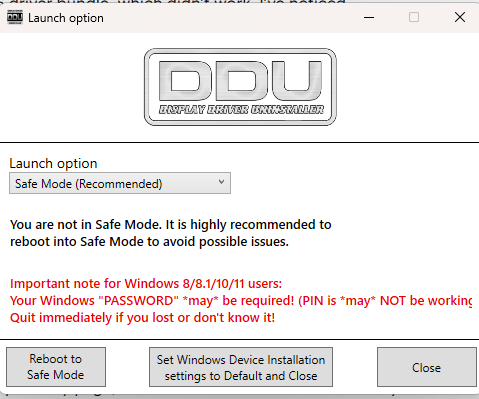
When running DDU, there is a menu that initally pops up. This makes it so windows doesn’t auto download bad drivers when it reconnects later.
Like so have it set like that, if you already have DDU it’s under options. Change it and ret the app. then you wanna launch it using the following settings:
Afterwhich, you can uninstall stuff then here the process:
DDU Uninstall
Install Framework 16 Bundle, restart
3.Install WHQL Drivers for 7700s, shut down
Mainboard reset, Thy might not have explained it well but I think you just have to trigger the switch 1-2 times just hold it for a few seconds, then wait repeat 1-3 times that’s what I’ve been doing.
This might help. I’ve been getting pretty bad issues as well but I’ve been able to slowly claw back function so I suspect it’s that the support team doesn’t really have many tools to actually figure out what the issues are and are calling it a day past a certain point esp if it’s outside warranty. Because you really can’t do much about it and they can’t really know if you’re troubleshooting it correctly on their end.
Also in regards to the ram, by all rights they should be correct, XMP increases the speed that the system is allowed to expect from the ram and really should only be an issue if you had purchased Ram with speeds higher than 5600.
Also, I’m also a game dev student 3rd-year and graduating this year :0
Without going into a lot of details here are some other conditions to setup to help determine where some of the issues may lie:
Get an Ubuntu USB and boot from a “Live” session; see if the same issues persist. If they go away then the issue is software/OS.
Do not use any other drivers other than the ones in the Framework bundle. As a developer, one of the key things when troubleshooting is get the basic pieces functioning then add pieces from there.
The Framework Laptop 16 should work just fine without the optional graphics card. If the machine will not function correctly without the optional graphics card, then something else is the issue and the graphics card is just adding to the complexity of figuring it out.
Yes there are known issues with certain vendors of RAM as not all 5600Mhz ram is created equal. The Kingston Fury line has been brought up several times in other threads and usually it is because of the tighter timings (Cas Latency) and subtimings that just are not working well with the hardware. Buying an 8GB stick to throw in the machine would be a cheap fix if that is what resolves these issues.
This might sound a bit obscure, but there have been issues with 24H2 when it first came out. It is a slightly different code base from Microsoft and some of the underlaying architecture has changed. Finding and installing 23H2 would be a bit of a chore to do, again if the issues do not follow when using Ubuntu this might be another step to try.
The computer store is != Framework who manufactured the device. Unless this store buys/sells/repairs Framework devices as a core part of its business, their suggestion may not be any better than asking some “AI” for answers.
Here’s the weird thing though, through the bios, the fans kick on as if nothing is wrong? What could be the issue with that? When I boot into windows, they just go quiet and nothing happens.
If the fans are working fine in the BIOS then it likely is an OS issue. I would try and Ubuntu USB and see if they kick on, if that is the case it’s fresh OS install time. Format the drive completely and start clean. (Or just the partitions for windows if you have Linux installed and dual boot)
Windows has some really odd nuances and can manage to get itself painted into a corner. It could be something with a user profile, could be a power profile setting that is not set right, could be a driver that is suppose to talk to the board but isn’t, corrupt registry, etc.
It is frustrating to have to go to this extreme. Fortunately reinstalling the OS is not as big of a deal as it was in the past.