I’m running thunderbolt between 2 395 Desktops. I’m also getting 9-11Gbps with iperf3. Which is unsurprising, as this is what iperf3 maxes out at.
iperf3 can do better than 9-11Gbps.
For example, via the loopback interface 127.0.0.1 it can do about 35-40Gbps.
# iperf3 -c 127.0.0.1
Connecting to host 127.0.0.1, port 5201
[  5] local 127.0.0.1 port 49490 connected to 127.0.0.1 port 5201
[ ID] Interval           Transfer     Bitrate         Retr  Cwnd
[  5]   0.00-1.00   sec  4.08 GBytes  35.0 Gbits/sec    0   1.12 MBytes
[  5]   1.00-2.00   sec  3.44 GBytes  29.6 Gbits/sec    0   1.12 MBytes
[  5]   2.00-3.00   sec  3.86 GBytes  33.2 Gbits/sec    0   1.31 MBytes
[  5]   3.00-4.00   sec  4.24 GBytes  36.4 Gbits/sec    0   1.31 MBytes
[  5]   4.00-5.00   sec  3.33 GBytes  28.6 Gbits/sec    0   1.31 MBytes
[  5]   5.00-6.00   sec  4.45 GBytes  38.2 Gbits/sec    0   3.00 MBytes
[  5]   6.00-7.00   sec  4.58 GBytes  39.4 Gbits/sec    0   3.00 MBytes
[  5]   7.00-8.00   sec  4.28 GBytes  36.7 Gbits/sec    0   3.00 MBytes
[  5]   8.00-9.00   sec  4.46 GBytes  38.3 Gbits/sec    0   3.00 MBytes
[  5]   9.00-10.00  sec  1.95 GBytes  16.7 Gbits/sec    0   3.00 MBytes
- - - - - - - - - - - - - - - - - - - - - - - - -
[ ID] Interval           Transfer     Bitrate         Retr
[  5]   0.00-10.00  sec  45.1 GBytes  38.7 Gbits/sec    0             sender
[  5]   0.00-10.00  sec  45.1 GBytes  38.7 Gbits/sec                  receiver

iperf Done.
I also tested with 2 iperf3 servers running at the same time. Two client sessions at the same time each got 35-40Gbps, total 80Gbps when using loopback, 127.0.0.1
So, iperf3 itself can handle more that 9-10Gbps.
I don’t know if the USB chips can though or not.
It absolutely does not. 
I have two Framework Laptop 13 mainboards connected over 20Gbps thunderbolt, and I can get 18Gb on the wire using iperf3 with a single stream.
[  5] local 10.100.1.2 port 49098 connected to 10.100.1.1 port 5201
[ ID] Interval           Transfer     Bitrate         Retr  Cwnd
[  5]   0.00-1.00   sec  2.11 GBytes  18.1 Gbits/sec   35   4.12 MBytes
[  5]   1.00-2.00   sec  2.13 GBytes  18.3 Gbits/sec    4   4.12 MBytes
[  5]   2.00-3.00   sec  2.14 GBytes  18.4 Gbits/sec    1   4.12 MBytes
[  5]   3.00-4.00   sec  2.13 GBytes  18.3 Gbits/sec    1   4.12 MBytes
[  5]   4.00-5.00   sec  2.13 GBytes  18.3 Gbits/sec    0   4.12 MBytes
[  5]   5.00-6.00   sec  2.13 GBytes  18.3 Gbits/sec    0   4.12 MBytes
[  5]   6.00-7.00   sec  2.11 GBytes  18.2 Gbits/sec    1   4.12 MBytes
[  5]   7.00-8.00   sec  2.10 GBytes  18.0 Gbits/sec    3   4.12 MBytes
[  5]   8.00-9.00   sec  2.12 GBytes  18.2 Gbits/sec    0   4.12 MBytes
[  5]   9.00-10.00  sec  2.13 GBytes  18.3 Gbits/sec    0   4.12 MBytes
- - - - - - - - - - - - - - - - - - - - - - - - -
[ ID] Interval           Transfer     Bitrate         Retr
[  5]   0.00-10.00  sec  21.2 GBytes  18.2 Gbits/sec   45            sender
[  5]   0.00-10.00  sec  21.2 GBytes  18.2 Gbits/sec                  receiver
Could you share specific commands you’re using on client and server?
Also interested in any kernel parameters or tuning parameters, OS/kernel version, etc.
I’ve been doing a bunch of testing and tuning on Strix Halo on Fedora 43 and am hitting limits that don’t make sense. Just haven’t seen anyone break past them on Strix Halo specifically. I have managed to get latency down to less than Ethernet, which was an welcome surprise.
To @James3 comments about loopback performance, on Strix Halo, using the USB4 connection I can get >100Gbps on the loopback:
pdrayton@fwd1:~/thunderbolt$ iperf3 -s -B 10.0.0.1 -p 5201 -D -1
pdrayton@fwd1:~/thunderbolt$ iperf3 -c 10.0.0.1 -p 5201 -t 10
Connecting to host 10.0.0.1, port 5201
[ 5] local 10.0.0.1 port 33884 connected to 10.0.0.1 port 5201
…
[ ID] Interval Transfer Bitrate Retr
[ 5] 0.00-10.01 sec 121 GBytes 104 Gbits/sec 0 sender
[ 5] 0.00-10.01 sec 121 GBytes 104 Gbits/sec receiver
Whereas to another FWD (Strix Halo) over a 1.5ft 80Gbps-rated TB5 cable, that negotiates in the OS as 40Gbs (2x20), it maxes out around 11Gbps:
pdrayton@fwd2:~/thunderbolt$ iperf3 -s -B 10.0.0.2 -p 5202 -1
pdrayton@fwd1:~/thunderbolt$ iperf3 -c 10.0.0.2 -p 5202 -t 10
Connecting to host 10.0.0.2, port 5202
[ 5] local 10.0.0.1 port 52108 connected to 10.0.0.2 port 5202
…
[ ID] Interval Transfer Bitrate Retr
[ 5] 0.00-10.00 sec 10.6 GBytes 9.10 Gbits/sec 0 sender
[ 5] 0.00-10.00 sec 10.6 GBytes 9.09 Gbits/sec receiver
To pre-empt the usual Qs about setup: OS is Fedora Server 43, kernel 6-17-1.300, kernel parameters added incl. usb4_dma_protection=off iommu=pt pcie_aspm=off processor.max_cstate=1. The USB4/TB connections are in the trusted zone so no firewall overhead, IPv6 disabled, IPv4 static address assignment on a private subnet, and MTU=9000.
TB latency is fantastic btw. Better than Ethernet. But unable to get throughput much past 10Gbps in one direction (Tx or Rx) on one link. Oddly, I can do the same in the other direction as well (~20Gbps total), or the same in both directions on both links (~40Gbps total). So it’s really unclear where the bottleneck is coming from.
Every report so far on this bottleneck seems to have been folk using Strix Halo. And folk using the other platforms with USB4 aren’t seeing it…
@DHowett
Just for clarity, which model of FW13 did you test with to get the 18Gbps result?
I think there might be a real bug here limiting some to 10Gbps.
I have a SN850X nvme ssd connected by a thunderbolt enclosure, that boltctl says is working at 2x20Gbps. This should be able to read about 32Gbps reads, but only gets 9-10Gbps on my FW16 7840HS.
To be very clear: I am demonstrating this only to reject the notion that iperf3 itself maxes out between 9 and 11 Gbps, regardless of hardware. I am not indicating anything about the performance of the hardware in front of you.
1 Like
100% ageed. iperf3 itself doesn’t seem to have any limits that I’ve managed to hit yet across lots of different link types: loopback, 5Gbe, 10GbE, 25GbE, even 100GbE.
My assertion/claim/belief is that there seems to be some limitation in USB4 networking on the Strix Halo platform with Fedora Server 43, of around 10Gbps per direction (Tx/Rx). IMO iperf3 is the speedometer surfacing the limit, not the limit itself.
I was interested to hear that you had measured 18Gbps in one direction on a 20Gbps TB link on a FW13 motherboard. There are a dizzying array of FW mainboards with different processors - which models specifically are you testing?
1 Like
Thanks for this test. So look like there is a low level limit … hardware? USB4 driver? that is the question
I think I see a case (Nvidia GB10) where you need 2 iperf3 to have the 200Gbps speed, But it is a ARM hardware design limit. And a corner case.
So if it is a hardware limit, the best we can have is ~20Gbps if aggregate the 2 links…
If there is a driver limit… let hop someone can get it better 
In my case, it’s between two 11th gen Mainboards (i7-1185G7) with a single no-name “40Gbps” “USB 4” cable off AliExpress.
1 Like
Hi
I did some more tests with “fio” and usb 4 enclosure. I got about 16Gbps. The enclosure says it is a 40Gbps enclosure, but only seems to have a 1x 20Gbps link.
With overhead, that makes it about 16Gbps.
I therefore suspect the enclosure is the problem.
1 Like
I can provide another data point on this - have a USB4v2/TB5 dock coming (claims up to 80Gbps), will throw in an M.2 and see how it does. Gemini predicts that even though the drive, dock & cable can hit 64Gbps, the port + signalling overhead will reduce the effective throughput ~3.9GB/s.
FWIW the silly robot had some thoughts on what might make a 40Gbps dock only manage 16Gbps throughput, and a list of things to test. I won’t AI slop it here, but you might try investigating to see where the issue might be on your end.
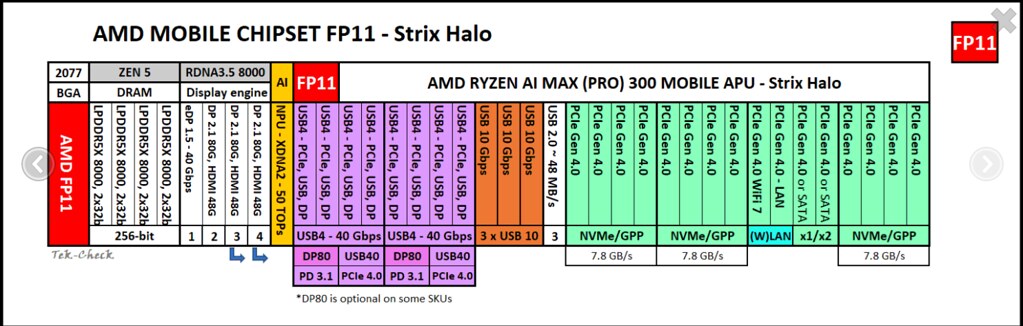
The USB-C cable has 2 TX and 2 RX links. Each link can do 20Gbps. So, usb-c only has 2 pcie lanes.
look the PCie over USB4 is more complicate…
But yes, the 4 pins may be the 2xTX + 2xRX USB4 lines…
@Mario_Limonciello do you know (or can ask) what is the thunderbolt-net speed limit, and if it is more than the ~10 measured her where we can open a issues?
I’m fairly certain you’ll see similar performance in Windows using it’s USB4 CM.
IE Linux→Windows, Windows→Windows and Linux→Linux will get similar performance.
Thanks for your quick reply.
(Even though I don’t really like what it implies  )
)
Apologies, I posted in the other thread but should have put the data here rather. Got all the bits and ran tests on storage, can confirm I’m seeing a solid 30+Gbs from the USB4/TB storage system on the exact same hardware and software that maxes out at ~11Gbps on TB networking.
@Djip I’m not sure that I follow correctly the details on that (very interesting) presentation. It it saying that USB4 stack operates in 3 modes, essentially:
- Generic USB4 (& 3) traffic: even with USB4 hosts & devices, the connection gets tunnelled via internal USB3 devices. And then these internal USB3 devices actually only have to support Gen2 x1 lanes (x2 optional)?
- DP: handled specially because no-one would accept the limits of #1 for display output.
- PCIe tunneling: handled specially because no-one would accept the limits of #2 for storage or GPUs.
Is this right? If so it seems entirely crazy. AIUI the Gen2 x1 lane speeds would be around 10Gbs, while Gen2 x2 lane speeds would be around 20Gbps. Since we are seeing 11Gbps-ish speeds on thunderbolt-net and apparently similar on Windows, does this mean that the software stacks are just doing a Gen2 x1 lane internally?
I am probably (hopefully?) confused here and would appreciate being ELI5ed.
No. Not modes.
USB4, as TB3 before it is essentially just a container. All it ever contains (other than low bandwidth configuration and management packets) are tunnels.
And you listed a few of those tunnel types with DP, USB3 and PCIe.
Cross-Domain, which is what is used for USB4Net packets would be a 4th tunnel type.
Also, USB4 only mandates USB3 10G support in all forms. But allows USB3 20G support and new USB3 Gen T (another tunnel type), which can have near arbitrary bandwidth (as its restricted to only being virtual on top of the USB4 network).
(For reference, TB3 did not have USB3 tunnels, it started out with DP and PCie only and Cross-Domain of course. USB4 added native USB3 tunneling and native USB2 support to make it more compatible with the existing USB ecosystem, which TB3 was not).
Intel has started supporting USB3 20G tunnels a few gens ago and in their new Barlow Ridge controllers (TB5 hubs), but AMD is still sticking to 10G native & tunneled so far.
USB3 on top of USB4 also follows a normal USB3 topology. So you will only have whatever USB3 connection from host to a USB4 hub (mostly 10G, like you said). And all 4 downstream USB3 ports that the commonly used Intel USB4 40G controller supports are driven by an integrated USB3 10G hub. The newest Intel controllers do 20G here as well. But that is essentially the USB4 architecture. For more USB3 bandwidth, you would need to use USB3 Gen T tunneling. Which is specced since USB4v2, but even Intel did not mention it anywhere with TB5. So so far, that is not coming. But all of this is only relevant for downstream USB3 functions. USB2 functions use sth. else and PCIe or DP use their respective tunnels.
A common limitation is that, USB4 hosts do not need to support dual-lane operation for cross-domain connections (between 2 hosts). So they often only make 1x20G lane connection (instead of the 2x20G lanes that would make up a USB 40G connection). That is what matches the ~18Gs max seen in the past. There have been some reports of people getting dual lane connections with Intel-integrated USB4 controllers under linux.
Did not look like AMD would support those dual lane cross-domain connections to me, but I have only tried that with Windows+Linux and Windows+Windows so far (and on top of the controller never entering bonded/dual-lane mode, this could also be explicitly disabled by the USB4 driver. And only for Linux do I have the diagnostic tools to confirm, that Linux does not restrict this).
Any further limit would need to be down to networking limits (which with USB4net is basically all software emulated) or it would need to be a particular bandwidth limit in the cross-domain tunneling infrastructure of Strix Halo. Because I believe I have seen Strix Point go beyond that in USB4Net (but not sure, as I mostly have one side still on Windows, I get Windows’ firewall overheads. But also, Windows configures larger packet sizes than Linux, so the Linux USB4Net implementation may still have room to improve there as well and in this combo the direction from larger packet size to smaller is usually way less performant).
1 Like
Look like apple have create a RDMA driver for there thunderbolt-5…
Did someone know it it is possible to create a RDMA driver for USB4 with the PCIe tunnelling ?
Cross-Domain is more or less RDMA. USB4Net is built on top of that to dumb it down and emulate normal ethernet, even if that does not make sense (because USB4Net is by definition P2P-only).
So maybe some marketing dude is trying to sell USB4Net as “RDMA” because the foundations on top of which its built are somewhat related…
Or you could replace USB4Net with something custom. As far as I know, everything on top of the Cross-Domain tunnel, like USB4Net is purely software in the driver anyway, thus easily replaceable if you control both sides of the connection.