I am wondering the same. While an intake CPU fan, is cooling the CPU more effectively, if the aim is to bring case temperatures down, to reduce heat at the PSU, turning it around and configuer the CPU fan as an exhaust fan, should make a difference, especially with the original shroud. The hot air should then be directly exhausted. and cool air pulled in through other opennings. I can’t test that so maybe someone can have a look at that (unless that has been already tried and I have missed that post).
Have not done too many physical tweaks. PSU fan still turns on but intervals in between are quite long and it seems to run for shorter.
I’m running Ubuntu 25.10 with the Noctua APU fan from Framework and this is what I’ve done:
installed CoreFreq which helps a bit with idle power consumption (from 12 W down to around 9W)… needs to be re-built with each kernel update which is a bit of a hassle as I’m usually not building kernel modules
built a podestal out of wood (pictures somewhere further up in this thread) so that the bottom plate has a higher distance to the wooden table it is standing on
set APU fan at 25% min
installed the Noctua 80mm fan following the official install guide which was shared here not long ago and set it to 25% min (source set to mainboard power)
The 80mm fan did not make that huge of a difference. Maybe I’ll keep tweaking settings and I think someone suggested to turn it around?
I think the podestal makes a noticable difference as the bottom plate where the PSU is really gets warm. APU fan set at 35% made a huge difference - PSU fan almost never turned on during a work day with my regular work load (mostly browsing, watching videos, light dev work & ssh sessions). Currently running at 25% as 35% is far more noticable to the ear. Not loud by any means, but a constant very silent noise of air being transported which I can hear clearly because the Desktop sits right in front of me on the table. Will experiment with 30% and ultimately switch back to 35% as it’s still better than the PSU fan. At 25% it just still runs too often.
A bit disappointed of the additional 80mm fan. The fan is great, but it does not make really a difference when installed like the official guide suggests. At least for me in my environment.
Hope we get an update from Framework and that there is a solution. Don’t mind swapping the PSU again (got a replacement which did nothing)… if it means the fan only turns on with high loads - maybe even with a gradual ramp-up instead of 0 - 100 in an instant.
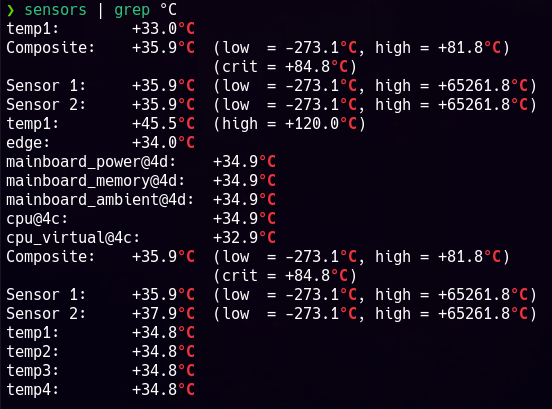
Screenshots of temp sensors right now (PSU fan is running - kicked in a few seconds before I took the screenshot):
Edit: After writing the post I let the system running at APU fan 30% for some time - seems to be the sweet spot. Only time will tell if the PSU fan ever kicks on during a longer work day
For anybody testing - don’t be discouraged by high temperatures immediately after turning the pc on. Temps were through the roof for the initial half hour or so (some sensors between 40 and 60 °C) - maybe because I spent some time in the Bios and I assume fan control is not very sophisticated when in the Bios which led to increased heat?
I think the room itself has cooled down as well (sun went down) which might have helped decrease by one or two °C. I’m in central Europe and weather is cold-ish. Not looking forward to hot summers. Hopeful that there is a real solution available till then.
Does anyone have fan SPEED feedback available under Windows 11 Pro? – I mean of the System fan, I know it is impossible to get it from the PSU w/o a USB / CorsairLink like connection? I get no speed sensors under HWiNFO, HWMonitor or LibreHardwareMonitorLib used and provided by Fan Control.
So I purchased a Corsair Commander Duo to control my two fans.
Oh Geez. What is wrong with my brain?! I meant to say I don’t get fan SPEED data by those three methods. I DO get temp sensor data in HWiNFO and HWMonitor. I’m going to edit my post to correct my mistake.
Ok, so I’m not alone. What is the program that gives you the fan speed in that black screencap? Thanx.
You said you installed the APU fan according to the official guide. That means it is an intake fan, right? I am really curious what impact it has on the PSU and internal case temperatures when you turn the APU fan around and make it an exhaust fan. APU temperatures will rise to some extend but what’s the impact on the PSU? If you blow out the hot air from the heat sink, instead of distributing it in the case, that should keep the case inside a lot cooler and as a consequence also help the PSU, at the expense of a hotter running APU. But this could be a tradeoff that is still worth it.
Right now I’m running the APU fan at 30% and the 80mm at 25%. Both as intakes - like in the guides (labels facing inward).
With that config the PSU fan has not turned on yet after running a few hours.
With APU 25% the PSU still turned on maybe once or twice per hour.
As it’s pretty solid with 30% I think I will not turn it around to make it an exhaust. My main goal is to have a nearly silent machine. Turned around I assume I would also have it run at some minimum speed and would end up with the same result but with extra steps. At 30% I can faintly hear it if I really pay attention to it, but in general it’s barely noticeable. Much much better than the PSU fan anyway.
Update on my end: support asked for a video, update of bios, then offered to send me a new PSU this morning. They admitted they have no idea whether the new PSU will behave better. According to what @wolfie wrote above, it won’t
You might get lucky. There seem to be some users not affected. Did a poll long ago and there were some people that said they had no issue..
At least from the people in this thread who had a replacement nobody had an improvement IIRC. Only the custom builds with different PSUs alltogether.
Framework seems to aknowledge that there is an issue and that they are investigating / working on it. The description in their deep-dive post on the PSU and how they market the machine as silent does not reflect reality. Them being completely silent is very frustrating, but given their track record with issues and fixing them in the end I’m hopeful we’ll get a solution some day.
Running the APU at a minimum speed is not ideal, but a good enough temporary workaround for me. At least currently in the winter months - we’ll see what summer brings
I can confirm my PSU sounds almost exactly like that. Is that a bit of chirping/whining from the PSU as well in between the louder fan noises? I get a bit of coil whine, but if I’m understanding correctly, that seems to be common with all the stock PSUs?
I can say I don’t have any issue with noise on 110V in the US here. My theory is younger people can hear the higher frequencies that may be the source of this. As you age the highest registers degrade first.