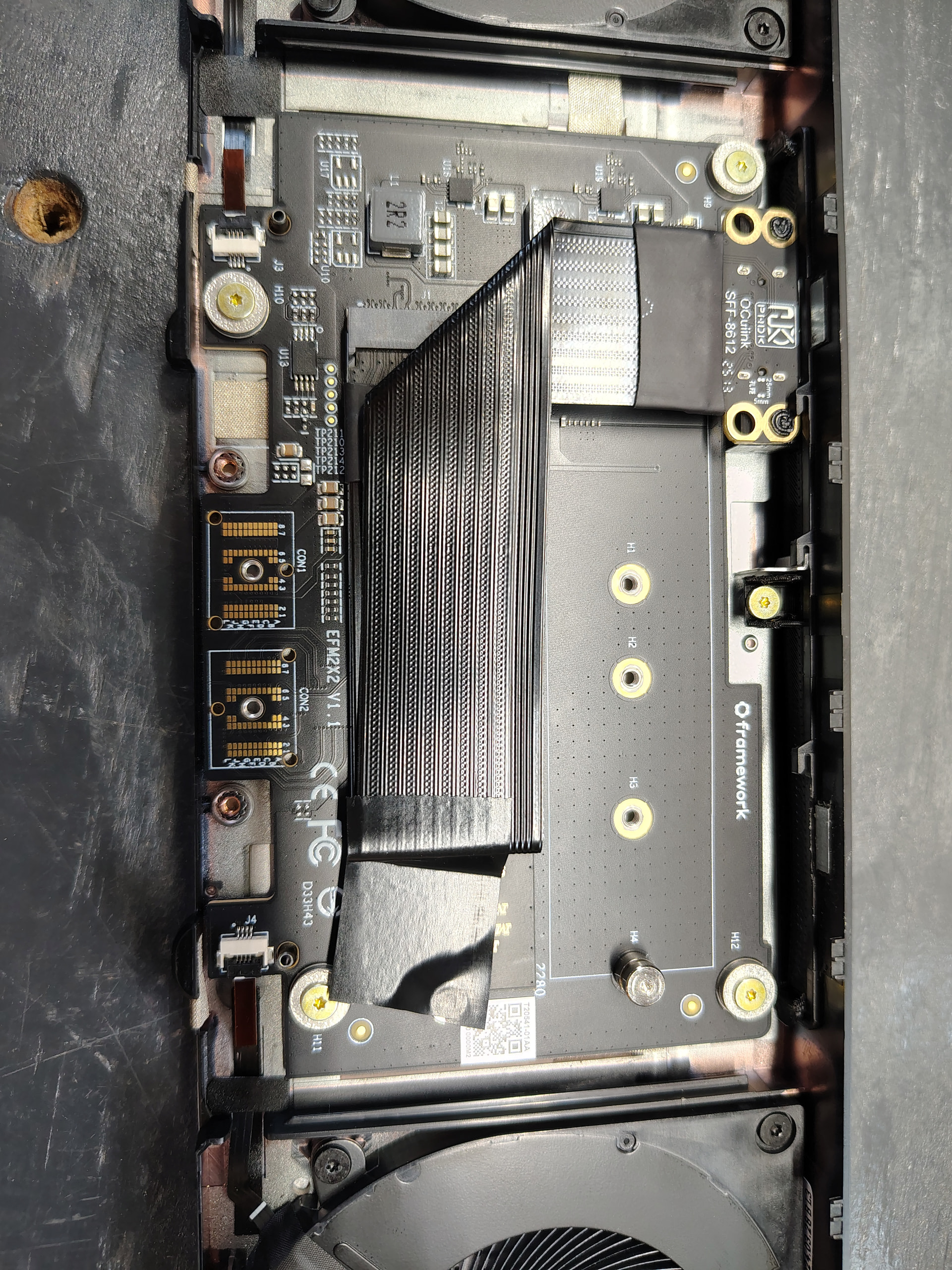
OcuLink eGPU works with the Dual M.2 expansion bay module

If I would have thought about it, I should have been smart and ran a benchmark just before the swap, but alas, I was too impatient and wanted to see if this thing would work. It is a lot of work to swap back and forth from this ribbon. One of my original tests when I had installed the oculink ribbon:

And then my most recent test with the prototype today:

Now, please keep in mind a few things:

  1. As I said, this a comparison of an older test as I was not smart enough (impatient!) to run a benchmark right before the swap of the ribbon and then right after the prototype installation.

  2. Some time has passed and I have been using this cpu/egpu setup for a bit now and hardware naturally will have some performance loss depending on use case. And I run games at ultra settings at 2k regularly.

  3. This prototype is not using gold pins as connectors for the PCIe slot since it is exactly that, a prototype just to see if it works. So connectivity is not as strong/reliable and could also explain some transfer/performance loss. The final product of course, will be gold pins.

Additional notes:

-I am running on BIOS 4.01 Beta.

-Windows 11 Pro

-7940hs cpu… repasted with PTM from Framework

-Power setting is at performance

-180W charger from Framework

Overall…

I am comfortable with saying that this product Kyle has created does indeed work for those of you like me, who use your expansion bay to run an egpu setup via oculink and the DEG1. Ultimately, this was to provide anyone else considering giving his final product a whirl if you have the DEG1.

8 Likes

One additional test an hour later:

Goes to show that it is highly likely the consistency of the pins on the prototype are the result of a poorer test result earlier.. Willing to bet the final product runs more efficient.

7 Likes

I am hoping the gold vs tin connectors of the production model might even work with my custom eGPU. I mean, I will be happy if it works with my AG02 but ecstatic if it works on a setup without a redriver. Should know in a couple weeks.

2 Likes

I have not had as much time to perform stability tests (actual game load) as I would like to due to my work schedule, but I can say that I was able to run both Starfield and Baldur’s Gate 3 for a few hours a piece and connectivity was consistent/stable. Didn’t notice any studder/chop, screen tear, loss of display, over heating, nor drop in fps. With the small amount I’ve been able to dabble thus far, all seems to meet if not exceed expectations for a prototype. Maybe come this weekend I can try to put it under load for several hours to see how it holds up.

4 Likes

Anyone have issues once the adapter is in? Not getting anything listed in lspci, and see the following in my dmesg output:

    0.474219] pci 0000:00:01.5: PCI bridge to [bus 01]
[    0.474269] pci 0000:00:01.5: broken device, retraining non-functional downstream link at 2.5GT/s
[    1.474499] pci 0000:00:01.5: retraining failed
[    1.474509] ------------[ cut here ]------------
[    1.474511] WARNING: CPU: 4 PID: 1 at drivers/pci/pcie/bwctrl.c:168 pcie_set_target_speed+0x1d0/0x250
[    1.474518] Modules linked in:
[    1.474523] CPU: 4 UID: 0 PID: 1 Comm: swapper/0 Not tainted 6.14.0-35-generic #35~24.04.1-Ubuntu
[    1.474527] Hardware name: Framework Laptop 16 (AMD Ryzen 7040 Series)/FRANMZCP09, BIOS 03.07 08/27/2025
[    1.474530] RIP: 0010:pcie_set_target_speed+0x1d0/0x250
[    1.474535] Code: 85 ff 0f 85 73 ff ff ff e9 76 ff ff ff 48 c7 c7 a0 5e 0f b9 e8 c1 8b 7d ff eb 9f 8b 1c 9d a0 fa eb b7 85 db 41 0f 94 c5 eb d5 <0f> 0b bb ea ff ff ff eb 87 89 f3 83 fe 19 77 4d 0f b6 83 f0 fa eb
[    1.474538] RSP: 0018:ffffd2a0c00ab8c0 EFLAGS: 00010202
[    1.474542] RAX: 00000000000000eb RBX: ffff8b0a82700000 RCX: 0000000000000000
[    1.474545] RDX: 0000000000000001 RSI: 00000000000000ff RDI: ffff8b0a82700000
[    1.474547] RBP: ffffd2a0c00ab8f0 R08: 0000000000000000 R09: 0000000000000000
[    1.474550] R10: 0000000000000000 R11: 0000000000000000 R12: 00000000ffffff92
[    1.474552] R13: 0000000000000044 R14: 0000000000000000 R15: 0000000000000008
[    1.474554] FS:  0000000000000000(0000) GS:ffff8b213fc00000(0000) knlGS:0000000000000000
[    1.474557] CS:  0010 DS: 0000 ES: 0000 CR0: 0000000080050033
[    1.474560] CR2: 0000000000000000 CR3: 0000000a48640000 CR4: 0000000000f50ef0
[    1.474563] PKRU: 55555554
[    1.474565] Call Trace:
[    1.474568]  <TASK>
[    1.474573]  pcie_failed_link_retrain+0x21c/0x230
[    1.474579]  pci_device_add+0x97/0x220
[    1.474583]  pci_scan_single_device+0xd4/0x110
[    1.474588]  pci_scan_slot+0x7a/0x230
[    1.474594]  pci_scan_child_bus_extend+0x3b/0x2c0
[    1.474599]  pci_scan_child_bus+0x10/0x20
[    1.474603]  acpi_pci_root_create+0x21d/0x290
[    1.474609]  pci_acpi_scan_root+0x217/0x260
[    1.474616]  acpi_pci_root_add+0x1eb/0x3e0
[    1.474620]  ? srso_alias_return_thunk+0x5/0xfbef5
[    1.474627]  acpi_bus_attach+0x1d4/0x2f0
[    1.474633]  ? __pfx_acpi_dev_for_one_check+0x10/0x10
[    1.474637]  acpi_dev_for_one_check+0x33/0x50
[    1.474640]  device_for_each_child+0x70/0xc0
[    1.474645]  acpi_dev_for_each_child+0x3b/0x60
[    1.474649]  ? __pfx_acpi_bus_attach+0x10/0x10
[    1.474653]  acpi_bus_attach+0x29f/0x2f0
[    1.474658]  ? __pfx_acpi_dev_for_one_check+0x10/0x10
[    1.474662]  acpi_dev_for_one_check+0x33/0x50
[    1.474667]  device_for_each_child+0x70/0xc0
[    1.474671]  acpi_dev_for_each_child+0x3b/0x60
[    1.474675]  ? __pfx_acpi_bus_attach+0x10/0x10
[    1.474679]  acpi_bus_attach+0x29f/0x2f0
[    1.474685]  acpi_bus_scan+0x7d/0x200
[    1.474691]  acpi_scan_init+0xe5/0x1c0
[    1.474697]  acpi_init+0x8a/0x160
[    1.474701]  ? __pfx_acpi_init+0x10/0x10
[    1.474706]  do_one_initcall+0x5b/0x340
[    1.474713]  do_initcalls+0x107/0x230
[    1.474718]  ? __pfx_kernel_init+0x10/0x10
[    1.474723]  kernel_init_freeable+0x138/0x210
[    1.474727]  kernel_init+0x1b/0x200
[    1.474732]  ret_from_fork+0x44/0x70
[    1.474735]  ? __pfx_kernel_init+0x10/0x10
[    1.474740]  ret_from_fork_asm+0x1a/0x30
[    1.474748]  </TASK>
[    1.474750] ---[ end trace 0000000000000000 ]---

This was what I ended up with hardware-wise, I had to crease the cable kind of hard to get the module back in. Open to suggestions.

It looks clean, but you may have bent the cable too much. It happened to me on the first try, I had to use another one with less bending and then it worked. But it does actually look good, so I think it is something else.

That is a possibility, as stated I needed to crease it (hard) to just get it back into the framework.

Any tips for fitment and keeping the cable in tact?

I removed the black plastic piece containing the fingerprint reader before inserting the expansion bay module. Made it a lot easier and relatively easy to do, it is just held in by the mid plate.

Talk to @Kyle_Tuck and drop the ribbon for one of his recent parts he created :sweat_smile: cuz I ran into a lot of issues with the ribbon too as far as removing/replacing the expansion bay. This is what I have been testing.


5 Likes

Soon I hope. I should have more information for y’all in about a week. If the new parts work at least as well as the test piece, we’re almost there folks.

4 Likes

As I said previously, they should work better since they are the same design just using more quality pins.

1 Like

Dang is there a list to join for one when the time comes? That is slick.

Still gonna try the ribbon in the meantime but would at least support this

No list. I want to have them in hand with at least some preliminary testing on a few pieces before I start collecting names.

3 Likes

giphy
… respectfully :slight_smile: I get it. Just excited for the obviously optimal result

2 Likes

I am also very interested in this. Add my name to the list

OK. Maybe one more update. :grinning_face_with_smiling_eyes:

I should have them in hand in the next day or two, and want to give folks in this thread a bit of a heads-up on a few things.

First, I want to make sure some things are as clear as I can make them. I am an individual. I have family commitments and a full-time job. There are some things about the process that you might not like, but I just don’t have the time or resources to go out of my way to do anything “above and beyond”. I need to prioritize the simple stuff first, such as limiting shipping to the US and Canada early on. I am exploring that a little, but again, I am just one person. Also, even though I may have them in hand in the next couple of days, that does not mean I will be able to do much testing within the next few days. Please be patient.

Second, I cannot fully test every piece, nor do I have a wide range of docks/equipment to test on. I will be testing a few pieces on a single Framework 16 with the dual M.2 expansion bay. I will test on a custom eGPU enclosure (not too worried if that doesn’t work) and an Aoostar AG02. I will be testing with a PCIe to M.2 riser with SSD, and an RX 9070 XT. I don’t have any other hardware to test with.

I cannot accept any liability if something goes horribly wrong. All I can say is that I installed 3 of the initial batch pieces that just didn’t work plus the 1 updated revision that did work. None caused any issues with my FW16. I shipped one of the original non-working pieces and the updated piece to OVER_CL0CK as well. He has reported the first piece did not work and the revised piece does work with his DEG1. It seems highly unlikely that something catastrophic would go wrong, BUT if you decide to acquire one of these, you are doing so at your own risk.

Finally, the estimated price will be about $60 US each plus shipping. I am still working on how much shipping in Canada will be. Shipping in US will be $10. These numbers are not final, again because I don’t even have them yet. Heck, I don’t even know 100% that any of them will work, but even assuming they work as well as the revised piece, there could still be “duds”.

I will only be able to accept PayPal and Venmo.

Oh. And there’s still no list. Assuming things go well, I will provide more information in this thread first so that those who have been following along here know about it first.

10 Likes

No stress, you’ve already done an amazing job. Just keep things at your pace, this is a hobby for everyone (except the folks at Framework) :slight_smile:

Can’t wait to see more, but in a respectful and healthy way :slight_smile:

3 Likes

Awesome work, and thanks for being clear. I’ve been lurking this thread for what might be over a year now, I think everyone left has enough patience and understanding to wait as long as we need to, so no rush.

4 Likes

I have been playing around with the M.2 board and trying to get x8 signal out to the GPU…. and I can say I managed to get some signal, the GPU would crash the laptop a few minutes after booting into windows due to such bad signal integrity with my setup.

I had 2 different M.2 to Oculink adapters in the slots and then a long 2x 4i Oculink to a single 8i Oculink cable connected to a 8i Oculink to PCIe x16 slot.

I did successfully get GPU-Z to show me a x8 connection to the GPU after flashing a custom EC firmware that forced the M.2 card to x8 PCIe instead of bifurcated 2x4. So having x8 is possible if you were to flash the M.2 card or the EC inside the laptop.

The issue is that it only went up to gen 2 speeds and was extremely glitchy with artifacts on the display connected to the GPU and the mentioned BSODs. Only issue is the signal integrity with my setup, but other people might have more luck with shorter cables, although the ideal solution would be a similar board to the single m.2 to oculink being produced here.

1 Like

As I mentioned before, please do not think in terms of timeline too much with this, I think everyone agrees and you can take your time. I am here in Europe and shall receive it when I receive it :). Thanks again for this initiative!