$100 for a board + Retimer + cable is still cheaper. But yeah not by a huge margin. Mm.
Well, I am not going with a USB 4 solution either. The time I spend with my GPU is not enough to warrant the spending of additional money for modules to utilize it more. Especially when I do have a e-waste desktop to help utilize it.
I might get a (relatively) inexpensive m.2 Oculink solution. Bare board only.
Well you have to get a motherboard, CPU, etc. It’s a whole another computer. If you have a use of another entire computer, yeah. It’ll be more performant, as well. But many of us don’t.
Mm. right.
I do not expect the firmware any time soon. There’s so many things.
My X11SSM-F have hot-plug PCIe slots, but linux straight up crash, and Windows dont let me
funny enough when I tried to eject my m.2 SSD in a expresscard (adapter) Windows bluescreens. Even though it says “safe to remove”.
It has to do with memory-mapped PCIe, sometimes loaded in Kernel. You need to un-map that, or have something handle it. Which is where firmware (for the lanes that the hot-plug PCIe device go to) comes in. But the OS have to be able to figure it out. This is generally pain and I think not worth the trouble when, realistically, shuttting down isnt that hard.
Do we? Because I did use Windows 10 22H2 on the X230T. I feel like this is a lot more exotic than you think.
Linux may have some form of that, I think. Havent tried it.
Linux is weird. They even claim NUMA support, but its “in development” for a decade
Maybe not for expresscard but that standard is pretty much dead. Thunderbolt/usb4 hotplug works pretty much flawlessly on both windows and linux as far as I tested. (except the be200 XD)
Got myself a couple of two-meter USB4 cables (10 Gbps in USB3 mode, 240W capable) from Cable Matters for 13€ each on sale. Verified with my Thunderbolt 3 eGPU - worked like a charm. So those cables are dirt cheap now. A bit thicker than active TB3 cables, but for the price, that’s awesome really.
I use Oculink for the exact use case of using the laptop as a “Desktop” - it really helps a lot with performance (as I mentioned earlier, my RTX 3090 does a really solid job even in modern AAA titles - much, much better than via tb3 naturally and I think I am pretty close to full performance). My personal strategy which Oculink allows well is to go with one system (no desktop) and invest all money into one single item: the next Desktop GPU.
@Gu_tally I hope all is well! I wanted to ask if you perhaps have a quick “status update” on your Oculink 8i board? No pressure (obviously), but would be thankful for any update in due course!
Oculink isn’t, and won’t be rated for PCIe 5, though I’m sure you’ll see a lot of folks try and pray. CopprLink is the successor to get back to 2 Meter external run support, but its connector is going to be much thicker than Oculink.
For now though, in the consumer realm that’s really only the NVIDIA 5090, and the difference between PCIe 5 and 4 is negligible at x16 (but measurable at x4). Still, folks in this thread have been constantly jumping between saying they need support for the fastest GPUs available without speed impact, while also saying they need to be able to support hardware from eWaste systems, so there’s a broad spectrum. For those on the bleeding edge, OCuLink is not really going to be able to support future flagship GPUs without further compromises. USB4 v2.0 will exceed OCuLink’s capabilities by the same degree that OCuLink exceeds USB4 today. But if USB4 is anything to go by, we’ve probably got another 1-2 years before we see an ecosystem mature enough to deal with it. Intel’s own Thunderbolt 5 (since that’s the closest you’re getting to seeing USB4 v2.0 in the wild right now) has had a fairly shaky start.
Thanks for the overview! My personal “endgame” is Oculink 8i, which should be really fast enough for some years to come. That’s the reason why I am staying with Oculink for now.
a quick update. I will be moving back to China next month. by than I can visit my friend with the laptop and the board to do the onsite test. than it will be easier to fix the fan and EC and etc issue.
the PCIe lane configuration is still, I believe a bios issue at framework end. you can manually overcome this with umaf bios editor, but it is a very not ideal solution.
to get a PCIe 4.0x8, you disable the mux, force dgpu connect and prefer start on external monitor.
none of these options are available in the normal bios.
than the laptop will boot into the internal monitor with the dgpu successfully handshaked and working properly. it will jump back and forth between internal and external display for some time and settle with the external gpu.
otherwise you will get a error 43 that the code 43 fixer cannot fix.
that is very conter intuitive
Indeed, Framework should be developing a desk like this (in partnership with someone). The Framework Desk. It would sell, and create substantial visibility. Even if just for the motherboard and many, many ports for connectivity. Ideally, of course, also for the laptop GPU. A desk that you can plug your GPU in.
40 GHz? Probably not. Still need to tune the differential pair length, as well.
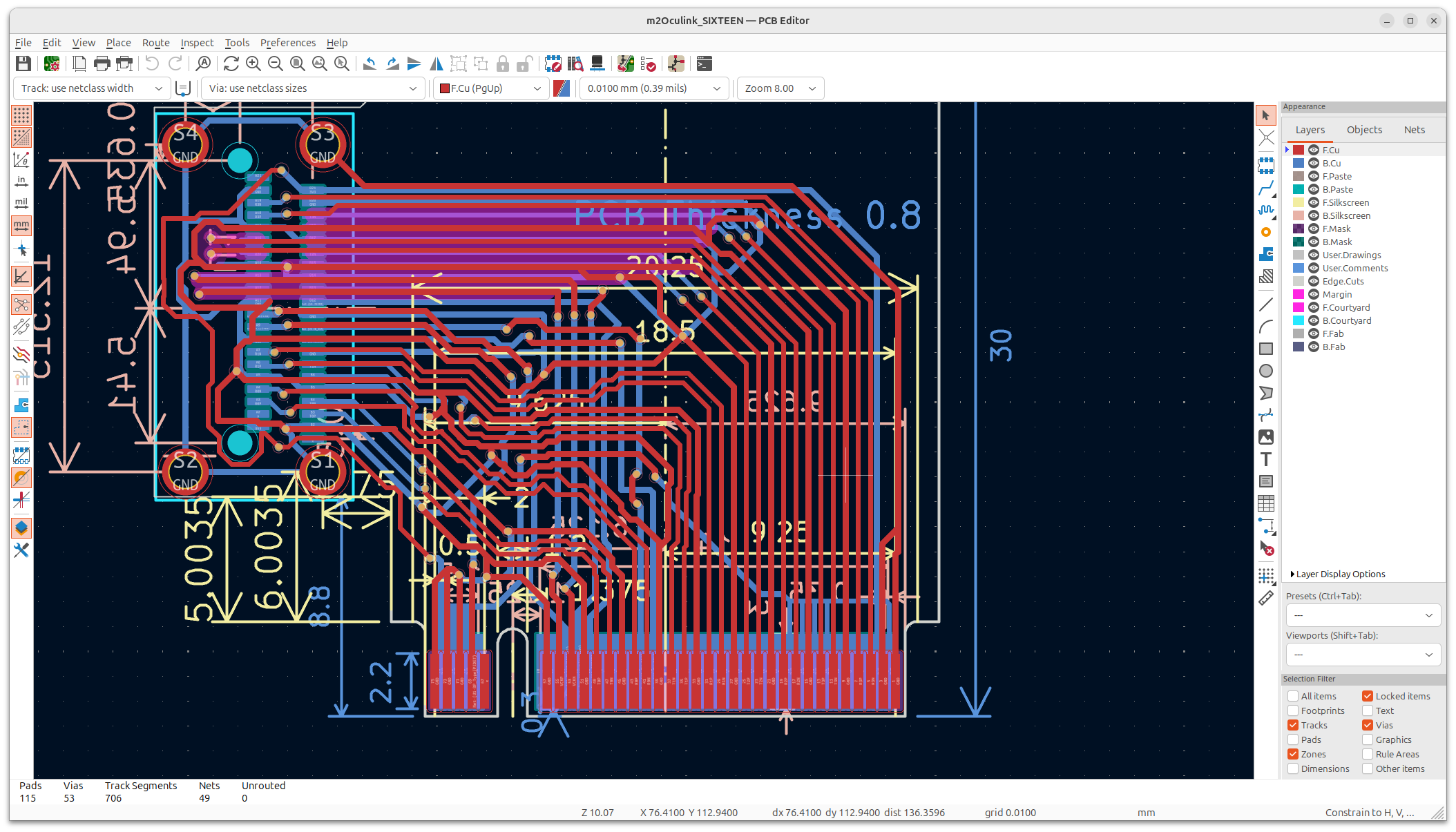
I dont have super high confidence in it, but I dont have money for a 4-layer board with ground plane pour in the middle, either. At least the impedance calculator tells me I am somewhat close.
As of those wondering. For good eye opening, you need to design circuit for at least 5x. PCIe 4.0 is 8 GHz, so 5x is 40. Was debating on if I need a redriver or not. But I can’t afford one, either. Nor can I relistically afford the significantly increased complexity.
And you wonder why motherboards are 10 layers nowadays ..
The calculator most likely uses an implicit reference plane for his calculation so you need a proper ground return path otherwise you significantly increase the impedance of the line. Could you share a screenshot of the tool you used with the calculation?
Well here’s the thing, its differential pair. It’s also capacitor coupled at both ends, so.
You are right that there is no ground plane beneath them, unlike in a more complex multi-layer board like a main board or a m.2 SSD.
You can find such a calculator in various different places, they give similar answer.KiCad PCB Calculator, ee-diary, jlcpcb, Sierra circuits. Ideally I would use Altium Designer, but I only have the community Circuitmaker, and importing KiCad project is finicky.
The concensus is that I do not have enough capacitance per length, since inductance per length you can’t really change that, beside making the traces thin and wide (which nobody does).
This is fair conclusion. Most high-speed circuits also involve 4+ layers, so you have lots of ground and other bits (including the PCB material) all around the traces, increasing capacitance. This is where trace size must be minimal, to reduce area for capacitance. And also where low-loss boards (with dielectric constant of 2 to 3) come in. It’s almost exactly half of FR4 (4 to 4.5), in addition to reducing transmission loss. (0.014 for good FR4 and down to 0.002 for ultra low loss)
Since I do not have the budget for 4-layer board, I will need to use high dielectric material for impedance matching. Having 1mm wide diff pairs on a connector with 0.5mm pin pitch is straight up impossible. To help, I tried to shove in as many ground traces (and as thick as possible) to surround the diff pairs. Seems okay, but I can’t do too much more, because I do not have budget for smaller vias. They cost extra.
Hey uh if you have the skills and you want to help me a bit, I’m all for it. I can get it up to Github, if you want.
We can work on this together. Clock is ticking. My plane is Aug 24th, I’d better get it submitted in the next 5 days. Take 2 days to make, 3 days to ship, and I will then need to bike to the PC shop opposite of the street (they have a hot air CNC reflow station, lmao), and solder on that Oculink port.
And then I don’t get to test it. Or do I?
That, or we wait until I am back to use the company’s PCB printer. That one is free, but I .. dont know if we have 0.8mm.
Question: you said the price is a constraint so why use the 2280 when you can use the 2230 or 2242? The bigger the PCB, the bigger is the cost. Can it be a good idea to reduce the board size?
 )
)