I think you will need an oscilloscope to diagnose the problem. It is probably the link training that is failing.
So, an oscilloscope that can show eye charts is probably what is needed so assess the signal quality.
1 Like
Even then, I am pretty certain that it should be able to link train at least even if my routing was extremely bad, considering that you can still get a link when using the M.2 board → M.2 to Oculink connector → Oculink cable to x16 board → x16 to GPU that probably ruins the signal integrity more than my routing. Although I could be wrong.
I did also verify my pinout using the M.2 board, to see if I was connecting TX, RX and REFCLK correctly.
1 Like
What spec material is the pcb made with?
1 Like
I used JLC04161H-3313stackup from JLCPCB and used their calculator to get the diff pair trace width and spacing.
But like I said, I doubt its my routing causing the issue since PCIe 1.0 should be able to work. I feel like I’m just missing something, although I do not know what it could be.
1 Like
The only other thing I can think of is that I might need coupling capacitors on the TX or RX lanes and that’s why the link training is failing.
1 Like
Hey - the routing looks good on your board, but your traces do look exceptionally thin. Have you tried, (I know it’s boring), just running a simple continuity check between all the lines on the occulink and interposer sides?
Some of the spacing between traces on the PCIE lines also looks exceptionally thin: I’d test these for shorts.
A32 and A33 aren’t REFCLK lines by the way, this datasheet seems to suggest that A32 is another PERST and A33 is CPRSNT. I can see you’ve got jumpers on them though so I presume you already know about this.
Do you know which way round the VSP lines are supposed to be? I can’t find any reliable information about them online.
It is strange though, as your schematic looks basically perfect.
1 Like
Have already done this. I checked my pinout using the M.2 expansion board and then my own board to compare them.
I used a 2x 4i to single 8i OCuLink cable with 2 of those M.2 to 4i OCuLink adapters. These were connected to an 8i OCuLink to x16 slot where I checked the pinout of every pin.
The REFCLK, TX, RX and PCIE_RESET signal are all connected correctly (when the two 4i connectors are connected in the correct order. I also get life from the GPU but it completely decimates the signal since it barely runs at PCIe 1.1 through so many connections). But these are definitely connected right on my board too.
The M.2 expansion board also connects CLKREQ to GND right next to the bottom M.2 slot via a 1kOhm resistor, whereas I did nothing with it initially, but I did connect it later by soldering a tiny wire to GND, although it didn’t change anything.
For REFCLK. I did disconnect the jumpers to the A32 and A33 pins while testing and it was still passed through via A11 and A12, so it seems like A32 and A33 are unused.
The PCIE_RESET signal is passed through to the x16 slot when connected to just B11, so I completely disconnected B32 for the next board since they seem to be unused in this case. (I did the same for B33 since its just Cable Present signal thats specific to OCuLink and is unused on the x16 board, but I left it connected via B12).
This I’m unsure about, but the order of REFCLK, TX or RX negative or positive sides shouldn’t matter as PCIe requires implementations of the spec to support swapping the positive and negative sides. The B11 and B12 seem to be VSP on your datasheet, but B11 is definitely the PCIE_RESET pin when I checked the pinout (and it didn’t get shorted to REFCLK or similar). I was not aware of your datasheet at the time as it was not available, so I was using this with the SFF-8621 spec under Table 7-2 and 7-3.
I did order a 2nd revision of the board with a bit more pins I’ll be able to check so here’s hope that one gives me some sign of life. I did also swap some negative and positive pins to make the routing look much nicer.
1 Like
I’ve got extremely great news.
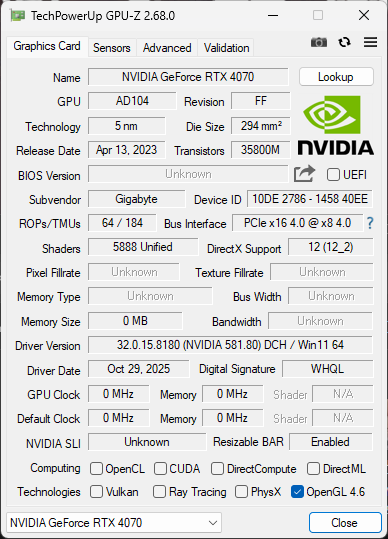
It works…. no redriver, nothing. I have to just finalize the pinout as even the next revision currently isnt correct and I had to short different pins. But I have actual x8 4.0 running games now. I do still need to test how stable it is, but this might not need any redriver.
24 Likes
This is wild! I think you are the first to achieve this. Can we see a picture of the setup/connection?
4 Likes
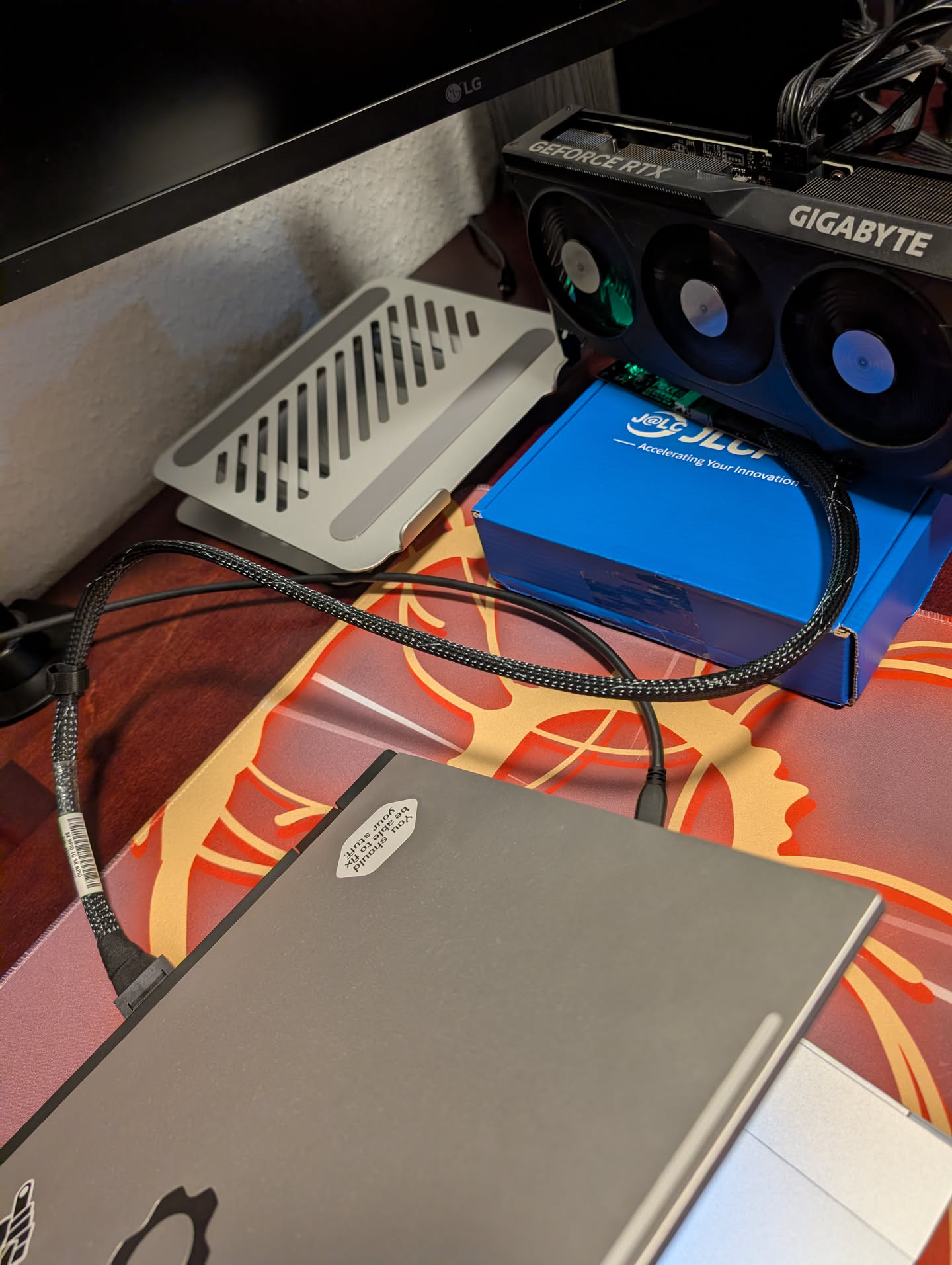
I’m using a 50cm long oculink cable from molex and its connected to that one generic x8 adapter found on aliexpress.

It dropped back to PCIe 1.1 here since I stopped the game, but it jumps back to 4.0 the moment I run the game and I’m not noticing any stuttering for now.
Will have the photos of the board soon too.
13 Likes
Please keep us updated.
3 Likes
Here is a photo of the board
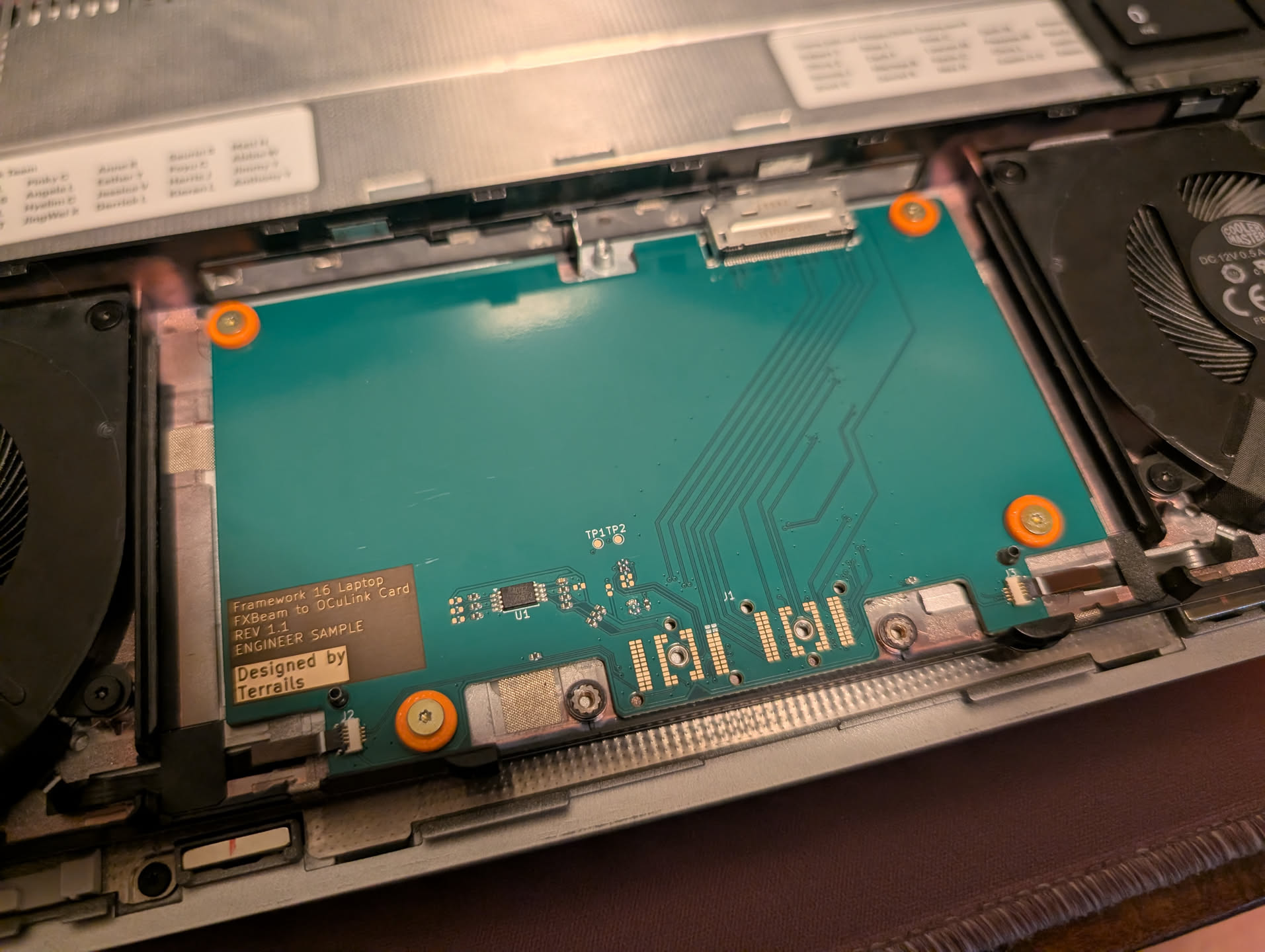
It is exactly the current version available on my repo, but I have just moved the 0 Ohm resistor that connects to the PCIe reset signal on the OCuLink connector. I originally had it connected to SA5 which is marked as “PEX_RST#” on Expansion Bay github, but now it is connected to PF3, which is the “EXT_SSD1_RST#” signal. I do wonder why it doesn’t want to work using the PEX_RST and what even is the use of that signal then.
20 Likes
It works well using the integrated display? I had a lot of trouble running the M.2→OcuLink → DEG1 when using the Framework 16’s display.
Define trouble? I’m not having any weird issues by just using the laptop. I even connected displays through the USB4 on the laptop and they worked well with the GPU. I will definitely plug directly into the GPU for better latency though.
This is very exciting! Do you plan on selling the boards when you finish or how does a layman order them?
6 Likes
Incredible work, can’t wait to hear more! How does it stand up to a benchmark/stress test? I have no idea how much work remains but this is clearly great progress.
2 Likes
This
2 Likes
@Filip Ditto! Super keen, 8x Oculink & directly connecting via the Graphics Module Interposer is what I’ve been waiting for! 
Yo!
Even link speed management is working. nice
Ironically Oculink (or PCIe direct) have a lot less trouble than with USB-4. Oculink offer native PCIe speeds, and on GPUs, the uplink (GPU to computer) is rarely used, so you lose like 2% performance.
You still lose between 5 to 20% to like, bandwidth and random latency, but compared to 20%-80% reduction on USB-4, I take this any day of week.
Though this is the full-blood x8 option. I am working on a x4 option that just adapt a m.2 to a Oculink 4i. Though … I am quite bad at this (lol).
You use 4-layer board? 2 layer?
How did you get the impedance to match?

1 Like
If you release the gerbers for this I’ll do a little jig or dance
Either that or selling them
2 Likes