I wonder if its possible or anyone tried to add an oculink adaptor throught the pcie 4 x4 in the framework desktop
It would be great if anyone can share hos experience or try it if he has one???
I wonder if its possible or anyone tried to add an oculink adaptor throught the pcie 4 x4 in the framework desktop
It would be great if anyone can share hos experience or try it if he has one???
I tried Ableconn PEX-OL153 PCIe OCuLink SFF-8612 Adapter Card but my system (Ubuntu 25.10) refused to see the GPU at all. lspci was completely blank. I swapped the Ableconn card for the RIITOP M.2 NVMe PCIe 4.0 x4 to OCuLink Host Adapter. As soon as I booted up, the system detected the video card immediately.
Yes I bought this product from Amazon:
I had to cut into the case the get the expansion card exposed to outside.
Everything worked with win11 flawlessly.
When i get back home I will post some photos.
Yes i remember this post.
for part 1
Sit at the top of a tall shelf and does compute for me.
If you have any questions I can answer no issue.
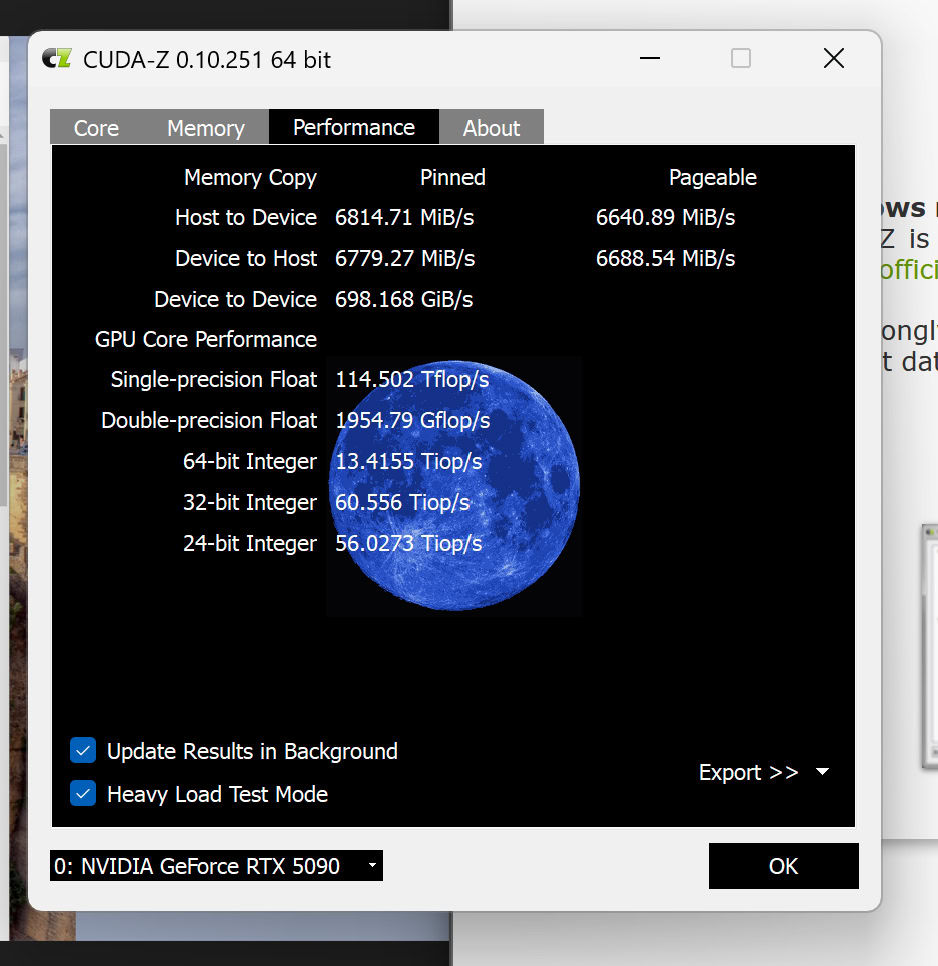
those are great speeds Jason!
Did you turn on error reporting (like another user suggested) and see if there are errors with your setup?
Does it run smoothly?
I don’t know where to enable that.
But i’ve not had any issue so far. if you like i can run some testing software if you have recomendations.
hell yeah. let us know
What do you recommend?
Hey quick question:
Isn’t your 5090 too bottleneck’d by the Gen 4 x4 slot’s limited max speed on the board side ??
Well yes it is, but as you can see from the performance benchmarks it dosen’t effect game too much.
I actually don’t use it for gaming at all, it’s all AI work and I try to keep it all in VRAM. so the reduction from 11-12 gbps to around 6 gbps mean that the GFX card’s VRAM is filed in 8s instead of 4-5s. when the work it does take’s minutes that 4s saving is nothing.
genuine question, what benefit is it to use the PCIE for?
Additionnal compute modules (gpu, ai accelerators), NICS, or storage …