Upgrade path for a Framework 13 11th Gen Intel

Hello, I’ve been using the Framework 13 11th Gen for about two and a half years now, and my specs are as follows,

OS: Fedora Linux 43
CPU: 11th Gen Intel(R) Core™ i5-1135G7 (8) @ 4.20 GHz
GPU: Intel Iris Xe Graphics @ 1.30 GHz [Integrated]
Memory: 32GB (16GBx2 Crucial 3200 MT/s DDR4)
Storage: 1TB (WDS100T1X0E-00AFY0)

I did buy the DIY version in batch 9, and bought my own RAM, SSD and charger back then. I have since then changed the speakers and the bezel. The laptop has held up well given my work involves a bit of travel. I have no major grouse so far, apart from minor paint chipping issue on the keyboard, battery life and Wi-Fi speeds (on Linux with the AX210).

But given the increase in workload I currently have, I do feel the need to upgrade. My primary consideration would be compatibility with Linux and battery life. I currently have the laptop on fairly heavy duty for about 3-4 hours a day (which would increase further) and lighter workloads account for about 6-8 hours a day. I have the following questions,

  1. Does it make sense to go down the route of AMD Ryzen 7 784Uor or the Intel Ultra 7 155H?
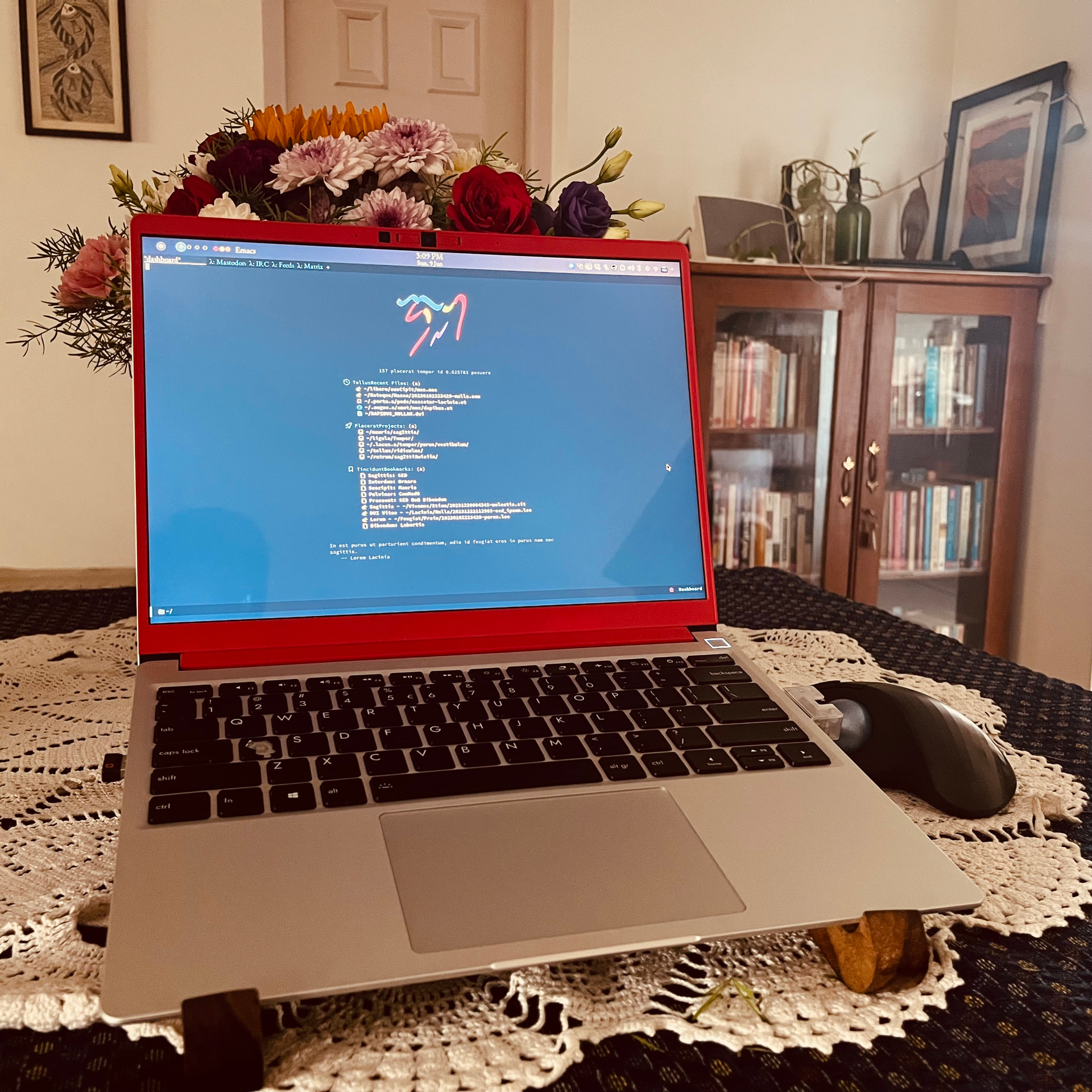
  2. Has the keyboard quality improved by any chance? I have paint chipping out on the A, S, Alt, Ctrl and Shift keys. Here is a picture from a Feb when it was only the Ctrl and A keys: Bharath M. Palavalli: "Is anyone’s @frameworkcomputer@fosstodon.org keyb…" - Mastodon @ SDF
  3. Does it make sense to get the new 61Wh battery upgrade make sense? Here is the output of upower -i /org/freedesktop/UPower/devices/battery_BAT1:
    native-path: BAT1
    vendor: NVT
    model: Framewo
    serial: 00B8
    power supply: yes
    updated: Sat 22 Nov 2025 18:15:58 IST (10 seconds ago)
    has history: yes
    has statistics: yes
    battery
    present: yes
    rechargeable: yes
    state: fully-charged
    warning-level: none
    energy: 44.4136 Wh
    energy-empty: 0 Wh
    energy-full: 44.4136 Wh
    energy-full-design: 55.0088 Wh
    voltage-min-design: 15.4 V
    capacity-level: Normal
    energy-rate: 0 W
    voltage: 17.268 V
    charge-cycles: 179
    percentage: 100%
    capacity: 80.7391%
    technology: lithium-ion
    icon-name: 'battery-full-charged-symbolic'
  4. For folks who have also upgraded the display, does it make sense to get the 2.2K matte or the 2.8K display? My primary consideration is again power draw/usage and consideration for outdoor usage when I travel. I do not do much multimedia work that would require “colour accuracy”, etc.
  5. Last question, is the v2 of the webcam a useful upgrade? I do tend to have numerous work related calls that I need the webcam for.

And for those of you who read so far, here is a picture from some time ago (with only the A key having the chipping issue):
  1. That’s somewhere between personal preference, software dependent, driver dependent. AFAICT both have quirks, strengths and weaknesses, etc.
  2. Not really. My 1 year old keyboard has the same finish loss issues, but a little but less bad than the two keyboards it replaced. First I had to replace due to my screw up bending the keyboard ribbon cable. Second went into building up a FWL13 for a neighbor who didn’t care about such aesthetic issues.
  3. Definitely not. I’m reading lots of cases of 61Wh batteries are puffing up, and rapidly degrade to the same real capacity as 55Wh batteries.
  4. I had the original glossy, and the same resolution matte. Matte is far superior in my opinion. Colors are nearly as good, but you’re not trying to see through your own reflection. If you’re outdoors or anywhere near a sunny window, it’s not even close, the matte blows away glossy in terms of eye comfort.
  5. Don’t know so I won’t speculate.
3 Likes

Thank you!

Is this the v2 of the keyboard (with the gear/framework logo instead of the Windows logo?)

I did read about the battery swells on the 61Wh but wanted to check if there are folks out here who have not had that issue, but I might actually wait it out on this one for a while.

I am leaning towards the Matte display, this helps! Given that when I travel, I have no control over the environment, and many a times I am outdoors, this makes sense.

I did find their post and video at https://frame.work/blog/framework-laptop-13-deep-dive---a-laptop-webcam-with-smartphone-technology.

Webcam is pretty negligible. I did a small comparison when it came out. I’d say if you don’t havw any pains with the 1st gen and if it doesn’t break, no point in upgrading it.

2 Likes

Thank you, that helps. One more ticked off the list :slight_smile:

1 Like

No my current keyboard still has the evidence of extortion on it (the winblows logo).

1 Like

Here is the TLDR version for folks, since I can’t seem to edit it:

  1. 11th Gen Intel i5 → AMD Ryzen 7 784U or the Intel Ultra 7 155H: YMMV
  2. Keyboard v2 (to fix paint chipping/extortion): No (This thread)
  3. Battery from 55Wh to 61Wh: No (until issues are fixed, check forums)
  4. Display from the original to 2.2K matte or the 2.8K display: Yes (Matte for folks who need all weather, and 2.8k for folks who want the colour quality(?), this thread and forums)
  5. Webcam from v1 to v2: No (this thread and forums)

So, for me, it is a wait it out for a bit then!

1 Like