I am upgrading the sn750 500GB drive in my 11th gen Framework 13in. I am looking at the sn850x 1Tb, but also see that the sn7100 is very efficient. Should I get the sn7100 instead or does it really matter?
Thanks!
I am upgrading the sn750 500GB drive in my 11th gen Framework 13in. I am looking at the sn850x 1Tb, but also see that the sn7100 is very efficient. Should I get the sn7100 instead or does it really matter?
Thanks!
I opted for the SN7100 - very power efficient.
If the price difference isn’t huge I’d say yes, if it matters highly depends on your workload but if it does the sn7100 is pretty much the best thing in the market right now efficiency wise.
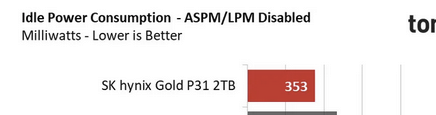
I use the SK Hynix P31 for best battery life. Toms hardware has good tests for current use on SSDs. It’s an older generation so more difficult to find but I recall it’s only 300mw where as most are 600mw or more now.
Thanks everyone! I went ahead and got the sn7100!
On the power use for doing stuff front the sn7100 is extremely good and the idle power should not matter too much as in a laptop it should go to sleep really quickly instead of staying idle.
Unless he is bench marking battery life, the ssd likely won’t have much effect on real life battery time. The SN7100 is an efficient SSD, but if battery life is your top priority, then the Hynix P31 simply can not be beat. If you made a histogram of a laptop’s SSD usage, you would see it likely spends the highest % of time at idle. Here are the official numbers from Tom’s Hardware tests:
Idle power Hynix P31 = 351 milliwatts
Idle power SN7100 = 969 millwatts (2.76x higher)
50GB copy average Hynix P31 = 2.28 watts
50GB copy average SN7100 = 2.81 watts (1.23x higher)
50GB copy max Hynix P31 = 2.81 watts
50GB copy max SN7100 = 4.17 watts (1.83x higher)
That sounds like desktop numbers not using apst, bot 0.3W and 0.9W are way too high for a proper sleep state.
APSM disabled numbers are pretty meaningless for laptop usage. We aren’t compairing cpus with disabled c-states either.
There was definitely something wrong with apsm on the review unit sn7100 since it doesn’t seem to work on both the tomshardware and techpowerup reviews. Though I am kinda curious how the apsm disabled idle power would look for the sn7100 running at pcie3.
In a rel world laptop scenario the ssd isn’t going to spend a lot of time idling, it goes to sleep which is low double digit to low tripple digit mW in really bad cases. Pretty much any scenario that would keep an ssd awake for significant periods also comes with enough cpu/gpu load to drown that out (or stuff like async trim which tends to be done when on ac power).
Energy is power x time, it’s fine and good the p31 uses half a W less but it also takes it twice the time so in regard to actual energy used for that 50gb file the p31 looses badly.
I am in no way saying the p31 isn’t a pretty nice ssd but the stuff it is good at doesn’t have a huge impact to actual laptop battery life.
I was just giving you reference numbers from the review tests. Either way it’s not worth arguing.
I opted for the Kingston Renegade series as it seemed to have good performance along with low power use, but I have not done any direct benchmarking to see how much it typically pulls in my system.
Unless your ssd is bugged or you have some very niche workloads that keep the ssd awake all the time while not producing much load otherwise the battery difference from ssd to ssd is going to be pretty marginal.
This topic was automatically closed 180 days after the last reply. New replies are no longer allowed.