I’ve recently gotten the framework desktop 64gb and since booting I have had a lot of issues with repeated amdgpu hangs and resets on normal use e.g. FireFox. I am also on the latest bios.
Symptoms
Screen freezes or goes black, often recovers but will sometimes log me out of the session. Have also had it not recover and I have to reboot the pc.
Occurs more often when watching videos (hardware accelerated apps like FireFox)
What I’ve tested
Disabling hardware acceleration (little change)
Changing OS, I have used arch, fedora43, ubuntu and nixos all with the same crash logs
Downgraded the amdgpu drivers, linux-firmware-amdgpu-20251111 and other previous versions. This helped but ultimately just made the crashes every 20 min instead of 10 min
I have tried the latest linux generic kernel 6.18, downgraded to 6.16 and used the LTS versions and zen versions. Zen 6.18 seemed to have the best stability of what I tried.
I have also used a variety of kernel parameters to disable some behaviors of the driver, with no luck at all e.g. amdgpu.mes=0
Question
Does anyone have any current solutions or recommended workarounds for this issue?
The amdgpu.dcdebugmask=0x10 arg has worked for me consistently on my Ryzen AI 9 HX 370 board (similar to yours with respect to the issue at hand) except for a few freezes post resume from sleep on kernel 6.17.7 IIRC.
I’ve been pretty happy with that workaround, but I just replaced it with --append=amdgpu.gpu_recovery=1 for kicks .
I suggest starting with amdgpu.dcdebugmask=0x10. If the errors persist, posting error logs will help with diagnosis and further fixes to try. You can get logs for the previous boot with journalctl -k -b -1 --no-hostname.
Thanks for the advice, I gave it a go but it still crashes quite frequently. Doesn’t seem like anything changed. Here is the full log of the crash amdgpu-crash - Pastebin.com.
Below is probably the issue.
Dec 30 15:53:55 systemd[1]: systemd-coredump@0-12289-3374_3375-0.service: Consumed 575ms CPU time over 601ms wall clock time, 525.3M memory peak.
Dec 30 15:53:55 drkonqi-coredump-processor[3376]: "/usr/lib/chromium/chromium" 1829 "/var/lib/systemd/coredump/core.chromium.1000.42c64fcffe554ff5bf92aff00674714f.1829.1767070434000000.zst"
Dec 30 15:53:55 systemd[1041]: Started Launch DrKonqi for a systemd-coredump crash (PID 3376/UID 0).
Dec 30 15:53:55 drkonqi-coredump-launcher[3387]: Unable to find file for pid 1829 expected at "kcrash-metadata/chromium.42c64fcffe554ff5bf92aff00674714f.1829.ini"
Dec 30 15:53:55 drkonqi-coredump-launcher[3387]: Nothing handled the dump :O
Dec 30 15:53:55 systemd[1]: drkonqi-coredump-processor@0-12289-3374_3375-0.service: Deactivated successfully.
Dec 30 15:53:57 kernel: amdgpu 0000:c2:00.0: amdgpu: MES failed to respond to msg=REMOVE_QUEUE
Dec 30 15:53:57 kernel: amdgpu 0000:c2:00.0: amdgpu: failed to unmap legacy queue
Dec 30 15:54:00 kernel: amdgpu 0000:c2:00.0: amdgpu: MES failed to respond to msg=REMOVE_QUEUE
Dec 30 15:54:00 kernel: amdgpu 0000:c2:00.0: amdgpu: failed to unmap legacy queue
Dec 30 15:54:03 kernel: amdgpu 0000:c2:00.0: amdgpu: MES failed to respond to msg=REMOVE_QUEUE
Dec 30 15:54:03 kernel: amdgpu 0000:c2:00.0: amdgpu: failed to unmap legacy queue
Dec 30 15:54:05 kernel: amdgpu 0000:c2:00.0: amdgpu: MES failed to respond to msg=REMOVE_QUEUE
Dec 30 15:54:05 kernel: amdgpu 0000:c2:00.0: amdgpu: failed to unmap legacy queue
Dec 30 15:54:08 kernel: amdgpu 0000:c2:00.0: amdgpu: MES failed to respond to msg=REMOVE_QUEUE
Dec 30 15:54:08 kernel: amdgpu 0000:c2:00.0: amdgpu: failed to unmap legacy queue
Dec 30 15:54:11 kernel: amdgpu 0000:c2:00.0: amdgpu: MES failed to respond to msg=REMOVE_QUEUE
Dec 30 15:54:11 kernel: amdgpu 0000:c2:00.0: amdgpu: failed to unmap legacy queue
Dec 30 15:54:13 kernel: amdgpu 0000:c2:00.0: amdgpu: MES failed to respond to msg=REMOVE_QUEUE
Dec 30 15:54:13 kernel: amdgpu 0000:c2:00.0: amdgpu: failed to unmap legacy queue
Dec 30 15:54:16 kernel: amdgpu 0000:c2:00.0: amdgpu: MES failed to respond to msg=REMOVE_QUEUE
Dec 30 15:54:16 kernel: amdgpu 0000:c2:00.0: amdgpu: failed to unmap legacy queue
Dec 30 15:54:19 kernel: amdgpu 0000:c2:00.0: amdgpu: MES failed to respond to msg=REMOVE_QUEUE
Dec 30 15:54:19 kernel: amdgpu 0000:c2:00.0: amdgpu: failed to unmap legacy queue
Dec 30 15:54:19 kernel: [drm:gfx_v11_0_hw_fini [amdgpu]] *ERROR* failed to halt cp gfx
Dec 30 15:54:19 kernel: amdgpu 0000:c2:00.0: amdgpu: MODE2 reset
Dec 30 15:54:19 kernel: amdgpu 0000:c2:00.0: amdgpu: GPU reset succeeded, trying to resume
Dec 30 15:54:19 kernel: [drm] PCIE GART of 512M enabled (table at 0x000000801FB00000).
Dec 30 15:54:19 kernel: amdgpu 0000:c2:00.0: amdgpu: SMU is resuming...
Dec 30 15:54:19 kernel: amdgpu 0000:c2:00.0: amdgpu: SMU is resumed successfully!
Dec 30 15:54:19 kernel: amdgpu 0000:c2:00.0: amdgpu: [drm] DMUB hardware initialized: version=0x09003500
From what I can tell, this issue seems related and cwsr_enable=0 helps. cwsr_enable=0 is a workaround and shouldn’t be needed starting with kernel 6.18, which is the kernel version that’s been the most stable for you (but still crashes).
My GPU driver is also crashing many times in games… I tried doing a DDU, and installing the AMD drivers from their website, as I saw many people said they are better than the FW ones, but I still have the same issue…
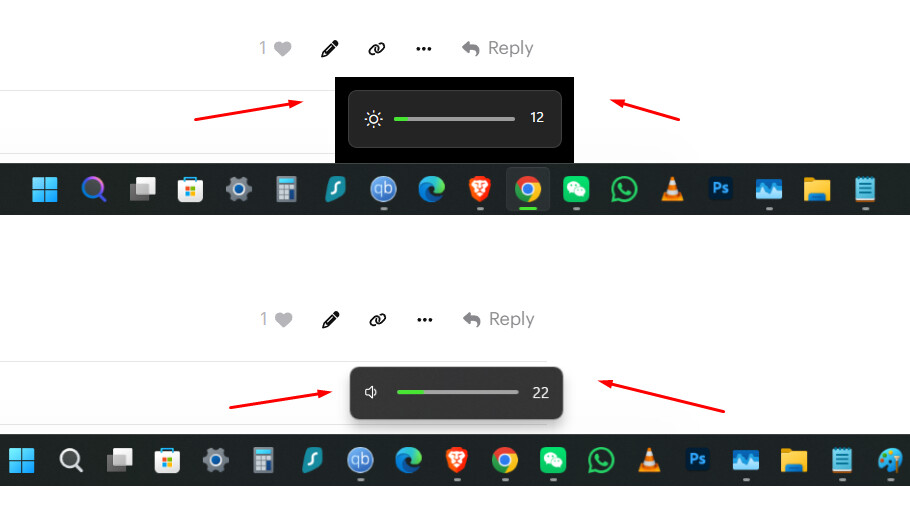
I also noticed some weird glitches here and there, for example, when adjusting brightness, there is that contour around/behind the popup, but it’s not showing up under the volume one (see screenshot below). Weird. Similar things also happen sometimes in Explorer or different programs, or sometimes when dragging windows it seem to be lagging, like in a game when vsync is not turned on. And other similar weird small glitches here and there…
I really hope these are GPU driver issues, and the GPU is not having any hardware damage/fault.
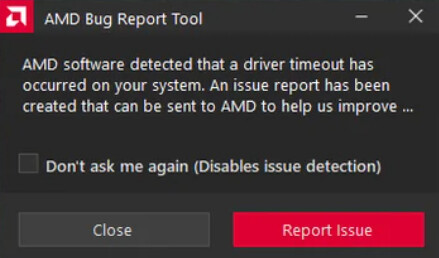
Update, latest AMD & FW drivers are doing the same thing. Cyberpunk crashes randomly, sometimes after 5-10 minutes of gaming, sometimes after 1-2 hours… And in some other games, the FW Desktop just restarts randomly; my guess is still the driver’s issue.
FW support suggested using the official FW drivers and not the AMD ones. I did again a DDU and installed those. Still the same issues…
Their next solution is to reinstall Windows, which is a pretty low-effort solution if you ask me, and probably won’t make any difference, since I have a pretty fresh install and have been having these issues for almost a month now.
Here are other issues I have that started around the same time, and I’m pretty sure all are related to the drivers:
other small glitches in Windows around Explorer, as mentioned above;
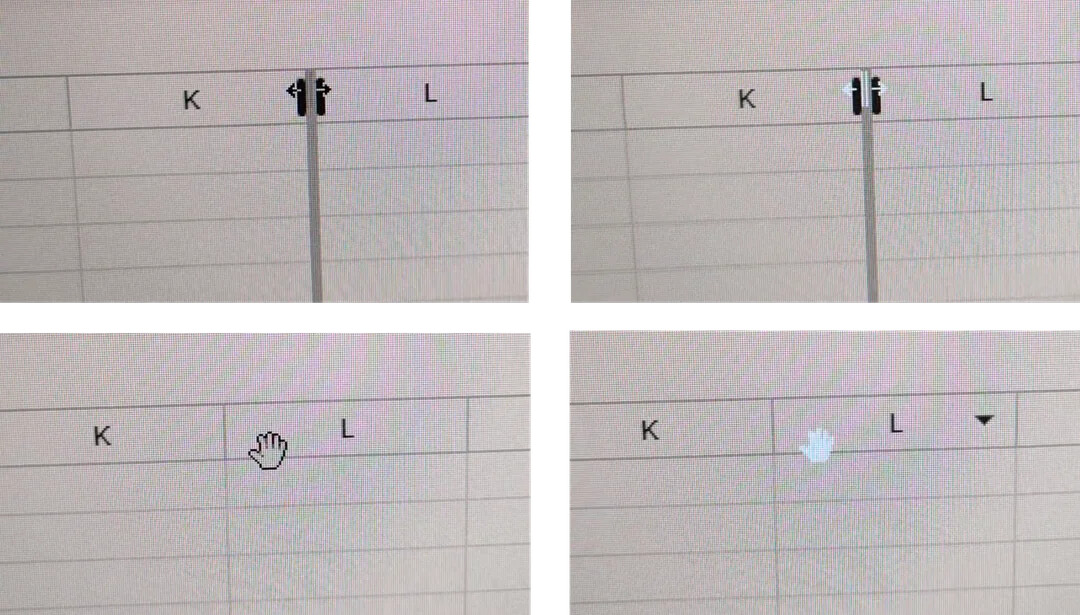
the mouse cursor sometimes blinks and turns cyan around specific elements, like when dragging columns in sheets or moving things around with the little hand cursor. I’ll add a picture at the end of the post for reference. This started right after the fresh install of Win 11 Pro, and it was the first sign suggesting a GPU driver issue;
most of the times Windows cannot resume hibernation and restarts itself, losing all my work. I first thought this only happens when putting the PC in hibernation after the GPU driver crashed. But it’s not the case, it’s completely random from what I’m seeing. Hibernation does not work anymore after latest BIOS and driver updates Upon looking up the error on the Microsoft forum “Windows failed to resume from hibernate with error status 0xC0000001” and the rest of the details from the event log, this also suggests a faulty GPU driver. Will send over the dump files to them for confirmation;
when putting it into hibernation, sometimes it still runs for like 10-15 minutes, until it shuts down;
getting stuck in the shutting down loop, and have to force shut it off (it just stays with the fan running and led on, I left it for more than 20 minutes and it didn’t shut down);
froze in sleep or when the screen turns off, after 5 min in my case, returning from standby got stuck and had to reboot it;
Overall, small issues, but all together very annoying.
Btw, I sent my dumpfiles over to Microsoft, and they confirmed it’s the AMD drivers:
-
Your minidump files indicate the chipset drivers and the graphics drivers as the cause of the system crashes, that is also the most likely cause of the resume from hibernate problems.
Go to the support page for your PC or Motherboard on the manufacturers website, then from there, download and install the version of Chipset drivers they recommend and while there, if you do not have your drive encrypted with Bitlocker, check for any BIOS update that may need to be installed.
If that does not resolve the problem, I understand you have already used DDU to remove the graphics drivers, the best option is to perform those steps again and try a couple of other versions of the graphics drivers from the manufacturers website.
In my case, the FW Desktop only gets stuck on the shutdown loop after the AMD drivers crashed. And the logs from the event viewer and dump files suggest the drivers are the main cause.
So every time the drivers crash, first I need to restart it, and just after that, shut it down. If I shut it down first, it gets stuck in the shutdown loop each time.
I’ve been searching the AMD forum about these driver crashes, and there are others having similar issues with other AMD CPUs & GPUs.
And people suggest that some AMD chips are borderline overclocked on stock settings. Do you guys think this would apply to the APU in our FW Desktop?
And how about disabling Windows MPO (Multiplane Overlay), did anyone try this? This is another debated thing on AMD forums. Some people say it fixed their driver crashes and timeouts. Others are completely against it…

 .
.