I’m no expert on these issues. I just installed the fan control program, but it doesn’t seem to detect the fans.
Is there anything else I need to do? Can anyone help me?
I’m no expert on these issues. I just installed the fan control program, but it doesn’t seem to detect the fans.
Is there anything else I need to do? Can anyone help me?
Please follow the link in my post. I am not talking about the “Fan-Control” app
Fan Control app not working on Framework 16?
That’s the powershell Script to control the fan with framework_tool.exe
I think it should work with Framework 16 too, buit only testet it on Framework 13 with Ryzen AI 350
# Path to Framework Tool
$toolPath = "framework_tool.exe"

function Get-APUTemp {
    $output = & "$toolPath" --thermal
    foreach ($line in $output) {
        if ($line -match "APU:\s+(\d+)\s*C") {
            return [int]$matches[1]
        }
    }
    return $null
}

function CalculateDuty ($temp) {
    if ($temp -lt 70) {
        return 15
    } elseif ($temp -le 85) {
        $duty = 15 + (($temp - 70) * (20 / 15))
        return [math]::Round($duty)
    } else {
        return $null  # over 85°C → Auto Fan Control
    }
}

$lastDuty = -1
$lastMode = ""

while ($true) {
    $apuTemp = Get-APUTemp
    if ($apuTemp -ne $null) {
        Write-Output "APU Temperatur: $apuTemp°C"

        $newDuty = CalculateDuty $apuTemp

        if ($newDuty -eq $null) {
            if ($lastMode -ne "auto") {
                Write-Output "APU > 85°C → Auto Fan Control on"
                & "$toolPath" --autofanctrl
                $lastMode = "auto"
            }
        } else {
            if ($lastDuty -ne $newDuty -or $lastMode -ne "manual") {
                Write-Output "Set manual Duty to $newDuty%"
                & "$toolPath" --fansetduty $newDuty
                $lastDuty = $newDuty
                $lastMode = "manual"
            } else {
                Write-Output "no change"
            }
        }
    } else {
        Write-Warning "no APU-Temperatur"
    }

    Start-Sleep -Seconds 2
}
I’ve searched for the framework_tools.exe executable but can’t find it.
Isn’t there a fan control plugin that allows you to control the CPU and GPU fans in Windows?
here is link to the latest release Release v0.4.2 · FrameworkComputer/framework-system · GitHub
please keep in mind that it requires crosEC driver Release CrosEC v0.0.2 · DHowett/FrameworkWindowsUtils · GitHub which requires disabling secure boot and enabling test signing. as an alternative you can use ectool. I forked GitHub - DHowett/ectool: ectool, isolated from the ChromeOS code, and with some Framework-specific support repo and merged PR which uses winring0. it works with secure boot enabled. here is link Release Release aa-a00923cf-bb · wmigas/ectool · GitHub and please keep in mind, that you need other application to load winring0. it can be open ahrdware monitor or universal x86 tuning utility. see PR for more details.
command to set fan speed
ectool.exe --interface=winring0 fanduty
if you will have ectool running then you can read AMD FW13 fan behaviour and ramp-up times - #22 by Charlie_6 it describes how to change “fan curve”
I just installed the official driver package that includes the Framework EC does not need to disable secure boot etc…
Then I downloaded framework-tools.exe and it controlling the fans works!
Could you be a bit more specific with what you mean regarding the official driver package? Do you mean the driver bundle for your mainboard? And updated version allows the framework tool to work without disabling secure boot?
yes, I mean the driver bundle
https://knowledgebase.frame.work/en_us/framework-laptop-13-bios-and-driver-releases-amd-ryzen-ai-300-series-r1wqKAs1e
as you can see, the “Framework EC” is included
Ok thank you! This is specific to the AMD as the Intel variants do not have the EC driver exposed. I guess yet ANOTHER reason to go AMD!!!
it looks like at this moment it is available only for FW 13 AI 300 series.
FW 16 AMD does not have EC exposed but at least it looks like there is some chance that it will be in the future
Is this only for the AI 300 series or does it also apply to the 7040’s as well?
I can’t say for sure, as I do not have an AMD board, but I can say for sure that ALL Intel mainboards currently do not have a windows EC driver that is signed and usable with secure boot active. Only the AMD mainboards.
If you are willing to disable secure boot (Make sure you disable bitlocker first or you will need to have your keys with you when booting with secure boot enabled again), and enable test drivers (put Windows into test mode). There are security implications with this, and some things that require secure boot like DRM or anti cheat may not work in this state, but then framework’s tool program will be able to speak with the EC.
All changes you make to the EC are only for that current session. In fact, even suspending or hibernating erases any changes you made to the fan although you are resuming the session. Still this is pretty huge, and I think it is great that Framework and @DHowett even made this a possibility. For newer platforms that should be all possible without needing test mode or secure boot disabled.
it is available only for AI 300 series.
if you look at AI 300 driver bundle there is listed Framework EC - 0.0.0.6
it is not available for AMD Ryzen™ 7040 Series 13 and FW 16
https://github.com/Steve-Tech/YAFI/releases/download/0.3/yafi-windows.zip
It works on Windows and is accessible to any user.
Hopefully, in the future we’ll have a more comprehensive program for Windows that allows you to manage TDP or frequencies, but the framework team isn’t helping at all despite all the requests.
However, the framework community is wonderful. I wish others would learn.
I was surprised to see so many complaints about the heat generated by the system while idle. This is solved by running the fans a bit and lowering the TDP, as with other systems, which allows the system to work perfectly.
But the framework seems to be just as happy to fix something that has an easy solution. It’s unfortunate.
There are things I have to praise the framework team for: the keyboard and thermal paste fixes were fantastic, but the fan and TDP issues are disappointing, despite being easily fixable.
It is not completely true, that they do not nothing. They created signed driver for EC, which allows safely communicate with EC and they are extending https://github.com/FrameworkComputer/framework-system to add missing methods which are available in ectool.
It works only for AMD AI series, but there is chance that they will do the same for FW 7040 Series.
I’m using modified version of ectool which uses winring0 driver but it may stop working soon. It was already added to Windows Defender list as a treat, but the change was rollbacked. Reddit - The heart of the internet
It is not safe, but gives a lot of options. I’m using “Universal x86 Tuning Utility” which under the hood use winring0 to control TDP / STAPM.
I wish they provide some tool which gives us fan control, TDP etc but they as company must to deliver it in a reliable and secure way. in that case the only option for them is they own driver for EC. Changing TDP / STAPM can be controlled by EC but probably by many other factors. at least “Universal x86 Tuning Utility” is reapplying settings every x seconds. I’m not an expert here and do not want to defend Framework, but it is not an easy task and there is small progress.
I wish to have that tool available from them sooner but at least now for FW AMD series 7060 we can use only winring0 and for AI series their custom driver to communicate with EC and make our life easier
Is there a version of UNIVERSAL XB6 TUNING UTILITY for Windows that runs on a framework as an exe? Where can I download it?
Link is on their site. It is available through GitHub releases https://github.com/JamesCJ60/Universal-x86-Tuning-Utility/releases/latest/download/Universal.x86.Tuning.Utility.V2.msi
Framework finally released a BIOS for FW 16 with the EC tool that has the ability to control fans. 
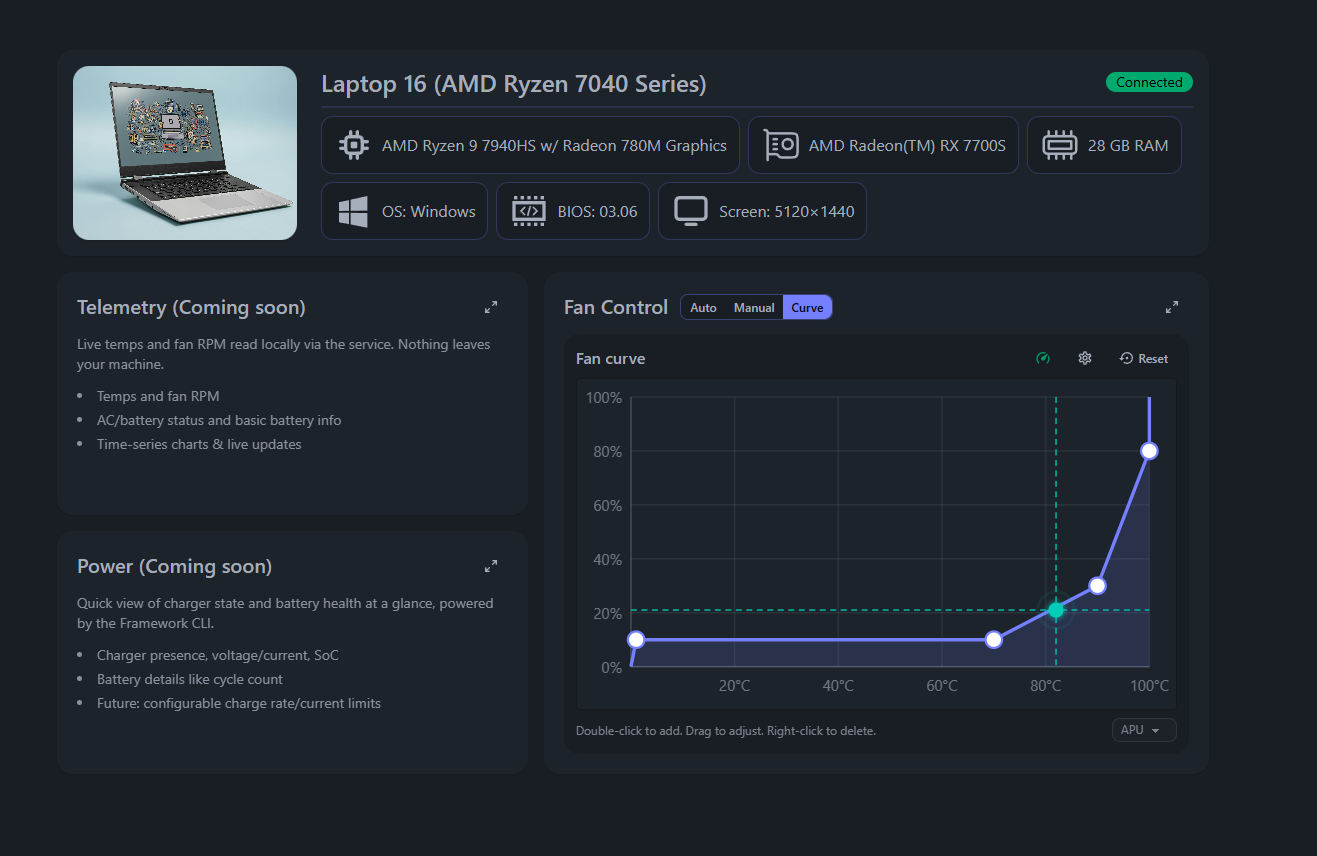
I built a lightweight tool that allows you to control fans and create a basic fan curve.
Framework 16 beta BIOS 3.06 is required (BETA) → BIOS
Here’s a link to the actual app: Framework Control
Need to install a lightweight Rust service to be able to use it. Link provided in the APP
All code belongs to me and is open. If paranoid, you can build the service from source (steps in the repo)
@Lupin and anyone else who needs a tool to be able to control fans on FW 16 on Windows. Might work for other Framework laptops, not tested.
Tested on my 7040 series Framework and so far, the fan curve option works great! Amazing work!