Howdy y’all, my “d” key is failing and wanted to reach out to the community before bothering support, and wanted to leave this here for others to also find and see if that helps them. I’m having keyboard issues where after I use the d key for a while, it starts lagging and repeating, and eventually stops being receptive to typing at all. Rarely, I get issues with other keys too, like w, p, i, and one time F7/F8 didn’t work when I tested it in windows (it showed the brightness menu but didn’t change it). This has started happening over the last couple weeks, I’ve since then been recording and testing it. If anyone could help me figure it out, I’d greatly appreciate it!
Some things I’ve done include using “libinput debug-events” to see that the keyboard in linux doesn’t register the d key was pressed. I rebuilt the initramfs, and tested that the d key starts failing around 30 taps and dies at around 90 taps. I’ve reseated and cleaned the pogo pin connectors, moved the keyboard to left and right (onto different pogos) with no luck. With an external keyboard plugged in, all keys work fine.
I don’t think this is an issue with the key because I clean the keyboard regularly and gently, I don’t mash the keyboard, and I don’t eat on it or haven’t spilled anything on it. In other post (1), 2 users have also shown similar issues that have repeated even when the keyboard has been changed. Post (2) had their solution as a mainboard replacement and showed the issue is with a faulty mainboard. At this point that’s what I’m pretty sure it is.
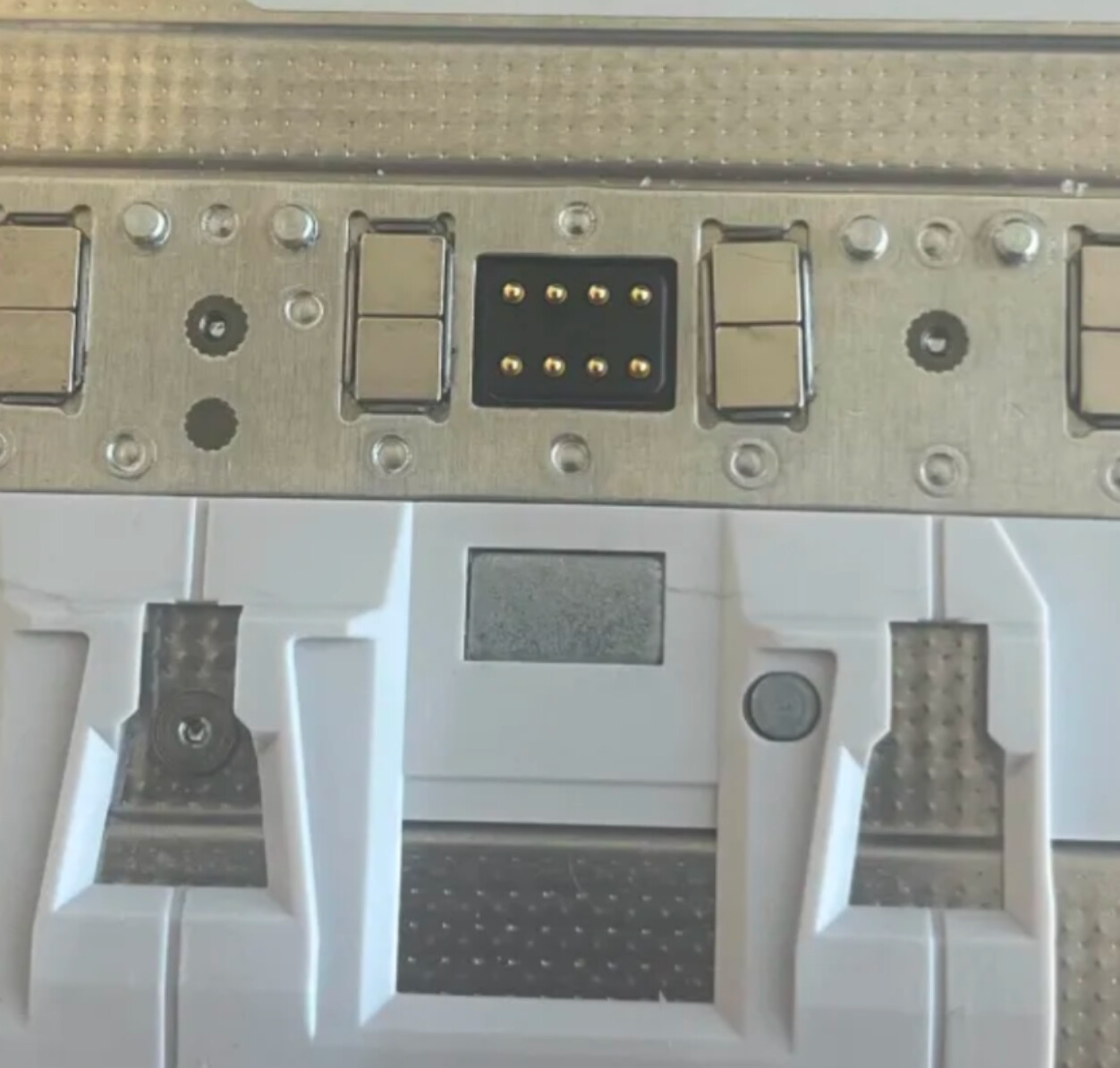
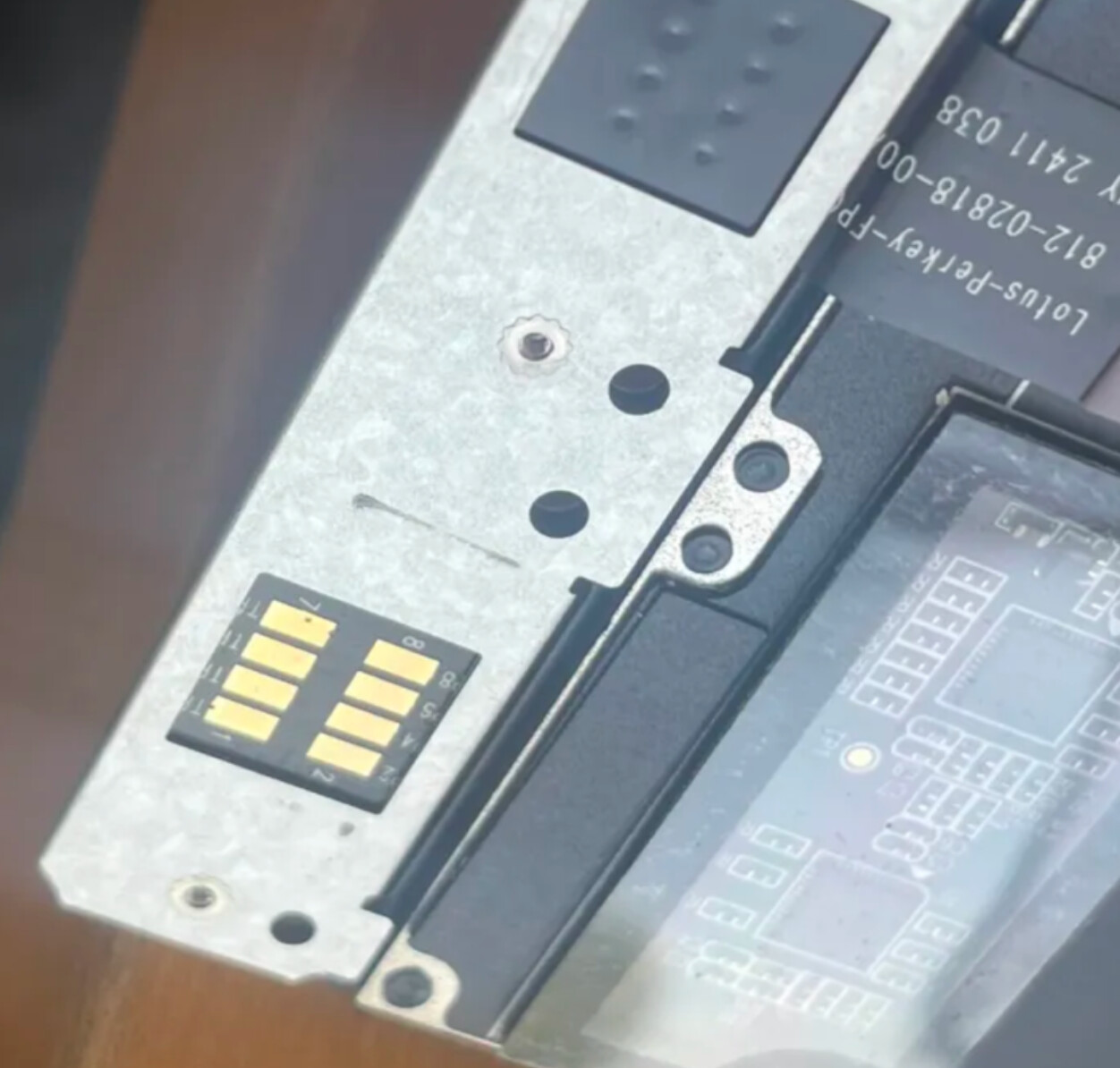
In the images there is what looks like a manufacturing defect of the keyboard magnet being mis-seated (which you can see the black scratch on the silver metal from), and what looks like a small dent/hole in the pogo pin connector (right next to #7).
I thought I’d just mention that it would be good not to look much for a solution in posts about the FWL13, like this one
As the FWL16 keyboard setup is fundamentally different.
FWL16 keyboards are full usb keyboards, with a keyboard controller that lives in the keyboard. Whereas, the FWL13 uses a traditional laptop setup of the keyboard just feeding its raw keymatrix lines to the mainboard. The role of keyboard controller is done by the EC chip on the mainboard on the FWL13. Being so different, the source of problems I think is more likely to be different.
If the magnet was too high, making it easier for the keyboard to loss contact & that was your issue, you could look for usb disconnects in dmesg. And moving the keyboard to a different location should stop the issue, if that was it.
Pin 7 is listed as just a duplicate, an extra gnd. Pin 1 being the 2nd gnd.
I have a feeling it won’t help in this case, but I tend to suggest trying an EEPROM reset for any FWL16 keyboard misbehavior.
Clearing the FWL16 keyboard's EEPROM (click to show)
This will erase any and all changes you’ve made in Via (keyboard.frame.work) and return the keyboard’s firmware to it default state. If the firmware is the original that came with the keyboard, then it will return to factory default.
• Clearing EEPROM from Via.
If this is your first time using the site, you’ll have to authorize connection to your keyboard first.
Interesting to learn how the 13 and 16 keyboards operate differently and the GND pin 7, and I’ll look through that post in more detail. I’ll try out the EEPROM reset in the morning and let you how it goes, thanks!
I should have maybe skipped the details & pointed out that one consequence of the difference is that if you have a problem with the FWL13 keyboard controller, you have a problem with your mainboard. But on the FWL16, a keyboard controller problem would be confined to the keyboard. Not that you couldn’t still potentially have a problem with the mainboard, it just seems less likely.
No worries! I appreciate the info you were sharing, it’s nice to know only the keyboar can be replaced. I’ll reach out to support & see if I can get some help
Have you tried putting the keyboard in another position? If you’ve got the numpad, put the keyboard to the right and numpad to the left, using another set of connectors, and try again. If this improves the situation, the problem lies with the midplate rather than the keyboard.
Update:
I’ve reached out to FW Support & they’ve been very quick, responsive, & helpful! After sending them a video of the keyboard test and some photos, they reached the conclusion that I will need a new keyboard which they are graciously replacing. If that doesn’t work we’ll go from there, but if I forget to update in a week or two, it worked.
I also had my keyboard replaced due to an issue with the D key, it stopped working then started, then was sometimes working and sometimes not, and even when it was working it would sometimes double (or triple?) click. Framework replaced it fairly quickly, although they did have me send back the older keyboard after the new one arrived.
One thing I did notice however was even when the D key was working, it didn’t behave like other keys. Normally when you hold a key and then press another it stops the first key, ie : qqqqqw - even if you are still holding q. However for the D key, when paired with some (not all) of the keys on the same row as it, it wouldn’t behave like this, ie : aaaaadaaaaaa for instance (D key could be first or second key). It wasn’t a big issue, but even if it seemed like it was working, there was clearly something different about it.
yup, same here
using Online Key Rollover Test - Mechanical Keyboard
I could see that for the d key a kl;’ keys would stop the d key from showing as pressed.. while all others were ok..
on the 2nd fw16 in the house.. the w key is the key to missbehave.. and for that one r uI][ are the ones that will stop the w…
some something is up… I do wonder which symptom starts 1st.. the key rollover missbeahving or the key stops working…
for the replacement keyboards when I buy them I will try to do periodicaly checks see if I can spot issue before its too late
Same here, the “d“ key suddenly stopped working correctly yesterday. It seemed to be linked with a hot laptop, but may be unlinked. I recently upgraded to BIOD 3.0.5, do not know if that cause the issue…
I’m sorry to hear that so many others are also having this issue
My new keyboard that FW sent a few months ago also just had the “d” key break again last night. Contact support and I guess we’ll see what happens. I’d probably just live with it at this point if it’s going to keep happening with new keyboards I buy anyway. Hopefully a gen2 keyboard could come out that fixes the issue.