On boot, Default (probably 6.11 or 6.14) - upgrading to 6.17 after first first update
Media tech wifi-card
AMD Ryzen™ AI 300 Series, and 12th Gen Intel® Core™
One line command for getting 6.17 on Linux mint:
sudo apt install linux-oem-24.04d
worth noting this is fairly low stakes to try, if it does not work, on rebooting, in the grub menu that pups up go into advanced options then select your old kernel. once booted up, go:
LM will automatically boot with the latest kernel installed
Hello,
I am running intel 12th gen and my windows embittered mum has received her FW13 AMD 340 model today and I will be trying her out on linux mint to see how she gets on.
In preparation I have been running kernel version 6.17.0-1005-oem with LM 22.2 Cinnamon on my i7-1260P to see if its stable. so far no issues
Today I will be installing LM22.2 on her new AMD AI 340 and upgrading to 6.17.0-1005-oem. I Just wanted to document here the experience and if it works as there isn’t very much info since the early teething months and it seems not many people are aware that 6.17 is available on LM with a one line command.
LM is more accessible than fedora and bazzite as if you have any issues, searching for solutions will mostly get you ubuntu/mint solutions and it is very windows familiar. I use Mint as an engineer, even have fusion 360 running thanks to cryinkfly (there is also a youtube video available) which coincidentally integrated a little better after upgrading the kernel..
Anyway, will post here after the fact in case anyone else is thinking along the same lines but was put off by early bug reports
Install, No hitches - Except definitely do not forget to disable secure boot, installation froze up with it on.
Updating to 6.17 as described above
Worked fine, no notable trouble (recommend sudo apt update, sudo apt upgrade before this for anyone following along). One glitch was on the first boot into 6.17 the screen was on minimum brightness and the f7,f8 brighness buttons didn’t work. using the brightness slider under “power management” app worked and later they stared working automagically. can not get it to repeat so putting that down to some one off funk.
Wifi:
150 Mb/s down
25 Mb/s Up
On an old router, 2.4GHz
checked against another old windows gaming laptop, it got 35 and 25
I cant test wifi 6-7 so sorry if you were interested in that
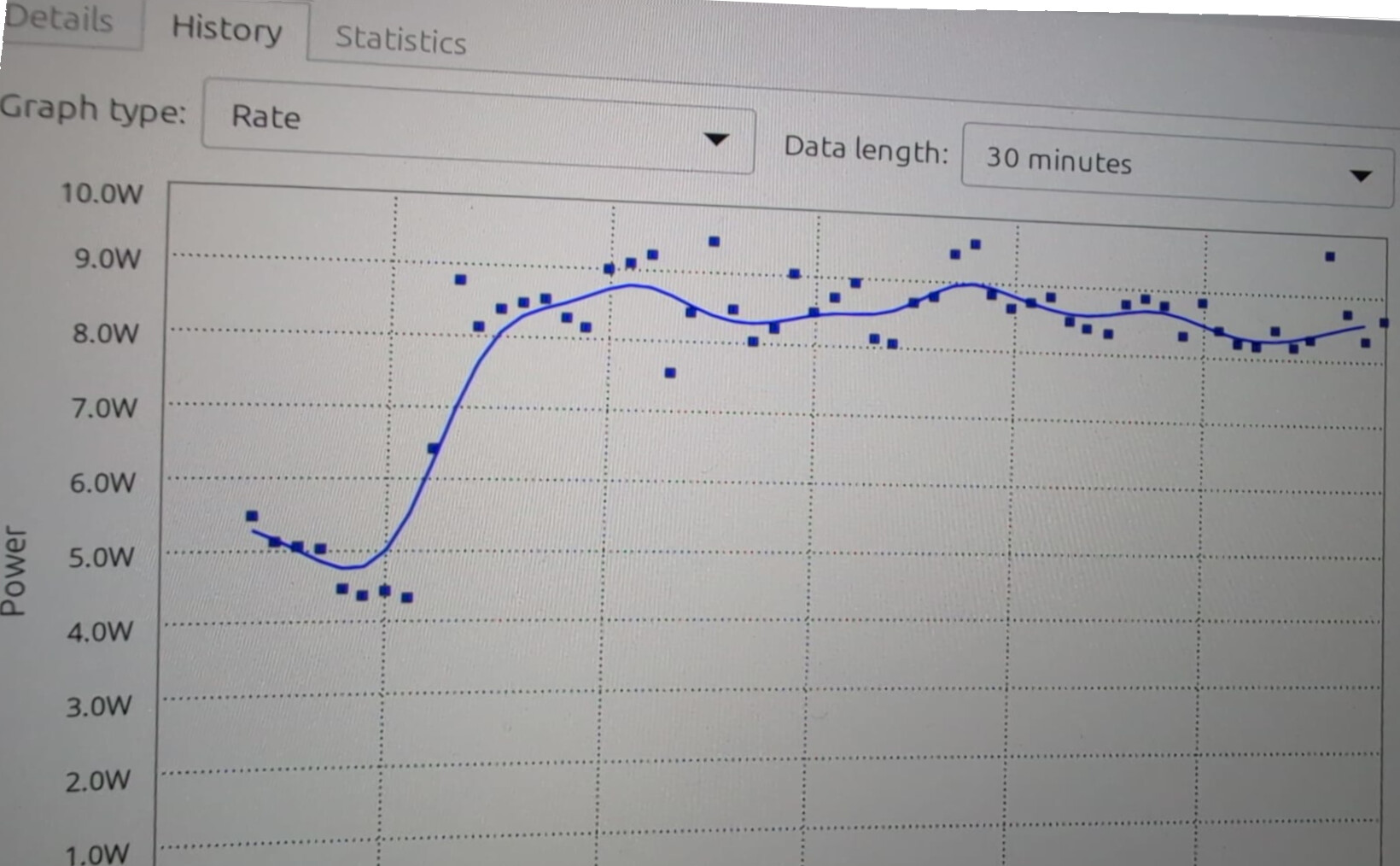
Power idles down to 4W and playing youtube sits at around 9W
For comparison my 12th gen intel idles at 6W and youtubes at 13W
I have not done any battery life testing but seems like it would last about 6-7 hours under normal use. could be better, could be worse. Until AMD and intel get into the 2nm CPU game like apple, this is about as good as I would expect, luna lake excluded of course. (that will probably happen with Medusa point, so fingers crossed for 2026-7)
I will report here if I have to do any bug fixes. Take no more posts to mean no problems
I’m a Linux newbie (W10 refugee) and was hoping to install the latest Mint on my AMD AI 9 HX 370. However, it keeps hanging a few minutes after booting, presumably due to the PSR issue referenced in the previous post. I can’t see a workaround by modifying the grub parameters when using a thumb drive to boot, since it won’t persist after reboot, so I’ll never be able to get the initial install to the HD done.
Can someone give me basic instructions for installing an earlier version of Mint, then upgrading to the most recent while fixing the grub config?
Sorry for the slow reply. Is this still an issue? I am not a linux expert my self.
This did not happen for me. once I manged to boot up off the USB I was able to complete the install just fine, the freezing came later. I wonder if the issue is worse or if there is a different problem for your model of CPU.
If you are still having the problem, you could try switching to wayland (the part of the OS the manages windows and such, it is an alternative to xorg that was causing my freezes). This fixed the freezing but for me had other issues because it is still in the experimental phase (fingers crossed for LM 23) so once I found the above fix I switched back you standard xorg. Running with wayland might get you through the install and then allow you to apply the fix linked above.
To try wayland is simple, It is already built in, you don’t need to install anything. Just log out, then click the cinammon icon which should open a drop down, one of the options should say wayland.
Here is a video of someone turning it on:
Probably better videos out there, was the first example that popped up
So I tried adding the 0x12 parameter to grub, and it has definitely been used (checked by ‘cat /proc/cmdline’) but the machine still hangs hard after ~5 mins.