I was watching videos on the Framework 16 and I had a thought that if you make a miniature drawing tablet module like a Wacom Intuos screenless drawing tablet on the surface of the laptop, that would be very convenient for my use case. A very basic drawing tablet for quick notes/diagrams.
I use a screenless drawing tablet to make annotations during Zoom meetings and sketch diagrams and math stuff, but the drawing tablet is a bit annoying because it either covers the keyboard or goes where my mouse should be (and it makes for a lousy mousepad) and I sometimes forget it if I have to change locations. A small one that can go in the corner when the touchpad is put to the side or where the numpad is would be a cool optional addition.
This might be completely impractical with the size constraints, but it might also be a really cool niche feature that works well with the modular ideal behind Framework.
making a drawing tablet is tricky. the hardware isn’t too hard, its basically a grid of magnetism sensors and a magnet in the stylus.
the software to turn a bunch of magnetism sensor inputs into a precise, accurate, and repeatable pen position is, tragically, one of those problems where the solutions are tightly kept secrets often tied up in patents.
so if there was enough demand, maybe a partnership with wacom or some other drawing tablet company could make it possible. Other than that, a really dedicated community project to reinvent the software from the ground up could probably pull it off, but that comes down to if passionate coders are willing to put in the effort
if the framework team or community somehow make a touchpad that’s also a drawing tablet i’d be extremely impressed
I was thinking a separate module to the side rather than replacing the mouse pad. I’m definitely not opposed to a collaboration with Wacom or some other company. I more definitely don’t expect them to do a 90 degree turn and start developing drawing tablets from scratch.
My hope is that Framework is considering the possibilities of a modular laptop deck for more than repositioning the keyboard and touchpad and choosing between keyboard layouts. Its modularity would mean they can allow the user to decide which niche functionalities or gimmicks they want to include and which they want to ignore and not include.
I feel that the best way to see interesting and useful modules come to be is to talk about what could be done. I posted about this on Reddit, and people had some interesting ideas for convenient modules that they would like to see, including NFC card reader, a MIDI keyboard/basic LCD with touch sensitivity, alternative mouse input devices (trackpoint, flat joystick, mouse buttons options), and a wireless charging module all were ideas I felt were interesting. I don’t expect them to make these things from scratch or at all, but it would be an improvement to the world of laptops to be able to choose what tools are always at hand. I suspect they would also want to make a standalone USB module holder if this happened to ensure the devices can outlive the laptop, which would be great.
understandable, I just happen to know a decent bit about DIYing a tablet because i tried too make one once. the hardware was easy, but the software was painfully obtuse.
that said, if anyone in the community wants to put in the effort, i’m all for it, especially if they make the digitizer software open source. that could bring down the price of drawing tablets in general.
regardless, i look forward to the wide array of modules the community will no doubt pump out, especially the nonsense ones
Count me as a +1 for users that would purchase a sub $300 “wacom module” to replace the trackpad bay on the 16 inch FW when they are available. Especially if the area could be used as a touch pad the way I’ve been using my “small” intuos 5 pth450 for over 10 years now.
I’d even contemplate an extra $100 module for the side of keyboard position, to replicate the express keys and dial that a wacom tablet has.
Sadly, I think FW are probalby about 20 million shipped units short of the mark that Wacom would need to develop such a module themselves, and any 3rd aprty attempt is almost certian to be a “nice try” at best, effort.
I know wacom is pretty protective of its products and its software so as much as I would love to see that, I’m not optimistic, but when I was looking at some glove safe touchpads I came across Sensel which has some pretty cool force-sensitive touchpads that might work as an alternative “drawing tablet” module on the framework 16, plus they do custom sizes already for OEM so they may be open to helping develop a module.
Actually I watched a couple tear-down videos for the basic graphic tablets (Wacom Intuos S and the Huion 420), all that’s under the plastic casing is the batter (for wacom) and the metal sheet, a protective plastic sheet and the PCB board itself.
The whole thing connects via USB to the computer. These models use USB 2.0 still and run off 5V if I’m not wrong. While I think re-desgning the board to be compatible with Framework’s modules would be somewhat challenging, it won’t be impossible? (Fully acknowledging that firmware would be the challenging part.)
BUT I do think that a janky DIY version would be doable if you don’t mind connecting a short USB cable from the tablet to a USB port. Since that way it’ll still use whatever drivers the manufacturers expected you to use it. I’m thinking it’d involve creating a thin enough cover for the graphic tablet to sit inside the keyboard input module area…
(I repeat, it’ll be very janky).
Maybe we’ll get lucky an a particularly handy DIY-er will pick this up and make it a reality for us
I built a wacom display from old tablets and a OEM display. I could see someone doing something similar for the FW16. Probably the way to go would be to have a loop at the top that plugs into USB unless the keyboard’s connections are similar enough to USB to function in that capacity.
I was just thinking about something similar! I have a similar use case and honestly it’s the one thing holding me back from getting a framework as i use the touch screen of my computer to draw up mockups/take notes.
I think a module that is about the size of/takes the place of the numpad would be perfect (for me at least).
Not very versed in the hardware creation side of things but I might have to look into what it’d take to make a open source digitizer software
So I’ve had this idea for a while now and wanted to post it here to see what the community thinks of it.
Basically, what if there was a input module that was the width of the keyboard and covered both the keyboard layers & touchpad which acted as a drawing tablet surface. (with enough space on the sides of a numpad and maybe it could have some extra buttons)?
Framework already has a stylus that could be used for it, or a custom designed stylus depending on how much info is derived from the display pad vs the pen itself.
Just throwing the idea out there since it’s been in the back of my head for a while!
I’ve been trying to find a good non-screen drawing tablet that could replace the entire Framework 16 trackpad module.
The one I found is the XP-PEN G430S. I couldn’t find any teardown or internal photos online, so I decided to open it myself. I found that the tablet is extremely thin (around 2 mm), and the overall size looks very close to the complete FW16 trackpad module.
My idea is to create a custom replacement trackpad module using the XP-PEN board, but I have some challenges:
I don’t know how to design the 3D structure/frame to make it fit correctly as a complete trackpad module.
I’m not sure about the best way to connect it to the laptop.
My current idea is to use the side USB-C port and route a thin/flexible USB cable directly to the XP-PEN board, instead of using the original trackpad connector.
I know the original trackpad uses a different connection method, so I’m not sure if using the internal connector is realistic.
That would be great! Then I could always have a drawing surface with me. Plus, a drawing tablet can work as a mouse in a pinch.
I would want it to be internal if possible. Or at least store flat with its cable.
Do you think it could have a normal trackpad on the left and the drawing table on the right? I don’t know how much horizontal space we would have to work with.
I think this could be possible, but it would require modifying quite a few things to make the tablet and the trackpad module fit together properly.
It’s actually a really interesting idea, but I don’t have the technical knowledge or skills to design and build all of this myself. Hopefully someone with more experience can help with these.
So if you shifted it to the right, you could have space on the left for a normal trackpad. The internal connection, AFAIK, isn’t USB, but perhaps it could be wireless or bluetooth, getting power from the computer.
I don’t really understand how HID works. My idea was to connect it to one of the 6 USB connectors instead of trying to use the original trackpad connection.
@Tr0LL Me neither, but I have to assume the trackpad receives power in some way and drawing tablets are pretty low powered. I’d be surprised if a person who knows what they’re doing (not me) couldn’t tap those power lines to charge a tiny battery. The bluetooth is just so we don’t have to run a cable. It’d be janky, but I think it would be less janky than a wire coming out of the top of your palm rest.
I have a 6 year old bluetooth drawing tablet and I’ve never had a reason to complain about its functionality over bluetooth.
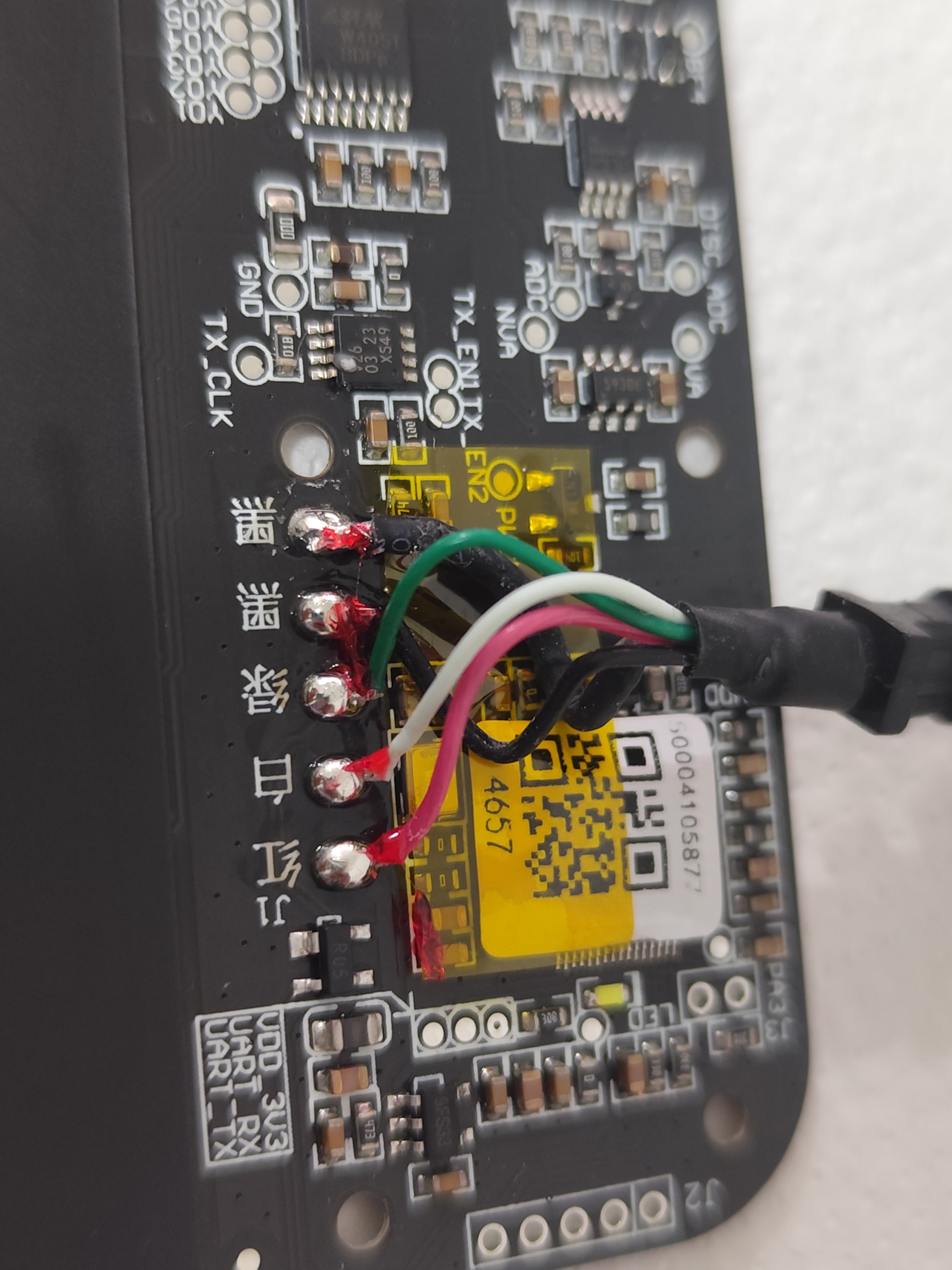
Don’t see why not, red and black are power (second back is likely the shield of the cable) and white green are the data pins. The color coding of the data pins is unfortunately not as consistent as we’d like but worst case you just need to swap them. Translating the chinese symbols next to the pins may also give you more insight.