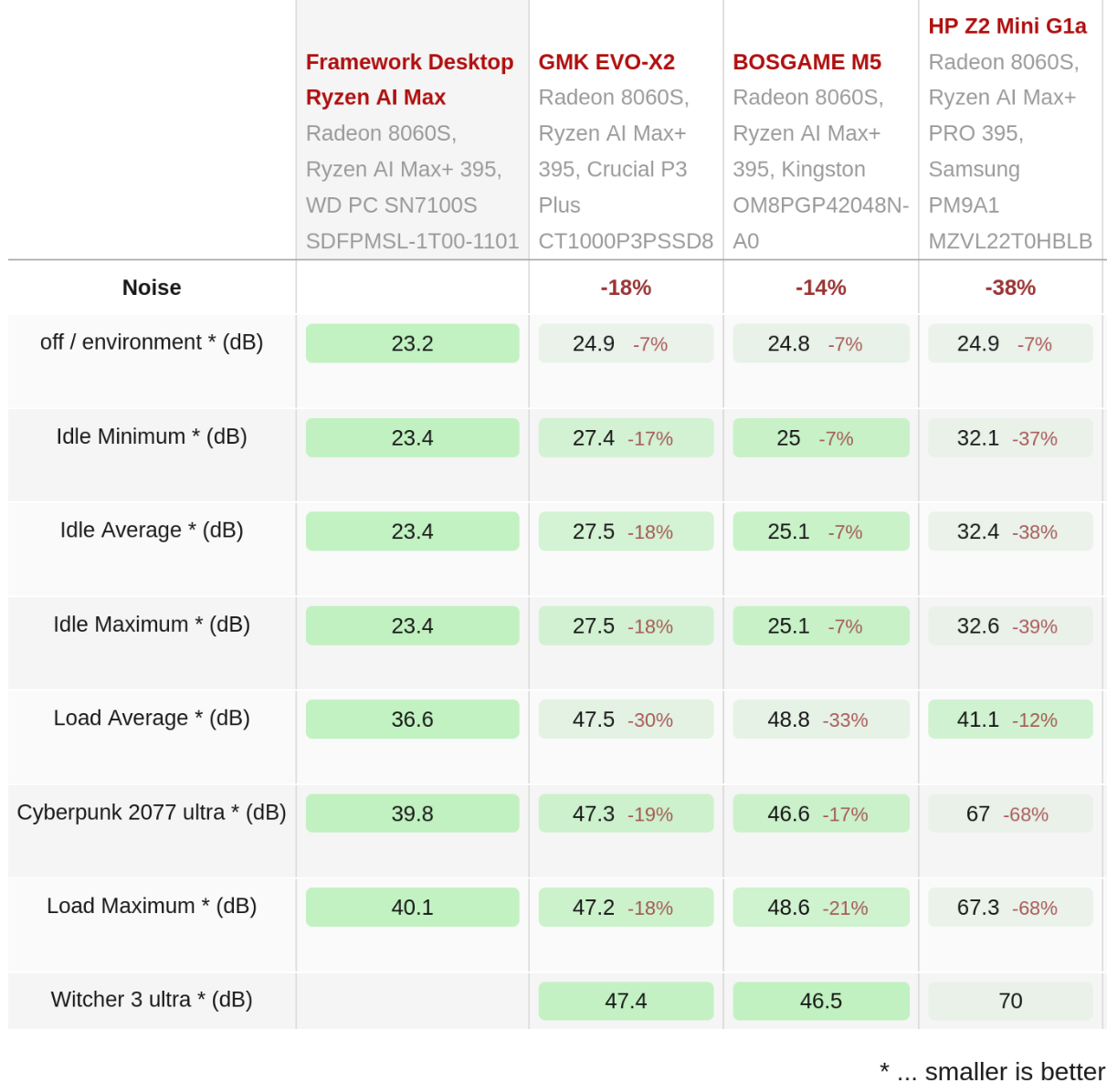
There were a number of people taking the no noise in idle option in the survey. It would be interesting to hear from one of those the details. Do they simply not mind the fan or is there, indeed, even if you listen no fan spin up in idle operation.
I am pretty sure the high idle consumption is a PSU feature and won’t change unless an entirely different one is used. My impression is, that they tried a lower power, not quite as loud Noctua fan but that was not powerful enough for the task. Their ventilation pipe is a very constrained design and probably adds to static pressure requirements on top of the cramped Flex ATX design, so maybe it needs to spin up like crazy to really move enough air.
I guess in this formfactor a fully custom PSU would have been necessary with better aearation concept than the Flex ATX format but that would have been a considerably bigger effort. Some competitors are doing that with the Strix Halo though. I would love to know how the PSU fan situation is with the HP Strix Halo workstation for example.
I agree with you. It’s expected for the PSU to be less efficient under light load. I think the PSU is FSP400-50FVB, and if you take the numbers from the specs here, 10W at idle feels about right (~7W package power at 75% efficiency).
Also, it’s physics that 40mm fans at high speed will make unpleasant noise.
What I’m curious is how the fan curve works. Would someone with the PSU be able to do a fan speed test using a tachometer like this below?
What speed the fan is spinning at idle
What’s the percentage to the max speed (based on the Delta fan’s specs)
Is the fan running in constant speed or will spin faster under high load/temp
A possibility is that the fan is already running at a relatively low speed and there is not much we can do about the noise at that speed.
This whole discussion about the noisy PSU fan doesn’t make any sense to me.
I produce music on the PC, thus I am always keen on getting the computer as silent as possible, while still aiming for enough horse power to run DAW software and demanding plugins.
What I really don’t understand is the following:
Does anyone here know of a customized SFF computer/Laptop that has really high specs and is not noisy?
As for the Framework Desktop:
How on earth could a 40mm fan put enough cooling power in a small form factor, but still powerfull PSU, without being noisy, due to high speed in order to get the same cooling power like, e.g. a relatively slow running 120mm fan?
Small fans always need to compensate with higher RPM compared to a bigger fan.
So here is my suggestion for folks that prioritize a silent computer:
Just order the Mainboard only, not the full Framework Desktop, buy a bigger case for bigger fans and better cooling and maybe even a passively cooled ATX-PSU.
If the most important thing about your next high performance computer is small size, then you HAVE to deal with at least some noise, since the volume of the case isn’t ideal for cooling and big fans.
This really is not rocket science and all of you could have anticipated, that small fans in high specs machines never are near silent.
It’s possible that all units are affected. We’ll see if these replacements truly solve the problem.
I can’t speak for others but I didn’t notice for almost a month. I only use the machine during the day for work when there’s other competing noise like my dogs or headphones. Now that I experienced the noise it’s easy to hear it again and again when it occurs.
We’re not complaining that there is noise, but rather that the noise itself is of a certain resonance to be irritating. Especially after Framework marketed near silence for the product. When my CPU fan spins up during compiling that noise is perfectly fine.
I think there is some misunderstanding. As @Matthew_Sanabria mentioned, people are not demanding a fully silent system under load. What’s being discussed here is the fan behavior and noise at idle.
Let’s say at idle the package consumes 7W and total power draw is 10W. This means the CPU heatsink and motherboard are dissipating 7W (without the CPU fan running btw).
This leaves 3W which is what the PSU has to dissipate. 3W is not much. I would expect this easily handled by a slow fan with minimum noise (or fully passively if well designed).
Do you consider less than 300W peak load to be “high spec”? There certainly are power supplies that provide more power and are not only absolutely silent, but also more efficient.
40 mm fans can be silent btw. I installed one on my Voron0 3D-printer. Noctua fan running on low speed, barely audible. The thing is that this won’t cut it for that PSU, given the constrained and long flow path.
The red flag for me was the information that the Noctua fan was too weak for the job. That’s where it became clear that it can’t be silent. Nonetheless I think a slower but constant speed would do the job just as well and be less harsh on the ear.
I think it’s the old fan blade optimization thing and whether it’s made for pressure (no or almost no visible gap when you look thru the blades) vs. flow (bigger to big gap when looking thru the blades).
Noctua doesn’t have pressure-optimized fans with small diameters. But, there are decent competitors to Noctua. I run 10 Noctua fans in my current server, so a bit of a self-professed ‘fanboy’. But I can look past that and have to believe some other manufacturer has a decently quiet[er] 40mm higher pressure fan with a more pleasant[ish] audio spectrum at 100%, than what all you owners hear and what we waiting guild members have heard in everyone’s recordings; thank you to all of you who shared them. … noone makes a better pressure-optimized one?
And if no one does then the answer is clear. Keep my newer batch 15 Mainboard order and go thru with cancelling my batch 14 full desktop order before it’s [ahem] shipped [lol, yes, no hurry].
I was very concerned after seeing this thread, as I am very sensitive to noise. I generally consider my hearing to be exceptional. I can hear high frequency pest deterrents that typically only children can hear.
I am however very happy with my Framework desktop. It’s not silent, at idle about the same as a standard ATX desktop, and under load it is noisy, but much less noisy than an equivalent ATX desktop under load. The frequency of the framework desktop noise is higher and more unpleasant than my ATX desktop, but it makes up for this by being quiter under load. Overall the framework desktop is well within an acceptable range for me.
I do not believe I have ever heard the PSU fan, or the PSU fan has been overwhelmed by the system fan noise. Even under load (15m+ of compiling code) in a hot (26°C) room.
I am using the stock black sidepanel, 110VAC, the Framework desktop is ontop of my desk about a meter from my ears. I did modify my Framework desktop with a front 80mm noctua fan because I didn’t like hot air coming out the front of the case, but I didn’t notice acoustic problems before adding the fan.
I do not intend to deny anyones claims that there is a problem. For all I know my PSU fan may be defective and never turns on. Or maybe in the summer heat my fan will switch on. This is simply another point of data.
What is your opinion on Framework deliberately marketing the machine as silent? Look at what they said in their deep-dive blog post praising their custom PSU adaptation: adjusted fan algorithm, custom hardware circuit, improved electrical acoustic noise, gradual ramping to the target RPM?
I’m happy it was very obvious for you. Given their claims I am very surprised by the PSU that is louder than the system fan and turns on for a few minutes every few minutes without any gradual ramp-up.
I wish they put out a clear statement. Like they did with the cracked FW12 chassis. Given the responses from support and them sending out replacement PSUs there does seem to be a problem and the PSU should behave differently than what we are experiencing.
Well, Delta fans already have the reputation of being such fans. There is only so much you can do with fan blade design. Also the high pitch is basically physics and hard to avoid, even though there is certainly the possibility to make the sound profile as a whole less annoying.
To be honest, a slow spinning radial fan might be able to get the necessary airlfow done at lower noise. Some of the low profile radial fans can be remarkable silent at moderate and low speed. Sure, airflow rates are pretty low but they are able to sustain those at fairly high air drag, without spinning up too much.
I’d really love to see how the 300W HP Z2 Mini G1a custom PSU is built. As flat as it is, it doesn’t look like it has an axial fan in it. So either there is a radial fan in there or it is even a passive PSU.
HP also charges substantially more for its Strix Halo workstation though and has the capability to go for such a custom internal PSU solution. The only other Strix Halo Mini-PC I know of with an internal PSU is from Minisforum I think. Not sure about how they have done it.
Yes, the HP is very loud under load, much worse than the Framework Desktop. No question. The cooling concept of the latter is much better, at a lower price (at the cost of an only slightly larger case). However my point was about the PSU only. I fear there is no information online on how the HP PSU looks like on the inside, if and how it is actively cooled.
Not that this PSU would fit for the Framework Desktop anyway.
Yes the idle fan noise is higher too. I wonder whether it’s due to the fan running constantly whereas on Framework the fan will not spin. There is no info on how Quite mode behaves. The only info I can find is qualitative comments likes these:
From Notebookcheck’s review:
However, we recommend Quiet Mode, which reduces the noise level to a tolerable level.
From AEG (link here) which sounds pretty promising:
Switching to Quiet Mode (after a reboot) prioritises acoustics over raw performance. The CPU automatically downclocks, and fan noise becomes barely audible — even during extended V-Ray renders. For short bursts, such as a one-minute render, the system still delivers 140W with a minimal frequency drop. Over a one-hour batch render, however, power levels dipped to 120W, and clock speeds averaged around 4.35 GHz.
The good news: this appeared to have negligible impact on performance, with V-Ray benchmark scores falling by just 1% compared to High Performance mode. In short, Quiet Mode looks to be more than sufficient for most workflows, offering near-peak performance with significantly reduced fan noise.
Finally, Rack Mode prioritises reliability over acoustics. Fans run consistently — even at idle — to ensure thermal stability in densely packed datacentre deployments.
The HP system has two large radial fans for APU cooling. I doubt they can possibly operate more silent than an axial 120mm Noctua fan on a desktop style heat sink but I would assume that at 100W sustained TDP they would not be the jet engines that they appear to be in performance mode.
Cool, sadly it doesn’t answer my question, other than showing that the PSU is a pretty flat fully closed off box (which is good, so opening the machine isn’t as inherently dangerous as opening a Mac Mini with the PSU internals being exposed.
Still, I wonder if the HP PSU contains a fan and if so what kind of fan.